
1:10
Explore
Introducing Le Chat Enterprise
Mistral AI · May 2025 · 1:21 · Code only · AI-annotated
- Length
- 1:21
- Scenes
- 30 · 2.7 s avg
- Product on screen
- 0:00
- Features shown
- 5
- Call to action
- 1:17 · 95%
- Voiceover
- No
- Views
- 5.4K on YouTube
as of November 27, 2026
00:00:00 / 01:21:16
- Length
- 1:21
- Scenes
- 30 · 2.7 s avg
- Product on screen
- 0:00
- Features shown
- 5
- Call to action
- 1:17 · 95%
- Voiceover
- No
- Views
- 5.4K on YouTube
as of November 27, 2026
Mistral AI’s 1:21 launch film runs 30 scenes, about 2.7 s each. The product is on screen from the first frame and 5 features are revealed. The call to action lands at 1:17 (95% in). The video alternates flat dark slides that announce each feature in scrolling or typed lines with cream UI demos that type out prompts and reveal documents, panels or agent cards, ending on a logo lockup with the URL. Signature moves are typewriter text, left-scrolling ticker lines, popping pixel icons, warm gradient wipes and quick 3D card tilts, all cut at a steady mid-tempo pace.
No filming indicatedEstimated needs: 6 capture groups — your screens or recordings · 1 official logo — reused across the film · 3 graphic passages — draw or supply · 2 3D passages — build or supply
Is this your launch? to your site or press kit.
More like this



Similar soundtrack
Films whose music sounds like this one, voice left out
1:00

Introducing Canvas in Gemini
Google · Modern electronic dance music (House, Tech House)
1:19

The New Mac Studio with M5 Max and M5 Ultra
Apple · Electronic Dance Music
0:53

Astor | Personal Investing Agent - We just launched Astor 2.0: your personal investing agent. It's our b
Astor · Electronic dance music with lo-fi and hip-hop influences
Introducing Le Chat Enterprise, scene by scene
· 30 scenes as text
01 · Product intro · 0:00–0:02
On a plain cream background, the wordmark Le Chat sits centered, then expands into the line Le Chat just got more as the remaining words slide in, and finally the word powerful scales in, each change crossfading with a faint ghost of the previous line.
On-screen text: “Le Chat”, “Le Chat just got more”, “powerful”
Techniques: Kinetic type, Morph
Camera: Static
02 · Product intro · 0:02–0:03
A cream card with the word powerful in black lowercase sans-serif tilts and spins in 3D against an orange checkered backdrop. The thin yellow frame with magenta corner triangles rotates edge-on in a single quick half-turn.
On-screen text: “powerful”
Techniques: 3D mockup
Camera: Static
03 · Product intro · 0:03–0:05
On a flat dark background, the line begins as a huge cropped crop of the words, then scales down to a centered sentence with the last two words in yellow. A faint gray word with a small circular icon fades in beneath it.
On-screen text: “So you can be more”, “Productive”
Techniques: Kinetic type
Camera: Static
04 · Product intro · 0:05–0:08
On a dark charcoal field, a stack of white words cycles vertically. Each word scales up to full brightness with a small orange pixel icon at its right, then dims and drifts upward as the next word takes the center. The frame stays locked off.
On-screen text: “Productive”, “Competitive”, “Creative”, “Connected”, “Informed”, “Inspired”, “Unstoppable”
Techniques: Kinetic type
Camera: Static
05 · Product intro · 0:08–0:09
A dark gray frame holds three stacked words, Informed, Inspired and Unstoppable, each paired with a small pixelated orange icon. The text block scales up slowly, the bottom word largest and brightest.
On-screen text: “Informed”, “Inspired”, “Unstoppable”
Techniques: Kinetic type
Camera: Static
06 · Product intro · 0:09–0:10
A white rounded pill on a cream background holds the word Introducing, which types out letter by letter behind a thin cursor bar, then the element scales and drifts right until the text clips at the edge.
On-screen text: “Introducing”
Techniques: Kinetic type
Camera: Static
07 · Product intro · 0:10–0:11
A plain cream background holds a white rounded pill centered in frame. The dark text inside the pill scales up from a smaller size, settling at full size by the end of the clip.
On-screen text: “Le Chat Enterprise”
Techniques: Kinetic type
Camera: Static
08 · Product intro · 0:11–0:13
A white rounded chat card on a cream background scales up from a small state to fill the frame. A soft yellow glow shifts to pink beside the Tools button and fades as the title darkens to black.
Techniques: UI zoom, Kinetic type
Camera: Push in
09 · Feature reveal · 0:13–0:18
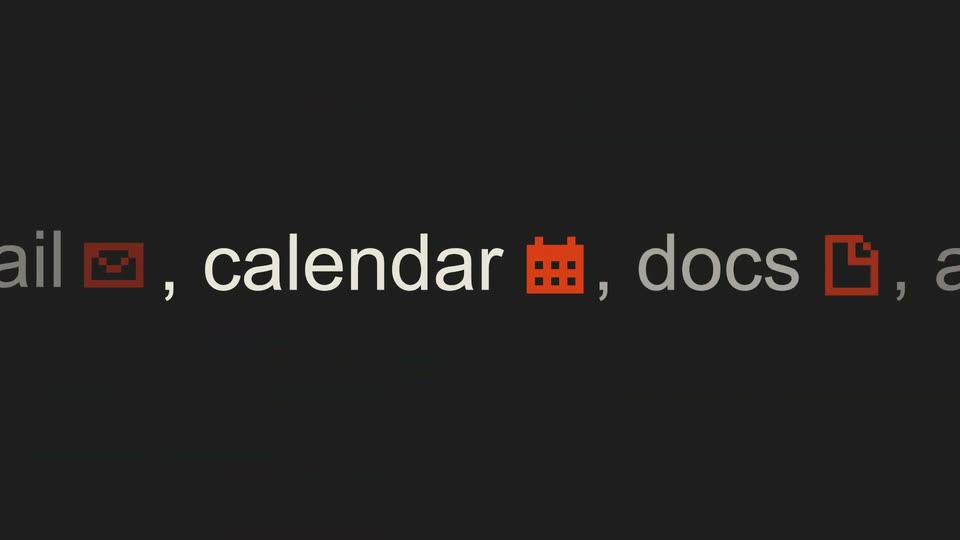
On a near-black background a single line of white text scrolls leftward across the frame, reading out a feature list. Small orange pixel icons sit inline after the keywords, a magnifier, a plus, a calendar, a document and a chat bubble.
On-screen text: “Search and summarize across your email, calendar, docs, and more”
Techniques: Kinetic type
Camera: Static
10 · Feature reveal · 0:18–0:22
A white chat input card sits centered on a cream background. A blinking caret fills the field as a prompt types out letter by letter, then the card slides up and a blank reply box appears below.
Camera: Static
11 · Feature reveal · 0:22–0:22
On a cream background, a top toolbar with a plus button, Tools label and orange share button slides up out of frame while a row of white app tiles with colorful Google icons settles into the center. A white input field then fades in at the bottom as a prompt line slides in.
Camera: Static
12 · Feature reveal · 0:22–0:24
Five white app icons (Calendar, Drive, Gmail, Keep, Photos) sit in a row on a cream background, then shrink and slide toward the center, collapsing into a single white tile that reveals an orange icon with a white pixelated M.
Techniques: Morph
Camera: Static
13 · Feature reveal · 0:24–0:27
A small white pill with an orange logo and gray dots sits centered on a cream background, then smoothly expands into a full document card revealing a weekly summary with meetings, emails, docs, and suggested actions.
Techniques: Morph
Camera: Pull out
14 · Feature reveal · 0:27–0:31
White and orange sans-serif text builds two sentences on a dark background, key words in orange. Orange arrows slide in, then a curved wipe opens to a cream panel showing a chat input field with a plus and Tools button on the right.
On-screen text: “And create custom connections”, “to your most important tools and data.”
Techniques: Kinetic type, Masking
Camera: Static
15 · Feature reveal · 0:31–0:36
A white chat input bar with an orange send button sits on a cream background. The view slides up to reveal a Connections panel listing Google Drive, Google Calendar, Sharepoint, PostgresDB, and Shared S3 bucket. A pixelated cursor clicks the PostgresDB and Shared S3 bucket checkboxes, turning them orange.
Techniques: UI zoom, Cursor demo
Camera: Push in
16 · Feature reveal · 0:36–0:37
A white Connections panel lists integrations with two orange checkmarks, a pixel cursor hovering at right. An ascending bar chart in warm orange and red tones rises from the bottom edge, partly covering the list.
Camera: Static
17 · Feature reveal · 0:37–0:38
White text reading 'Automate routine tasks' is centered on a dark background. A cluster of overlapping colored rectangles in the top left corner vanishes as the word 'tasks' slides into alignment from the right.
On-screen text: “Automate routine tasks”
Techniques: Kinetic type
Camera: Static
18 · Feature reveal · 0:38–0:41
On a dark background, the line “Automate routine tasks” holds, then “with AI agents connected to your apps and libraries” slides left, with “AI agents” and “apps” in yellow. Four white agent cards with pixel-art robot icons scale in behind the moving text.
On-screen text: “Automate routine tasks”, “with AI agents connected to your apps and libraries”
Techniques: Kinetic type
Camera: Static
19 · Feature reveal · 0:41–0:44
A grid of cream cards, each topped with a blocky pixel-art figure, scrolls upward on a dark field while oversized white text slides behind it. The grid warps into a curved plane, then flattens into a three-column row.
Techniques: Parallax, 3D mockup
Camera: Pan
20 · Feature reveal · 0:44–0:46
On a near-black background, the white line “With new enhancements” is revealed through a thin horizontal line, then a second line slides in: “analysis” in white between gray “for writing” and “and ideation,” with small orange pencil and chart icons.
On-screen text: “With new enhancements”, “for writing analysis and ideation”
Techniques: Masking, Kinetic type
Camera: Static
21 · Feature reveal · 0:46–0:48
A dark gray field holds a single line of type that scrolls right to left like a ticker: gray “alysis,” a red pixel chart mark, white “and ideation,” and an orange pixel image mark. The line keeps sliding until the words run off the left edge.
On-screen text: “for writing”, “analysis”, “and ideation”
Techniques: Kinetic type
Camera: Static
22 · Feature reveal · 0:48–0:51
A white chat input card sits centered on a cream field as a rounded mask opens from the dark corners. A gray placeholder scales out while a prompt types out letter by letter with a blinking caret, ending on 'specific to Asia'.
Techniques: Masking, Kinetic type
Camera: Static
23 · Feature reveal · 0:51–1:00
A document editor shows an article on AI in the automotive industry. The opening paragraph highlights, a prompt bar asks for a chart, and a four-bar chart of Asian countries drops in. The view zooms to the top-right, where a cursor opens the export menu and clicks Export as PDF.
Techniques: UI zoom, Cursor demo
Camera: Push in
24 · Feature reveal · 1:00–1:05
A line of white text tracks left across a dark field, spelling “Leveraging real-time information and global news” as small orange chart and globe icons pop in inline. The line exits and a white chat input box with a placeholder and an orange send button scales in at center.
On-screen text: “Leveraging real-time information and global news”
Techniques: Kinetic type
Camera: Static
25 · Feature reveal · 1:05–1:08
A white rounded input card scales in at the center of a dark gray background. A prompt types out letter by letter with a blinking cursor, asking for a financial markets round up. A plus icon and a Tools pill sit bottom left, an orange arrow button bottom right.
Techniques: Kinetic type
Camera: Static
26 · Feature reveal · 1:08–1:11
A white chat card on a dark background holds a prompt bubble and a long answer that scrolls down as an AFP source card pops in inline. The card then tilts into 3D perspective against a red and yellow gradient.
On-screen text: “Tools”
Techniques: 3D mockup
Camera: Pull out
27 · Other · 1:11–1:12
Vertical bands of solid warm color, cream, yellow, orange and red, slide horizontally across the frame in a fast pan. The flat stripes shift position, the dark block on the left giving way to a full row of warm tones.
Camera: Static
28 · Other · 1:12–1:14
A red panel on the left wipes away as white text types out “All while keeping your data” on a dark background. The sentence then swaps for the word “private” with an orange padlock icon.
On-screen text: “All while keeping your data”, “private”
Techniques: Kinetic type
Camera: Static
29 · Other · 1:14–1:17
A dark plain background holds the white lowercase word “private” centered and still. To its right, a small orange padlock icon snaps together from scattered fragments into a closed lock beside the text.
On-screen text: “private”
Techniques: Morph
Camera: Static
30 · CTA · 1:17–1:21
White “private” text and an orange padlock sit beside yellow-to-red gradient bars that sweep across the dark frame. The bars collapse into the pixelated Mistral M, which settles into an orange rounded square with mistral.ai below.
On-screen text: “private”, “mistral.ai”
Techniques: Morph
Camera: Static