
1:43
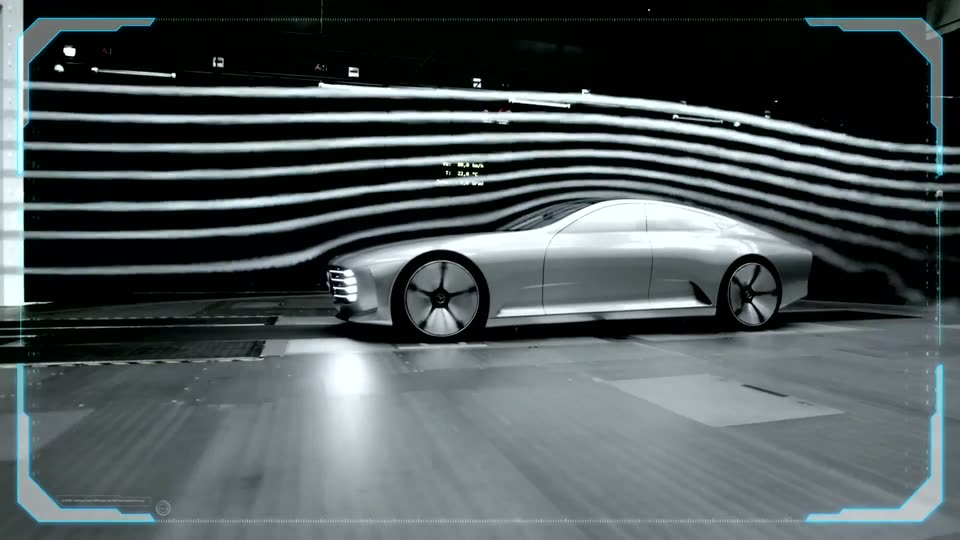
Intelligent Aerodynamic Automobile – the “Concept IAA” – Mercedes-Benz original
Mercedes-Benz · Sep 2015
Astor’s 0:53 launch film runs 30 scenes, about 1.8 s each. The product shows up at 0:09 and 5 features are revealed. The call to action lands at 0:46 (86% in). The video is built as a cascade: a cinematic notification hook, a product intro, then a run of capability statements, each paired with a 3D phone mockup demoing a screen, closing on store badges and a logo card. Its signature moves are oversized display type that assembles word by word over blue gradients, 3D phones tilting in space, and rack-focus blur transitions between beats.
Is this your launch? to your site or press kit.
Mercedes-Benz · Sep 2015
Tornyol · Consumer · Nov 2025
Films whose music sounds like this one, voice left out
Lightricks · Electronic Dance Music (EDM)
Golf · Electronic dance music, UK Garage, Tech House
Apple · Electronic dance music
Top-down 3D render of a white car on an assembly line, framed by robotic arms. A white rounded notification card with a blue logo scales in at the center over the car, its two text lines filling in.
On-screen text: “Astor”, “Your portfolio update is ready.”
Techniques: 3D mockup, Masking
Camera: Static
A rendered machine head hovers above a blueprint glowing on a dark workbench, with a white notification card floating centered in front. The card shows a blue logo, the sender name, and a message whose final word fades in from gray to black.
On-screen text: “Astor”, “Your portfolio update is ready.”
Techniques: Kinetic type
Camera: Static
A frosted-glass notification card with a blue app icon, the title Astor and the line Your portfolio update is ready. holds center over a top-down night cityscape of lit streets. The city drifts slowly while a warm glow shifts across the card surface.
Techniques: Light sweep
Camera: Static
A rocket climbs through a sunset sky above a churning sea of clouds while a white Astor notification card with a cursor arrow sits centered over the flame. The card and text hold still as the rocket and clouds drift upward.
Techniques: Cursor demo
Camera: Static
Aerial live-action shot of green fields with a wind turbine, a glass notification card floats centered showing the Astor logo and a message, and a cursor moves from over the card to below it as the camera pulls back.
On-screen text: “Astor”, “Your portfolio update is ready.”
Techniques: Cursor demo
Camera: Pull out
A 3D green mountain ridge fills the lower frame, its crest traced by a glowing green line that draws left to right. A large dark dollar total counts up in the top left above a small green delta, the image racking from soft to sharp focus.
On-screen text: “$608,259.94”, “+$17,476 +3.8%”
Techniques: Light sweep
Camera: Pull out
A 3D phone mockup eases from a blurred center to the right over a cloudy blue sky, its finance app showing a balance and green chart. White headline text on the left reads “Now your portfolio”, then “has an agent.”
On-screen text: “Now your portfolio”, “has an agent.”
Techniques: 3D mockup, Kinetic type
Camera: Pull out
A blue word “Introducing” holds on a pale textured field, then swaps to the Astor 2.0 logo lockup. A dark smartphone in 3D perspective tilts in at right while “Your personal” slides in at left, the app open on its screen.
On-screen text: “Introducing”, “Astor 2.0”, “Your”, “personal”, “$608,259.92”, “has an”, “agent.”
Techniques: Kinetic type, 3D mockup, Morph
Camera: Pull out
A dark phone mockup floats in 3D at the center of a pale blue field, its screen showing a chat greeting and suggestion chips. The headline “Your personal” slides in from the left while “investing agent” settles at the right as the phone tilts upright.
On-screen text: “Your”, “personal”, “investing”, “agent”
Techniques: Kinetic type, 3D mockup
Camera: Push in
A vertical blue gradient runs from dark navy at the top to pale blue below. White text reads 'It knows' at center, then 'what you' scales in word by word, replacing the first line.
On-screen text: “It knows”, “what you”
Techniques: Kinetic type
Camera: Static
A dark smartphone floats in side profile against a blue-to-white gradient, rotating to reveal its side buttons and bottom port. The oversized white word “own” scales behind it, completing the headline “what you own.”
On-screen text: “what you”, “own”
Techniques: 3D mockup, Kinetic type
Camera: Pull out
A phone mockup floats in a blue-to-white gradient, tilted in 3D, then rotates flat to face the camera as it scales up. The word “Why” fades in at left while the large word “own” scales in beside it.
On-screen text: “Why”, “own”
Techniques: Kinetic type, 3D mockup
Camera: Static
A 3D iPhone floats center on a blue gradient, its screen switching from a stock chart to a position detail view. White text reads on the left and blue text on the right, both holding still.
On-screen text: “Why you”, “bought it.”
Techniques: 3D mockup
Camera: Push in
A 3D iPhone mockup showing a finance portfolio app tilts and slides left over a blue gradient. Large background type reads Why you bought it. then swaps to Why you And as the phone rotates and the screen content changes.
On-screen text: “Why you bought it.”, “And”
Techniques: 3D mockup
Camera: Static
A 3D iPhone mockup floats at an angle on the left over a blue-to-white gradient, its dark app screen switching from a stock movers list to an analytics chart card. Large blue text holds on the right, then the whole frame softens out of focus.
On-screen text: “And how you invest.”
Techniques: 3D mockup
Camera: Pull out
Blue text assembles on a pale blue textured background, with words sliding and scaling into two staggered lines. A defocused dark smartphone mockup fades in at center behind the text and stays out of focus.
On-screen text: “It”, “watches”, “the”, “market”
Techniques: Kinetic type, 3D mockup
Camera: Pull out
A dark smartphone floats in 3D against a blue sky, rotating from a tilted angle to face the camera while its finance app shows an S&P 500 line chart. Large caption words then scale and slide in, and the frame pulls out of focus, blurring the phone and sky.
On-screen text: “watches”, “the”, “market”
Techniques: 3D mockup
Camera: Pull out
A blue gradient darkens to navy as white words assemble the line “And every position you hold.” “Position” scales in at center while “you” and “hold” slide in from the right, each glowing softly against the deepening background.
On-screen text: “And”, “every”, “position”, “you”, “hold”
Techniques: Kinetic type
Camera: Pull out
A hand holds an iPhone against a warm cream backdrop, the washed-out screen darkening to a lock screen as the phone slides right. The word When enters in large black type on the left, followed by short words sliding across.
On-screen text: “When”, “you”, “hold”, “every”, “position”, “And”
Techniques: Kinetic type
Camera: Pull out
A hand holds a 3D iPhone in profile against a warm gradient as a notification slides onto the lock screen. On the left, a large gradient headline swaps from 'When something moves' to 'that matters...' word by word.
On-screen text: “When something moves”, “that matters...”
Techniques: Kinetic type, 3D mockup
Camera: Static
A tilted smartphone in 3D perspective shows a report screen with a gloved-hand image and a headline. On the right, dark gray text reads 'It tells you what happened', then is replaced by 'And how it affects you'.
On-screen text: “It tells you what happened”, “And how it affects you”
Techniques: 3D mockup
Camera: Pan
A blurred phone and the line “And how it affects you” fade out as the frame sharpens to a pale blue patterned background, where the blue phrase “Execute custom strategies.” assembles and the word “custom” scales up to dominate the layout.
On-screen text: “Execute custom strategies.”
Techniques: Kinetic type
Camera: Static
A blue gradient headline reads “Execute custom strategies.” on the left while a 3D phone mockup on the right tilts from a side angle to a flat front view, revealing a chat message.
On-screen text: “Execute custom strategies.”
Techniques: 3D mockup
Camera: Static
On a light textured backdrop, the blue headline “Execute custom strategies.” sits at left while a phone mockup on a blue gradient panel shows a dark app. A chat bubble and two stock rows (AMZN, SHOP) populate the screen, the second row and a closing paragraph fading in.
On-screen text: “Execute custom strategies.”
Camera: Static
A blue smartphone mockup sits in 3D perspective on the right, its dark screen showing stock tickers, while a blue headline holds on the left against a light textured background. The phone rotates slightly to face the camera.
On-screen text: “Execute custom strategies.”
Techniques: 3D mockup
Camera: Static
Three blue headline lines stack up on the left while a cursor clicks the Connect Robinhood button on the right. The dialog card collapses into a slim pill with a checkmark, then the whole frame blurs out of focus.
On-screen text: “On your”, “Robinhood”, “Agentic Account”
Techniques: Kinetic type, Cursor demo, Morph
Camera: Pull out
A phone with a message app types a query to Astor, the screen blurs then sharpens, then it cuts to a dark scene where the tilted phone mockup floats beside large white text reading On your that scales in.
On-screen text: “On your”
Techniques: Kinetic type, 3D mockup
Camera: Pull out
A 3D iPhone mockup tilts into perspective at center, its screen showing an iMessage chat with a typing indicator. A dark App Store badge slides in from the left and an iMessage badge from the right against a blue gradient.
On-screen text: “Download on the App Store”, “Available on iMessage”
Techniques: 3D mockup
Camera: Static
A 3D iPhone mockup sways gently against a blue gradient. Its screen shows a messaging thread where a news brief types itself out, while App Store and iMessage badges hover at either side.
On-screen text: “Download on the App Store”, “Available on iMessage”
Techniques: 3D mockup, Parallax
Camera: Pull out
A blue circular logo sharpens from a blur at center, then the blue wordmark Astor 2.0 fades in to its right, both held above a misty green mountain ridge under a pale sky.
On-screen text: “Astor 2.0”
Camera: Pull out