0:28


Best AI Product Demo Video | Vanta
Vanta · Sep 2026
LTX Video · Mar 2025 · 0:53 · AI-annotated
LTX Video’s 0:53 launch film runs 21 scenes, about 2.5 s each. The product is on screen from the first frame and 5 features are revealed, with social proof. There is no explicit call to action; a voiceover carries the film. Structure the launch as a stack of feature blocks: each periwinkle headline card cuts to a white-card demo of stock footage, then snaps back to the next headline. Keep the pace at roughly 12 cuts per minute, and reuse snap wipes, gradient bar fills and counting numerals as the signature moves.
Is this your launch? to your site or press kit.
Vanta · Sep 2026
HockeyStack · Apr 2026
A black LTXV wordmark locks in on a pale background as the final V draws in, then a purple rounded badge with 0.9.5 slides in from the right. A diagonal light sweep glints across the V.
On-screen text: “0.9.5”
Techniques: Light sweep
Camera: Static
The blue LTXV wordmark appears on a pale gray field, then gives way to the headline “Major Upgrade.” The line “The fastest open-source video model on the market” slides right to left, and two live-action clips pop in at the frame edges.
On-screen text: “LTXV”, “Major Upgrade”, “The fastest open-source video model on the market”
Techniques: Kinetic type, Split screen
Camera: Pan
Three vertical video panels slide across a white background, cutting quickly between an elevator scene, a red-lit face close-up, and a spinning chrome car wheel.
Techniques: Split screen
Camera: Push in
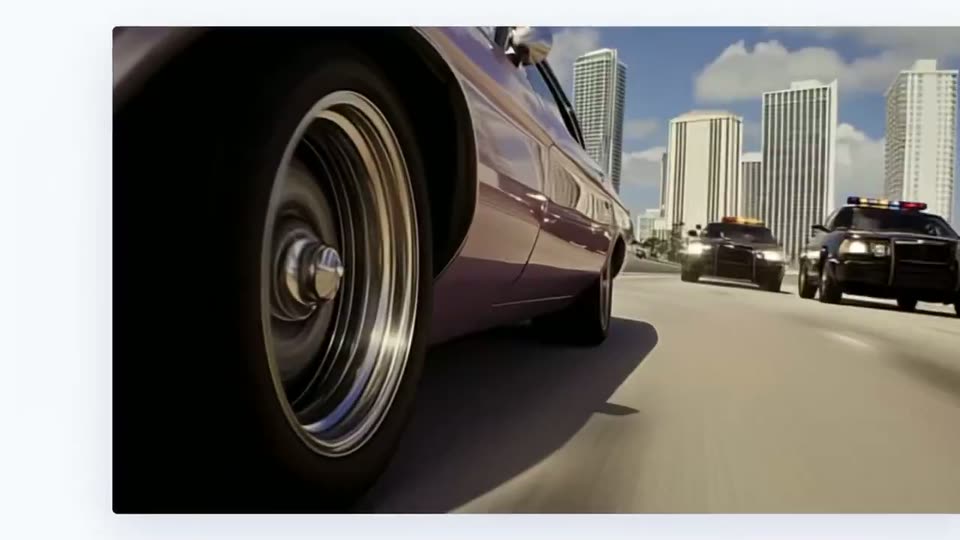
A 3D-rendered car chase on a city highway: a maroon sedan speeds past in the foreground with its wheel blurred, two police cars with flashing lights follow, and skyscrapers line the background. The camera stays locked off while Control scales in at center, then swaps to Flexibility.
On-screen text: “Control”, “Flexibility”
Techniques: Kinetic type
Camera: Static
A pale off-white background holds a large “Flexibility” headline with a smaller blue “Keyframes Nodes” line centered beneath it. The word “Nodes” fades from a light tone to full color, and a faint mirrored copy sits at the bottom edge.
On-screen text: “Flexibility”, “Keyframes Nodes”
Techniques: Kinetic type
Camera: Static
A rectangular video of a gray-haired man in a red shirt and dark vest, standing in a white office, sits centered on a white background. The single frame then splits into a grid of panels showing his upper body, a full-body walking shot, and two headshots.
On-screen text: “Keyframes Nodes”
Techniques: Split screen
Camera: Pull out
Four panels on a white slide: two top clips of a mustached man in a red shirt and navy vest, one close-up turning to profile, one wide walk blending into a medium shot; two small thumbnails below labeled Start Frame and End Frame.
On-screen text: “Start Frame”, “End Frame”
Techniques: Split screen, Morph
Camera: Static
A periwinkle title wipes in on a pale lavender field, then scales up and moves to the top as a row of labeled film stills fades in below, showing a red-haired woman from the front and from behind.
On-screen text: “Frame Interpolation”, “Start Frame”, “Middle Frame”, “End Frame”
Techniques: Masking
Camera: Static
A large clip of a red-haired woman walking through a sunlit street plays above three smaller thumbnails on a pale background. A vertical purple line sweeps left to right across the thumbnails, landing on each in turn, while the top clip advances from her face to her back.
On-screen text: “Start Frame”, “Middle Frame”, “End Frame”
Techniques: Split screen
Camera: Static
A pale field holds the blue heading Footage Extension, then a flat video-player mockup pops in: a first-person forest bike clip with a 2x badge and arrow, and a smaller duplicate clip beneath it.
On-screen text: “Footage Extension”, “Start Frame”, “Middle Frame”, “End Frame”
Camera: Static
A video editor preview on a pale background plays a first-person bike ride through a sunlit forest at 2x speed, handlebars steady in frame. Below, a sprocketed film-strip timeline unfurls from a small centered card to full width, widening from a tight crop to the wide source frame as it plays.
Techniques: Masking
Camera: Push in
A man with curly gray hair and a mustache, wearing a red shirt and dark vest, stands in a fluorescent-lit office. The white text Video to Video sits centered over his face. He shifts his gaze slightly to the side.
On-screen text: “Video to Video”, “2×”
Camera: Static
Two stacked video panels show the same bearded man in a bright office. The top clip keeps his full beard, the bottom clip swaps it for a mustache and purple aviator sunglasses, staging a video-to-video transformation.
On-screen text: “Video to Video”
Techniques: Split screen
Camera: Static
A 2x3 grid of portrait panels on a white background, each playing a short clip of the same man's head turning, rendered in different styles: live action with varied hair, a neon cyberpunk look, a green suit, and a flat comic-book illustration.
Techniques: Split screen
Camera: Push in
A light lavender background holds one line of blue sans-serif text. The phrase reveals from left to right with a soft edge, then settles into full opacity.
On-screen text: “Native ComfyUI Support”
Techniques: Kinetic type, Masking
Camera: Static
A ComfyUI node graph floats in 3D space, its colored connection lines arcing across the frame as the camera glides through the layout. A green-bordered node panel and a video preview of a woman in a yellow jacket sit at the lower right.
On-screen text: “Native ComfyUI Support”
Techniques: 3D mockup, Parallax
Camera: Push in
A blurred close-up of a node-based video interface pulls back to reveal the full graph, with prompt nodes above a row of generated frames showing a woman in a yellow hoodie. Near the end, a sampler node pops up centered with a green progress bar while the rest dims.
Techniques: UI zoom
Camera: Pan
A dark node panel with a green progress bar hovers over a faded node graph, which dissolves to a plain white background. A lavender rounded bar slides in from the left, sweeping behind the static headline “Reduce cost and time”.
On-screen text: “Reduce cost and time”
Camera: Static
A horizontal bar chart on a pale background compares six video models. Blue-to-purple bars grow from the left under the title Cost Efficiency, then the chart re-animates under Inference Time with a new axis caption.
On-screen text: “Reduce cost and time”
Camera: Static
Two horizontal blue-to-purple gradient bars grow from the left on a pale background. Centered numerals count up from 0 to 50 and 47 to 3600, dark until the fill passes over them, then white. Small black captions sit under each bar.
On-screen text: “50”, “5 seconds videos generated for $1”, “3600”, “Frames generated per minute”
Techniques: Kinetic type, Masking
Camera: Static
A black LTXV wordmark and the two-line tagline OPEN SOURCE VIDEO MODEL sit centered on a plain off-white background. The lockup holds still for the full shot, serving as a sign-off.
On-screen text: “LTXV”, “OPEN SOURCE”, “VIDEO MODEL”
Camera: Static