0:35

Chris Hladczuk - No CFO signed up to be human duct tape. Today, we’re cutting the tap
Hanover Park · Jul 2026
Miro · Jul 2020 · 0:35 · Full motion · AI-annotated
Miro’s 0:35 launch film runs 15 scenes, about 2.3 s each. The product is on screen from the first frame and 1 feature is revealed. The call to action lands at 0:27 (78% in), over a voiceover. Built as a single-feature launch: a logo open, a typed product line over a live board, then one long feature block that scrolls a spec card and pans through four embedded app windows before a flat CTA and a logo sign-off. The style is flat lavender fields with white interface cards, soft drop shadows, and slow drifts or pans that let named cursors do the acting, all cut at a relaxed 95 bpm.
Is this your launch? to your site or press kit.
Hanover Park · Jul 2026
Phone Harness · B2B · Nov 2026
Anthropic · AI · May 2026
Films whose music sounds like this one, voice left out
Superhuman · Modern electronic
DJI · Electronic
Microsoft · Upbeat electronic
On a plain lavender field, a dark navy rounded-square logo with white chevrons sits centered. A small indigo name tag with a speech-bubble tail slides in from the right and docks at the logo's lower corner, then a lighter rounded panel fades in behind the logo.
On-screen text: “Terrence”
Camera: Static
A Miro whiteboard screen with scattered colored sticky notes and moving named cursors. A large blue headline is typed letter by letter in the center, then the canvas pans and a white panel labeled Live Embed slides up from the bottom.
On-screen text: “Online whiteboard platform”, “Live Embed”
Techniques: Kinetic type
Camera: Static
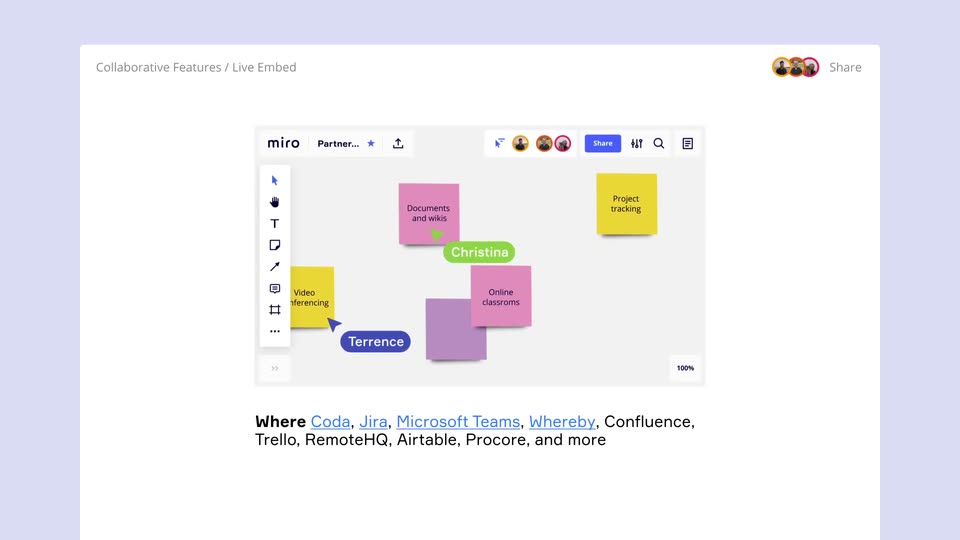
A white document card on a lavender background shows the Live Embed heading above a Miro board with colored sticky notes and named user cursors. The page scrolls down to reveal a list of integrations while the cursors drift between notes and fade out.
On-screen text: “Live Embed”, “What Live embeds allow you to work on Miro boards in a wide variety of applications.”, “Where Coda, Jira, Microsoft Teams, Whereby, Confluence, Trello, RemoteHQ, Airtable, Procore, and more”
Techniques: Cursor demo
Camera: Static
A white card on a lavender field shows a live Miro board with colored sticky notes and two named cursors. The card slides up to reveal a Coda page holding an embedded mind map, as a dark headline appears above it.
On-screen text: “Where Coda, Jira, Microsoft Teams, Whereby, Confluence, Trello, Remote, Miro, Airtable, Procore, and more”, “You can share mind maps in Coda,”
Camera: Static
A Coda page titled Features brainstorm displays an embedded Miro mind map with colored sticky notes and curved connector lines. The dark headline sits centered above the window, and the whole composition drifts slowly upward while a faint caption edge ghosts in from the right.
On-screen text: “You can share mind maps in Coda,”
Camera: Static
A lavender background holds a large dark headline that pans left, reading “You can share mind maps in Coda, add user journeys to Jira Software,”. Below, three flat interface panels (a Miro mind map and two Jira boards) slide in from the edges and overlap into a centered stack.
On-screen text: “You can share mind maps in Coda, add user journeys to Jira Software,”
Techniques: Kinetic type
Camera: Pan
A Jira issue page fills the frame, its center holding an embedded Miro board with a user journey map of colored sticky notes and two collaborator cursors. A dark navy headline hovers above the window. The shot holds steady.
On-screen text: “add user journeys to Jira Software,”
Camera: Static
A Miro mind map inside a Microsoft Teams window scales up to the center while faint boards sit on either side. A dark indigo headline scrolls left across the top, naming Jira Software and Microsoft Teams.
On-screen text: “add user journeys to Jira Software, or run brainstorms in Microsoft Teams”
Techniques: Kinetic type, UI zoom
Camera: Pan
A dark navy headline reads above a Microsoft Teams window that opens on a Miro board. Sticky notes and a priority matrix cover the canvas. A blue cursor tagged Thom glides across the board as other named cursors pop in.
On-screen text: “or run brainstorms in Microsoft Teams”
Camera: Static
A Miro whiteboard with sticky notes and a left toolbar sits in a floating window, then the view reframes to show the same board embedded in a green Whereby call, with a four-person video grid on the right.
Techniques: UI zoom, Split screen
Camera: Pan
A Whereby call view shows a Miro whiteboard packed with sticky notes, photos and a central question. The board slowly pans right and zooms in on the question while three participants talk in stacked video tiles on the right.
Techniques: UI zoom
Camera: Push in
The product board slides up and out of the top of the frame, leaving the centered call-to-action on a pale lavender field. The text then holds still, locked in place, for the rest of the short clip.
On-screen text: “Try it today”
Camera: Pan
A centered dark navy headline reads “Try it today” on a flat pale lavender background. The frame is locked off and the type holds still for the duration.
On-screen text: “Try it today”
Camera: Static
A pale lavender field holds a centered sign-off: a yellow rounded square with three dark chevrons pops in, and the dark navy lowercase wordmark assembles to its right, the final letter drawing in last.
Camera: Static
The Miro logo, a yellow rounded square with dark chevrons beside the dark wordmark, holds centered on a pale lavender field with the URL set below it. Both elements fade out to an empty background in the final second.
On-screen text: “miro.com/live-embed”
Camera: Static