1:22
Explore
Chris Hladczuk - No CFO signed up to be human duct tape. Today, we’re cutting the tap
Hanover Park · Jul 2026 · 0:35 · AI-annotated
- Length
- 0:35
- Scenes
- 15 · 2.4 s avg
- Product on screen
- 0:11
- Features shown
- 1
- Call to action
- 0:26 · 75%
- Voiceover
- Yes
00:00:00 / 00:35:08
Hanover Park’s 0:35 launch film runs 15 scenes, about 2.4 s each. The product shows up at 0:11 and 1 feature is revealed. The call to action lands at 0:26 (75% in), over a voiceover. The video opens with a deadpan duct-tape van gag, moves through a kinetic-typography problem list, a product intro and one feature demo, then a CTA and a bookend van gag, cutting at about 15 cuts per minute to a steady beat near 99 BPM. Its signature moves are the persistent dark caption pill tracking the voiceover, word-by-word type builds on a pale mint field, and thin green lines linking floating UI cards around a bold headline.
Footage neededEstimated needs: 1 capture group — your screens or recordings · 1 official logo — reused across the film · 5 filmed passages — shoot, supply or replace · 5 graphic passages — draw or supply
Is this your launch? to your site or press kit.
More like this
1:01

Introducing Runway Agent 2.0 | Runway
Runway · AI · Jun 2026
1:24

Meet the Underlord: Descript's Open Beta Feature Drop
Descript · Design · May 2025
Chris Hladczuk - No CFO signed up to be human duct tape. Today, we’re cutting the tap, scene by scene
· 15 scenes as text
01 · Hook · 0:00–0:05
A red-haired man sits on a stool in the open side door of a white cargo van, his torso wrapped in silver duct tape. Bottom captions read 'No CFO signed up' then 'to be human duct tape.' He then rips the tape away from his body as a second person appears behind him.
On-screen text: “No CFO signed up”, “to be human duct tape.”
Camera: Push in
02 · Problem · 0:05–0:07
A light background holds the gray headline 'Rebuilding the' and 'same reports' flanking a small PDF file icon that slides into the center. A dashed selection box and a 'SAFE_ACME.pdf' tooltip pop up around the icon while a dark caption box repeats the line at the bottom.
On-screen text: “Rebuilding the same reports”, “Rebuilding the same reports,”
Techniques: Kinetic type
Camera: Static
03 · Problem · 0:07–0:09
On a pale gray field, a dashed spreadsheet card titled Investors sits centered with gray bars and a cursor. Large gray words flank it, crossfading with a soft blur from Rebuilding the same reports to Reconciling stale data, while a bottom caption tracks the voiceover.
On-screen text: “Rebuilding the”, “same reports”, “reconciling stale data,”, “Reconciling”, “stale data”, “and holding a dozen”
Techniques: Kinetic type
Camera: Static
04 · Problem · 0:09–0:11
A centered sentence builds on white: “And holding a dozen” gives way to “disconnected tools together” as three green floppy-disk icons labeled General Ledger, Excel, File Storage pop in between the words, then the line resets to “So we built”. Small white captions on dark pills mirror it below.
On-screen text: “And holding a dozen”, “and holding a dozen”, “disconnected tools”, “together”, “So we built”
Techniques: Kinetic type
Camera: Static
05 · Product intro · 0:11–0:12
A red-haired man in a grey jacket speaks to camera in a blurred office, locked-off medium shot. As he talks, large white words “So we” and “built” pop in on either side of his head, while a small caption “So we built” sits at the bottom.
On-screen text: “So we built”, “So we”, “built”
Techniques: Kinetic type
Camera: Static
06 · Product intro · 0:12–0:14
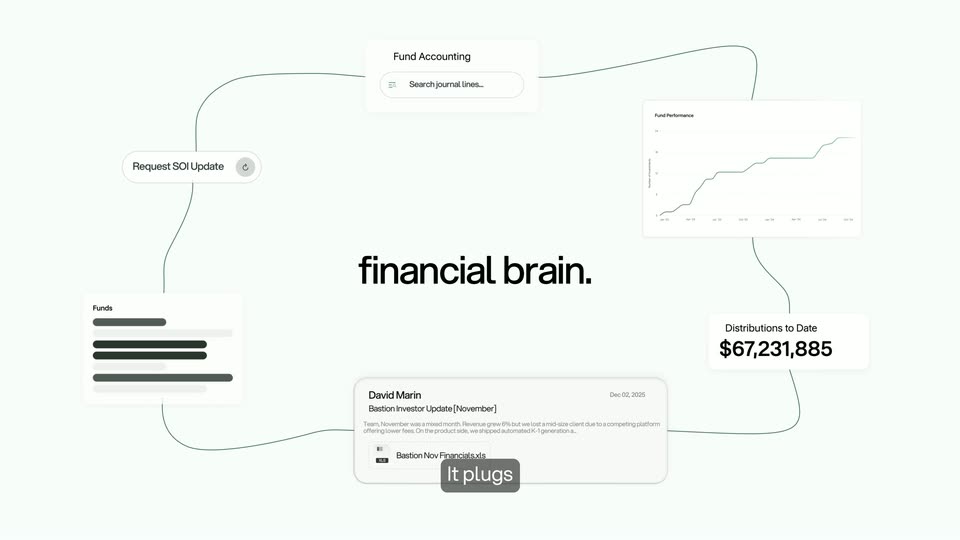
The Hanover Park leaf mark and wordmark fade in on a pale mint field, then bold black MCP snaps in beside it. A gray caption pill tracks the voiceover, then the lockup resolves into white UI cards (search bar, chart, email, dollar figure) floating around the black headline financial brain.
On-screen text: “So we built”, “Hanover Park's MCP”, “to be your firm's”, “financial brain.”
Camera: Static
07 · Feature reveal · 0:14–0:15
A network of small white UI cards (search bar, line chart, stat, email) floats around a bold black headline on a pale background, linked by thin green lines. A dark pill caption at the bottom types out the voiceover word by word.
On-screen text: “financial brain.”, “It plugs your accounting,”
Techniques: Kinetic type
Camera: Pan
08 · Feature reveal · 0:15–0:18
Split screen: a red-haired man in a beige jacket stands in a daylight office on the left; on the right, a dark green panel stacks three glassy pills, Accounting, Portfolio, LP Data, sliding in with icons. The view then reframes into the right panel, isolating the LP Data pill.
On-screen text: “your accounting,”, “Accounting”, “portfolio and LP data”, “Portfolio”, “LP Data”, “straight into”
Techniques: Split screen, UI zoom
Camera: Pan
09 · Feature reveal · 0:18–0:21
The bold phrase “straight into” sits centered on a dark green gradient, then shrinks as a rounded bar of four AI app icons pops in. A cursor arrow drifts below while the icons blur, and a bottom caption changes to “So you can just ask,”.
On-screen text: “straight into”, “your favorite AI tools.”, “So you can just ask,”
Techniques: Kinetic type, Cursor demo
Camera: Static
10 · Feature reveal · 0:21–0:23
A dark rounded chat field on a pale background starts blurred, then sharpens as white text types out a prompt with a blinking caret. A black arrow cursor slides in from the right and clicks the send button, blurring the field. A gray caption pill below reads 'or run budget versus actual.'
On-screen text: “So you can just ask,”, “or run budget versus actual”
Techniques: Cursor demo
Camera: Static
11 · Feature reveal · 0:23–0:24
A light gray chat view holds a black message bubble on the right while gray text types out on the left, the place name tinted green. A gray caption pill stays fixed at the bottom.
On-screen text: “or run budget versus actual”
Camera: Static
12 · Feature reveal · 0:24–0:26
A dark chat bubble reading “Run budget versus actual.” sits above a gray status line that types out “Connecting to Hanover Park and pulling most recent data.” The bubble slides left with motion blur as a small gray pill caption at the bottom switches from “without ever” to “leaving the chat.”
On-screen text: “without ever”, “leaving the chat.”
Techniques: Kinetic type
Camera: Static
13 · CTA · 0:26–0:30
A red-bearded man in a beige jacket stands in an office, filling the left half of a split screen. On the right, a dark green panel holds a search bar where company names cycle vertically. The panel slides away to reveal the man full frame as he finishes his line.
On-screen text: “leaving the chat.”, “It works”, “because Hanover Park”, “already has your firm's”, “Request a demo”
Techniques: Split screen
Camera: Static
14 · CTA · 0:30–0:32
On a cream field, a green leaf mark sharpens from a blur at center while the wordmark Hanover Park fades in beside it. The URL hanoverpark.com settles below, and a dark pill caption at HanoverPark.com holds at the bottom edge.
On-screen text: “Request a demo”, “at HanoverPark.com”, “hanoverpark.com”
Camera: Static
15 · Outro · 0:32–0:35
Black and white side view of a man seated inside a white van; the sliding side door closes over him. Centered white text reads “Never let your data”, then swaps to “be held hostage again.” as the door shuts.
On-screen text: “Never let your data”, “be held hostage again.”, “hanoverpark.com”
Camera: Static