
1:27
Explore
00:00:00 / 02:00:11
- Length
- 2:00
- Scenes
- 48 · 2.5 s avg
- Product on screen
- 0:29
- Features shown
- 3
- Call to action
- 1:44 · 87%
- Voiceover
- Yes
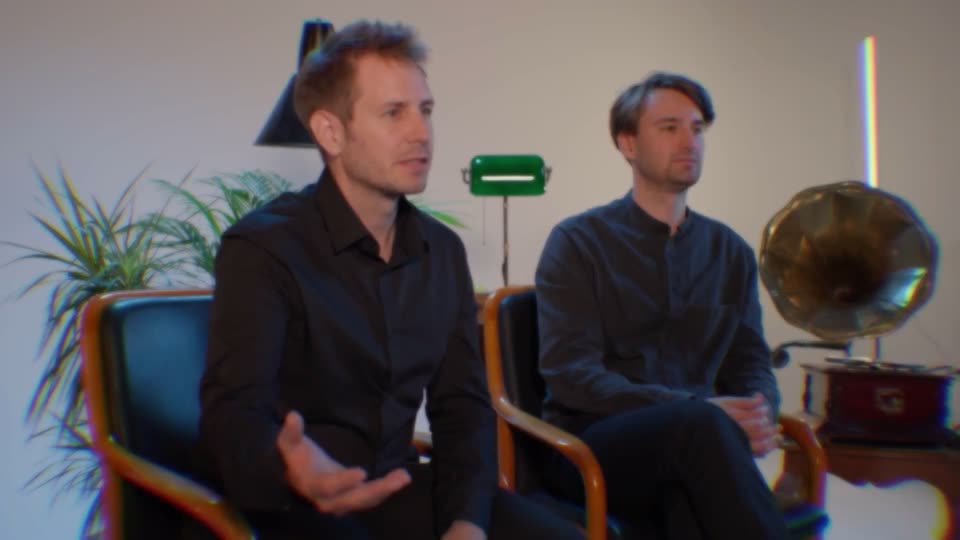
Mirelo’s 2:00 launch film runs 48 scenes, about 2.5 s each. The product shows up at 0:29 and 3 features are revealed, with social proof. The call to action lands at 1:44 (87% in), over a voiceover. The video is built as a chain of short live-action skits (drum kit, mug drop, split screens) that are each interrupted by floating UI cards explaining the AI step, moving from problem to demo to launch offer. Its signature moves are oversized white headlines sliding across the frame and UI chips, waveforms and cursors that pop, scale and snap into place over the footage.
Footage neededEstimated needs: 3 capture groups — your screens or recordings · 1 official logo — reused across the film · 34 filmed passages — shoot, supply or replace · 1 graphic passage — draw or supply · 2 3D passages — build or supply
Is this your launch? to your site or press kit.
More like this
2:08
Athreya Anand - We’re proud to launch @hwintelligence (YC S26): AI tools for the chip
hardware intelligence · B2B · Jul 2026
1:24

Launching Gradon (YC F26): The AI Partner for AEC Firms
Gradon · B2B · Oct 2026
Similar soundtrack
Films whose music sounds like this one, voice left out
0:42

Best AI SaaS Product Demo Video | CoGrader
CoGrader · Upbeat electronic
1:04

HR, Payroll & Time Tracking… Automated in Minutes with AI 🤯
Sira · Electronic
1:26


Manuarii - Introducing “Argil Atom” the most controllable video AI model in the
Argil · Upbeat electronic dance music
Mirelo launch video | Flowjam, scene by scene
· 48 scenes as text
01 · Hook · 0:00–0:02
A drummer plays a red kit in a fog-filled blue studio while a translucent speaker icon with a small '0' floats above him. The icon and '0' vanish, large white 'Sound on.' text appears above, and a crew member's silhouette crosses the foreground.
On-screen text: “0”, “Sound on.”
Camera: Push in
02 · Hook · 0:02–0:03
A close-up of a silver cymbal with red drums behind it. A drummer strikes the cymbal with sticks as the static caption Sound on. holds in frame.
On-screen text: “Sound on.”
Camera: Static
03 · Hook · 0:03–0:03
Low-angle close-up of a person's dark shoes and pant legs walking across a pale blue floor, backlit into near-silhouette. The camera is locked at floor level as the feet step into frame, plant and lift again in a slow, deliberate stride.
On-screen text: “L”
Camera: Static
04 · Problem · 0:03–0:05
A man in a dark suit sits behind a red drum kit on a rug against a pale blue studio backdrop. A second man in black walks in from the left and stops, opening both hands in a questioning gesture toward the drummer.
Camera: Push in
05 · Problem · 0:05–0:08
A presenter in black stands left of a seated drummer at a red drum kit in a blue studio. Large white words slide across the frame behind and in front of the two, reading 'Looks amazing', then 'So why does it sound like this?' while the presenter gestures toward the kit.
On-screen text: “Looks amazing”, “So why does it sound like this?”
Techniques: Kinetic type
Camera: Push in
06 · Problem · 0:08–0:11
A close-up of a brass cymbal with a drumstick resting on it, red drums blurred in cool blue light behind. A dark rounded UI card fades in at center, titled Now playing, listing a greyed expected cymbal_crash.wav row above an orange highlighted rubber_duck_squeak.wav row, each with a waveform.
On-screen text: “So”, “ad like this?”
Camera: Pull out
07 · Problem · 0:11–0:12
A presenter in a black shirt gestures to camera at left as a man sits behind a red drum kit at right on a pale blue backdrop. A “Now playing” list scales in over the frame, showing two .wav file names, one crossed out with an X.
On-screen text: “Now playing”, “expected·cymbal_crash.wav”, “X”, “rubber_duck_squeak.wav”
Camera: Pull out
08 · Problem · 0:12–0:13
A presenter in a black shirt gestures beside a seated drummer at a red kit on a pale blue set. The shot then reframes into a monitor displaying the same footage inside a dark player interface with a timeline and side panel.
Camera: Pull out
09 · Problem · 0:13–0:14
Under blue desk lighting, two hands type on a laptop whose screen shows a video editor timeline with a snowy drum-kit clip. Behind it, a monitor displays the sound library site with a search field reading “cymbal crash metallic hard” and a row of category chips.
Camera: Pull out
10 · Problem · 0:14–0:15
A person seen from behind in a blue-lit studio is surrounded by floating interface mockups: a white Sound Library window, a small video card, and a dark search panel where “cymbal crash metallic hard” types out letter by letter above three chips. A slow push-in tightens the frame.
Techniques: 3D mockup
Camera: Pull out
11 · Problem · 0:15–0:18
A floating Sound library panel overlays a man working at a purple-lit desk with a laptop and a monitor. The panel shows a search query and tag chips, then a list of waveform clips as the orange highlight moves from the first row to the third, then fades out.
Camera: Static
12 · Problem · 0:18–0:19
A laptop in a dark blue-lit room shows an audio file list with a download progress bar at 64%. A floating Sound library card in front highlights the bottom row orange, then the highlight jumps to the top row with a checkmark as hands rest on the keyboard.
Camera: Static
13 · Problem · 0:19–0:20
A laptop in a dark room shows a file list of .wav sound files with a download popup. A floating Sound library card overlays the keyboard, its orange row checked while the download bar climbs from 24% to 100%; hands type on the keys.
Techniques: 3D mockup
Camera: Static
14 · Problem · 0:20–0:22
A green audio timeline fills the frame with one orange clip highlighted. An orange timecode pill and a dark Timeline card fade in over it, repeating the clip and a frame-nudge toggle, while the camera drifts slowly across the screen.
Camera: Static
15 · Problem · 0:22–0:24
Over a blurred studio mixing desk, a floating timeline UI shows an orange audio clip with a waveform and a HIT marker. The clip nudges right to snap into frame alignment as the timecode updates and a still +1f off tag clears, then the panel drifts up and defocuses.
Camera: Static
16 · Problem · 0:24–0:26
A man sits at a dimly lit mixing desk, lit in blue, working on a laptop. Over the locked-off shot, rounded sound-file chips with a note icon, filename, waveform and duration slide across and rearrange into a grid, one highlighted in orange, while small index numbers scroll along the top.
Camera: Static
17 · Problem · 0:26–0:29
A person sits at a laptop in a dark studio as translucent chips with .wav filenames and waveforms float over the shot. The view cuts to the laptop screen, where a man gestures beside a drummer seated at a red drum kit on a light gray backdrop.
Camera: Push in
18 · Product intro · 0:29–0:32
A man in a black shirt gestures beside a drummer at a red drum kit in a blue studio. The shot cuts to a close-up where he walks across the frame, passing in front of a large white headline that reads behind him.
On-screen text: “Straight to this”
Techniques: Kinetic type
Camera: Push in
19 · Product intro · 0:32–0:33
A hand in a dark sleeve reaches in from the left across a blue gradient and presses a rounded volume icon with a white speaker and lime waves. Large headline text sits in the frame, one word sliding in.
On-screen text: “Straigh”, “this”
Camera: Static
20 · Product intro · 0:33–0:37
A man in black stands at left, gesturing, while a seated man in a dark jacket plays a red drum kit on a patterned rug against a plain blue backdrop. A dark rounded UI panel with four waveform boxes labeled KICK, SNARE, KICK, CRASH rises along the bottom edge.
Camera: Static
21 · Product intro · 0:37–0:38
A man in a dark blazer plays a drum kit against a pale blue backdrop. A translucent panel overlays the lower frame; its four waveforms light up green in sequence as the status text shifts from Syncing 3 / 4 to Synced 4 / 4.
Camera: Pan
22 · Product intro · 0:38–0:48
Two men sit in a dim room; the right one talks and gestures. A large white Mirelo SFX title scales in at the top, a card with a machine assembling metal parts slides in between them with three label chips, and a green waveform bar pulses below.
On-screen text: “Mirelo SFX”, “OBJECT”, “Industrial Robot”, “MATERIAL”, “Machined Metal”, “ACTION”, “Assembling”
Techniques: Kinetic type
Camera: Static
23 · Demo · 0:48–0:50
Two men sit in wooden chairs in a bright room with a plant, green lamp and gramophone, talking. White kinetic text overlays the left, swapping from “Show” with an eye icon to “Works” with a rocket icon in time with the voiceover.
On-screen text: “Let me Show you”, “how it Works”, “Mirelo SFX”
Techniques: Kinetic type
Camera: Static
24 · Demo · 0:50–0:55
Two men sit on wooden chairs at the center of a studio set, surrounded by vintage speakers and a brass gramophone. Out-of-focus lights, a tripod camera and a boom mic frame the shot. A crew member walks in from the right and bends toward the seated men.
Camera: Static
25 · Demo · 0:55–1:06
A dim studio set shows two seated men as a third knocks a mug from his hand. An analyzing bar and object labels overlay the action, then a sound list appears and a green Mirelo AI cursor picks Liquid Splash. The set lights up as the man walks off.
On-screen text: “Analyzing Video...”, “OBJECT”, “Mug”, “MATERIAL”, “Ceramic”, “ACTION”, “Falling Down”, “Generating Sound Effect”, “Mirelo SFX”, “Final Sound Effect Glass Impact Shatter Liquid Splash Mirelo AI”
Techniques: UI zoom, Cursor demo, Morph
Camera: Static
26 · Demo · 1:06–1:07
Two men sit in wooden chairs on a patterned rug, flanked by a gramophone, radio and speakers against a plain wall. The man on the right makes a brief hand gesture while the other stays still. The camera holds a wide static shot.
Camera: Static
27 · Feature reveal · 1:07–1:09
Two men sit in wooden-framed chairs against a white wall, the man on the left gesturing with open hands while speaking. A potted plant, a green desk lamp and a brass gramophone fill the background behind them.
Camera: Pull out
28 · Feature reveal · 1:09–1:10
A rounded white card holding a still photo of a white race car with maroon livery on a dirt track fades into focus at center on a pale gray field. The photo sharpens from a soft blur to a crisp image as the card settles.
Camera: Static
29 · Feature reveal · 1:10–1:13
A white Generate modal sits centered over a blurred video editor background. It lists checked Sound Effects and Music rows with variant dropdowns, plus an unchecked Foley cues row and Skip/Start buttons. A cursor glides in from the right and rests on the black Start button.
Techniques: Cursor demo
Camera: Static
30 · Feature reveal · 1:13–1:15
A white rounded loading card sits centered over a heavily blurred video frame, its progress bar filling from left to right above the caption Preparing audio. The blur gradually lifts to reveal a white car on a dirt track.
Camera: Static
31 · Feature reveal · 1:15–1:19
A video editor interface fills the frame. The top preview plays a white rally car drifting on a dirt track, dust trailing behind it. Below, a playhead sweeps left to right across a timeline of video and colored audio waveform tracks.
Camera: Static
32 · Feature reveal · 1:19–1:21
Two men in dark shirts sit in wooden chairs before a plant and black lamp. A rounded status card labeled Seedance 2.0 scales in at the lower center, its text switching from Generating clips to Finalizing with a checkmark.
Camera: Static
33 · Feature reveal · 1:21–1:29
Three video thumbnails with timecode rulers and waveforms sit on white. A “Generating sounds” badge pops above the middle clip, a green “Mirelo AI” bubble slides along the waveforms, the three tracks merge into one green waveform, and the UI tilts into 3D perspective.
On-screen text: “Generating sounds”, “Mirelo AI”, “Finalizing”
Techniques: Morph, 3D mockup
Camera: Push in
34 · Feature reveal · 1:29–1:32
A pale green interface shows a vertical list of audio waveform rows with file names and durations scrolling upward beneath a static headline. A small counter at the top ticks up as the list moves, then one row highlights with a play button and the view zooms in on it.
On-screen text: “Endless options”
Techniques: UI zoom
Camera: Push in
35 · Feature reveal · 1:32–1:33
A light interface shows three mountain-road image cards above a timecode ruler and a green audio waveform. A green selection box highlights a waveform segment, and a row of sound pills with intensity and distance sliders sits below. The view holds still with only the waveform region framed.
On-screen text: “Endless options”, “2481 variations generated”
Camera: Static
36 · Feature reveal · 1:33–1:35
A studio set shows two men seated among vintage speakers and a gramophone. The frame then splits, adding a woman at a dining table on the right with a small editing panel below her displaying a Dialog track and an orange SFX button.
Techniques: Split screen
Camera: Pan
37 · Feature reveal · 1:35–1:39
Split screen: two men sit in a bright studio while a woman in a white sweater talks at a dining table on the right. A dark sound panel overlays her, its SFX track switching from orange to blue as a green Mirelo AI tag slides in.
On-screen text: “Mirelo AI”
Techniques: Split screen
Camera: Static
38 · Social proof · 1:39–1:41
Two men sit in wooden chairs on a rug in a set with a gramophone, lamp and plant. Large white words crossfade on the wall behind them: Thousands, then creators, with small of and and above. The men gesture and settle as the words change.
On-screen text: “of”, “Thousands”, “studios”, “and”, “creators”
Techniques: Kinetic type, Masking
Camera: Push in
39 · Social proof · 1:41–1:44
Two men in dark shirts sit in wooden chairs facing the camera. A wall of video clips with audio waveforms fills the background. A white rounded-square logo with a black sound-wave mark scales up between them.
Camera: Static
40 · CTA · 1:44–1:47
Two men sit in chairs in a vintage-styled room. A screen behind them reveals an office, while three sound-effect cards rise from the bottom. A magenta cursor tagged You glides to the middle card's play button.
Techniques: Cursor demo
Camera: Push in
41 · CTA · 1:47–1:50
Two men in dark shirts sit in wooden chairs before a white wall, a potted plant and a black lamp between them. The man on the right gestures while the headline appears across the top of the frame and holds still.
On-screen text: “SFX 2.0 is live.”
Camera: Static
42 · CTA · 1:50–1:53
Two men sit in a bright room beside a vintage gramophone. A dark floating card showing a drummer and an audio waveform rotates from a tilted 3D angle to face the camera, and the headline “SFX 2.0 is live.” appears over the scene.
On-screen text: “SFX 2.0 is live.”
Techniques: 3D mockup, Light sweep
Camera: Static
43 · CTA · 1:53–1:54
Two men in dark shirts sit in a bright room beside a plant and gramophone. A video player showing a drum kit and waveform floats between them, then expands into a wall of small clip thumbnails behind them. The man on the right gestures as he speaks.
Techniques: Morph
Camera: Static
44 · CTA · 1:54–1:54
Two men in dark shirts sit in chairs before a wall of small photo tiles, looking off to the side. A white headline reading for Free appears centered over them, with for small above the large Free.
On-screen text: “for Free”
Camera: Static
45 · CTA · 1:54–1:57
Two men sit in wooden chairs in a dim room, a plant between them. A dark chat card slides down over them showing the Mirelo logo, a reply bubble, and a drummer clip with a green waveform, then wipes out.
Techniques: Masking
Camera: Pull out
46 · CTA · 1:57–1:57
A chat card labeled Mirelo with the line “Here's your clip, with sound.” scales in over an overexposed shot of two people at a table with a lamp. The footage blows out to a cream white as a teal band holds the frame and the corner logo stays fixed.
Camera: Static
47 · Outro · 1:57–1:58
A thin mint diagonal band widens into a large triangle across a cream background. Centered black text 'Sound on.' stays still while a small black sound icon sits in the lower-left corner.
On-screen text: “Sound on.”
Techniques: Morph
Camera: Static
48 · Outro · 1:58–2:00
The Mirelo mark and wordmark sit centered on a plain off-white background. A soft green gradient wedge in the top-left corner shrinks and fades as the clip runs.
On-screen text: “Sound on.”
Camera: Static