1:22
Explore
Anurag Choudhary - allow @deoeven and I to introduce the future of music creation. riff
Riffle · May 2026 · 1:27 · AI-annotated
- Length
- 1:27
- Scenes
- 54 · 1.6 s avg
- Product on screen
- 0:24
- Features shown
- 5
- Call to action
- 1:20 · 92%
- Voiceover
- Yes
00:00:00 / 01:27:14
Riffle’s 1:27 launch film runs 54 scenes, about 1.6 s each. The product shows up at 0:24 and 5 features are revealed, with social proof. The call to action lands at 1:20 (92% in), over a voiceover. Built as a fast-cut sketchbook, the video alternates locked-off white cards with chunky lowercase type and 3D props against floating translucent UI panels composited over blurred live footage. Its signature moves are the blue play-cursor that drives every demo and the hard cuts between retro B-roll (vintage TV, jazz band, party clips) and the interface.
Footage neededEstimated needs: 6 capture groups — your screens or recordings · 1 official logo — reused across the film · 17 filmed passages — shoot, supply or replace · 8 graphic passages — draw or supply · 6 3D passages — build or supply
Is this your launch? to your site or press kit.
More like this
Anurag Choudhary - allow @deoeven and I to introduce the future of music creation. riff, scene by scene
· 54 scenes as text
01 · Hook · 0:00–0:00
A black rounded sans word reading imagine sits centered on a pale off-white field. The letters contract inward toward the middle until only the single letter a remains, locked in the center of the frame.
On-screen text: “imagine”, “a”
Techniques: Kinetic type
Camera: Static
02 · Hook · 0:00–0:01
A gray, carved 3D tombstone sits centered on a plain white background, then morphs into a smaller mossy-green tombstone of the same shape.
On-screen text: “a”
Techniques: Morph
Camera: Static
03 · Hook · 0:01–0:02
A central grey tombstone with a floral wreath sits on a white background. The word 'like' appears above it. Surrounding tombstones of varying designs and a pixelated shape pop in and out rapidly, creating a scattered graveyard layout.
On-screen text: “like”
Camera: Static
04 · Hook · 0:02–0:05
Nine gray gravestone cut-outs in a 3x3 grid on white; a dark music note stamps onto each stone as the image's corner peels back, then a cut to the line 'didn't make it' in bold black lowercase centered on white.
On-screen text: “didn't make it”
Techniques: Masking
Camera: Static
05 · Hook · 0:05–0:06
Locked-off, a pixelated pink brain illustration fades in behind centered bold black text that swaps from “outta the” to “human brain”.
On-screen text: “outta the”, “human brain”
Techniques: Kinetic type
Camera: Static
06 · Problem · 0:06–0:07
A smiling man sits behind the window of a moving car on an open desert highway, a yellow vehicle and a flat-topped butte ahead. The camera holds a locked-off side view with motion blur on the road as the car travels.
On-screen text: “human brain”
Camera: Static
07 · Problem · 0:07–0:07
A man in a car drives along a desert highway, a yellow school bus ahead and a mesa on the horizon. A white sound-wave graphic pulses and drifts from the right edge toward the center of the frame.
Camera: Static
08 · Problem · 0:07–0:08
A woman in a suit and tie smiles from the back seat of a car, the shot softly blurred. Hand-drawn white audio waveforms inside translucent rounded pills appear and shift around her, visualizing sound.
Camera: Static
09 · Problem · 0:08–0:10
A top-down aerial view holds on a person in a red cap and green striped shirt lying on their back in a grassy field, arms and legs spread wide. Dappled tree shadows fall across the lawn around them.
Camera: Static
10 · Problem · 0:10–0:12
The Ableton logo, a mango emoji, and a turntable icon sit on a light gray field. A white cursor taps the mango, then the icons shrink to the bottom as a purple-outlined card zooms in, showing a blurred music software interface above the caption 'open a music software and'.
On-screen text: “open a music software and”
Techniques: Cursor demo
Camera: Static
11 · Problem · 0:12–0:12
A purple-bordered rounded window on a white field flips between two blurry music-software screens, knobs and a mixer. A white caption sits at the bottom edge, above a row of three icons: an Ableton logo, a carrot with a cursor, and a disc icon.
On-screen text: “open a music software and..”
Camera: Pull out
12 · Problem · 0:12–0:13
On a white background, a blue rounded frame holds a blurred music software timeline that cuts to a hardware synth panel. Below, three small icons sit in a row, and a white caption reads along the bottom.
On-screen text: “open a music software and..”
Camera: Pull out
13 · Problem · 0:13–0:14
A rapid, motion-blurred cut jumps from a hardware drum machine to the green Ableton interface. A white caption holds at the bottom while the whole frame stays heavily blurred, marking a fast transition.
On-screen text: “open a music software and..”
Camera: Static
14 · Problem · 0:14–0:15
A pale background holds a blurred, blue-edged window filled with orange. A bald man's face fades into its center over a faint panel of knobs and sliders, while white script text sits along the bottom edge and the frame jitters.
On-screen text: “open a music software and”
Camera: Pull out
15 · Problem · 0:15–0:16
A defocused close-up of a person singing in warm amber light dissolves into a wide desert shot, Joshua trees silhouetted against a hazy peach sky with a bright low sun on the horizon.
On-screen text: “senamusic software ant”
Camera: Static
16 · Problem · 0:16–0:18
A white slide holds a bold blue all-caps headline, EVERY OTHER CREATIVE MEDIUM, in the top left above a rectangular crop of a Van Gogh self-portrait. The painted eyes open, then close. The frame stays locked off.
On-screen text: “EVERY OTHER CREATIVE MEDIUM”
Camera: Static
17 · Problem · 0:18–0:19
A close-up of an oil-painted eye, thick green and red brushstrokes, fills the locked-off frame. White serif captions appear one phrase at a time over the pupil, synced to the voiceover, then are replaced by the next phrase.
On-screen text: “EVERY OTHER”, “CREATIVE”, “MEDIUM”, “figured out”, “just”
Techniques: Kinetic type
Camera: Static
18 · Problem · 0:19–0:21
A lowercase blue serif word sits centered on a pale gray background, locked off. The word swaps in step with the voiceover, “just”, then “make”, then “thing”, each holding still before the next takes its place.
On-screen text: “just”, “make”, “thing”
Techniques: Kinetic type
Camera: Static
19 · Problem · 0:21–0:22
A black rounded-square icon sits centered on a pale background. Its inner red, green and blue shapes morph into a serif N, the tile tilts into 3D showing a white top face, then flattens into an N struck through with a diagonal line.
Techniques: Morph, 3D mockup
Camera: Static
20 · Problem · 0:22–0:23
A rainbow-reflecting CD sits centered on a plain white background. Curved purple serif text reads “music has been waiting” along the top arc and “for 30 years” along the bottom, fading in once and holding still.
On-screen text: “music has been waiting”, “for 30 years”
Camera: Static
21 · Problem · 0:23–0:24
A vintage black CRT television with a built-in VCR sits centered on a plain off-white background. Its screen plays an outdoor clip of a man in a yellow shirt at a keyboard, which then distorts into heavy analog static and rainbow glitch.
On-screen text: “music has”, “s been waiting”, “for 30 years”
Camera: Static
22 · Product intro · 0:24–0:25
A black vintage TV with a digital tuner is centered on a plain white background. The screen shows multicolor static, then resolves into a top-down shot of people reclining on grass, with the white word riffle appearing across the middle.
On-screen text: “riffle”
Camera: Static
23 · Product intro · 0:25–0:26
A dark vintage television sits centered on a white background, its screen showing a person lying on grass with the word niffle in puffy white letters across their body. The frame then bursts into a radial zoom blur as the view dives into the screen.
On-screen text: “niffle”
Techniques: 3D mockup, Kinetic type
Camera: Push in
24 · Product intro · 0:26–0:28
A grainy, scanline-textured vintage clip of people lying on grass plays behind a centered cream wordmark that scales up. The footage holds still while the rounded type grows in the middle of the frame.
On-screen text: “niffle”
Techniques: Kinetic type
Camera: Static
25 · Product intro · 0:28–0:33
A white music-project window with four colored timeline lanes floats over a blurred shot of a hand in tall grass. The window scales up from a small panel to a larger one; a blue 'zayn' bubble and a yellow sticky note sit to its right.
Camera: Push in
26 · Feature reveal · 0:33–0:36
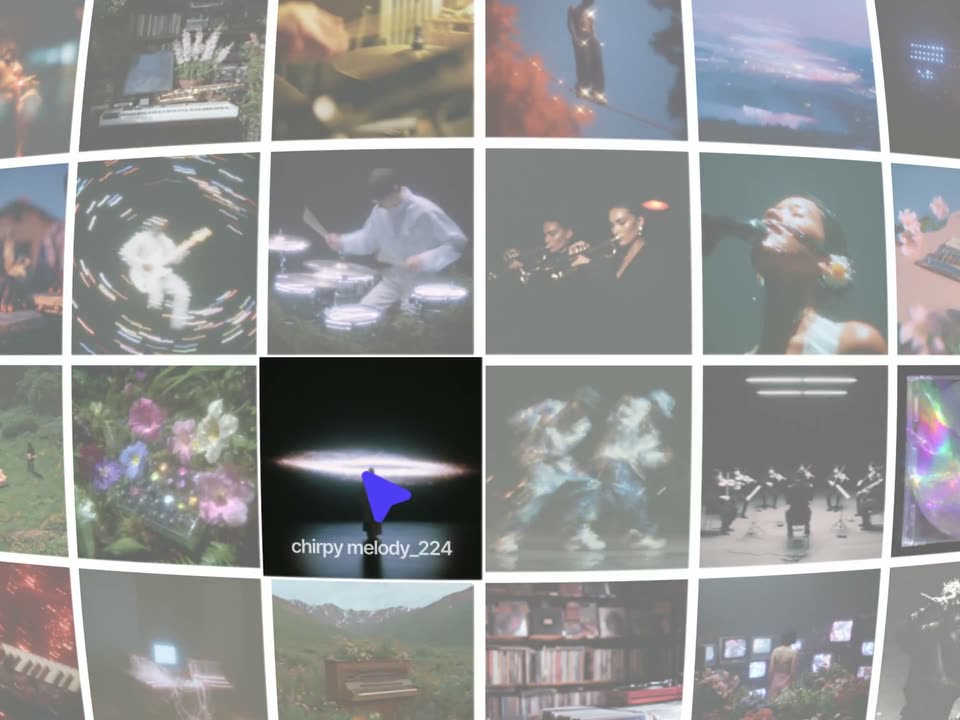
A wall of video thumbnails curves in 3D perspective, filling the frame. A blue play-shaped cursor drifts from the lower right to the center and hovers over one dark tile; the surrounding tiles wash out to gray and the tile's name chirpy melody_224 appears beneath it.
Techniques: 3D mockup, Cursor demo
Camera: Push in
27 · Feature reveal · 0:36–0:37
A 3D wall of video sample thumbnails tilts in perspective as a blue play icon hops from tile to tile, each active tile revealing its sample name label. The view drifts and zooms across the grid.
Techniques: 3D mockup, UI zoom
Camera: Push in
28 · Feature reveal · 0:37–0:39
A grid of dimmed video thumbnails fills the frame in a sample browser. One central clip of a singer holding a microphone stays in full color, marked by a purple play triangle and a white text label below it. The frame holds still.
Camera: Static
29 · Feature reveal · 0:39–0:40
A white board interface floats over a sunlit garden where two women stand. A purple cursor moves across the empty canvas and drops a small dark photo of a face onto it. The left toolbar and top controls stay fixed.
Techniques: Cursor demo
Camera: Static
30 · Feature reveal · 0:40–0:42
A semi-transparent white music-board panel floats over sunlit forest footage of two people walking. A blue cursor drops a drum sample onto the timeline, swapping a face thumbnail for a cyan waveform block labeled Drum Sample.
Techniques: Cursor demo
Camera: Static
31 · Feature reveal · 0:42–0:45
A translucent hawt tub timeline window floats over a sunlit studio, with a small PIP of hands striking a rainbow MIDI pad at lower left and a Pads key panel at lower right. The whole composite eases in scale as the red playhead moves across the tracks.
Camera: Static
32 · Feature reveal · 0:45–0:46
Four suited musicians in sunglasses perform on a dim stage: a saxophonist in mint at left, an upright bassist center, a guitarist in brown at right, and a singer in tan in the foreground. The camera holds a tight medium shot with a slight drift.
Camera: Static
33 · Feature reveal · 0:46–0:48
A jazz band in suits plays on a dim stage with green curtains. A white circle bearing a dotted outline and a blue cursor arrow pops into the center, and a yellow speech bubble with the text appears above it.
On-screen text: “sous chef [ctrl+k]”
Camera: Static
34 · Feature reveal · 0:48–0:48
A live-action jazz band plays behind a yellow tooltip reading sous chef [ctrl+k], above a dotted chef-hat icon and a blue cursor. A vertical wipe slides left, opening a split screen with the product's sous-chef panel on the right.
On-screen text: “sous chef [ctrl+k]”
Techniques: Split screen, Masking
Camera: Static
35 · Feature reveal · 0:48–0:49
A split view pairs a live-action saxophonist in a light blue suit with the sous chef interface panel. The frame zooms down to the input bar as a blue cursor rests on the Ask anything field.
Techniques: UI zoom, Cursor demo
Camera: Static
36 · Feature reveal · 0:49–0:54
A blue cursor types a question into a chat input field, then the text lifts into a black bubble above as the field clears. A pixel avatar replies, and a gray pill marked “creating groovy bassline” fills with an audio waveform as the status reads “sample created”.
Techniques: Cursor demo, Morph
Camera: Static
37 · Feature reveal · 0:54–0:55
A light gray rounded pill centered on a white background holds a row of vertical bars forming an audio waveform. The pill widens and the bars extend and shift as the clip plays, like a sound waveform growing.
Camera: Static
38 · Feature reveal · 0:55–0:58
A translucent audio app window floats over out-of-focus yellow leaves. The panel fades to opaque as three tracks load in sequence: a blue drum waveform, a green bass waveform, and an orange pads lane. A yellow sticky note sits at the right edge of the window.
Camera: Static
39 · Feature reveal · 0:58–0:59
A white rounded prompt card floats over a backdrop of yellow autumn leaves. It sharpens from a translucent state to solid, revealing a plus icon, the typed line “can you also chop it up and shuffle it?”, an arrow button, and an “Auto” pill beneath.
Camera: Static
40 · Feature reveal · 0:59–1:00
A white audio-editor card with a cyan drum waveform, a green bass waveform and orange pad bars holds still over a filmed backdrop of yellow autumn leaves. The leafy branches drift slowly behind the static interface, creating a layered depth effect.
Techniques: Parallax
Camera: Static
41 · Feature reveal · 1:00–1:01
A tight close-up of a fist striking a vertical wooden plank surface. The hand blurs as it drops in a fast downward motion, then exits the frame, leaving the bare wood grain in view.
On-screen text: “Drum Sample”
Camera: Static
42 · Feature reveal · 1:01–1:03
Indoors near a mirror and pink flowers, a bearded man in a grey shirt and silver chain turns to face a person with braided hair in a red checkered shirt. The shot tightens on the man's serious expression as he stares the other person down.
Camera: Static
43 · Feature reveal · 1:03–1:04
A man with a furrowed brow and open mouth leans toward a person seen from behind, who has braided hair and a red checkered shirt. The tight over-the-shoulder framing holds both in a static interior shot.
Camera: Static
44 · Feature reveal · 1:04–1:06
A group of men dance and laugh in a brightly lit room, wearing casual clothes and caps. The handheld camera moves erratically among them, capturing their energetic movements and joyful expressions.
Camera: Pan
45 · Feature reveal · 1:06–1:09
A crowd dances in a dim room, handheld and blurred, as a white share bar with a bell, four avatars, and a dark Share button holds center. Colored name tags with small arrow pointers slide in from the edges around the bar.
On-screen text: “Share”, “Reems”, “Anurag”, “phillis”, “days”
Techniques: Kinetic type
Camera: Static
46 · Feature reveal · 1:09–1:11
A band of five musicians plays inside a van: a keyboardist left, a guitarist and bassist center, a drummer right, and a singer holding a handheld mic to his mouth. The locked-off wide frame holds the whole interior as a small caption slides in at the edge.
On-screen text: “Share”
Camera: Static
47 · Feature reveal · 1:11–1:12
A flat white music editor panel with cyan, green, orange and pink tracks floats over a blurred green backdrop. A cursor glides to the yellow Share button beneath it and presses it.
Techniques: Cursor demo
Camera: Static
48 · Feature reveal · 1:12–1:13
A dark rounded card floats over a blurred green foliage backdrop. A colorful gradient square slides right from the edge and lands on a translucent disc, the white niffls wordmark fades out, and a mouse cursor hovers by the disc.
On-screen text: “niffls”, “Share”
Techniques: Cursor demo
Camera: Static
49 · Feature reveal · 1:13–1:17
A dark player card with the riffle logo, colorful album art and a vinyl disc sits over blurred greenery. A comments column slides in from the right as small avatar badges pop along the waveform, while a cursor rests at the playhead.
Techniques: Cursor demo
Camera: Pan
50 · Social proof · 1:17–1:20
A black void holds a tilted collage of seven video tiles, each playing a different musician: a woman at a laptop, hands on a red MIDI pad, a red keyboard, a saxophonist, a cap-wearing man, a double bassist, and guitarists in an airport. The center tiles cycle to new clips.
Camera: Static
51 · CTA · 1:20–1:22
A spherical green flower head on a thin stem fills the center against a blurred glass dome. A lime-green pill reading go play rests on the bloom. A purple cursor glides in from the right and taps the pill. The frame stays locked off.
On-screen text: “go play”
Techniques: Cursor demo
Camera: Static
52 · CTA · 1:22–1:25
A lime pill reading go play with a blue cursor arrow sits at center, then shrinks away as the black riffle.studio wordmark pops in and tilts to a slight diagonal on white.
On-screen text: “go play”, “riffle.studio”
Techniques: Kinetic type
Camera: Static
53 · Outro · 1:25–1:27
A black circle holding a white cursor arrow sits centered on a plain off-white background. A thin gray outline around the circle fades out, leaving the solid mark locked in place.
Camera: Static
54 · Outro · 1:27–1:27
A solid black screen with no visible content, serving as a transition or fade point between scenes.
Camera: Static