
0:14
Explore
28 reactions | We've just added Tables to Milanote 🎉 Use them to plan project timelines, calculate budgets and keep track of all the details. We've included the best parts of a spreadsheet (formulas, cell types and basic formatting), without the complexity. Try them out and tell us what you think! | Milanote
Milanote · Nov 2023 · 0:22 · Clip · AI-annotated
- Length
- 0:22
- Scenes
- 2 · 11.4 s avg
- Product on screen
- 0:00
- Features shown
- 1
- Voiceover
- No
- Views
- 492 on Facebook
as of November 15, 2026
00:00:00 / 00:22:23
- Length
- 0:22
- Scenes
- 2 · 11.4 s avg
- Product on screen
- 0:00
- Features shown
- 1
- Voiceover
- No
- Views
- 492 on Facebook
as of November 15, 2026
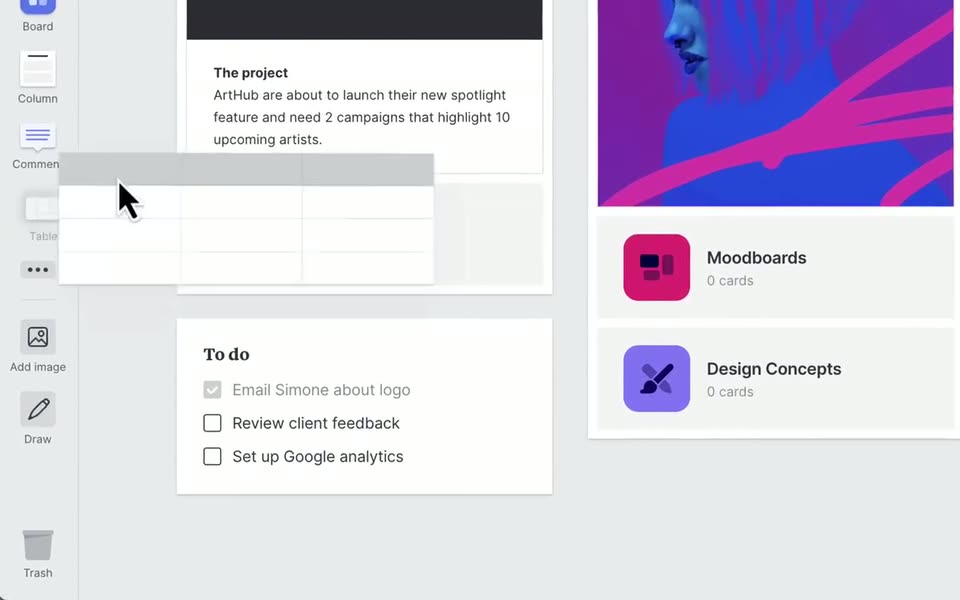
Milanote’s 0:22 clip runs 2 scenes, about 11 s each. The product is on screen from the first frame and 1 feature is revealed. A single continuous take with no cuts: the camera zooms into the board, a hand cursor builds a spreadsheet step by step, then the camera zooms back out to the full board. The style is cursor-led and deliberate, with a purple-to-magenta accent palette, serif headings and a light-gray canvas giving it a polished product-demo look.
No filming indicatedEstimated needs: 1 capture group — your screens or recordings
Is this your launch? to your site or press kit.
More like this


28 reactions | We've just added Tables to Milanote 🎉 Use them to plan project timelines, calculate budgets and keep track of all the details. We've included the best parts of a spreadsheet (formulas, cell types and basic formatting), without the complexity. Try them out and tell us what you think! | Milanote, scene by scene
· 2 scenes as text
01 · Feature reveal · 0:00–0:01
The campaign board interface zooms in from a full-screen view to a close-up of the left columns. A hand cursor glides to the Table icon in the left sidebar and hovers there, while the About and Research & Design cards settle into frame.
Techniques: UI zoom, Cursor demo
Camera: Push in
02 · Feature reveal · 0:01–0:22
A cursor builds a spreadsheet on a whiteboard next to a moodboard card: it types phase and budget rows, picks dates from a popup calendar, formats values as currency and sums them. The frame zooms out to reveal the whole ArtHub Campaigns board.
Techniques: Cursor demo, UI zoom
Camera: Pull out