2:31
Microsoft Integrations
Harvey · Oct 2025
Microsoft · Aug 2019 · 1:23 · Full motion · AI-annotated
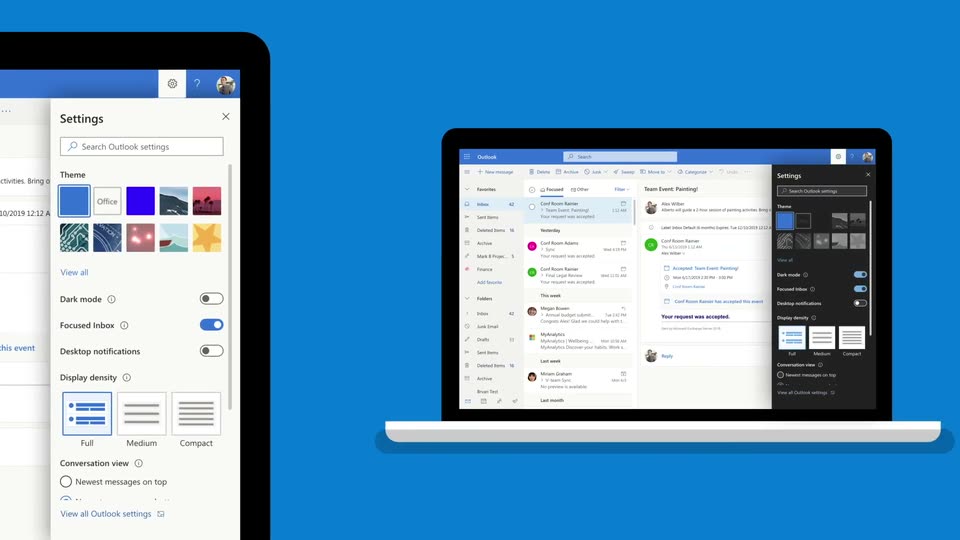
Microsoft’s 1:23 launch film runs 25 scenes, about 3.3 s each. The product is on screen from the first frame and 7 features are revealed. There is no explicit call to action; a voiceover carries the film. The video is a feature tour: a flat laptop on a solid blue field opens the piece, then each feature gets a white headline over a 3D device that flips between tablet and laptop before the shot zooms into the flat interface. Signature moves are the 3D tilt-and-zoom into the UI, crossfading headline lines, and the constant blue field with white light-type titles, closing on white logo cards.
Is this your launch? to your site or press kit.
Harvey · Oct 2025
Windsurf · Developer tools · Aug 2025
Uniswap · Feb 2024
Films whose music sounds like this one, voice left out
Stych · Upbeat modern electronic
Canva · Upbeat electronic and rock
Superhuman · Modern electronic
On a solid blue background, a white laptop rotates open from a flat edge-on view to face the camera, its screen showing the blue Outlook logo. Two lines of white text appear above the laptop.
On-screen text: “Outlook on the web”, “updated user experience”
Techniques: 3D mockup
Camera: Static
Solid blue field with a flat front-facing laptop illustration. Its screen cuts from the Outlook logo to the web inbox, and a settings panel opens on the right. The white headline above cycles through phrases, then fades as the laptop scales up.
On-screen text: “Outlook on the web”, “updated user experience”, “and new features”, “helps you do more things faster”
Techniques: Kinetic type, UI zoom
Camera: Push in
A flat Outlook settings window on the left pulls back to reveal the full inbox list, while a 3D tablet on the right shows the same settings panel with theme swatches and toggles, drifting toward the right edge on a blue field.
On-screen text: “Outlook on the web”, “helps you do more things faster”
Techniques: 3D mockup, UI zoom
Camera: Push in
Two Outlook devices sit side by side on a blue field, the tablet showing light-mode settings and the laptop its inbox. The laptop flips to a dark theme, then the view zooms into the compose pane where a Turn on the lights toggle sits beside the message body.
Techniques: Split screen, UI zoom
Camera: Push in
A tilted 3D laptop mockup of Outlook crossfades and straightens into a flat dark-mode interface. The compose pane on the right shows a draft to Bryan, and a small light-bulb button labeled Turn on the lights sits above the formatting bar.
Techniques: 3D mockup
Camera: Push in
A dark Outlook window fills the frame, with a folder list on the left, an inbox list in the center, and a light compose pane on the right. The pre-filled email in the compose pane fades out, leaving only the empty To, Cc and subject fields.
Camera: Static
The Outlook compose window, shown flat at first, settles into a 3D laptop mockup against a blue field. A pale rounded caption bar at the bottom holds the static label Tab compose.
On-screen text: “Tab compose”
Techniques: 3D mockup
Camera: Pull out
A front-facing laptop on a blue field shows Outlook. An open compose draft collapses to reveal a row of tabs along the bottom edge. A grey cursor clicks the tabs, and the reading pane switches to a budget email thread.
On-screen text: “Tab compose”
Techniques: Cursor demo
Camera: Static
A tablet in 3D perspective displays an Outlook inbox with an open email thread and a row of subject tabs along its bottom edge. The white headline Tab compose sits centered below the device on a solid blue field, while the shot eases in slightly.
On-screen text: “Tab compose”
Techniques: 3D mockup
Camera: Push in
A blue backdrop holds the white title Categories above a tablet in 3D perspective running Outlook. The tablet rotates from an angle to face the camera, a Categorize dropdown opens, then a pink Finance tag appears beside the open email subject.
On-screen text: “Categories”
Techniques: 3D mockup
Camera: Push in
A black laptop in 3D perspective displays the Outlook mail view with Finance tags, set on a blue field. The white word Categories fades in above the device as the laptop drifts slightly upward.
On-screen text: “Categories”
Techniques: 3D mockup
Camera: Static
Under the headline 'Favorite your contacts', a tablet on a blue field shows the Outlook inbox. A cursor opens a contact menu and selects 'Add to favorites'; the device then tilts into 3D beside an enlarged contact card.
On-screen text: “Favorite your contacts”
Techniques: Cursor demo, 3D mockup
Camera: Push in
A close-up Outlook contact card for Megan Bowen sits on the left, its rows settling into place, while a 3D laptop on the right shows the Outlook inbox and a starred favorites list, all on a blue background.
Techniques: Split screen, 3D mockup, UI zoom
Camera: Static
On a blue background, a flat email panel on the left swaps to a month calendar while a 3D laptop on the right switches from an email list to a week calendar. The white headline New calendar experience slides in at the top.
On-screen text: “New calendar experience”
Techniques: 3D mockup, Split screen
Camera: Push in
A week view of the Outlook calendar sits in a flat device frame on a blue field under a white headline. The headline crossfades from one line to another as day columns highlight in sequence, then a cursor hovers a canceled event and the shot zooms into the interface.
On-screen text: “New calendar experience”, “Helps you manage your time”
Techniques: Kinetic type, Cursor demo, UI zoom
Camera: Push in
A flat Outlook calendar event view scrolls down, revealing the Meeting Insights section with three file cards. The view then zooms out to frame the app inside a tilted tablet on a blue background.
Techniques: UI zoom, 3D mockup
Camera: Pull out
A white 'Quick compose' headline sits above a tilted tablet showing the Outlook week calendar. The view zooms into the screen, a compose panel opens, and a cursor selects a room from a suggested-locations list before pulling back to the tablet.
On-screen text: “Quick compose”
Techniques: 3D mockup, UI zoom, Cursor demo
Camera: Push in
A black tablet in 3D perspective sits on a blue field, displaying the Outlook week calendar with multicolored event bars. The white headline Calendar search fades in above the device as the interface sharpens.
On-screen text: “Calendar search”
Techniques: 3D mockup
Camera: Static
A black tablet mockup on a blue field sits below the white headline Calendar search. The Outlook search box switches from digital assets web to business development and the week view swaps Core Web Team blocks for canceled meetings. The tablet tilts in 3D as the screen fades.
On-screen text: “Calendar search”
Techniques: 3D mockup
Camera: Pull out
A 3D laptop on a blue background scales in to show the Outlook web inbox, then switches to a compose view as white headline lines appear above it in sequence.
On-screen text: “See,”, “what did I tell you?”, “That was fast.”, “Outlook on the web helps you”, “connect.”
Techniques: 3D mockup, Kinetic type
Camera: Pull out
A flat vector laptop on a solid blue field displays the Outlook calendar in week view. A white two-line headline sits centered above the screen. The shot is locked off and static for the full duration.
On-screen text: “Outlook on the web helps you organize.”
Camera: Static
A flat blue backdrop holds a white two-line headline above a front-facing laptop illustration. Inside the screen, an Outlook calendar event panel scrolls vertically, revealing attendee names and a Meeting Insights block.
On-screen text: “Outlook on the web helps you”, “get things done.”
Camera: Static
A white two-line headline sits above a front-facing laptop on a flat blue field, its screen showing an Outlook meeting detail with attendees and suggested times. The whole frame fades to a pale wash.
On-screen text: “Outlook on the web helps you”, “get things done.”
Camera: Static
A flat blue Outlook icon, a rounded square with a white O overlapping an open envelope, fades in at the center of a plain white background and holds. The two-line headline stays locked in place.
On-screen text: “Outlook on the web helps you”, “get things done.”
Camera: Static
A white field holds the Microsoft mark at center: the four colored squares assemble while the gray wordmark fades in, then the full logo holds still as the sign-off.
Camera: Static