1:39

adam - Introducing Adam, the first AI mechanical engineer
Adam · B2B · Jan 2026
Microsoft · May 2020 · 0:55 · Full motion · AI-annotated
Microsoft’s 0:55 launch film runs 25 scenes, about 2.2 s each. The product shows up at 0:07 and 3 features are revealed. The call to action lands at 0:41 (76% in), over a voiceover. The video opens with a problem checklist, then reveals the product and moves through short feature beats using 3D device mockups and abstract bar grids. It relies on hard color wipes, locked-off headlines, and recurring card fans to keep the pace brisk.
Is this your launch? to your site or press kit.
Adam · B2B · Jan 2026
Figma · Design · Nov 2026
Microsoft · AI · Nov 2023
Films whose music sounds like this one, voice left out
Google · Electronic Dance Music (House, Nu-Disco)
NotebookLM · Funk, Disco, Eurodance, Italo House
Figma · Electronic dance music with funk and disco influences
On a blue gradient, a white headline zooms out from a blurred close-up and sharpens. Four circular face avatars pop in above the line, then slide down to replace the words, leaving only the tail of the sentence beside them.
On-screen text: “Your team is in charge of a lot”
Techniques: Kinetic type
Camera: Static
On a flat green field, a circular photo tile dissolves into a thin white ring holding a small dot. Above it the words 'a lot' drift up and fade while 'of information' slides into place below. A blue band at the top edge recedes as green wipes upward.
On-screen text: “Your team is in charge of a lot”, “of information”
Techniques: Kinetic type, Masking
Camera: Static
A purple field holds two white text lines, each preceded by a circular checkbox icon. The top checkmark draws in while the bottom line brightens from dim purple to white and its circle outline completes. Both lines slide in on a locked-off frame.
On-screen text: “of information”, “of events”
Techniques: Kinetic type
Camera: Static
On a teal field, a checklist of white line icons and text sits at left; the third row, of assets, slides in from the right as its circle checkmark draws on.
On-screen text: “of information”, “of events”, “of assets”
Techniques: Kinetic type
Camera: Static
On a red-orange gradient, three white text lines with circular check icons slide into place one after another, then a fourth line with an empty circle drops in below them.
On-screen text: “of information”, “of events”, “of assets”, “of everything”
Techniques: Kinetic type
Camera: Static
On a flat indigo field, four white lines read 'of information', 'of events', 'of assets', 'of everything', each led by a thin circular checkmark icon. The top three lines slide horizontally into place while the bottom line holds fixed, in a locked-off frame.
On-screen text: “of information”, “of events”, “of assets”, “of everything”
Techniques: Kinetic type
Camera: Static
A blue side panel carrying stacked lines slides off to the right, revealing a centered headline and a flat iPhone mockup that recenters beneath it. The phone screen shows a list app with a search field and one entry.
On-screen text: “of information”, “of events”, “of assets”, “of everything”, “We've got a brand new superpower for that”
Techniques: Kinetic type, Parallax
Camera: Static
A dark gray background holds a bold white headline with the word “superpower” in cyan above a phone mockup in 3D perspective. The phone shows the My Lists app screen as the whole composition scales up slightly.
On-screen text: “We’ve got a brand new superpower for that”
Techniques: 3D mockup
Camera: Push in
On a dark teal field, a tight stack of flat rounded cards at the left edge fans out into a diagonal cascade. Each card is a solid color with a white footer strip and a small black square, spreading from black and red to teal, blue, purple, pink and maroon.
Camera: Static
A diagonal fan of colorful folder icons with white checkbox strips slides right across a dark teal background as a smartphone rises into frame, its screen showing a lists app with a favorites section and a row of app icons.
Camera: Pull out
A tablet in 3D perspective displays the Microsoft Lists interface as a fan of colorful cards rotates and stacks in front of it, while the white title Microsoft Lists fades in and scales up to the center.
On-screen text: “Microsoft Lists”
Techniques: 3D mockup, Kinetic type
Camera: Pull out
A white “Microsoft Lists” title slides up over a dark teal background while a tablet showing the Lists app, with colorful Favorites and Recent Lists cards, slides down into the lower frame.
On-screen text: “Microsoft Lists”
Techniques: Kinetic type
Camera: Push in
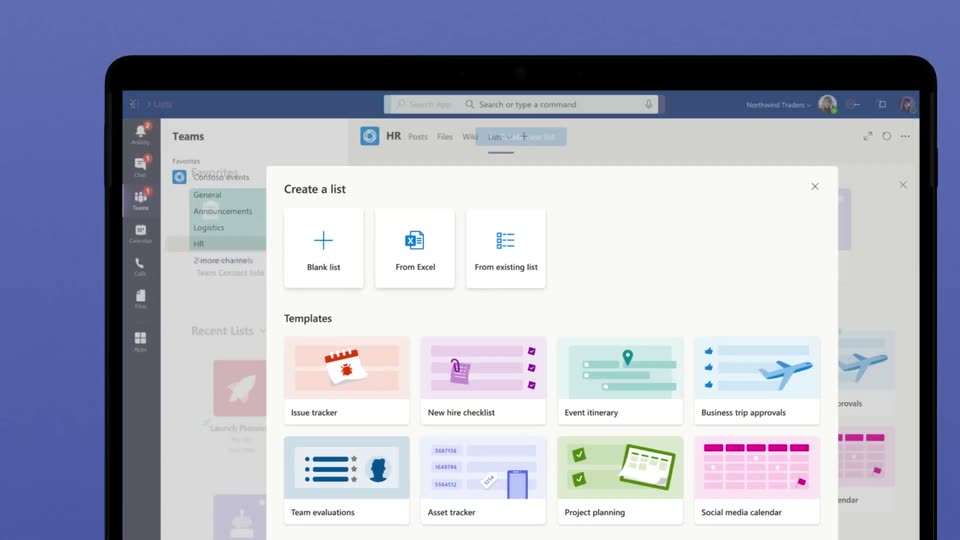
A 3D laptop mockup displays the Microsoft Lists interface, transitioning to the Teams app while a 'Create a list' dialog stays open. The text 'Keep teams in sync' appears on the left.
On-screen text: “Microsoft Lists”, “Keep teams in sync”
Techniques: 3D mockup, Morph
Camera: Pull out
A tablet in 3D perspective on the right displays the Teams app, its screen switching from a template grid to a list of names with colored status tags. A white headline fades in on the left over a blue field with thin curved lines, then the frame drifts to reframe.
On-screen text: “Keep teams in sync”, “and on track”
Techniques: 3D mockup
Camera: Pan
A dark gray field of wireframe bars and avatar circles holds the white text “What comes in” at center. The grid slides right as a blue panel wipes in from the left, revealing a tablet edge with a data list, and the text swaps to “goes out”.
On-screen text: “What comes in”, “goes out”
Techniques: Kinetic type, Masking
Camera: Pan
A tilted 3D laptop mockup shows a lists table, rotating to face the camera as the view zooms into one row where a cursor opens a small icon menu. A white headline reads needs attention at the top over a blue field.
On-screen text: “needs attention”
Techniques: 3D mockup, UI zoom, Cursor demo
Camera: Push in
A laptop mockup in 3D perspective shows the Microsoft Lists app against a blue gradient. The white headline swaps from needs attention to gets updated while the interface pans right to reveal the Welcome & Introduction detail panel and its Comments list.
On-screen text: “needs attention”, “gets updated”
Techniques: Kinetic type, 3D mockup, UI zoom, Cursor demo
Camera: Pan
A laptop in 3D perspective on a blue background shows a web app with a comments panel. White text reads above it while a cursor types a comment into the box, then the camera zooms into the screen.
On-screen text: “gets updated”
Techniques: Cursor demo, UI zoom
Camera: Static
A 3D laptop mockup sits centered on a dark gray background, its screen showing a list view of the interface. Above it, the headline “All lit up in the places you need it most” settles into place, the word “lit” in cyan with a small sparkle flickering above.
On-screen text: “All lit up in the places you need it most”
Techniques: 3D mockup
Camera: Pull out
A phone rises in front of a laptop and tablet, all displaying the same list app beneath a static headline. The camera zooms into the phone screen as a context menu slides up and closes, then pulls back to show the full device.
On-screen text: “All lit up in the places you need it most”
Techniques: 3D mockup, UI zoom
Camera: Pull out
On a dark gray field, a grid of colored rounded bars and circular user icons builds up row by row, filling the frame. The white headline slides in word by word, then gives way to “Microsoft Lists” at the bottom.
On-screen text: “Cue it up and watch your work flow”, “Microsoft Lists”
Techniques: Kinetic type
Camera: Pan
A row of colorful abstract list bars, toggles and avatar circles in purple, blue, green, orange, red and pink sits across the top of a dark field, fading and shifting, while the white title Microsoft Lists slides in centered below.
On-screen text: “Microsoft Lists”
Techniques: Kinetic type
Camera: Static
Faint interface outlines fade out along the top of a dark gray frame while the white title Microsoft Lists slides into the center and holds.
On-screen text: “Microsoft Lists”
Techniques: Kinetic type
Camera: Static
The Microsoft 365 logo sits centered on a white background. The 365 fades out, leaving the Microsoft wordmark, then a blue bar wipes in from the left as the Microsoft Lists title slides in.
On-screen text: “Microsoft 365”, “Microsoft Lists”
Techniques: Masking
Camera: Static
A flat end card: a blue panel on the left holds the white word Subscribe, while two empty video boxes on the right draw themselves with dashed lines, fill to solid outlines, then fade out in a repeating loop.
On-screen text: “Subscribe”
Camera: Static