0:55
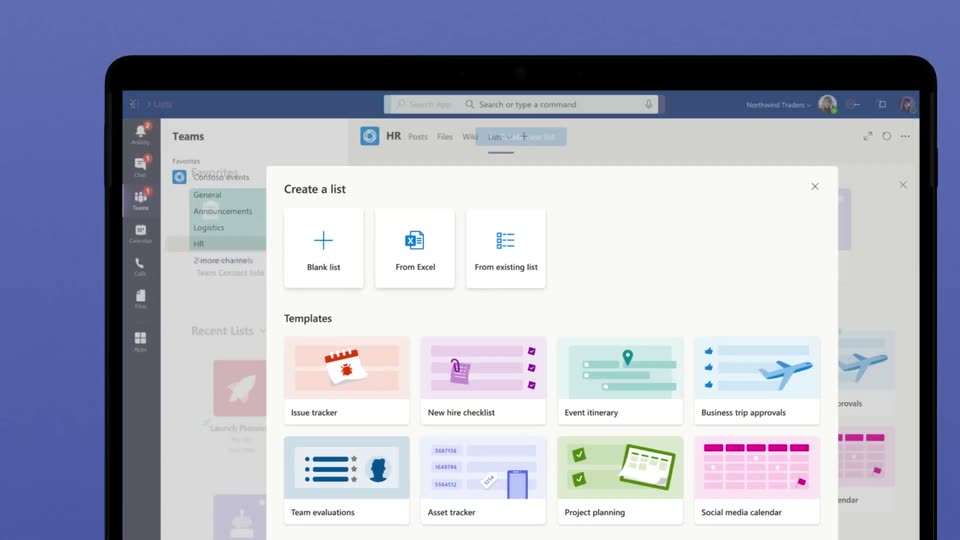

Announcing Microsoft Lists - a new Microsoft 365 app to track information and organize work
Microsoft · AI · May 2020
Adam’s 1:39 launch film runs 40 scenes, about 2.5 s each. The product is on screen from the first frame and 4 features are revealed. The call to action lands at 1:28 (89% in), over a voiceover. Hosted walkthrough that cuts between a pink-lit studio and full-screen CAD demos, with each feature named by a blurred-in neon title card on black. Fast 140 bpm pace, magenta-on-black palette, glow and blur transitions, and pink dimension callouts give the video a consistent motion language.
Is this your launch? to your site or press kit.
Microsoft · AI · May 2020
Figma · Design · Nov 2026
Rippling · Jun 2026
A man in a white apron sits at a desk with a laptop and broadcast microphone, gesturing as he speaks to camera. A pink neon 'adam' sign glows on the wall behind him, and a lower-third name caption with a pink logo appears in the lower left.
On-screen text: “HEY, I'M ZACH, AND TODAY I'M EXCITED TO INTRODUCE YOU TO”, “zach dive”, “CEO & Founder”, “YOU TO ADAM, THE WORLD'S FIRST AI MECHANICAL ENGINEER.”
Camera: Static
The white adam wordmark with a pink 3D a holds center on black above a purple floor glow. A neon-gradient tagline AI mechanical engineer fades in below it while the bottom caption swaps to LET ME SHOW YOU ADAM IN ACTION.
On-screen text: “YOU TO ADAM, THE WORLD'S FIRST AI MECHANICAL ENGINEER.”, “AI mechanical engineer”, “LET ME SHOW YOU ADAM IN ACTION.”
Camera: Static
Locked-off shot through the open door of a yellow Porsche convertible, framing the steering wheel and tan dashboard. A man in a black t-shirt sits in the driver's seat, holding a phone and gesturing as he speaks. White subtitle lines sit at the bottom of the frame.
On-screen text: “SO TODAY WE'RE GOING TO BUILD A MAG-SAGE”, “PHONE HOLDER FOR YOUR CAR IN ONSHAPE.”, “adam”, “Al mechanical engineer”
Camera: Static
Hands hold a small white and orange 3D-printed part in a car interior, then the shot cuts to a smartphone with a white circular MagSafe ring on its back, plugged into the dashboard. The title “mag-safe phone holder” and an Onshape button fade in on the left.
On-screen text: “SO TODAY WE'RE GOING TO BUILD A MAG-SAGE PHONE HOLDER FOR YOUR CAR IN ONSHAPE.”, “mag-safe phone holder”, “Onshape”
Camera: Static
Inside a dim car, a hand holds a beige circular MagSafe ring in front of the dashboard, then pulls away to reveal the phone locked to it, screen glowing with the time. White headline and a pink Onshape chip sit on the left while subtitles roll across the bottom.
On-screen text: “mag-safe phone holder”, “Onshape”, “SO TODAY WE'RE GOING TO BUILD A MAG-SAGE PHONE HOLDER FOR YOUR CAR IN ONSHAPE.”, “THE FIRST THING I'M GOING TO WALK THROUGH IS HOW ADAM CAN”
Camera: Static
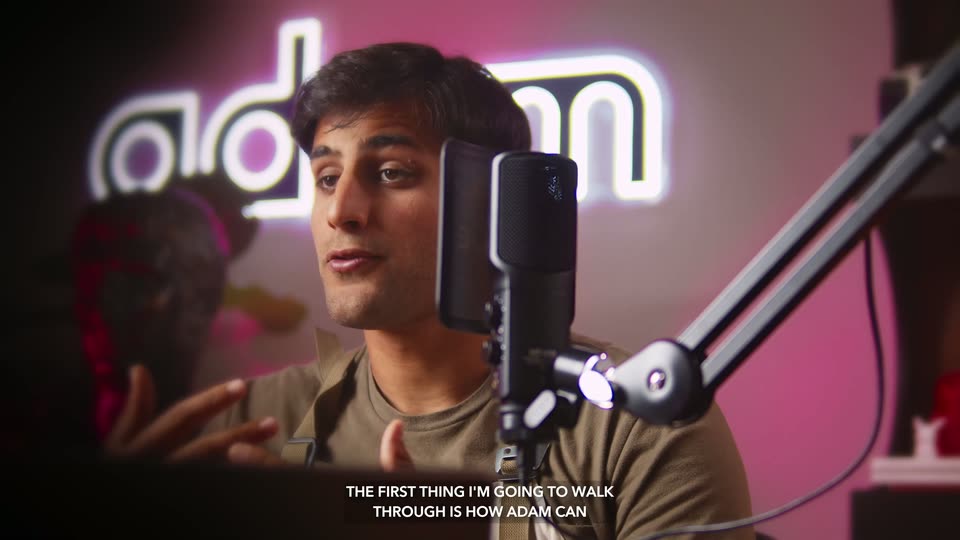
A man in a tan shirt speaks into a studio microphone, gesturing with both hands, against a pink-lit wall bearing a white neon “adam” sign. A two-line caption sits at the bottom center.
On-screen text: “THE FIRST THING I'M GOING TO WALK”, “THROUGH IS HOW ADAM CAN”
Techniques: Kinetic type
Camera: Static
A man in a work apron sits at a desk in front of a laptop, gesturing with both hands as he talks into a boom microphone. A pink and white neon adam sign glows on the wall behind him, and white subtitles run along the bottom of the frame.
On-screen text: “THE FIRST THING I'M GOING TO WALK THROUGH IS HOW ADAM CAN”, “BE USED TO GENERATE FEATURES ON TOP OF AN EXISTING PART.”
Camera: Static
The words feature generation sit centered on a black field with a magenta gradient below, starting heavily blurred and racking into sharp focus while a colored halo glows around them. A small white caption runs along the bottom.
On-screen text: “feature generation”, “BE USED TO GENERATE FEATURES ON TOP OF AN EXISTING PART.”
Camera: Static
The Onshape CAD interface fills the frame on a pink background. A green and grey 3D ball socket model rotates in the viewport, turning to show its threaded end, while a circular inset top right shows a man speaking into a microphone. A caption bar sits at the bottom.
On-screen text: “IN THE DOCUMENT I CREATED A THREADED BALL SOCKET AND A TIGHTENING NUT.”
Techniques: 3D mockup
Camera: Static
A man in a white apron sits at a desk, typing on a laptop and speaking into a boom mic. A pink neon sign and a bust statue sit on the wall behind him. He gestures with his free hand while subtitles run along the bottom of the frame.
On-screen text: “SO FIRST OF ALL I'M GOING TO SELECT THE BOTTOM FACE OF THE PART AND I'M GOING TO”
Camera: Static
A CAD screen on a pink desktop shows a green and gray socket model in 3D. The model rotates from a three-quarter view to face its bottom, which highlights orange when selected, while a circular webcam of the presenter sits top right. White subtitles run along the bottom.
On-screen text: “SO FIRST OF ALL I'M GOING TO SELECT THE BOTTOM FACE OF THE PART AND I'M GOING TO”, “ASK ADAM TO GENERATE THE FEATURES THAT I WANT.”
Techniques: 3D mockup, Cursor demo
Camera: Static
A man in an apron sits at a desk in front of a laptop, gesturing as he speaks, with a pink neon adam sign and a bronze bust behind him. White subtitle captions sit at the bottom center and swap to a new pair mid-scene.
On-screen text: “ASK ADAM TO GENERATE THE FEATURES”, “THAT I WANT.”, “SO SPECIFICALLY I'M GOING TO TELL IT TO BUILD”, “A SNAP FIT HOUSING FOR A CIRCULAR”
Camera: Static
A CAD interface fills the frame, its prompt box typing 'Create a snap fit housing for' letter by letter. A circular webcam feed of a speaking presenter sits top right over a magenta backdrop, while white subtitles run along the bottom.
On-screen text: “SO SPECIFICALLY I'M GOING TO TELL IT TO BUILD A SNAP FIT HOUSING FOR A CIRCULAR”, “PUCK THAT IS 55.5 MILLIMETERS IN DIAMETER AND”
Techniques: Kinetic type
Camera: Static
A man at a desk holds a small puck and gestures toward his laptop, neon adam sign glowing behind him. On the left, a pink dimension line draws in with 55.5mm and Diameter, then a second line adds 4.37mm and Thickness.
On-screen text: “PUCK THAT IS 55.5 MILLIMETERS IN DIAMETER AND”, “55.5mm”, “Diameter”, “Thickness”, “4.37mm”, “4.37 MILLIMETERS THICK CENTERED ON THE FACE.”
Camera: Static
The lowercase word partediting, with a plus sign for the t, sharpens in from a horizontal blur at center, glowing blue on the left and red on the right against a black field with a purple haze at the base. A small white caption holds at the bottom.
On-screen text: “partediting”, “HERE WE CAN SEE ADAM'S PART GENERATION CAPABILITY.”
Techniques: Kinetic type
Camera: Static
A glowing 'part editing' title on black wipes right as a pink bar reveals a Figma canvas on the left showing a circular sketch; a dark caption box slides in at the lower right.
On-screen text: “part editing”, “IT CREATES A CIRCULAR SKETCH WITH THE DIAMETER THAT I REQUESTED AND A 1.75”
Techniques: Masking
Camera: Pan
A 2D CAD sketch of a toothed circle fills the Onshape window on a pink border. A magenta leader line labels the outer circle, then a blue line adds a second callout as the sidewall ring highlights, while white captions run along the bottom.
On-screen text: “IT CREATES A CIRCULAR SKETCH WITH THE DIAMETER THAT I REQUESTED AND A 1.75”, “circular sketch”, “MILLIMETER OFFSET SKETCH FOR THE SIDEWALLS.”, “offset sketch”
Camera: Static
A man in a white apron sits at a desk with a laptop and boom microphone, gesturing as he talks. A pink and white neon adom sign glows on the wall behind him. The shot cuts to a tight close-up of his face.
On-screen text: “AS ADAM IS AGENTIC IT'S ABLE TO EXECUTE A SERIES OF ACTIONS TO CARRY OUT A HIGH”, “LEVEL TASK JUST LIKE A HUMAN ENGINEER WOULD.”
Camera: Static
A man in a tan shirt speaks into a black studio microphone on a boom arm, framed against a glowing white neon logo on a pink wall. The shot is locked off while white subtitles sit at the bottom of the frame.
On-screen text: “LEVEL TASK JUST LIKE A HUMAN ENGINEER WOULD.”
Camera: Static
Three neon-outlined black pills with white lowercase text fade in on the left, chained by white curves, beside a flat CAD app window showing a green socket mount on a gray disc. Subtitles at the bottom swap mid-scene.
On-screen text: “WE ALSO UNDERSTAND THAT PART GENERATION IS”, “JUST A PART OF THE MECHANICAL DESIGN”, “design intent”, “check dependencies”, “scan feature tree”, “WORKFLOW AND SO WE'VE BUILT”, “ADAM TO BE PROACTIVELY”, “LEVEL TASK JUST LIKE A HUMAN”, “ENGINEER WOULD.”
Camera: Static
A man in a tan shirt talks into a boom-arm microphone, gesturing with his hands, against a pink wall with a glowing neon adam sign behind his head. A second person is partly visible at the left edge. White subtitles sit at the bottom of the locked-off frame.
On-screen text: “WORKFLOW AND SO WE'VE BUILT ADAM TO BE PROACTIVELY”
Camera: Static
A man in a green shirt and white apron sits at a desk, gesturing with his right hand while speaking. A neon 'adam' sign glows on the wall behind him beside a bust and headphones, with an open laptop in front.
On-screen text: “WORKFLOW AND SO WE'VE BUILT ADAM TO BE PROACTIVELY”, “USEFUL IN DAILY TASKS SUCH AS OPTIMIZING YOUR FEATURE TREE.”
Camera: Static
A black field with a magenta glow at the base. The white lowercase title feature tree optimization snaps from a horizontal blur into focus, edged by a blue halo on the left and a pink halo on the right, above a small uppercase caption.
On-screen text: “feature tree optimization”, “USEFUL IN DAILY TASKS SUCH AS OPTIMIZING YOUR FEATURE TREE.”
Techniques: Kinetic type
Camera: Static
A man in a work apron sits at a desk behind a laptop and boom microphone, raising one hand to gesture as he talks. A pink neon adam sign glows on the wall behind him beside a bronze bust and shelved props. The camera stays locked off.
On-screen text: “HERE IS AN EXAMPLE OF A CONVERSATION WHERE”, “I'VE ASKED ADAM TO DO JUST THAT.”
Camera: Static
A man in a tan shirt speaks into a studio microphone, close-up against a pink wall with a blurred white neon sign behind him. The camera holds still while white subtitles at the bottom swap once mid-sentence.
On-screen text: “HERE IS AN EXAMPLE OF A CONVERSATION WHERE I'VE ASKED ADAM TO DO JUST THAT.”, “IN RESPONSE IT TELLS ME THAT I'VE CREATED MULTIPLE FILLETS WITH THE SAME RADIUS”
Camera: Static
A CAD app screen shows a green 3D part and an AI chat panel suggesting to merge two fillets. The interface blurs behind the panel as a bold 'fillet merging' caption with a purple connector line appears on the left, while bottom captions narrate the suggestion.
On-screen text: “IN RESPONSE IT TELLS ME THAT I'VE CREATED MULTIPLE FILLETS WITH THE SAME RADIUS”, “fillet merging”, “multiple fillets can be optimised into a single fillet”, “THAT COULD BE MERGED INTO A SINGLE FILLET OPERATION.”, “SO MAKE SURE THESE FILLETS CAN”, “BE GROUPED INTO ONE.”
Techniques: Kinetic type
Camera: Static
A man in a white apron sits at a desk, gesturing while speaking into a boom microphone. A laptop sits open before him, a neon “adam” sign glows on the wall behind, shelves hold books and cameras. The locked-off camera holds as he looks down at the screen.
On-screen text: “SO MAKE SURE THESE FILLETS CAN”, “BE GROUPED INTO ONE.”
Camera: Static
Onshape interface: a green and black Magsafe mount model in the viewport, AI chat panel on the right. The frame blurs and refocuses as captions appear, then a white rounded outline with pink badges 1 and 2 highlights the left feature tree. A cursor hovers over the chat suggestions.
On-screen text: “I'M GOING TO JUST HOVER OVER HERE AND SEE WHICH”, “SPECIFIC FILLETS ADAM IS SUGGESTING THAT I MERGE.”
Techniques: Cursor demo
Camera: Static
A CAD interface shows a green and black 3D model in the center, with a features panel on the left outlined in purple and marked with numbered callouts. The background is blurred. A white caption on a dark bar sits at the bottom.
On-screen text: “SPECIFIC FILLETS ADAM IS SUGGESTING THAT I MERGE.”
Camera: Static
A man in an olive shirt and apron sits at a desk with an open laptop and a studio microphone, gesturing with both hands as he speaks. A neon sign, a bust and shelves fill the background. The locked-off frame carries a two-line white caption along the bottom.
On-screen text: “IN SITUATIONS WHERE IT'S MORE APPROPRIATE”, “TO USE PARAMETRIC DESIGN PRACTICES ADAM”
Camera: Static
A CAD app window shows a green gear-like ring on a white disc in the viewport. The view zooms into the right-hand chat panel, where an AI reply types out line by line, while a white caption bar sits at the bottom.
On-screen text: “IN SITUATIONS WHERE IT'S MORE APPROPRIATE”, “TO USE PARAMETRIC DESIGN PRACTICES ADAM”
Techniques: UI zoom
Camera: Push in
A close-up of a CAD software panel lists code parameters and status messages about updated features and failed fillets. The frame slowly pushes in on the text while a lower-third caption swaps its lines.
On-screen text: “IN SITUATIONS WHERE IT'S MORE APPROPRIATE”, “CAN REPLACE MATCHING DIMENSIONS WITH A VARIABLE REFERENCE.”
Techniques: UI zoom
Camera: Pan
A tilted Onshape window floats on a pink gradient, its center viewport holding a green and white gear-shaped mount that stays still. A white caption rests along the bottom edge of the frame.
On-screen text: “CAN REPLACE MATCHING DIMENSIONS WITH A VARIABLE REFERENCE.”
Techniques: 3D mockup
Camera: Static
On a black background with a purple haze along the bottom, the white words beta access and the pink-to-violet available now fade in from darkness to full neon brightness. A small white two-line caption stays fixed at the bottom of the frame.
On-screen text: “beta access”, “available now”, “WE'RE OPENING UP OUR BETA ACCESS”, “TO A SELECT FEW COMPANIES”
Camera: Static
A black frame with a magenta glow rising from the bottom holds a centered title, white 'beta access' over a pink-purple gradient 'available now' with a glow and a down chevron. A white uppercase caption at the bottom swaps sentences as the title drifts slightly up.
On-screen text: “beta access”, “available now”, “WE'RE OPENING UP OUR BETA ACCESS”, “TO A SELECT FEW COMPANIES”, “IF YOU WANT TO CHECK IT OUT,”, “GO TO OUR WEBSITE AT ADAM.NEW”
Camera: Static
A dark desktop app fills the screen over a magenta gradient: a left window shows a blue, green and orange 3D CAD part, a right chat panel lists prompt steps, and a dock of app icons sits below. The panels drift slightly while a white caption states the URL at the bottom.
On-screen text: “IF YOU WANT TO CHECK IT OUT, GO TO OUR WEBSITE AT ADAM.NEW”
Camera: Static
A flat product interface displays a 3D mechanical part next to a chat panel on a dark pink gradient. A magenta search icon grows and morphs from a circle into a pill at the top, above a white caption.
On-screen text: “IF YOU WANT TO CHECK IT OUT, GO TO OUR WEBSITE AT ADAM.NEW”
Techniques: Morph
Camera: Static
A tilted laptop screen floats on a pink gradient, its interface showing a 3D part model, a chat panel and an app dock. A black pill with the URL adam.new sits at the top while a white caption appears at the bottom as the view pulls back slightly.
On-screen text: “adam.new”, “IF YOU WANT TO CHECK IT OUT, GO TO OUR WEBSITE AT ADAM.NEW”
Techniques: 3D mockup, UI zoom
Camera: Static
A dark landing page tilts in 3D perspective over a white browser window. The camera pushes in on a magenta Book a Demo button with a play icon as a white hand cursor slides in to hover over it.
On-screen text: “AND BOOK A DEMO WITH US TODAY”
Techniques: 3D mockup, UI zoom, Cursor demo
Camera: Push in
The adam wordmark holds center on a flat black field, its pink 3D letterform forming the 'o'; a small white caption reads AND BOOK A DEMO WITH US TODAY. The frame is locked off and static.
On-screen text: “AND BOOK A DEMO WITH US TODAY”
Camera: Static