1:10

Clam (YC W26) - Security meets OpenClaw
BaseFrame · B2B · Feb 2026
Microck · Nov 2026 · 0:26 · Full motion · AI-annotated
Microck’s 0:26 launch film runs 13 scenes, about 2.0 s each. The product shows up at 0:06 and 4 features are revealed. The call to action lands at 0:20 (77% in). The video is cut to a 120 bpm pulse as a chain of short cards: a meme-style zoom hook, a tagline card, then one feature per beat (app UI, benchmark comparison, engine size, CLI, platforms) closing on an install command. Its signature moves are the pixel-to-vector resolution wipe, pop-in comparison panels with wiping size bars, and letter-by-letter terminal typing, all held on a dark graph-paper grid with flat terracotta, cream and blue color blocks.
Is this your launch? to your site or press kit.
Films whose music sounds like this one, voice left out
Genspark · Electronic, Chiptune, Latin Dance
Klarna · Funk, disco, and electronic dance music with synth-pop elements
Anthropic · Electronic, chiptune, synthwave
A pixel-art orange creature on a white square sits centered on a dark gray field, then scales up toward the camera. A dark caption box holding the word enhance. appears beneath it.
On-screen text: “enhance.”
Camera: Static
A cream square card holding an orange pixel creature with two black square eyes sits centered on a dark field. The view zooms in until the creature fills the frame, and the black caption box reading enhance. scales up with it.
On-screen text: “enhance.”
Camera: Static
A pixelated orange field with a dark square fills the frame under the scaling caption ENHANCE!. A white line wipes left to right, resolving the pixels into flat smooth shapes, while the captions switch to “that is not how pixels work.” then “trace it instead.”
On-screen text: “ENHANCE!”, “that is not how pixels work.”, “trace it instead.”
Techniques: Kinetic type, Masking, Light sweep
Camera: Static
A close-up of a terracotta pixel creature's eye zooms out to reveal the full invader-like figure on a cream field, set beside a dark charcoal panel that holds the gray monospace caption.
On-screen text: “pixels in.”
Techniques: Split screen
Camera: Pull out
On a dark charcoal background, a pixelated orange invader sits in a cream square on the left. To the right, the tagline 'pixels in.' in pixel mono and 'curves out.' in bold white sans resolves from a brief glitch to clean.
On-screen text: “pixels in.”, “curves out.”
Techniques: Morph
Camera: Static
A dark desktop app displays a pixelated orange creature on a cream canvas. The canvas zooms out from a black square to the full image, then the cursor moves to the Export button while format options remain on the right.
On-screen text: “a native desktop app, built on gpui.”, “export svg, pdf, eps, ai, dxf or emf.”
Techniques: UI zoom, Cursor demo
Camera: Static
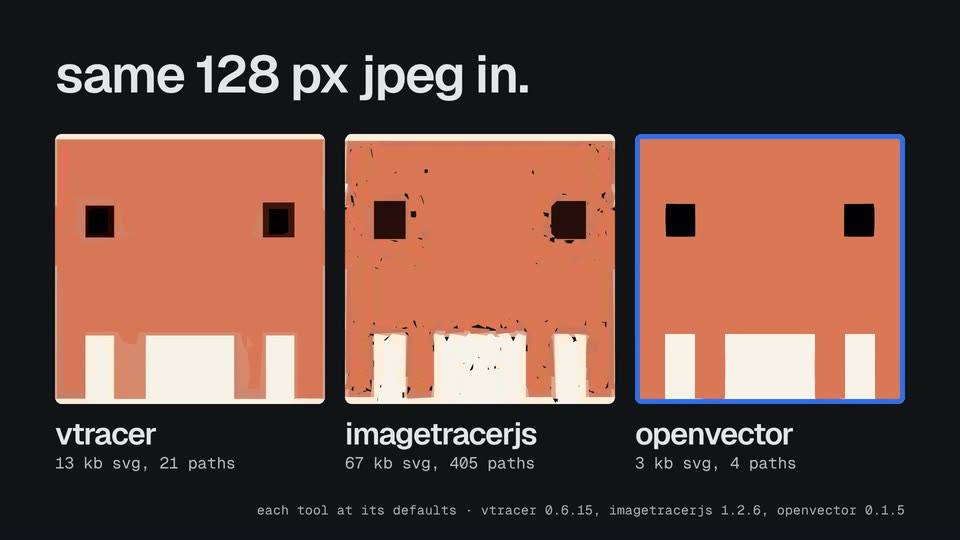
On a near-black background, a bold white headline reads same 128 px jpeg in. A clean traced face sits under vtracer; two more panels, a noisy one and a blue-bordered one, pop in beside it with their labels and path counts.
On-screen text: “same 128 px jpeg in.”, “vtracer”, “13 kb svg, 21 paths”, “each tool at its defaults · vtracer 0.6.15, imageracerjs 1.2.6, openvector 0.1.5”, “imageracerjs”, “67 kb svg, 405 paths”, “openvector”, “3 kb svg, 4 paths”
Techniques: Split screen
Camera: Static
On a solid blue field, a large white 4.2x settles from a slight offset on the left while the vtracer bar wipes to full length on the right, dwarfing the short openvector bar. Static captions state the file sizes and a footnote sits bottom right.
On-screen text: “4.2x”, “smaller file”, “than vtracer.”, “vtracer”, “13.4 kb”, “openvector”, “3.2 kb”, “same source, each tool at its defaults”
Camera: Static
A light gray card holds a large black 3.3 mb headline with two left aligned sublines, the whole engine. and one rust binary. A small monospace caption sits in the bottom right corner and scales in. The frame stays locked off.
On-screen text: “3.3 mb”, “the whole engine.”, “one rust binary.”, “linux arm64 cli binary, openvector 0.1.5”
Camera: Static
A dark grid background holds a white three-line headline on the left and a black terminal window on the right, where a command types out letter by letter with a blinking cursor.
On-screen text: “and a cli”, “your agents”, “can run.”
Camera: Static
A dark grid backdrop holds a bold white headline on the left while a terminal window on the right types out a vectorize command. Its output card shows an orange pixel creature beside the filename clawd.svg and its size.
On-screen text: “and a cli your agents can run.”
Camera: Static
Three stacked color bands reveal top to bottom in quick succession: a blue band with macos, a light gray band with windows, and a navy band with linux. Each row pairs a large platform name on the left with a small architecture note on the right, holding still once revealed.
On-screen text: “macos”, “apple silicon + intel”, “windows”, “x64”, “linux”, “amd64 + arm64”
Camera: Static
Centered on a dark charcoal background, a pixelated logo and wordmark assemble from small squares, then resolve into clean white vectors. The tagline, install command, and a small footnote fade in below, then hold still.
On-screen text: “openvector”, “turn any image into clean vectors.”, “npm install -g openvector”, “ps: clawd is anthropic's mascot. we just gave him his corners back.”
Techniques: Morph
Camera: Static