
0:50
Explore
00:00:00 / 00:29:01
- Length
- 0:29
- Scenes
- 15 · 1.9 s avg
- Product on screen
- 0:01
- Voiceover
- No
- Views
- 1.9K on YouTube
as of November 25, 2026
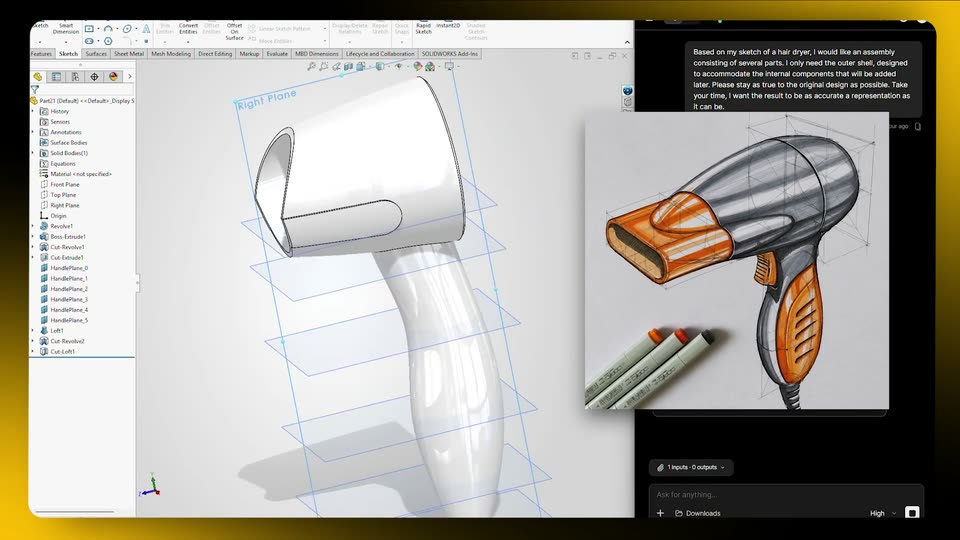
MecAgent’s 0:29 launch film runs 15 scenes, about 1.9 s each. The product shows up at 0:01. There is no explicit call to action. The video opens on a live-action sketch, then locks into a split-screen of a SolidWorks viewport beside a static prompt-and-sketch panel for the remaining runtime. A bright yellow frame and a fast 153 bpm cut rate give the dark UI a high-energy product-demo feel, with the signature move being the live CAD build playing against the frozen hand-drawn reference.
Footage neededEstimated needs: 3 capture groups — your screens or recordings · 1 filmed passage — shoot, supply or replace
Is this your launch? to your site or press kit.
More like this
0:39

Sam Bhagwat - Today we're excited to launch something we've been cooking for a whil
Mastra · B2B · Nov 2026
1:06

Google - Gemini 4 Argon can turn messy data into clean, visual narratives in j
Google · AI · Oct 2026
Similar soundtrack
Films whose music sounds like this one, voice left out
1:39

Introducing: GhostEye
GhostEye · Electronic Dance Music (Future House / Progressive House)
1:11

Resin EDA
Resin Technologies · Electronic dance music (trance/progressive house)
1:37


Summer Engine: Make and play games together
Summer Engine · Electronic dance music
Astra 6.2 on Sketch-to-CAD - MecAgent V2.0.0, scene by scene
· 15 scenes as text
01 · Hook · 0:00–0:00
A hand holds a black stylus over a tablet, drawing a 3D orange and black handheld device in a design app. The camera pulls back to reveal the full tablet and the XD Pen mark on its lower bezel.
Camera: Pull out
02 · Hook · 0:00–0:01
A slightly tilted tablet screen shows a painting app canvas with a hair dryer sketched in orange and gray over a faint 3D wireframe. Brush and color panels fill the left edge, layer panels the right. The frame holds still against a yellow wall.
Camera: Static
03 · Product intro · 0:01–0:02
A laptop screen angled in space shows a reflective black cube render, then the view zooms in to a flat desktop where app icons line both edges and a cursor rests at the right.
On-screen text: “080”
Techniques: UI zoom
Camera: Pull out
04 · Product intro · 0:02–0:03
A dark screen displays a grid of application icons for Inventor 2024, SOLIDWORKS Design, and Onshape. A mouse cursor hovers over the MecAgent Copilot icon in the center.
On-screen text: “Create an assembly from my product design sketch. I only want the product's outer shell.”
Techniques: Cursor demo
Camera: Static
05 · Product intro · 0:03–0:04
A dark AI prompt screen with a white hexagon cube logo and the headline asking what to build. The typed prompt sits in the input bar; a sketch attachment chip appears and the hair dryer sketch briefly enlarges in the center of the screen before settling back into the chip.
Techniques: Cursor demo
Camera: Static
06 · Demo · 0:04–0:07
A split screen shows a SolidWorks CAD window on the left stepping through sketch and extrude steps that build a hair dryer, while a dark AI chat panel on the right holds a static prompt and a colored pencil sketch of the dryer with two pens.
Techniques: Split screen
Camera: Static
07 · Demo · 0:07–0:08
A desktop screen captures a CAD viewport on the left that switches from a 3D shell to a flat circular grille sketch, beside a right panel holding a text prompt and a gray-and-orange hair dryer drawing with markers.
Camera: Static
08 · Demo · 0:08–0:09
A locked-off screen recording shows the SolidWorks interface on the left and an AI chat panel on the right holding a hair dryer sketch and a text prompt. The feature tree fills with plane names as a blue sketch plane with a drawn circle appears in the viewport.
Camera: Static
09 · Demo · 0:09–0:12
A CAD viewport on the left generates a hair-dryer shell, morphing from flat circles into a solid brown 3D form, beside a dark panel on the right holding a static text prompt above a colored marker sketch of the dryer and three pens.
Techniques: Split screen, Morph
Camera: Static
10 · Demo · 0:12–0:17
Split screen: a CAD workspace left, a dark prompt panel right. The left viewport builds the model step by step, from circle sketches to a 3D extruded hair dryer body, while the right holds a static pencil sketch of the dryer beside colored pencils and a text brief.
Techniques: Split screen
Camera: Static
11 · Demo · 0:17–0:20
A screen recording of SolidWorks beside a dark chat panel. The viewport shows the hair dryer shell: an orange extruded profile gives way to a circle sketch, then a lofted solid, while the feature tree adds items. The right panel holds the user prompt and the colored sketch.
Techniques: Split screen
Camera: Static
12 · Demo · 0:20–0:21
A CAD viewport on the left shows a dark gray hair dryer model resolving from a rounded mass into its full form, while a right panel holds a colored marker sketch and an AI prompt box. The layout stays static.
Techniques: Split screen, 3D mockup, Morph
Camera: Static
13 · Demo · 0:21–0:22
A CAD program fills the left half, its viewport switching from a dark circular dryer front with white bars to a flat orange shell profile. The right half holds a fixed sketch of the dryer with colored pencils and a text prompt box.
Camera: Static
14 · Demo · 0:22–0:27
A split screen shows a CAD viewport on the left and a dark AI chat panel with a hand-drawn hair dryer sketch on the right. The 3D hair dryer model rotates and zooms in the viewport while the chat text scrolls up.
Techniques: Split screen, 3D mockup, UI zoom
Camera: Static
15 · Demo · 0:27–0:29
A SolidWorks window shows a hair dryer model spinning in the viewport, its cutaway shell exposing the orange internal parts. A chat panel on the right keeps a static sketch of the dryer with marker pens.
Techniques: 3D mockup
Camera: Static