1:14

SaaS Explainer Video for Recruitment Platforms 2026 | JobWriter
JobWriter · May 2026
Manifold · Nov 2026 · 1:17 · AI-annotated
studio Hlib Trazanov
Manifold’s 1:17 launch film runs 54 scenes, about 1.4 s each. The product shows up at 0:18 and 3 features are revealed, with social proof. The call to action lands at 1:12 (94% in), over a voiceover. The video opens on torn-edge news cards and a dark chat thread that frame the pain, then names Manifold with a neon logo draw and a red-on-black dashboard before a white-mode carousel announces three pillars and a long node-graph walkthrough demos discovery, scoring, blast radius and blocking. The signature moves are the red cursor arrow, the Sankey and node-graph motion, the torn-paper news cards, and the hard switch between a black/red alert palette and a clean white UI palette, all cut at a快步
Is this your launch? to your site or press kit.
JobWriter · May 2026
Polymarket · Dec 2025
Liveblocks · Sep 2023
Films whose music sounds like this one, voice left out
Concourse · Modern electronic
Armature · Electronic
Melius · Upbeat electronic
A news webpage mockup sits tilted in 3D perspective with a torn paper edge along the bottom. The headline on two pink highlight bars reads in bold black type. The page rotates to a flat frontal view over the short clip.
On-screen text: “AI-First Strategy: Board Mandates Agent Adoption”
Techniques: 3D mockup
Camera: Pull out
A white news card with a torn paper bottom edge sits tilted in 3D perspective. Its pink highlighted headline and right-hand thumbnail swap rapidly through stories while the card holds its angle.
Techniques: 3D mockup
Camera: Static
A stack of white torn-edge briefing cards flips through in 3D. The first card carries a server-room photo and a pink-bar serif headline; it rotates away to reveal a second card with a trading-screen photo and a pink-bar sans headline, each tilting on a vertical axis.
On-screen text: “Boardrooms Order Agents Into Every Workflow by Q4”, “Automation Targets Reach Every Team”, “Agent Rollouts Accelerate”, “AI Mandate Hits Every Function”, “SIGNAL”, “THE ENTERPRISE BRIEFING”, “OPERATIONS”, “Firms Rush to Automate Workflows”
Techniques: 3D mockup
Camera: Static
A white card with a torn bottom edge shows a dark photo and a large black headline on pink bars. The scene then cuts to a product interface, with the Security channel selected in a left sidebar and a security updates panel on the right.
On-screen text: “Agent Adoption Becomes”, “a Board-Level Metric”, “Security Teams Warn on Runtime Gaps”, “Chief AI Officers Appointed”
Camera: Push in
A dark chat window shows a CEO message pulsing with a red glow while its reaction counts tick upward. A second urgent CEO message then drops in with the same red pulse as the view drifts down to reveal it.
Camera: Pan
A dark messaging interface with a left channel list, the security channel marked red. The view sharpens from a blur into focus as a glowing red outline draws around Lena Park's message, 'We have zero visibility, right now.' The red border pulses.
Camera: Pull out
A 3D laptop mockup sits on a red field of concentric rings, its dark code editor showing a Cursor Developer Agent tooltip. Small 3D icons float in rounded frames around it. The camera pulls back from a close-up of the screen to reveal the whole rig.
On-screen text: “ASTRAMOTION”
Techniques: 3D mockup
Camera: Pull out
On black, a blue “Agent Session” node sits center-left in sharp focus while a column of red and blue items stands angled on the right, soft from depth of field. Colored lines draw out from the node to each item as the camera eases in and the right column resolves.
Techniques: 3D mockup, Parallax
Camera: Pan
A dark 3D node graph shows an Agent Session label fanning into colored tags. The camera pans right with shallow depth of field, blurring the edges, then reveals a stats panel on the right.
On-screen text: “ASTRA MOTION”
Techniques: 3D mockup, Parallax
Camera: Pan
Glowing blue and red data streams curve across a black field, dotted with moving nodes, while a tilted activity list blurs past on the left. On the right, a stats panel counts up three metrics: agents discovered, seen by your stack, and blind spots.
Techniques: 3D mockup, Particles
Camera: Pull out
Rows of open laptops with dark dashboard screens tile an orange floor in 3D perspective. The camera drifts slowly right across the field while one screen glows red with a 1,064 blind spots counter. The Astra Motion logo sits in the top-left corner.
Techniques: 3D mockup
Camera: Pull out
A dark code diff fills the frame, showing a commit header and red/green line changes. It zooms out into a small centered card with a soft glowing border while the ASTRAMOTION logo fades in at the top left.
On-screen text: “ASTRAMOTION”
Techniques: UI zoom
Camera: Push in
A code editor diff view fills the screen, with a green Cursor Developer Agent card centered over the code, showing a robot icon and the line Moved the files and fixed the issue. A white headline runs across the top and a cursor arrow rests at the card's lower right.
On-screen text: “statusInput: prevent selecting 'detecting' status as default”
Camera: Push in
A dark financial dashboard titled FY2026 Revenue Forecast fades in from black, its region and business unit tables sharpening into focus. A blurred caption ghosts across the top edge while a star logo and studio name sit in the upper left corner.
On-screen text: “FY2026 Revenue Forecast”
Camera: Static
A white FY2026 REVENUE FORECAST headline and red CONFIDENTIAL line sit over a blurred dashboard; the view zooms into the interface, revealing a revenue table with the Q4 column outlined in blue, a cursor over it, and a Finance Agent pill at bottom right.
On-screen text: “FY2026 REVENUE FORECAST”, “CONFIDENTIAL - FOR FINANCE & BOARD ONLY”
Techniques: UI zoom, Cursor demo
Camera: Static
A dark financial spreadsheet fills the frame, the Q4 FY2026 column boxed in blue with a cursor resting at its base. A purple chip with a robot icon reads Finance Agent at lower right, and a red STRICTLY CONFIDENTIAL stamp sits top right.
Techniques: Cursor demo
Camera: Static
A dark analytics dashboard fills the frame. A row of stat cards shows live figures counting up, with a green-and-red verification bar below. The camera pulls back and pans to reveal the full row. The ASTRA MOTION logo holds in the top-left corner.
Camera: Push in
A dark security dashboard shows a stat card titled BLIND SPOTS with the figure 17,467 and the caption unmonitored agent paths, framed by a glowing red border and a warning triangle. The card blooms brighter then fades to black as a neighboring card sits dimmed at left.
Camera: Pull out
On a deep red gradient, a large white M with a hot pink neon outline is drawn in and glows bright. The figure 17,467 holds still in the frame.
On-screen text: “17,467”
Camera: Pull out
A white M-shaped mark with a small square at its base sits centered on a red-to-black gradient, glowing softly at the top. A faint dashboard UI fades in behind the logo as the clip ends.
Camera: Static
A 3D laptop showing a white security dashboard tilts from an angled view to face the camera and scales up. Behind it, the black “Manifold” wordmark and a red asterisk logo appear, then crop out as the laptop fills the frame.
On-screen text: “ASTRA MOTION”, “Manifold”
Techniques: 3D mockup
Camera: Pull out
A silver laptop mockup rotates in 3D on a white stage, its screen showing a security dashboard with metrics and bar charts. Behind it, a red angular logo and the word Manifold sit in large black type, with an Astra Motion mark in the top left.
On-screen text: “ASTRA MOTION”, “Manifold”
Techniques: 3D mockup
Camera: Static
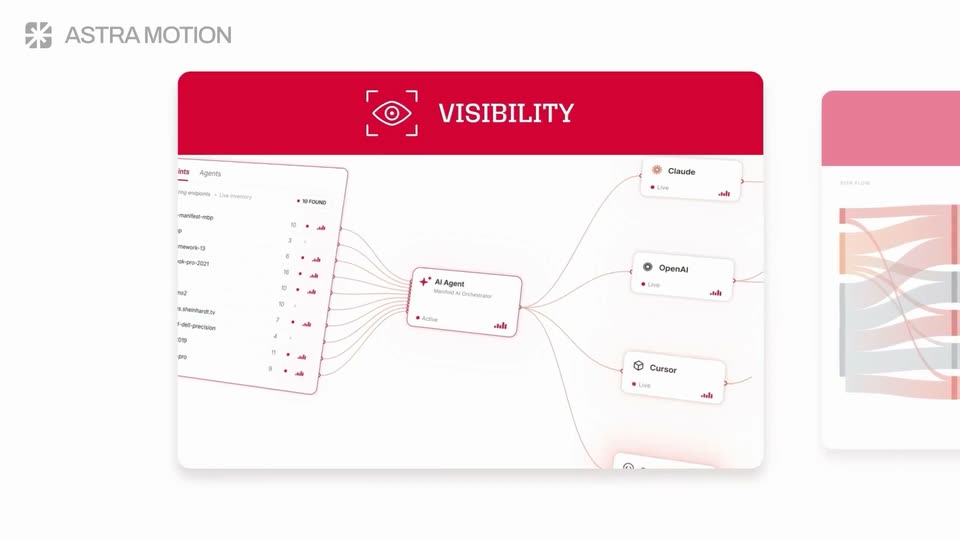
A 3D carousel of white feature cards with red headers slides across a light gray background. The focused card shows a node graph linking endpoints to AI agents under a red VISIBILITY banner with an eye icon, while blurred RISK and endpoint cards sit at the edges.
On-screen text: “VISIBILITY”, “RISK”
Techniques: 3D mockup, Parallax
Camera: Push in
A row of tilted dashboard panels sits in 3D perspective, the center one sharp and the side ones blurred. Its red header reads RISK POSTURE with a shield icon, above a red and gray flow diagram and a score table, while a floating HIGH RISK detail card hovers at the bottom right. The header text slides in from a blurred offset to a crisp stop.
Techniques: 3D mockup
Camera: Pan
A 3D perspective of three dashboard cards sits on a light background, the center red RISK POSTURE panel in focus with a Sankey risk flow and a registry list, a small risk-score card floating at lower right. The set then blurs and pans right, bringing a THREAT card into frame.
Techniques: 3D mockup, Speed ramp
Camera: Pan
A white interface card slides in from the right and settles center frame, overlapping a second card at the left edge. Its red banner reads THREAT DETECTION AND RESPONSE beside a crosshair icon; below, a session trace timeline of blue and red bars and a threat context table hold still.
On-screen text: “THREAT DETECTION AND RESPONSE”
Camera: Push in
A white security dashboard card with a red banner slides off to the right while a second red card enters from the left. Behind them, a large white word reads across the pale gray background as the panels pass.
On-screen text: “THREAT DETECTION AND RESPONSE”, “works”
Techniques: Parallax
Camera: Pan
A black background glows red in the lower corners. The white headline 'Here's how it works' sits centered, settling from a brief horizontal blur as a white and red bar slides off the left edge.
On-screen text: “Here's how it works”
Techniques: Kinetic type
Camera: Static
A dashboard mockup in 3D perspective, holding an endpoints list panel and an AI Agent card, rotates from a steep tilt to a flat front view. The inner endpoints card scales up toward the camera while the agent card slides in from the right.
On-screen text: “Here's how it works”
Techniques: 3D mockup, UI zoom
Camera: Push in
A flat white network diagram: a left Endpoints list card links via curved lines to a central AI Agent card with a red glow, which fans out to right-side cards for Claude, OpenAI, Cursor and Codex. The camera slowly pulls back to reveal the full graph.
Camera: Pull out
A white 3D network of flat UI cards linked by thin red lines, the camera glides laterally across the grid. Cards read AI Agent, Claude, OpenAI, Cursor, Codex, then MCP and task tiles, with the left list card tilted in perspective.
Techniques: 3D mockup
Camera: Pull out
A node graph of white rounded cards, each with an icon, a label and an Active status, is linked by thin red curves. The tilted plane levels out as the view drifts right, then the whole diagram blurs out of focus.
On-screen text: “ASTRA MOTION”
Techniques: 3D mockup
Camera: Pan
A light dashboard list of registry tools with score and verdict columns sharpens from a faded state as it pans left. A white detail card slides in on the right, showing a high risk verdict, a score of 40, and a dashed arrow path linking agent, MCP server and production credentials.
Camera: Push in
A white dashboard interface pans left, settling on a HIGH RISK card showing a 40/100 manifest score and an Agent to MCP Server to Production Credentials flow, as a Sankey chart of red and gray bands fades in on the right linking categories to AI tools.
Camera: Pan
A product interface displays a red and grey Sankey diagram. A red cursor hovers over an 'Analyze' button with a bar chart icon.
Techniques: Cursor demo
Camera: Push in
A Sankey diagram of orange and gray ribbons pans horizontally across a white interface, revealing risk labels on the right. A fixed white callout with a red border, a bar chart icon, the word Analyze, and a red cursor stays centered above the flow.
On-screen text: “Analyze”
Techniques: Parallax
Camera: Pan
A network graph on a light field shows a hexagon node linked to a central red node and a column of database icons; red lines draw out to a right-hand list that slides in. The view cuts to a white evidence card listing subject, owner, risk profile and timestamps.
Camera: Static
A white evidence card listing subject, owner, risk profile and timestamps slides up and off the top of the frame, exposing a Policies table with two rows, action tags and toggle switches on a light background.
Camera: Static
A light UI card shows a Policies table with rows, category and action tags, and red toggle switches. Text labels overlap briefly and settle into their final positions while the card stays centered on a pale background.
Camera: Static
A light dashboard card titled Agents & tools settles upward into frame over a faint ghost of itself. The openclaw-agent row is boxed in a dashed outline with a red ACCESS DENIED tag, and a Blocked by policy tooltip card with a shield icon rests at the lower right.
Camera: Static
A matte black 3D bust of a head and shoulders is centered on a plain white background. An orange grid of plus signs fills the face, and a glowing orange arc sweeps down from the crown across the forehead. The camera holds still on the figure.
Techniques: Light sweep
Camera: Static
A glossy dark 3D head and shoulders sit centered on white, the face mapped with orange plus markers and a glowing scan line across the eyes. A red HUD frame of nested brackets and crosshairs pulses around the head. The gray ASTRA MOTION logo holds in the top left.
On-screen text: “ASTRA MOTION”
Camera: Push in
A full session-trace dashboard fills the frame, then the frame zooms into the activity timeline as a red playhead triangle slides across the blue and red bars. The view reframes onto the threat-context list, marking a red detection entry, and fades to white.
Techniques: UI zoom
Camera: Push in
A light security log timeline drifts slowly downward as a red 3D cursor arrow travels down the list, pointing at the red DETECTION row, then the rule box and the high-severity pill.
On-screen text: “ASTRA MOTION”
Techniques: Cursor demo
Camera: Static
A dashboard card listing endpoints and a rogue agent alert slides in from the left, leaving a faded trail. A bottom status pill expands to add a second label.
On-screen text: “ASTRA MOTION”
Camera: Pan
A flat agent dashboard on a pale background: a left list panel and right provider cards link by thin red lines to a glowing central card. The view slowly zooms and reframes onto the central card as the side panels slide out of frame.
On-screen text: “ASTRA MOTION”
Techniques: UI zoom
Camera: Pan
A pale dashboard diagram links a left list panel with curved red lines to a central claude-code-agent card and a column of live provider cards. The frame blurs and reframes right as the links turn blue and large counters appear beside OpenRouter and OpenAI cards.
On-screen text: “ASTRA MOTION”
Techniques: UI zoom
Camera: Pan
A node graph of agent components on white, with three stat cards stacked on the right. The graphic sharpens from a blur as the red blind spots number counts down from 6,329 to 42, then the camera zooms in on that card.
On-screen text: “AGENTS DISCOVERED”, “24,817”, “SEEN BY YOUR STACK”, “2,143”, “BLIND SPOTS”, “42”, “secured by Manifold”
Techniques: Kinetic type, UI zoom
Camera: Push in
A white stat card holds the gray label BLIND SPOTS and a red counter that ticks from 01 down to 0, with a green caption secured by Manifold below. The card then blurs out as a person in dark clothing fades into the foreground.
On-screen text: “BLIND SPOTS”, “secured by Manifold”
Techniques: Kinetic type
Camera: Push in
A woman in a black long-sleeve top sits at a white desk, typing on a silver laptop and smiling. The frame opens soft and pulls into focus. Faint curved lines cross the white background, and the Astra Motion logo sits in the top left.
On-screen text: “ASTRA MOTION”
Camera: Pull out
A woman in a black top types on a laptop at a white desk. The camera tracks left around the machine to reveal its screen, which shows a white analytics dashboard with bar charts and red labels.
On-screen text: “ASTRA MOTION”
Camera: Push in
A silver laptop sits on a white desk in 3D perspective, its screen showing a white dashboard with red and orange bar charts. The laptop rotates from a side angle to face the camera as the dashboard numbers slide into place. Thin curved lines drift across the plain white background.
Techniques: 3D mockup
Camera: Push in
A silver laptop mockup angled in 3D perspective sits on a white set, its screen filling a white analytics dashboard with red and orange bar charts and KPI figures. The frame opens in sharp focus and defocuses to a soft blur by the end. The ASTRA MOTION logo holds in the top-left corner.
Techniques: 3D mockup
Camera: Static
A glowing white neon outline of the M mark fills solid red on a black grid as the wordmark Manifold slides in beside it. The lockup shifts up to reveal a red Book a demo button and the URL www.manifold.security, then the frame defocuses to black.
On-screen text: “Manifold”, “Book a demo”, “www.manifold.security”
Techniques: Kinetic type
Camera: Pull out