0:36
Explore
Liveblocks - Introducing the most advanced platform for Yjs. →
Liveblocks · Sep 2023 · 1:20 · AI-annotated
- Length
- 1:20
- Scenes
- 29 · 2.8 s avg
- Product on screen
- 0:14
- Features shown
- 3
- Call to action
- 1:12 · 90%
- Voiceover
- Yes
00:00:00 / 01:20:01
Liveblocks’s 1:20 launch film runs 29 scenes, about 2.8 s each. The product shows up at 0:14 and 3 features are revealed. The call to action lands at 1:12 (90% in), over a voiceover. A dark, near-black launch film that alternates 3D product UI with abstract 3D graphics and bold centered type cards, cut at a steady mid-tempo so each beat lands on the beat. Signature moves are the camera push into code, the odometer counters, the braided data tubes and the world-map network, all tied together by the recurring Y mark and white document cards.
No filming indicatedEstimated needs: 4 capture groups — your screens or recordings · 1 official logo — reused across the film · 7 graphic passages — draw or supply · 6 3D passages — build or supply
Is this your launch? to your site or press kit.
More like this

Liveblocks - Introducing the most advanced platform for Yjs. →, scene by scene
· 29 scenes as text
01 · Hook · 0:00–0:03
A browser window showing a document editor fades in from black, then tilts into a 3D perspective with a soft drop shadow on a dark background before flattening to a front view. A cursor rests at the right edge of the page.
Techniques: 3D mockup
Camera: Push in
02 · Hook · 0:03–0:04
A document editor tilts in 3D against a black background, showing a top toolbar, a pink avatar and a black Share button. A cursor glides in from below and presses the Share button.
Techniques: 3D mockup, Cursor demo
Camera: Static
03 · Hook · 0:04–0:06
A white Share document dialog sits centered over a dimmed document page. A cursor clicks the dark Invite button, and a new user row with a Can read dropdown slides in below the email field. The faded background shows document headings and a company address.
Techniques: Cursor demo
Camera: Static
04 · Hook · 0:06–0:07
A cursor types a purple @mention and the word 'thoughts' into a white comment box on a gray canvas; the view then switches to a document where the mention sits as a yellow tag above headings and body copy.
Techniques: Cursor demo
Camera: Static
05 · Hook · 0:07–0:09
A white document page sits at a 3D angle on a gray backdrop. The heading Hello Liveblocks types out behind a blinking caret while an orange collaborator tag labeled Mislav Abha drifts beside it. The Overview and Goals sections with placeholder text stay still.
Techniques: 3D mockup
Camera: Static
06 · Problem · 0:09–0:14
A dark 3D frame with glowing corner dots holds redacted code, gray pill bars with purple punctuation. The camera pushes straight into the code, the bars growing until the screen fills with out-of-focus symbols.
Techniques: 3D mockup, UI zoom
Camera: Push in
07 · Product intro · 0:14–0:16
On a dark grainy field, faint blurred code-like bars fade out, then a three-color Y mark in orange, green and blue pops into the center, with white lowercase js letters appearing at its base.
Camera: Static
08 · Product intro · 0:16–0:18
A browser window on a dark background shows the Yjs GitHub repository. The page scrolls down through the file list, revealing the README with the Yjs logo and a paragraph describing the project.
Camera: Static
09 · Product intro · 0:18–0:21
A GitHub repository page for the Yjs project scrolls upward, then the view pushes into the README card, blurring the file list and right sidebar into soft focus.
Techniques: UI zoom
Camera: Pan
10 · Product intro · 0:21–0:25
A centered grid of seven white logos, ProseMirror, Slate, lexical, Quill, Tiptap, Monaco, CodeMirror, sits on a near-black background with a soft central glow. The grid fades in from black, holds, then fades out.
On-screen text: “ProseMirror”, “Slate”, “lexical”, “Quill”, “Tiptap”, “Monaco”, “CodeMirror”
Camera: Static
11 · Problem · 0:25–0:26
A near-black field of low-contrast embossed shapes, small spheres, rounded bars, triangles and thin lines, fades up from black and holds nearly still while the voiceover plays.
Camera: Static
12 · Problem · 0:26–0:30
A flat gray grid plane holds scattered matte 3D primitives: spheres, cubes, pyramids, capsules, thin lines and chevron arrows. The camera slowly zooms in, enlarging the shapes and tightening the frame on the central cross and square.
Camera: Push in
13 · Problem · 0:30–0:32
A white digit counter spins rapidly on a black background, rolling from 123 up to 794, while a smaller static MB label sits to its right. The odometer-style roll suggests file size growing quickly, matching the voiceover about documents getting big.
On-screen text: “123 MB”
Techniques: Kinetic type
Camera: Static
14 · Product intro · 0:32–0:38
White translucent tubes with flowing square particles emerge from the left, curve and braid across a purple gradient while showing repeating text labels, then straighten into parallel horizontal lines.
Techniques: Particles
Camera: Pull out
15 · Product intro · 0:38–0:39
A faint wireframe Y outline sits centered on a near-black background. White monospace text, @liveblocks/yjs, holds still across the middle of the frame for the full shot.
On-screen text: “@liveblocks/yjs”
Camera: Static
16 · Product intro · 0:39–0:45
A dark dotted globe rotates, drifting from center to the right of a black frame, while white text on the left swaps from the headline 'The most advanced platform' to 'Building', 'Hosting' and 'Scaling'.
On-screen text: “@liveblocks/yjs”, “The most advanced platform”, “Building”, “Hosting”, “Scaling”
Camera: Pan
17 · Product intro · 0:45–0:48
On a near-black gradient, the centered line “No configuration” fades in, then dissolves into “No maintenance” while a faint echo of the first word lingers. The frame stays locked.
On-screen text: “No configuration”, “No maintenance”
Techniques: Kinetic type
Camera: Static
18 · Feature reveal · 0:48–0:50
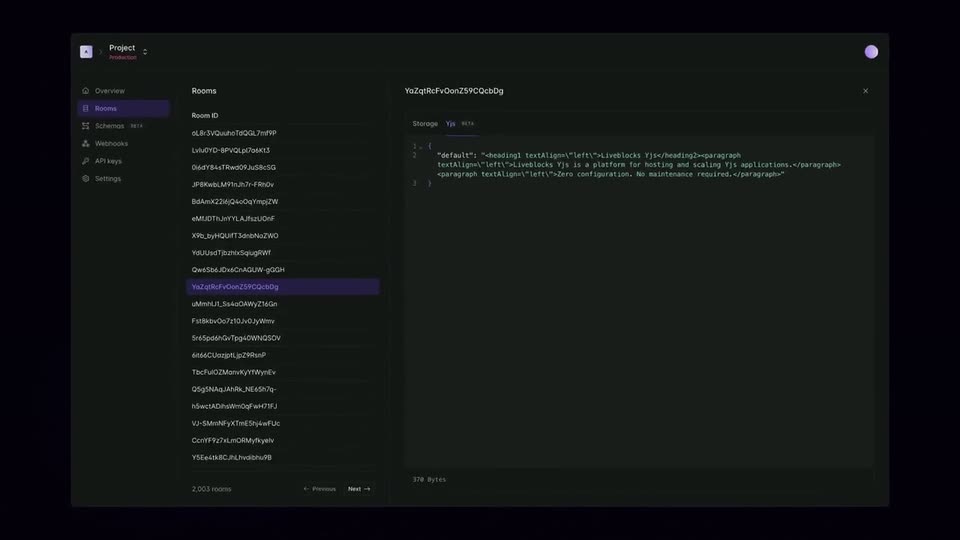
A dark dashboard UI holds still: a left sidebar lists navigation items, a middle column shows a long list of resource IDs with one row highlighted in purple, and a right panel displays code under a Storage tab. The frame is locked-off and static.
Camera: Static
19 · Feature reveal · 0:50–0:55
A dark dashboard fills the frame: a left sidebar, a Rooms list, and a Storage panel on the right. The view zooms and pans right, ending on the Storage panel, which tilts into a slight 3D angle as its code text comes fully into view.
Techniques: UI zoom, 3D mockup
Camera: Static
20 · Feature reveal · 0:55–1:00
A browser window slides in from the left showing a document editor, its title updating from Hello world to Hello Liveblocks with a loading then saving badge, then slides out, while a dark band on the right holds the label YDocUpdatedEvent as a purple glow sweeps across.
On-screen text: “YDocUpdatedEvent”
Techniques: Split screen, Light sweep
Camera: Static
21 · Feature reveal · 1:00–1:01
A 3x3 grid of white interface cards fades in and scales up over a dark dotted world map. Each card shows the Liveblocks Yjs heading, code lines, and a small red cursor chip, then the grid settles into a locked-off frame.
Camera: Static
22 · Feature reveal · 1:01–1:02
A dotted world map fades up from black on a dark purple field, then white editor cards pop in over several continents, joined by purple nodes and lines into a global network.
Camera: Static
23 · Feature reveal · 1:02–1:04
A dark dotted world map fills the frame. Five white browser-window cards float over it, each holding a short document titled Liveblocks Yjs or Hello world. Purple lines and round nodes link the cards across continents. The composition stays nearly still, the cards drifting only slightly.
Camera: Static
24 · Feature reveal · 1:04–1:05
A dotted world map on a dark navy field carries five white document cards, each showing code, joined by purple lines and nodes. The network drifts slowly, then the whole frame blurs into a fast zoom-out.
Techniques: Speed ramp
Camera: Push in
25 · Feature reveal · 1:05–1:07
A 3D cylindrical gauge with a clock-like dial rests on a dark reflective grid. A single pointer sweeps across the face as the tick marks glow green and red, and the body's lighting warms from green to pink.
Techniques: 3D mockup
Camera: Static
26 · Feature reveal · 1:07–1:09
A 3D circular gauge with a green-to-red tick ring sits in dark space, thin red and yellow lines radiating from it. The camera pulls back and rises, revealing a pale green grid plane with small gauges at each intersection, receding into the dark distance.
Techniques: 3D mockup, Parallax
Camera: Pull out
27 · Feature reveal · 1:09–1:12
A loose constellation of small colorful shapes, triangles, circles, squares and a green gear, drifts slowly outward on a black background as thin gray lines stretch between them.
On-screen text: “×”
Techniques: Particles
Camera: Static
28 · CTA · 1:12–1:19
A near-black navy field with a soft central glow. A thin white line draws the outline of a Y in the center, then the URL liveblocks.io/yjs fades in across its middle. A small liveblocks wordmark and icon settle at the bottom. Locked-off frame, slow fades.
On-screen text: “liveblocks.io/yjs”, “liveblocks”
Camera: Static
29 · CTA · 1:19–1:20
A near-black frame holds a thin outlined Y mark in the center, with the URL liveblocks.io/yjs set across it in light gray and the liveblocks wordmark small at the bottom. The frame is locked off and all elements stay still.
On-screen text: “liveblocks.io/yjs”, “liveblocks”
Camera: Static