
0:22
Explore
Introducing Linear Initiatives
Linear · Jun 2024 · 4:14 · Full motion · AI-annotated
- Length
- 4:14
- Scenes
- 16 · 15.9 s avg
- Product on screen
- 0:00
- Features shown
- 1
- Voiceover
- Yes
- Views
- 22K on YouTube
as of November 27, 2026
00:00:00 / 04:14:09
- Length
- 4:14
- Scenes
- 16 · 15.9 s avg
- Product on screen
- 0:00
- Features shown
- 1
- Voiceover
- Yes
- Views
- 22K on YouTube
as of November 27, 2026
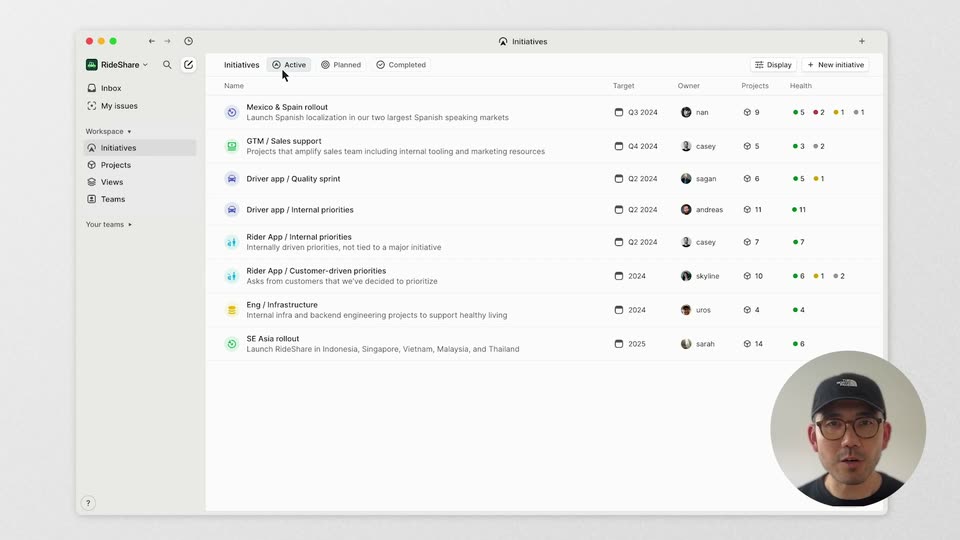
Linear’s 4:14 launch film runs 16 scenes, about 16 s each. The product is on screen from the first frame and 1 feature is revealed. There is no explicit call to action; a voiceover carries the film. A single continuous screen recording of the Initiatives table carries the whole video, with the presenter in a corner face cam and only small cursor moves and UI transitions providing motion, bookended by a black title card and a black logo card. The pacing is slow and narration-driven, moving from the Active tab's health monitoring to the Planned tab's setup without cuts, so the style is defined by steady, low-motion UI states rather than animated set pieces.
No filming indicatedEstimated needs: 2 capture groups — your screens or recordings · 1 official logo — reused across the film
Is this your launch? to your site or press kit.


Introducing Linear Initiatives, scene by scene
· 16 scenes as text
01 · Product intro · 0:00–0:03
A locked-off title card on a black field. A large white headline reads Introducing Linear Initiatives above a smaller gray line, A primer with, a round grayscale avatar, and Nan Yu, Head of Product. All elements stay static for the full duration.
On-screen text: “Introducing Linear Initiatives”, “A primer with”, “Nan Yu, Head of Product”
Camera: Static
02 · Feature reveal · 0:03–0:59
Linear's Initiatives table in a browser window fills the frame; a circular webcam feed of a man in a cap and glasses sits bottom right. A cursor moves across the sidebar and filter tabs, switches the list to Completed and back, then the view zooms onto the right-hand columns.
On-screen text: “Introducing Linear Initiatives”, “A primer with”, “Nan Yu, Head of Product”
Techniques: Cursor demo, UI zoom
Camera: Static
03 · Feature reveal · 0:59–1:03
A white initiatives modal sits over the app, listing update cards with green status tags. The list scrolls down to reveal more entries while a cursor hovers at the right edge, and a presenter's face appears in a circle at the bottom right.
Techniques: Cursor demo
Camera: Static
04 · Feature reveal · 1:03–1:05
A product screen shows the Initiatives table. A detail panel for the Mexico and Spain rollout closes, revealing the full list with target dates and colored health dots. A circular webcam feed of a man in a cap stays in the lower right corner.
Techniques: Cursor demo
Camera: Static
05 · Feature reveal · 1:05–1:13
A light initiatives list fills the frame. A cursor hovers the Health column, popping up the At risk and Off track tooltips, then a detail panel for the Mexico rollout slides in from the right. A circular webcam of a man in a cap and glasses sits in the bottom right corner.
Techniques: Cursor demo
Camera: Static
06 · Feature reveal · 1:13–1:27
A project management UI displays an initiative panel with an Off track status and a comment thread; a cursor clicks the reaction icon, an emoji picker pops open, and a reaction is added. A circular presenter face cam sits in the lower right.
Techniques: Cursor demo
Camera: Static
07 · Feature reveal · 1:27–1:33
A light gray initiatives table fills the frame with columns for target, owner, projects and health. A cursor hovers over a gray status dot, opening an Outdated tooltip, while a circular inset of a presenter in a black cap and glasses sits in the lower right corner.
Techniques: Cursor demo
Camera: Static
08 · Feature reveal · 1:33–1:47
A white update card floats over a dimmed list. A cursor clicks the reply box, types 'Any new updates?', and presses send, posting a comment. A man in a black cap sits in a circular webcam inset at bottom right.
Techniques: Cursor demo
Camera: Static
09 · Feature reveal · 1:47–1:58
A light initiatives table with owner avatars and colored health dots fills the frame. A cursor hovers over a gray count in the Health column, holding an Outdated tooltip open, while a circular headshot of a man in a cap and glasses sits in the lower right corner.
Techniques: Cursor demo
Camera: Static
10 · Feature reveal · 1:58–2:30
A cursor clicks the Planned tab in the initiatives list, swapping the active rows for three planned items, then opens a new row, types South America rollout with a summary, and hits Create to land on its detail page. A presenter's circular video sits in the corner.
Techniques: Cursor demo
Camera: Static
11 · Feature reveal · 2:30–2:49
A project app window on a gray backdrop scrolls down an initiative page as the cursor clicks Add a project, types searches in a modal, and checks three projects. A circular webcam of the presenter sits in the bottom right corner.
Techniques: Cursor demo
Camera: Pan
12 · Feature reveal · 2:49–2:56
A 'New project' dialog sits over a project board. The cursor types 'Argentina rollout' into the name field, then clicks Members, opening a dropdown of user names. The cursor picks one and the field reads '1 member'. A circular webcam of the presenter occupies the lower right corner.
Techniques: Cursor demo
Camera: Static
13 · Feature reveal · 2:56–3:04
A project app window shows the Overview tab, then the cursor clicks Projects to open an empty quarterly timeline. The view dissolves to the next quarter, where colored bars for each rollout fill the months. A small circular webcam of a man sits in the corner.
Techniques: Cursor demo
Camera: Static
14 · Feature reveal · 3:04–3:23
A project-management interface lists initiatives. A cursor checks rows, opens a status menu, and moves items between the Active and Planned tabs; the view then zooms onto the table as the Health column updates. A presenter sits in a circle at the bottom right.
Techniques: Cursor demo, UI zoom
Camera: Static
15 · Other · 3:23–4:09
A full-screen view of a project management app's Initiatives table, with a left sidebar of workspace links and a circular webcam feed of a man in a black cap talking in the bottom right corner. The mouse cursor hovers near the Display button while the interface stays static.
Camera: Static
16 · Outro · 4:09–4:14
A white Linear logo mark and wordmark sit centered on a solid black background, completely static for the full clip.
Camera: Static