2:27


Meet DJI ROMO 2 Series — Thinks Deeper. Cleans Smarter.
DJI · Hardware · Sep 2026
Lenovo’s 1:04 launch film runs 37 scenes, about 1.8 s each. The product shows up at 0:06 and 5 features are revealed. There is no explicit call to action; a voiceover carries the film. A dark, neon-purple product film built on a tight beat: an abstract hook, a named intro, then a stack of single-feature blocks (chip, big screen, workspace, AI, rollable display) each announced by a glowing headline and shown in 3D. The signature moves are the rolling screen ribbon, the magenta-glow headline treatment, and fast orbiting camera moves that close on brand logo cards.
Is this your launch? to your site or press kit.
DJI · Hardware · Sep 2026
CORSAIR · Dec 2022
Lenovo Project AeroBlade · Sep 2026
Films whose music sounds like this one, voice left out
Internest · Electronic, Future Bass
Microsoft · Cinematic electronic hybrid
Pitch · Modern electronic dance music with global, tropical, and synth-pop influences
Black background. The white headline “Don’t just see the” sits above “bigger picture,” which glows in purple. A purple angular 3D blade with a bright blue tip sweeps in from the left, trailing a thin white streak above it.
On-screen text: “Don’t just see the”, “bigger picture”
Camera: Static
A dark 3D device with purple edge lighting and slatted fins rotates slowly against black. The headline 'Experience it.' sharpens in at the top, then a camera move tracks across the engraved 'bigger picture' text on the device face.
On-screen text: “Experience it.”, “Don't just see the”, “bigger picture”
Techniques: 3D mockup, Light sweep
Camera: Static
The headline holds still at the top of the frame while a dark keyboard, lit in purple, rushes past below with heavy motion blur, the keys and light streaks smearing into the distance.
On-screen text: “Experience it.”
Camera: Static
A glowing purple ribbon with a bright magenta edge bends in 3D space against a dark background, pulsing and rotating slightly. The white tagline sits locked at the top with a pink glow.
On-screen text: “Experience it.”
Camera: Static
A dark 3D render of a phone's top edge, traced by a glowing purple light line, tilts slowly in perspective. The white headline glows pink above it, locked in place.
On-screen text: “Experience it.”
Techniques: 3D mockup, Light sweep
Camera: Static
A rollable PC lies flat in 3D perspective on a purple stage, its display extended into a second panel showing code and layout panels. The camera tilts up from the lower panel to the main screen as pink headline text fades in above.
On-screen text: “Introducing”, “the first Rollable Copilot+ PC”, “Experience it.”
Techniques: 3D mockup, Parallax
Camera: Pull out
A rollable laptop is shown in 3D from a low front angle, its screen tilted toward the camera and displaying a website with a shifting pink and blue abstract image. The blurred keyboard sits in the foreground. A glowing white headline hovers above the device against a purple gradient.
On-screen text: “Introducing”, “the first Rollable Copilot+ PC”
Techniques: 3D mockup
Camera: Static
A silver laptop sits in 3D perspective on a purple gradient backdrop, its screen showing a dark website mockup with a green Web 3 Labs card and glossy 3D shapes. The camera pulls back from a close crop of the screen to the full device as a white headline fades in at the top left.
On-screen text: “Lenovo ThinkBook Plus”, “Introducing”, “the first Rollable Copilot+ PC”
Techniques: 3D mockup
Camera: Pull out
A dark laptop in 3D perspective rests on a purple gradient backdrop, its screen showing a colorful webpage with abstract shapes and a green card. A white headline fades in across the top naming the model.
On-screen text: “Lenovo ThinkBook Plus G6 Rollable AI PC”
Techniques: 3D mockup, Kinetic type
Camera: Static
A 3D laptop on a purple gradient background. The camera orbits from a front view to the thin side edge, then tilts down to a top view of the keyboard. The screen shows a colorful abstract image with a green card. A white headline glows at the top.
On-screen text: “Lenovo ThinkBook Plus G6 Rollable AI PC”
Techniques: 3D mockup
Camera: Pull out
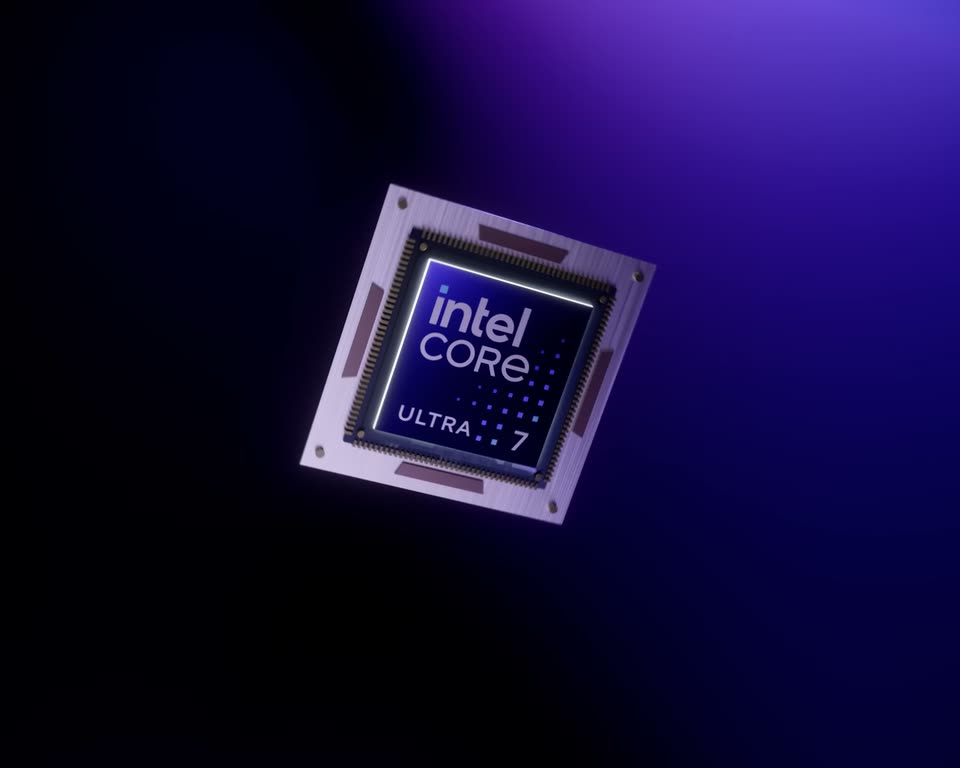
A 3D Intel Core Ultra processor spins from an edge-on view to face the camera, its blue die carrying the white brand logo. The chip floats and tilts against a purple to dark blue gradient.
Techniques: 3D mockup
Camera: Static
A 3D Intel Core Ultra 7 chip tilts from a dark angled pose to a brighter frontal view over a field of glowing circuit squares, while a beam of light sweeps across its face. The label on the chip brightens as the background grid ignites.
On-screen text: “Powered by”, “Intel® Core™”
Techniques: 3D mockup, Light sweep
Camera: Pan
A 3D Intel Core Ultra chip tilts and rotates over a glowing blue circuit board as the camera pulls back. A bright beam sweeps diagonally across the chip's blue die while small sparks drift in the background.
On-screen text: “Powered by”, “Intel® Core™ Ultra processor (Series 2)”
Techniques: 3D mockup, Light sweep, Particles
Camera: Pull out
A MacBook floats in 3D perspective against a purple gradient, its screen showing a screenplay. The laptop rotates from a steep tilt to a flatter angle as the white headline builds at the top, the pink 16.7 completing the line and a white ULTRA word sliding over the document.
On-screen text: “Maximize productivity”, “with”, “16.7” screen”, “ULTRA”, “Powered by”, “Ultra processor (Series 2)”
Techniques: 3D mockup, Kinetic type
Camera: Push in
A bold white headline reading “Maximize productivity with 16.7” screen” holds still at the top while a page of gray screenplay text scrolls beneath it. The screen size is highlighted in glowing purple.
On-screen text: “Maximize productivity with 16.7” screen”
Camera: Static
A 3D laptop mockup sits on a purple gradient background, its screen filled with colorful code. The camera drifts around the device while the headline stays locked at the top, with a pink glow behind “16.7””.
On-screen text: “Maximize productivity with 16.7” screen”
Techniques: 3D mockup
Camera: Static
A laptop in 3D perspective sits on a dark background, its screen showing an NFT fashion website. The camera reframes from a steep side angle to a frontal view. A white headline with a pink glow reads “Maximize productivity with 16.7” screen”.
On-screen text: “Maximize productivity with 16.7” screen”
Techniques: 3D mockup
Camera: Static
A tilted 3D interface shows a RECENT ITEMS gallery of fashion images. The camera pushes in as the pink panels slide and reframe, while a white headline with a pink glow holds at the top.
On-screen text: “Maximize productivity with 16.7″ screen”
Techniques: 3D mockup, UI zoom
Camera: Pan
A 3D laptop mockup on a dark purple background. The screen starts in heavy motion blur, then sharpens to show a video call and a monsoon presentation. The camera pulls back to reveal the keyboard, then tilts and zooms into the screen, ending on a close-up of the title.
On-screen text: “Maximize productivity with 16.7” screen”
Techniques: Speed ramp, 3D mockup, UI zoom
Camera: Push in
The camera drifts through a field of floating 3D calendar, clock, and task widgets on a purple background, then lands on an angled close-up of the app's empty state with a blue stopwatch. A white caption appears word by word along the bottom.
On-screen text: “Explore the new ThinkBook Workspace”
Techniques: 3D mockup, Parallax, Kinetic type
Camera: Push in
A laptop screen in 3D perspective shows a dark desktop with a Reminder widget (calendar, stopwatch) and a To-do List panel. The camera glides across the tilted display while a white caption with a purple glow sits fixed at the bottom.
On-screen text: “Explore the new ThinkBook Workspace”
Techniques: 3D mockup
Camera: Pull out
A purple gradient field with a soft glow at the lower left holds a coin seen edge-on as a thin white ellipse. The coin rotates toward the camera, revealing a blue mesh face and a white rim, then tilts slightly as it settles.
Techniques: 3D mockup
Camera: Static
A blue pill-shaped search bar floats in 3D perspective against a purple gradient. The bar tilts as the placeholder “Search...” fades in on its surface, while a small white arrow rotates near the left edge.
Techniques: 3D mockup
Camera: Static
A blue search bar tilts in 3D on a purple field, its placeholder text shifting from Search to Summarize this prese as the camera orbits. Two small white outline arrows hover above, all rendered with shallow depth of field.
Techniques: 3D mockup
Camera: Static
A blue-lit close-up of a UI button. The camera pulls focus from a blurred foreground band to the sharp label 'Summarize this presentation' with a send arrow, while a cursor rests at the bottom edge.
Camera: Static
A translucent blue wavy sheet with white text-line bars sits in 3D, topped by a pill search bar reading “Summarize this presentation” with a play arrow; the camera pulls back from a tilted close-up to reveal the full sheet.
Techniques: 3D mockup
Camera: Pull out
A translucent purple 3D ribbon of stacked UI panels twists and rolls across a violet gradient. White headline text 'Embrace the future with' appears at the top left as the shape rotates past.
On-screen text: “Embrace the future with”
Techniques: Kinetic type
Camera: Static
A 3D laptop screen ripples like a purple ribbon, then flattens as the camera pushes in on an AI chat window. A white headline reads “Embrace the future with advanced AI”, the last two words glowing magenta, while a caption names Lenovo AI Now and Microsoft Copilot+ at the bottom.
On-screen text: “Embrace the future with advanced AI”, “Lenovo AI Now and Microsoft Copilot+”
Techniques: 3D mockup, Morph, UI zoom
Camera: Push in
A close-up of a laptop keyboard pushes in on a function key glowing with a magenta outline. A 3D extruded copy of the key lifts up and floats above the physical key as the caption scales in below.
On-screen text: “Activate brilliance with a single touch”
Techniques: 3D mockup
Camera: Push in
A 3D laptop sits at an angle on a purple gradient background. A hand of glowing purple particles rises and touches the top of the display as the screen rolls out to expand. A white caption fades in at the bottom.
On-screen text: “Enable the rollable screen with the”, “keyboard or a gesture”
Techniques: 3D mockup, Particles, Light sweep
Camera: Push in
A 3D laptop is shown at a low angle, its rollable screen unrolling from the hinge to widen the display. The silver keyboard and black screen edge frame a purple and orange abstract wallpaper. A two-line caption sits over the frame.
On-screen text: “Enable the rollable screen with the”, “keyboard or a gesture”
Techniques: 3D mockup
Camera: Pull out
A dual-screen laptop render orbits from a front view to a low side angle on a dark blue stage, the second screen raised above the keyboard. The headline stays locked at the top, its second line glowing magenta.
On-screen text: “Embrace the”, “bigger picture”
Techniques: 3D mockup
Camera: Static
A silver laptop rotates in 3D on a blue backdrop, the view tightens on the two side ports, then the lid opens and the screen rolls out to the right into a wider panel as the headline and product title appear.
On-screen text: “2x Thunderbolt™ 4 ports”, “Embrace the”, “bigger picture”, “Lenovo ThinkBook Plus G6 Rollable AI PC”
Techniques: 3D mockup, Morph
Camera: Pull out
A silver rollable laptop sits in 3D on a purple gradient floor, its screen unrolling from a partial to full size. The white title text slides in from the left across the top, ending with a pink glow on the last words.
On-screen text: “Lenovo ThinkBook Plus G6 Rollable AI PC”
Techniques: 3D mockup, Kinetic type
Camera: Pull out
Black opens, a white product headline slides in, then the red Lenovo logo box fades up centered on a purple-to-red gradient with faint geometric shapes. The logo slides left as the white tagline appears to its right, holding.
On-screen text: “Lenovo ThinkBook Plus G6 Rollable AI PC”, “Lenovo”, “Smarter technology for all”
Camera: Static
A dark blue tunnel of floating cubes rushes toward the camera in a fast dolly, then cuts to a black card where a white square mark sits centered as the Lenovo wordmark slides in above it and the tagline stacks below.
On-screen text: “Lenovo”, “Smarter”, “technology”, “for all”
Techniques: Speed ramp, Kinetic type
Camera: Pull out
A blue 3D chip mockup bearing the Intel Core Ultra logo starts out of focus with a horizontal light beam crossing it, then racks into sharp focus, centered in a receding dotted grid.
Techniques: Light sweep, 3D mockup
Camera: Pull out