0:39
Editwhiz | Motion Designer - Launch video for Slice
Slice · Aug 2026
Microsoft · Jul 2021 · 1:06 · AI-annotated
Microsoft’s 1:06 launch film runs 36 scenes, about 1.8 s each. The product shows up at 0:02 and 3 features are revealed. There is no explicit call to action. The video opens on a quiet night office, then accelerates into a cursor-driven 3D tour of the cloud PC, using whip pans, depth-of-field sweeps, and dissolve-to-white transitions to move between feature beats. Its signature moves are the floating glass objects, the recurring light ribbons, and the tagline cards that land on plain gray before the final logo.
Is this your launch? to your site or press kit.
Slice · Aug 2026
Lovio · Jul 2026
RealPact · Real Estate and Construction · Aug 2026
A 3D-rendered home office at night bathed in cool blue light. A desk with a glowing monitor sits center, a chair in front, a floor lamp and a glowing orb on the right. The frame stays locked off.
On-screen text: “助”
Camera: Static
A 3D desk scene in cool blue tones frames a monitor on a stand, with keyboard, mouse, plant and pen holder. The screen shows the Edge start page over a desert wallpaper, and the browser window scales up to fill the display.
Techniques: 3D mockup
Camera: Push in
A tilted browser window floats over a blue gradient backdrop. The cursor clicks the address bar and types windows365.microsoft.com while the view zooms in on the toolbar. Weather and app icons sit below.
On-screen text: “windows365.microsoft.com”
Techniques: 3D mockup, Cursor demo, UI zoom
Camera: Push in
A 3D office set: a monitor on a dark desk displays a browser with the Windows 365 home page. The camera starts close on the screen, pulls back to reveal keyboard, mouse, plant and pen holder, then tilts to a low angle looking up at the display.
Techniques: 3D mockup
Camera: Pull out
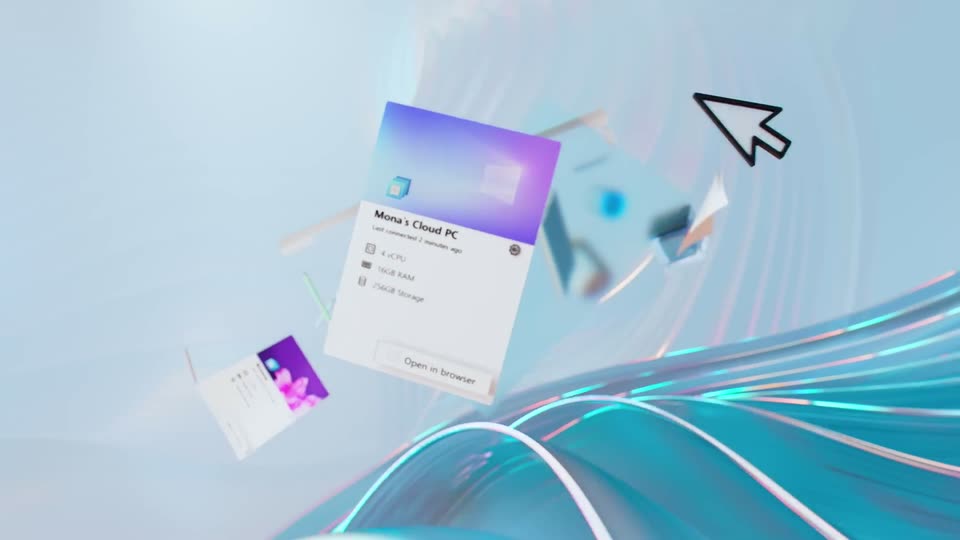
A fast blurred sweep resolves into a 3D workspace where a tilted card reading 'Mona's Cloud PC' floats above a desk with a laptop and monitor. Curved cyan and pink light ribbons arc across the floor as a large black cursor pops in at the right.
Techniques: Speed ramp, 3D mockup
Camera: Pull out
A soft blue abstract field of rippling lines and glowing bokeh dots drifts slowly, lit by a beam from the top left. Two white cursor arrows glide across the right, one fading as the other settles near the center.
Techniques: Particles
Camera: Push in
A black cursor arrow with a lightning bolt inside floats at center as the camera pans across a 3D field of wavy glass tubes dotted with glowing points, the surface turning from blue to pink.
Techniques: Parallax
Camera: Push in
A blurred blue gradient fills the frame as a translucent grid panel tilts in 3D perspective on the right, a bright light streak sweeping across it, while a white arrow cursor hovers at left.
Techniques: Cursor demo, 3D mockup, Light sweep
Camera: Static
A browser window showing a Windows desktop recedes into a 3D space, framed by flowing glass ribbons in the foreground. The headline “Windows in the Cloud” fades in over the purple desktop wallpaper as the camera pulls back.
On-screen text: “Windows in the Cloud”
Techniques: 3D mockup, Parallax
Camera: Pull out
A tilted desktop with a browser open to windows365.microsoft.com sits in 3D perspective against a soft blue backdrop. The camera then whips around the screen, blurring the Office icons and blue wallpaper into streaks.
Techniques: 3D mockup, Speed ramp
Camera: Static
Out-of-focus white 3D shapes on a pale ground rack into sharpness, revealing a curved white panel edged in teal and a row of floating letter cubes (X, W, E) in green, blue, red and white. The camera drifts right, the red gradient panel sliding across the left edge.
Techniques: Parallax
Camera: Pan
A slow dolly-out and pan reveals a pastel 3D landscape of floating Excel and Word app tiles, a green bar chart, a pie chart, and a curved ribbon with a save message. A cursor arrow and an orange rolled sheet sit in the background while the tiles drift.
On-screen text: “Power & Simplicity - Saved”
Techniques: 3D mockup, Parallax
Camera: Pan
A bright 3D field of floating icons, yellow folders, a blue Word tile, white discs and green pills, blurs past as the camera rushes forward and lands on a single large yellow folder against a soft bokeh background.
Techniques: 3D mockup
Camera: Static
A 3D orange folder sits centered on a soft blurred background and springs open, ejecting a PowerPoint file, a blue film strip marked 4k, and colorful abstract shapes; a cursor glides up to the file.
Techniques: 3D mockup
Camera: Static
3D file and media icons, a PowerPoint document with a cursor, an orange folder, a blue 4K film strip and abstract pie shapes, drift across a soft white bokeh background. The cluster slides gently across the frame.
Techniques: 3D mockup
Camera: Push in
A tilted 3D mockup of a messaging app thread scrolls slowly downward while a hand-drawn black arrow carrying a red 3D PowerPoint icon slides from the top right down to the file attachment and the new conversation button, then exits.
Techniques: 3D mockup
Camera: Pan
A soft-focus close-up of a presentation slide pulls back and sharpens to reveal a PowerPoint Live session in a browser on a laptop, the participant video grid on the right. A cursor hovers at the bottom of the slide.
Techniques: Light sweep, Cursor demo
Camera: Pull out
A laptop on a white desk against a blue backdrop shows a Windows cloud PC dashboard with three device cards. A large blue-purple headline fades in over the lower screen as a cursor arrow drifts across the interface. The camera holds a slight angle and pulls back slowly.
On-screen text: “Personalized cloud PCs”
Techniques: Cursor demo
Camera: Push in
A glassy settings card titled Mona's Cloud PC floats in 3D perspective, angled and softly blurred, with a blue-to-pink gradient header and a gear icon. The camera pushes in and reframes onto the spec list, 4 vCPU, 16GB RAM, 256GB Storage, as the text scales up.
Techniques: 3D mockup, UI zoom
Camera: Push in
A blue stacked-disk cylinder with a wireframe icon on top floats among glass panels, one holding a purple bar chart, another a cursor arrow, on a soft blue depth-blurred background. The camera drifts around the set as the title text scales in.
On-screen text: “Mona's Cloud PC”, “Last connected 2 minutes ago”, “4 vCPU”, “16GB RAM”, “256GB Storage”
Techniques: 3D mockup, Parallax, Kinetic type
Camera: Static
Isometric 3D render of frosted glass blocks labeled vCPU and 6GB RAM arranged around a blue database cylinder. Pink RAM bars glow inside the blocks, an orange disc floats at right, and two flat black cursor arrows point at the blocks before the elements drift and settle with soft depth blur.
Techniques: 3D mockup
Camera: Static
Floating translucent cubes and a blue disc stack, marked 256GB, drift and tilt in a soft blue space. They slowly rotate and lock into one cube, the stack and pink cells now enclosed, with 512GB and VCPU embossed on its faces.
Techniques: 3D mockup
Camera: Static
A 3D lattice of translucent cyan glass cubes glows with pink light inside. The camera pulls back and rotates around the corner, revealing the stacked blocks and a small circular logo on a blue face. Spec labels VCPU and 512GB appear over the structure.
On-screen text: “VCPU”, “512GB”
Techniques: Parallax
Camera: Pull out
An isometric grid of white and blue 3D cubes fills the frame as the camera tracks slowly across it, glowing cells and thin circuit lines flicker, and the static tagline holds centered.
On-screen text: “Simple. Powerful. Secure.”
Techniques: Parallax
Camera: Pull out
An isometric 3D grid of pale blue cubes and glowing cyan circuit lines drifts past as the camera glides across the structure, the deeper blocks shifting slower than the foreground. The tagline sits fixed at the center.
On-screen text: “Simple. Powerful. Secure.”
Techniques: Parallax
Camera: Static
A blue isometric grid of glowing cubes fills the frame in 3D perspective as the words Simple. Powerful. Secure. sit centered. The camera drifts and the structure floods with white light, dissolving the blocks until the frame goes bright.
On-screen text: “Simple. Powerful. Secure.”
Techniques: Parallax
Camera: Pull out
A hazy, overexposed 3D grid of small pale-blue cubes and glowing dots, seen from an isometric angle, fills the frame, then dissolves into a plain lavender gradient. A faint vertical line remains at center as the structure fades out.
Techniques: Particles
Camera: Pull out
A 3D laptop on a white kitchen island shows a purple screen with a window pane graphic. The camera pulls back to reveal cabinets, chairs, a phone and a glass, while vertical dotted light streaks flicker around the device and fade.
Techniques: 3D mockup, Particles, Parallax
Camera: Pull out
A 3D living room renders into focus around a laptop on a round wooden table, its screen glowing purple. White text 'Streamed to any device' scales in across the center.
On-screen text: “Streamed to any device”
Techniques: 3D mockup
Camera: Pull out
A stylized 3D living room shows a laptop on a low wooden table. The white headline “Streamed to any device” scales in the center over the scene.
On-screen text: “Streamed to any device”
Techniques: Kinetic type, 3D mockup
Camera: Pull out
A 3D living room with a laptop on a coffee table fills the frame, a white headline scales in at center, then the view pulls back to reveal the room is a video on a tablet held in a hand.
On-screen text: “Streamed to any device”
Techniques: Kinetic type, 3D mockup
Camera: Pull out
A dark blue 3D desk scene shows a tablet lying flat with a purple gradient screen and a window logo. A potted plant, lamp and chair sit around it. The camera drifts slowly, revealing the curved desk edge and the dim room.
Techniques: 3D mockup
Camera: Pull out
A plain light gray background holds one centered line of blue text that sharpens from a soft blur into focus, the words staying locked in place while the frame remains static.
On-screen text: “Hybrid Windows for a hybrid world”
Camera: Static
A pale gray background holds two centered blue headlines. The first line fades in word by word from left to right, then clears as the second line reveals the same way.
On-screen text: “Hybrid Windows for a hybrid world”, “Welcome to Windows 365”
Techniques: Kinetic type
Camera: Static
A centered blue headline, “Welcome to Windows 365”, holds on a pale gray field, then dissolves to nothing as the clip ends.
On-screen text: “Welcome to Windows 365”
Camera: Static
The blue Windows 365 logo, a four-pane window icon beside the wordmark, fades in from a soft blur at the center of a plain light gray background, then holds still on a locked-off frame.
Camera: Static