4:14

DJI - Introducing the Spreading Wings S1000
DJI · Hardware · Jan 2014
Internest’s 1:20 launch film runs 18 scenes, about 4.5 s each. The product is on screen from the first frame and 2 features are revealed. There is no explicit call to action; a voiceover carries the film. A corporate tech launch built on a deep blue radial field: a brand card, a rooftop presenter pitch, then a chain of 3D-plus-live demos framed by navy side bars and introduced with thin white headlines and callout boxes, closing on the brand card with a contact email. Its signature moves are the vertical-slit wipes, the white corner-bracket lock-on reticle, and long, steady holds at a moderate 92 bpm pace.
Is this your launch? to your site or press kit.
DJI · Hardware · Jan 2014
FLUX · Sep 2026
CORSAIR · Jan 2023
Films whose music sounds like this one, voice left out
Sureform · Electronic
Miro · Electronic, Lo-fi Hip-hop, Future Bass
Figure AI · Cinematic electronic dance music
On a dark blue radial background, the white circular logo and the light-blue Internest wordmark fade in from black. A thin horizontal rule extends under the wordmark, a vertical line rises at center, and the dark-blue tagline fades in below.
On-screen text: “Internest”, “Autonornous flights in complex environments”
Camera: Static
A blue card with the logo and wordmark holds a thin vertical slit at center. The slit opens like a mask, widening to reveal a man in a white shirt standing before a glass storefront.
On-screen text: “Internest”, “Autonornous flights in complex environments”
Techniques: Masking
Camera: Static
A man in a white shirt stands on a rooftop before a glass station building, talking to camera. White caption lines swap in a translucent bar at the bottom of the frame. The shot is letterboxed with blue side panels and ends on a cloud wipe.
On-screen text: “Our embedded system allows drone”, “provide autonomous flight”, “and capacity to land”, “on fix and mobile platforms.”
Camera: Static
A black carbon-fiber quadcopter with spinning propellers banks across a blue sky of soft white clouds, framed by dark navy side bars. The camera orbits low around the airframe, revealing its underside and side profile.
On-screen text: “on fix and mobile platforms.”
Techniques: 3D mockup
Camera: Push in
A black quadcopter drone hovers in 3D against a blue sky. Its carbon shell fades to transparent, exposing the internal circuit board and a green chip at the center, while the arms ghost out behind it.
Techniques: 3D mockup, Morph
Camera: Static
A 3D render of a black circuit board with white components and a green chip, mounted inside a drone frame with a transparent canopy. The camera orbits and pulls back, revealing the board shrinking against a cloudy sky while cables and rotor arms sweep past.
Techniques: 3D mockup, Parallax
Camera: Static
A gray quadcopter drone renders in flight against a cloudy blue sky, the camera pulling back from a close-up of its underside to reveal a circular landing pad marked H below. White leader lines connect the drone to two annotation boxes labeling its sensors and main board.
On-screen text: “Drone sensors”, “x2”, “Drone main board”, “x1”
Techniques: 3D mockup
Camera: Pull out
A gray quadcopter hovers over a circular landing pad with a blue H, against a cloudy sky. It fades to a ghost as a callout labels the four landing zone sensors, then a 2x2 HUD grid shows X, Y, Z and Yaw readings as it settles.
On-screen text: “Drone main board”, “X1”, “Landing zone sensors”, “X4”
Techniques: 3D mockup
Camera: Static
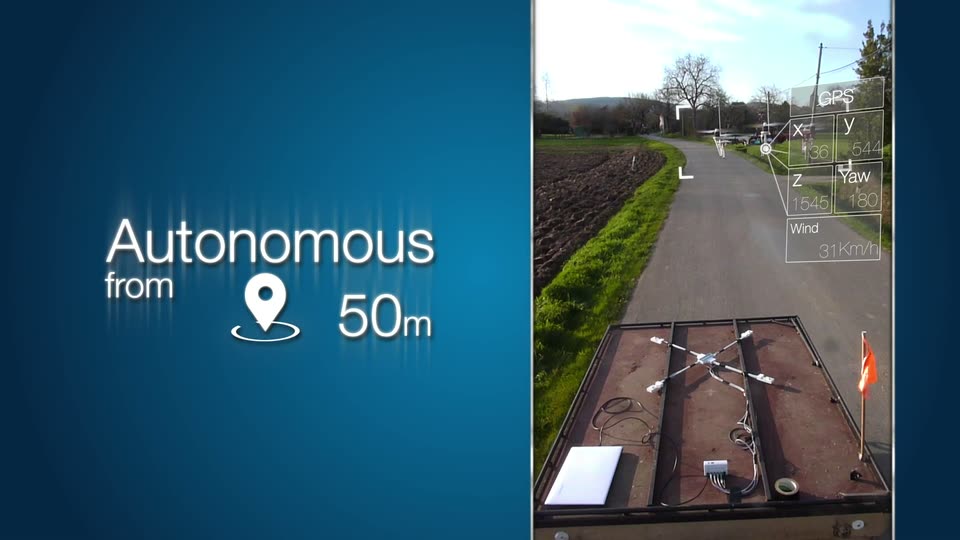
A blue panel on the left holds white headlines while the right opens from a thin sliver into drone footage of a quadcopter flying a country lane toward a trailer. The headline cycles through Centimeter accuracy, Autonomous from 50m and Moving Platform as the drone lands.
On-screen text: “Centimeter accuracy”, “Autonomous from 50m”, “Moving Platform”
Techniques: Masking, Split screen, Kinetic type
Camera: Pan
Split screen: a blue panel holds white “Moving Platform” text beside a four-way arrow icon, which then fades and slides off. On the right, a trailer platform drives along a rural road, a white GPS readout overlay ticking through X, Y, Z, Yaw and wind values.
On-screen text: “Moving Platform”
Techniques: Kinetic type, Split screen
Camera: Static
A vertical strip of live-action drone footage on a trailer, with a white HUD overlay of GPS and wind data, slides off to the right across a blue radial field. A white right-pointing arrow sits on the left, cueing the wipe as the footage exits.
Techniques: Masking
Camera: Static
A white corner-bracket reticle tracks a drone hovering in thick fog, a leader line dropping to an outlined callout box. The box shows ALL VISIBILITY CONDITION with a slashed eye icon, then crossfades to NO CAMERA NO LIDAR. The box clears and the drone descends through the haze toward a tree line.
On-screen text: “ALL VISIBILITY”, “CONDITION”, “NO CAMERA”, “NO LIDAR”
Camera: Pull out
A white quadcopter hovers in a foggy field above a concrete pad with cables and a white box. White corner brackets lock onto the drone. Dark blue side bars close in, narrowing the frame to a vertical strip.
Techniques: Masking
Camera: Static
On a deep blue field, a narrow vertical white slit widens horizontally, opening a window onto a beach: a standing figure, then palm trees and a small boat. A small white numeral 7 slides in beside the strip.
On-screen text: “7”
Techniques: Masking
Camera: Static
A wide shot of a grassy field with a hazy city skyline shows canisters releasing blue, white and pink smoke that billows right, two drones parked on a path. On the left, a gray tile with a snowflake icon and the word ice fades in over a dark blue frame.
Techniques: Masking
Camera: Static
A blurred outdoor field with billowing blue and pink smoke fills the frame as a row of six white line-icon tiles labeled ice, sun, humidity, IP67, sand/dust and Rain sits across the center; the two rightmost tiles pop in at 1.4 s.
On-screen text: “ice”, “sun”, “humidity”, “IP67”, “sand/dust”, “Rain”
Camera: Static
A row of six gray icon tiles (snowflake, sun, humidity gauge, IP67 circle, sand/dust, rain drops) sits over a blurred outdoor set with drifting blue and purple smoke. Dark blue panels slide in from both edges to frame the row.
On-screen text: “ice”, “sun”, “humidity”, “IP67”, “sand/dust”, “Rain”
Techniques: Masking
Camera: Static
A blue gradient background holds a white vertical bar that wipes away to reveal the circular atom logo, white disc with blue orbital rings. The logo slides left as the wordmark fades in beside it, then a thin line, the tagline, and the contact email appear in sequence, holding on a locked frame.
On-screen text: “Internest”, “Autonomous flights in complex environments”, “[email protected]”
Techniques: Masking
Camera: Push in