1:10
Explore
FLUX 3 Action: A 7B World Action Model for Robot Control
FLUX · Sep 2026 · 1:10 · AI-annotated
- Length
- 1:10
- Scenes
- 33 · 2.1 s avg
- Product on screen
- 0:00
- Features shown
- 2
- Voiceover
- No
00:00:00 / 01:10:15
- Length
- 1:10
- Scenes
- 33 · 2.1 s avg
- Product on screen
- 0:00
- Features shown
- 2
- Voiceover
- No
FLUX’s 1:10 launch film runs 33 scenes, about 2.1 s each. The product is on screen from the first frame and 2 features are revealed. There is no explicit call to action. The video opens and closes on a drifting collage of demo clips around the FLUX 3 Action title, then runs straight into unedited robot footage with monospace prompt captions. Pacing is steady at about 15 cuts per minute, alternating split-screen grids and single-camera tabletop shots, with typed-out title cards that announce each capability.
Footage neededEstimated needs: 2 capture groups — your screens or recordings · 19 filmed passages — shoot, supply or replace · 3 graphic passages — draw or supply · 3 3D passages — build or supply
Is this your launch? to your site or press kit.
More like this
4:14

DJI - Introducing the Spreading Wings S1000
DJI · Hardware · Jan 2014
0:40


MusicArena: The Crowdsourced Music Benchmark for AI
MusicArena · B2B · Sep 2026
Similar soundtrack
Films whose music sounds like this one, voice left out
0:30

Meta Ray-Ban Display: AI Glasses With an EMG Wristband
Meta · Electronic dance music with funk and disco influences
2:13
Aman - We’ve raised a $7.5M seed round led by Felicis so AI can read documen
Unsiloed · Electronic
1:14

Warp - You can now run any CLI agent with first-class support in Warp, inclu
Warp · Instrumental hip-hop and funk
FLUX 3 Action: A 7B World Action Model for Robot Control, scene by scene
· 33 scenes as text
01 · Product intro · 0:00–0:02
On a black field, the white title FLUX 3 Action sits locked in the center while two arcs of small video clips, showing robotic arms, driving sims and game courts, drift and shuffle around it. Faint columns of data code and two monochrome framed stills bookend the edges.
On-screen text: “FLUX 3 Action”
Techniques: Parallax
Camera: Static
02 · Product intro · 0:02–0:04
Split screen of two robot feeds: left, a white arm hovers over a table with red plates and a green cup; right, a black gripper closes on a green ball among a banana and yellow blocks. The Black Forest Labs logo sits in the lower left.
On-screen text: “FLUX 3 Action”
Techniques: Split screen
Camera: Static
03 · Demo · 0:04–0:08
Two side-by-side clips show robot arms executing tasks. Left, a white arm lowers a fork onto a red plate. Right, a black gripper lifts a yellow block and drops it into a blue cup. White captions label each prompt below the panels.
On-screen text: “Prompt: put the fork on the plate”, “Prompt: put the yellow block in the blue cup”
Techniques: Split screen
Camera: Static
04 · Demo · 0:08–0:09
Two filmed clips sit side by side on a black background. The left shows a white robotic arm setting a fork on a red plate; the right is a first-person view of a gripper lifting a yellow block toward a blue cup. A prompt caption locks under each panel.
On-screen text: “Prompt: put the fork on the plate”, “Prompt: put the yellow block in the blue cup”
Techniques: Split screen
Camera: Static
05 · Demo · 0:09–0:16
Six views labeled left, wrist and right form a two-row grid of a white robot arm. Top row: the arm lifts a yellow sponge toward a red bowl. Bottom row: it grabs a white marker over grid paper. Prompt captions sit under each row.
On-screen text: “Prompt: put the sponge in the bowl”, “Prompt: put the marker in the bowl”, “Black Forest Labs”
Techniques: Split screen
Camera: Static
06 · Demo · 0:16–0:17
A two-by-three grid of robot footage shows a white arm from left, wrist and right angles. Top row, the arm carries a yellow sponge to a red bowl; bottom row, it lifts a marker over a grid mat. Prompt captions sit under each row.
On-screen text: “Prompt: put the sponge in the bowl”, “Prompt: put the marker in the bowl”, “Black Forest Labs”
Techniques: Split screen
Camera: Static
07 · Demo · 0:17–0:18
A six-panel grid shows a white robot arm from three angles in two rows, the top row placing a yellow sponge into a red bowl and the bottom row holding a marker, each row captioned with a prompt. The Black Forest Labs logo sits in the lower left.
On-screen text: “LEFT”, “WRIST”, “RIGHT”, “Prompt: put the sponge in the bowl”, “LEFT”, “WRIST”, “RIGHT”, “Prompt: put the marker in the bowl”, “Black Forest Labs”
Techniques: Split screen
Camera: Static
08 · Demo · 0:18–0:19
A six-panel split screen shows a white robotic arm on a table from left, wrist and right camera views, moving a yellow sponge and a white marker toward a red bowl. Two prompt captions sit below the top and bottom rows; a Black Forest Labs logo anchors the lower left.
On-screen text: “Prompt: put the sponge in the bowl”, “Prompt: put the marker in the bowl”, “Black Forest Labs”
Techniques: Split screen
Camera: Static
09 · Demo · 0:19–0:24
A white robot arm on a table of colored blocks picks up the blue block and drops it into a gray tray, then repeats with the white block. A gray bar at the bottom shows the matching instruction caption, and a subtitle reads In training distribution.
On-screen text: “Black Forest Labs”, “put the blue box into the container”, “In training distribution”, “put the white box into the container”
Camera: Static
10 · Demo · 0:24–0:25
A white robotic arm on a tan mat lifts a small grey box and moves it toward a grey metal tray holding a white cube and a blue box. The camera holds a fixed high angle while the arm completes the pick-and-place motion.
On-screen text: “put the grey box into the container”, “In training distribution”
Camera: Static
11 · Demo · 0:25–0:26
A white robotic arm on a cork tabletop reaches down and closes its gripper around a small black box, with a gray tray holding blocks and a blue tile to the right. The shot is a static wide angle; the arm moves in real time while a gray instruction bar and a bottom label stay fixed.
On-screen text: “In training distribution”
Camera: Static
12 · Demo · 0:26–0:27
A white robot arm over a tan mat cuts to a 3x3 grid of nine robot demo clips, each with a task caption. The label Object adjustments sits top left, and the caption In training distribution stays centered at the bottom.
On-screen text: “In training distribution”
Techniques: Split screen
Camera: Pull out
13 · Feature reveal · 0:27–0:28
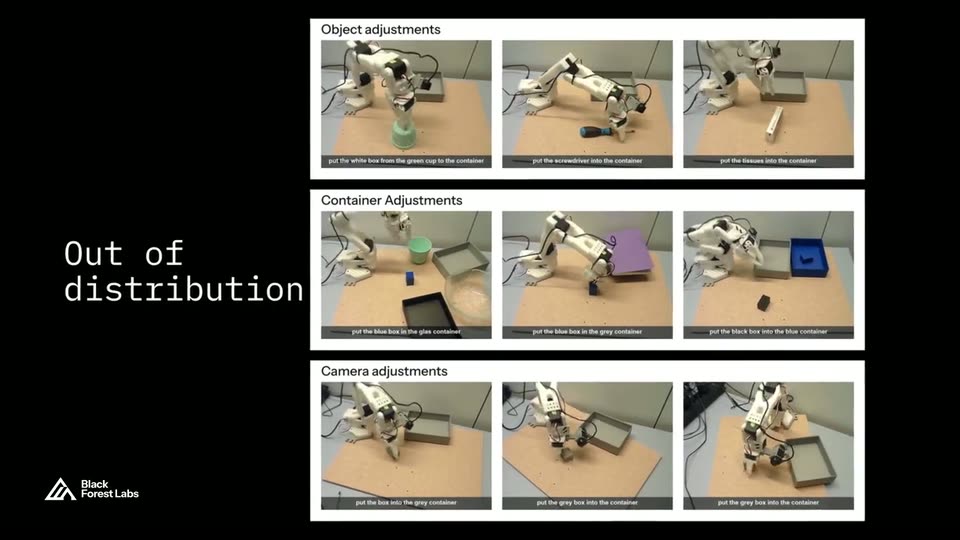
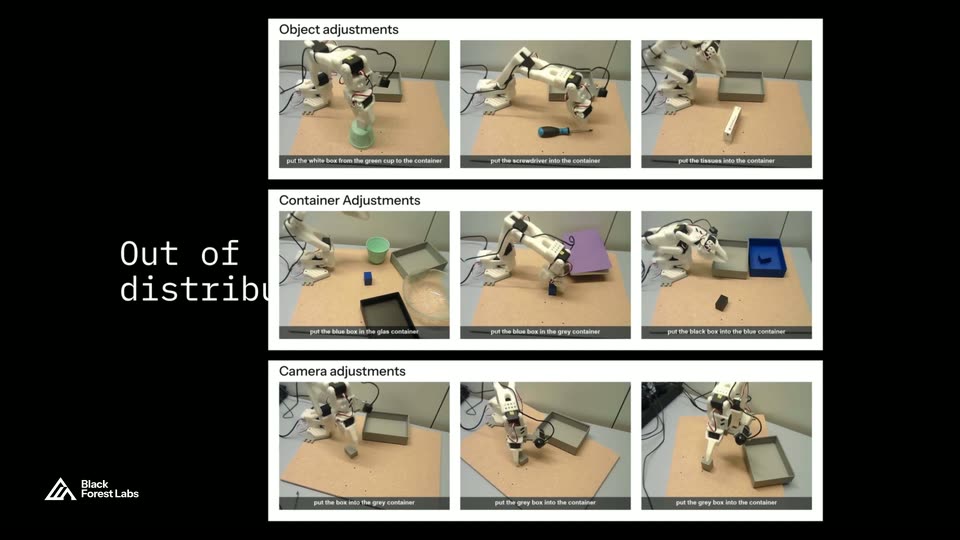
A white-framed grid of nine robot-arm task clips, grouped into three labeled rows, settles in from the right on a black background. On the left, the words Out of distribution type out letter by letter in monospace. The Black Forest Labs logo sits in the bottom corner.
On-screen text: “Out of distribution”
Techniques: Kinetic type
Camera: Static
14 · Feature reveal · 0:28–0:32
A black panel holds the white title Out of distribution beside a 3x3 grid of robot-arm manipulation clips. Row labels read Object adjustments, Container Adjustments, Camera adjustments. The grid holds still, then the view zooms into the top-left clip as the title slides out of frame.
On-screen text: “Out of distribution”
Techniques: UI zoom
Camera: Push in
15 · Feature reveal · 0:32–0:34
A small video window in the upper left shows a white robotic arm on a tan mat with a green cup and metal container. The window scales up to fill the frame as the arm reaches for the container. A caption bar at the bottom slides instructions through, and the Black Forest Labs mark stays in the corner.
On-screen text: “put the white box from the green cup to the container”, “put the screwdriver into the container”
Techniques: Kinetic type
Camera: Push in
16 · Feature reveal · 0:34–0:37
A white robotic arm on a wooden table reaches down, grips a blue and black screwdriver, and lifts it toward a metal tray. The shot opens with a horizontal wipe, and a bottom caption states the task.
On-screen text: “put the screwdriver into the container”
Techniques: Masking
Camera: Pan
17 · Feature reveal · 0:37–0:39
A white robotic arm on a wooden table lifts a small blue box into a clear glass bowl and sets it inside. The camera holds a static high angle over a green cup and black tray, while a white subtitle at the bottom swaps between two instructions.
On-screen text: “put the screwdriver into the container”, “put the blue box in the glas container”
Camera: Pan
18 · Feature reveal · 0:39–0:41
A white robotic arm rests on a wooden table beside a green cup, gray tray, black tray and a glass bowl with a blue cube. A human hand slides the cup forward, then lifts the black tray and sets it down. The arm holds its gripper open, still.
On-screen text: “put the blue box in the glas container”
Camera: Static
19 · Feature reveal · 0:41–0:43
A human hand sets a small blue box on a wooden table beside a green cup and a clear glass bowl. A white multi-jointed robotic arm then lowers its gripper and closes around the box. A static high-angle shot frames the tabletop setup.
On-screen text: “put the blue box in the glas container”
Camera: Static
20 · Feature reveal · 0:43–0:46
A white robot arm with exposed wires lowers a blue box toward a glass bowl on a workbench beside a green bowl. A hand enters to reposition the glass bowl and a metal tray, then the arm reaches back for the box. A caption bar sits at the bottom.
On-screen text: “put the blue box in the glas container”
Camera: Static
21 · Feature reveal · 0:46–0:47
A white robotic arm rests over a cork tabletop while a hand sets a small blue block beside an open gray tin. A clear glass bowl sits in the foreground and a green bowl peeks in at the lower right. The shot holds steady on the workspace.
On-screen text: “put the blue box in the glas container”
Camera: Static
22 · Feature reveal · 0:47–0:48
A white robotic arm on a cork tabletop closes its gripper on a small blue box and lifts it over a clear glass bowl. A human hand reaches in from the right to steady the bowl. A gray caption bar with the instruction runs along the bottom.
On-screen text: “Black Forest Labs”, “put the blue box in the glas container”
Camera: Static
23 · Feature reveal · 0:48–0:50
A black title slide holds the white headline on the left and the Black Forest Labs mark in the bottom corner. On the right, a windowed clip of a car racing game runs, a sedan driving down a tree-lined road with speedometer and lap HUD, while the headline and logo stay static.
On-screen text: “Control any environment”
Camera: Static
24 · Feature reveal · 0:50–0:51
White headline 'Control any environment' sits on the left of a black frame while the right stacks two game views: a rear-chase racing car on a forest road above a first-person dark tunnel with a red target. Both play continuously.
On-screen text: “Control any environment”
Techniques: Split screen
Camera: Static
25 · Feature reveal · 0:51–0:55
A 2x2 grid of game footage tiles at right shrinks and multiplies into a 4x4 grid of varied 3D game scenes, while static white text holds at left on a black background.
On-screen text: “Control any environment”
Techniques: Split screen
Camera: Push in
26 · Feature reveal · 0:55–0:55
A black screen holds the white monospace line “Control any environment” on the left, with the Black Forest Labs mark in the lower corner. On the right, a 4 by 4 grid of game clips plays at once, showing driving, shooting, and blocky 3D worlds.
On-screen text: “Control any environment”
Camera: Static
27 · Feature reveal · 0:55–0:58
Two side-by-side panels show a third-person game: a helicopter hovers over a street left, a character sprints along a wall right. Beneath each, a keyboard strip lights up pressed keys in green. A white Black Forest Labs logo rests bottom-left.
Techniques: Split screen
Camera: Static
28 · Feature reveal · 0:58–0:59
Two game views sit side by side: a city street with a small plane on the left, a character running on a sandy ramp on the right. A strip of recorded key inputs runs beneath each view, and a small white wordmark rests in the lower left corner.
On-screen text: “Black Forest Labs”
Techniques: Split screen
Camera: Static
29 · Feature reveal · 0:59–0:59
Two side-by-side game views: a street with a red biplane on the left, a running character on the right. A keyboard map under each panel highlights the pressed key, D then E. The Black Forest Labs logo sits in the bottom-left corner.
Techniques: Split screen
Camera: Static
30 · Feature reveal · 0:59–1:03
Two side-by-side cab views of a truck driving simulator move along a rural road, speedometer numbers tick up and HUD panels update as the road scrolls past. The Black Forest Labs logo sits static in the lower left corner.
On-screen text: “Black Forest Labs”
Techniques: Split screen
Camera: Static
31 · Feature reveal · 1:03–1:03
Two side-by-side cockpit views of a truck driving simulation show a rural road, side mirrors and a telemetry panel on the right. The frame is locked off while the simulation advances slowly, speedometers ticking. A Black Forest Labs logo sits in the bottom left corner.
On-screen text: “Black Forest Labs”
Techniques: Split screen
Camera: Static
32 · Feature reveal · 1:03–1:07
A black quadcopter lifts off a white coffee table in a sunlit 3D living room, flies past a yellow armchair and settles on a window ledge. A telemetry bar-graph panel and a small preview thumbnail sit in a strip below the frame.
Techniques: 3D mockup
Camera: Static
33 · Outro · 1:07–1:10
On black, the title FLUX 3 Action fades in at center as two arcs of small video clips, robot arms, driving and game footage, drift slowly above and below it, linked by thin lines and small code text. The Black Forest Labs logo sits in the lower left corner.
On-screen text: “FLUX 3 Action”
Camera: Static