0:38

Loom - It’s a new year — and it’s easier than ever to embrace new ways of wo
Loom · Productivity · Jan 2024
Warp · Apr 2026 · 1:14 · AI-annotated
Warp’s 1:14 launch film runs 21 scenes, about 3.6 s each. The product shows up at 0:01 and 6 features are revealed. The call to action lands at 1:04 (86% in), over a voiceover. Built as a feature tour over a single drifting purple gradient, with each capability announced by a left-aligned white caption and proven by a dark UI panel that floats, tilts or zooms in 3D. Pacing is brisk (cuts roughly every 7 seconds, ~161 BPM) and the signature moves are the cursor-driven micro-interactions, the perspective-tilted window cards, and the letter-by-letter type reveals that bookend each section.
Is this your launch? to your site or press kit.
Loom · Productivity · Jan 2024
Ahrefs · Aug 2026
Google · AI · Jan 2026
A soft purple gradient fills the frame while a single white line of text sits centered and remains still. The composition stays locked off for the full duration.
On-screen text: “Introducing universal agent support”
Camera: Static
White text “Level up” and “with Warp” flank a centered rounded app icon tile on a soft purple gradient. A cursor hovers at the tile's edge as the icon and label cycle through Codex, OpenCode, Gemini CLI, and Claude Code, then the tile fades out, leaving the headline.
On-screen text: “Level up”, “with Warp”, “Codex”, “OpenCode”, “Gemini CLI”, “Claude Code”
Techniques: Morph
Camera: Static
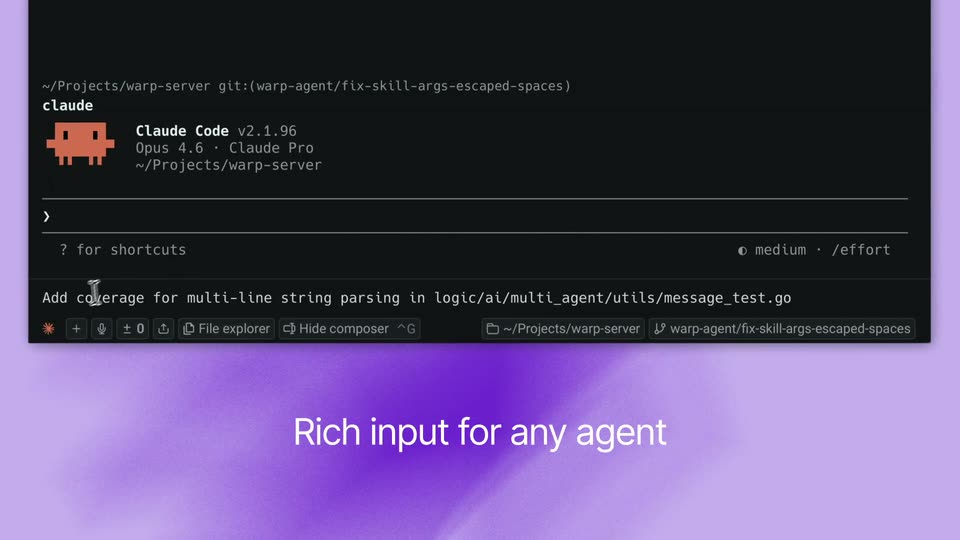
A dark Warp terminal expands to show the Claude Code agent header. A cursor opens the composer, types a prompt, and an autocomplete list inserts a file path. The prompt is sent and the agent starts working as the view zooms in. Caption: “Rich input for any agent”.
On-screen text: “Rich input for any agent”, “Level up”, “with Warp”
Techniques: Cursor demo, UI zoom
Camera: Push in
A dark agent interface floats in 3D perspective over a purple gradient, angled to the left. A white hand cursor rests on the toolbar's tabs icon, popping a small tooltip, while the window subtly rotates and shifts in depth.
Techniques: 3D mockup, Cursor demo
Camera: Pan
A dark editor window sits on a purple gradient. A left sidebar lists agent tasks with small avatars, and a status dropdown fades in over the code panel as the overlapping text resolves into place. A hand cursor hovers over one list item.
Techniques: Cursor demo
Camera: Static
A dark vertical tabs panel sits on the left over a purple gradient while a cursor moves down the list, highlighting each row and revealing its branch metadata. On the right a white headline fades in and out.
On-screen text: “Vertical tabs surface relevant metadata and remember your past sessions”
Techniques: Cursor demo
Camera: Static
A dark GitHub pull request page sits on a purple gradient. The body text reflows and settles into place, expanding the experiment summary and results sections as the right sidebar fills in.
Camera: Push in
A dark GitHub pull request page floats in 3D perspective over a purple gradient. The page scrolls down past Bayesian analysis text, a small sample warning, a changes list, and a Vercel bot comment showing a deployment table and a success notice.
Techniques: 3D mockup
Camera: Pan
A dark code-review interface sits blurred across the frame while two sharp notification cards slide in from the right, listing pull-request titles and an Approve button.
Camera: Static
Two dark notification cards sit on a soft purple gradient. A white cursor arrow appears and points at the lower card, which dims while the white headline remains fixed.
On-screen text: “Get notifications when agents need attention”
Techniques: Cursor demo
Camera: Static
A dark code-review panel sits on a soft purple gradient, locked off. A hand cursor hovers over the green diff badge in the top-right corner while the body text about git worktree paths stays static.
Techniques: Cursor demo
Camera: Static
A dark code-review window floats on a purple gradient. A white caption fades in at the bottom, then the frame zooms into the diff panel as a cursor clicks a comment icon, opening a small comment input box.
On-screen text: “Review code right in your terminal”
Techniques: Cursor demo, UI zoom
Camera: Push in
A dark code review interface displays a shell script with green-highlighted lines and a branch selector at the top. A comment box in the center types a sentence letter by letter, while a white hand cursor hovers at the left margin. The frame stays static throughout.
Camera: Pan
A purple gradient panel holds a white headline that fades in line by line on the left, while a tilted tablet on the right shows a code-diff view with an inline comment; both layers drift right at different speeds.
On-screen text: “Send inline comments from Warp's code review directly to a running agent session”
Techniques: Kinetic type, 3D mockup, Parallax
Camera: Pull out
A code review window on a purple gradient shows a diff with green added lines. A comment box holding a note collapses into a 1 comment chip, then a cursor moves to the Send to Agent button and clicks it, raising a small tooltip.
Techniques: Cursor demo
Camera: Static
A dark terminal window rests on a soft purple gradient. Inside, a code diff flashes red and green lines above an agent panel, then the camera pushes in until the window's edges crop out of frame.
Techniques: UI zoom
Camera: Pan
A dark terminal window sits on a purple gradient as the agent's grep results and thinking text scroll upward. A cursor glides to the bottom toolbar, hovers a button, and a 'Copied to clipboard' toast pops in below.
Techniques: Cursor demo
Camera: Pan
A smartphone mockup in 3D perspective slides down from the top left, its dark screen showing a feature-flag chat, while a white two-line headline holds still on the right over a soft purple gradient.
On-screen text: “Control any CLI agent on the go”, “app.warp.dev”
Techniques: 3D mockup
Camera: Static
A tilted smartphone mockup shows a dark terminal interface whose task lines scroll upward, then the device exits the frame, revealing a soft purple gradient where the word Built fades in.
On-screen text: “Built”
Techniques: 3D mockup
Camera: Push in
A purple gradient holds the white line “Built for any CLI agent.” typing in letter by letter. A rounded icon pops in on the right, swapping from the Claude knot mark to a dark tile with a red robot face, then a cut lands on the centered white Warp logo.
On-screen text: “Built for any CLI agent.”
Techniques: Kinetic type
Camera: Static
A soft purple gradient drifts slowly. The white Warp logo sits centered, then yields to a two-line white tagline, which clears as “Download for free” slides left and “warp.dev” settles in to its right.
On-screen text: “The agentic development environment”, “born out of the terminal”, “Download for free”, “warp.dev”
Techniques: Kinetic type
Camera: Static