2:11
Bambu Lab S1 | 3D Scanner
Bambu Lab · Nov 2026
Lenovo · Nov 2026 · 1:06 · Full motion · AI-annotated
Lenovo’s 1:06 launch film runs 43 scenes, about 1.5 s each. The product is on screen from the first frame and 9 features are revealed. There is no explicit call to action. A feature-by-feature march: each block pairs a 3D chip, interface or render shot with a one-line tagline, opening on the product name over a neon grid and closing on brand logos. The style is defined by push-in camera moves, glowing wireframe transitions, and a magenta-and-green neon palette on a dark grid.
Is this your launch? to your site or press kit.
Films whose music sounds like this one, voice left out
PlayStation · Cinematic trailer music and electronic pop
DJI · Cinematic trailer, electronic
Xiaomi · Electronic, Cinematic, EDM
A dark field of neon dotted squares in magenta and green fills the frame. The thin outlined white wordmark Lenovo YOGA resolves at the center, sharpening and brightening as the grid glows.
On-screen text: “Lenovo YOGA”
Techniques: Kinetic type
Camera: Pull out
A closed dark laptop lies on a black surface in 3D perspective, locked off. A green holographic wireframe traces its edges and a glowing grid fades onto the lid while the white title sits centered.
On-screen text: “Introducing Lenovo Yoga Pro 9n”
Techniques: Light sweep
Camera: Static
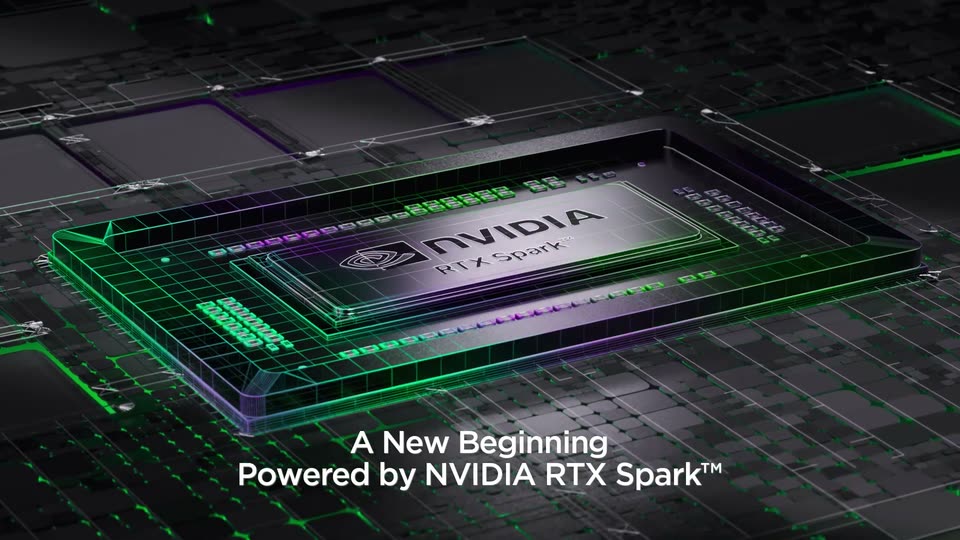
A high-angle 3D view of a processor on a dark circuit board. The chip shifts from a glowing green wireframe to a solid metal top bearing the NVIDIA mark, as green traces pulse around it. Two lines of white caption text fade in at the bottom.
On-screen text: “A New Beginning”, “Powered by NVIDIA RTX Spark™”
Techniques: 3D mockup, Morph
Camera: Static
A top-down circuit board centers an NVIDIA RTX Spark chip, green light pulsing along its edges. The camera tilts to a low 3D angle as green and purple beams rise from the chip, then pulls back into a dark field of blurred vertical streaks.
On-screen text: “A New Beginning”, “Powered by NVIDIA RTX Spark™”
Techniques: Light sweep, 3D mockup
Camera: Pull out
In a dark void, a Nodegraph panel blurs past on a horizontal accent line, then a Massing A panel with a wireframe square and a cursor arrow settles into focus.
Techniques: Parallax, Masking, Cursor demo
Camera: Static
A tight close-up on a single component card pulls back to reveal the full dark canvas, where the card links by a yellow line to a global panel and a parameter grid sits below, framed by a neon 3D backdrop.
Camera: Pull out
A laptop in 3D perspective displays a dark node-graph interface with three connected blocks. Behind it, vertical light streaks in purple and green shimmer against a dark grid. A mouse rests at the lower right edge.
Techniques: 3D mockup
Camera: Pull out
A 3D laptop showing a node-based editor sits on a desk beside a mouse inside a colorful wireframe grid room. The camera pulls back and rises, then cuts to a low angle of the device, marked NVIDIA, on a reflective grid floor with green and purple light streaks.
On-screen text: “Up to 128GB unified memory”, “Render complex scenes locally”
Techniques: 3D mockup, Parallax
Camera: Pull out
A 3D chip mockup rests on a dark circuit floor, ringed by glowing translucent cubes with white caps. The camera lifts and tilts from a low angle to a top-down view over the chip. Two white caption lines hold at the bottom, then fade out.
On-screen text: “Up to 128GB unified memory”, “Render complex scenes locally”
Techniques: 3D mockup
Camera: Pull out
A 3D render of a laptop's rear vent with pink light beams rising from the grille. The view rotates from an angled hinge close-up to a straight-on shot, bringing the Lenovo X Power mark on the body to center as it scales up.
On-screen text: “Lenovo X Power”
Techniques: 3D mockup
Camera: Pull out
A 3D chip with glowing magenta edges and a grid pattern sits on a dark circuit board. Vertical light beams rise as the chip's top surface brightens to a solid pink glow. The camera drifts slowly over the scene.
On-screen text: “Made for demanding AI workflows”
Techniques: 3D mockup
Camera: Push in
A camera pushes forward through a dark 3D tunnel of glowing neon lines in pink, cyan and green, with bright nodes at their ends. Small particles drift in the depth. A white caption sits at the bottom.
On-screen text: “Made for demanding AI workflows”
Techniques: Parallax, Particles
Camera: Static
Neon circuit traces in magenta, green and purple radiate through a dark 3D space as the camera pushes forward, passing a glowing purple node and a dotted pill shape. Small particles drift at varying depths.
On-screen text: “Made for demanding AI workflows”
Techniques: Parallax, Particles
Camera: Static
A dark 3D wireframe tunnel recedes toward a glowing purple core while colored light streaks fly past. A dotted prompt bar with a plus icon and cursor floats center, holding the phrase Futuristic building references, as the camera pushes forward. A white headline sits fixed at the bottom.
On-screen text: “Made for demanding AI workflows”
Techniques: Parallax, Particles
Camera: Push in
A neon wireframe tunnel flies forward with pink and green light streaks converging on a glowing purple portal. The portal resolves into a 3D card showing a ribbed futuristic building render, then frames with pink selection lines. A bottom caption swaps from one tagline to another.
On-screen text: “Made for demanding AI workflows”, “Your new creative co-architect”
Techniques: Parallax, 3D mockup, Morph
Camera: Static
A stack of translucent panels in 3D perspective shows glass tower facades, framed by a glowing pink wireframe path on a dark dotted grid. A pink node pulses at the base while the camera drifts slowly.
On-screen text: “Your new creative co-architect”
Techniques: 3D mockup, Parallax
Camera: Static
A stack of translucent panels, each showing a curved glass tower, fans out in 3D over a dark grid of glowing nodes and miniature buildings. A small orb shifts from pink to blue along a foreground line as the camera orbits. A white caption sits at the bottom.
On-screen text: “Your new creative co-architect”
Techniques: 3D mockup, Parallax
Camera: Pull out
A silver laptop on a desk against a maroon wall shows a dark interface: a grid of cityscape thumbnails on the left, orange lines drawing from each into a results panel on the right. A static tagline sits over the scene.
On-screen text: “Your new creative co-architect”
Techniques: 3D mockup
Camera: Pull out
Macro angled shot of a black laptop keyboard with white legends, the lower screen edge showing a code line and a small thumbnail. The camera drifts slowly right, sliding across the key rows while a soft magenta glow lingers on the left edge.
Techniques: 3D mockup
Camera: Static
A close-up of a purple laptop corner in 3D perspective. A light sweep shifts the color gradient across the surface, and the edge glows green before fading.
Techniques: 3D mockup, Light sweep
Camera: Push in
A tilted monitor in 3D perspective shows a dark CAD interface. A wireframe model of a rounded object with purple handles rests on a black grid, and a cursor glides in to nudge its control points. The word YOGA holds large and static over the frame.
On-screen text: “YOGA”
Techniques: 3D mockup, Cursor demo
Camera: Pull out
A white wireframe shape with purple accent lines sits on a black plus-grid, then shrinks into a dark recessed square as the frame pulls back to a blue-lit border. Glowing blue orbs with light trails fly across the right.
On-screen text: “Power and performance”, “that keeps you in your flow”
Camera: Pull out
A dark tunnel of glowing blue rectangular frames recedes into the distance, a wireframe shield and two bright blue spheres linked by lines float at the center, and a sharp glint marks the lower-left corner. The camera pushes slowly inward.
On-screen text: “Power and performance”, “that keeps you in your flow”
Techniques: Parallax
Camera: Static
A blue glowing orb with a horizontal light trail flies rightward through a dark 3D space, passing a wireframe circular object inside a box frame. Vertical columns of small colored dashes fill the background as the camera tracks the orb.
On-screen text: “Windows 11”, “Power and performance that keeps you in your flow”
Techniques: Particles, Parallax
Camera: Static
A 3D modeling app window with a glowing blue border rotates in perspective over a dark field of vertical light streaks and drifting colored dots. Its viewport holds a wireframe shape with an orange outline, and the right panel of properties turns into view as the window faces forward.
On-screen text: “Windows 11”, “Power and performance”, “that keeps you in your flow”
Techniques: 3D mockup, Particles
Camera: Pan
A laptop screen shows a 3D modeling app where a gray hand model morphs through finger poses inside an orange wireframe. The camera pulls back from an angled close-up to a frontal view, revealing a purple wall, a desk lamp, and a ribbed white object on the left.
Techniques: 3D mockup, Morph
Camera: Pull out
A gray wireframe building model floats in a dark grid space with colored connection lines. A glass prompt panel slides in from the right, the text Generate variations is typed into it, and a pink Generate button appears. The camera tilts and pushes in.
Techniques: 3D mockup
Camera: Push in
A dark 3D grid space holds a sneaker mockup and floating panels of neon line-art. The camera glides across the depth as glowing dots and colored lines drift. A white caption reads at the bottom.
On-screen text: “From idea to done”
Techniques: 3D mockup, Parallax, Particles
Camera: Pan
A dark 3D field of translucent panels, each holding a neon wireframe line drawing, drifts past the camera as glowing lines and dots link them. A white caption reads From idea to done at the bottom.
On-screen text: “From idea to done”
Techniques: Parallax
Camera: Pan
A laptop mockup on a dark desk displays a wireframe tower model inside a 3D app, with a stylus resting on the keyboard. The view pushes into the screen as the interface expands. White caption From idea to done sits at the bottom.
On-screen text: “From idea to done”
Techniques: 3D mockup, UI zoom
Camera: Pull out
A laptop sits on a dark desk in 3D perspective, its screen showing a parametric design app with an orange wireframe tower and a grid of variation thumbnails. The camera pans across the scene, blurring the white objects at the edges, while a caption holds at the bottom.
On-screen text: “From idea to done”
Techniques: 3D mockup, Parallax
Camera: Static
A chrome tower of stacked discs stands at the center of a dark wireframe grid, ringed by curved panels of glowing dots. Neon lines in green, magenta and cyan trace the floor and air as the camera orbits slowly around the structure.
Techniques: 3D mockup
Camera: Static
A metallic spiral tower with two silver spires and stacked discs sits on a reflective floor. The camera orbits it while the backdrop crossfades from a black neon wireframe grid to a sunset sky with vertical light streaks.
Camera: Static
A metallic spiral tower spins against a purple sunset sky, its reflective layered rings catching the light. Diagonal streaks of color fall across a glowing grid floor as the structure rotates.
Camera: Push in
A 3D metallic tower climbs past the camera as it ascends, blue rings catching warm orange light against a purple sky. A white HUD frames the view with an objective line, a wireframe tower diagram, a top ruler and a bottom tagline.
On-screen text: “Work hard. Game effortlessly”
Techniques: Parallax
Camera: Static
A 3D figure in a dark suit climbs a glossy metallic tower, the camera tilting up to follow the ascent. A red-and-white sci-fi HUD frames the shot, its height and level counters ticking upward. The caption holds static at the bottom.
On-screen text: “Work hard. Game effortlessly”
Techniques: Parallax
Camera: Static
First-person game view over a brick tower top with a glowing magenta portal. Two stylized hands reach forward as the camera tilts up, the altitude counter climbs from 444 M to 482 M and the level bar fills to 68/68. A purple cityscape sits behind the HUD frame.
On-screen text: “Work hard. Game effortlessly”
Techniques: 3D mockup
Camera: Static
A first-person 3D view of two hands cradling a glowing magenta orb on a grid tower, framed by a game HUD, wipes away on a diagonal magenta mask to reveal a spiral 3D tower against a purple sky, then the PURESIGHT PRO wordmark fades in at the bottom.
On-screen text: “Work hard. Game effortlessly”, “PURESIGHT PRO”
Techniques: Masking, 3D mockup
Camera: Pull out
A 3D laptop on a dark desk displays a vivid purple architectural render, framed by a monitor, lamp, headphones and mouse. The camera pulls back to reveal the full workspace while the label stays fixed at the bottom.
On-screen text: “PURESIGHT PRO”
Techniques: 3D mockup
Camera: Pull out
A 3D-rendered desk holds a laptop showing a glowing tower render, flanked by white headphones, a lamp, a mouse and a monitor with a wireframe model. The camera slowly pulls back. A PURE SIGHT PRO badge at the bottom gives way to a two-line tagline.
On-screen text: “PURESIGHT”, “PRO”, “This is Yoga Pro 9n”, “The next generation of AI Creator PCs”
Techniques: 3D mockup
Camera: Pull out
The Windows 11 logo and wordmark sit centered on a flat light gray background. They start faint and out of focus, then sharpen and saturate to full blue while the frame stays locked off.
On-screen text: “Windows 11”
Camera: Static
A red-to-purple gradient with a faint grid of geometric shapes fills the frame. The Lenovo logo, white text on a red bar, slides into the center with a soft glow, then a faint tagline fades in to the right.
On-screen text: “Lenovo”
Techniques: Kinetic type
Camera: Static
A red Lenovo wordmark lockup holds left of center with the white tagline stacked in three lines to its right, on a purple-to-red gradient. The logo slides in from a soft blur while the tagline stays still, then the frame sharpens and locks off.
On-screen text: “Smarter technology for all”
Camera: Static