
1:48
Explore
00:00:00 / 00:57:08
- Length
- 0:57
- Scenes
- 31 · 1.8 s avg
- Product on screen
- 0:20
- Features shown
- 6
- Call to action
- 0:49 · 87%
- Voiceover
- Yes
- Views
- 144 on YouTube
as of November 28, 2026
Lemlist’s 0:57 launch film runs 31 scenes, about 1.8 s each. The product shows up at 0:20 and 6 features are revealed. The call to action lands at 0:49 (87% in), over a voiceover. The video alternates flat color field title cards with letter by letter typed text against fast UI and phone demos, building a WhatsApp feature story from a comedic no show setup to a URL close. Its signature moves are the blinking caret typing, the 3D phone easing in beside a headline, and the green chat bubble captions that stamp each feature.
Footage neededEstimated needs: 6 capture groups — your screens or recordings · 1 official logo — reused across the film · 3 filmed passages — shoot, supply or replace · 4 3D passages — build or supply
Is this your launch? to your site or press kit.
More like this
0:58
Introducing Anything Max
Anything · Sep 2025
1:25
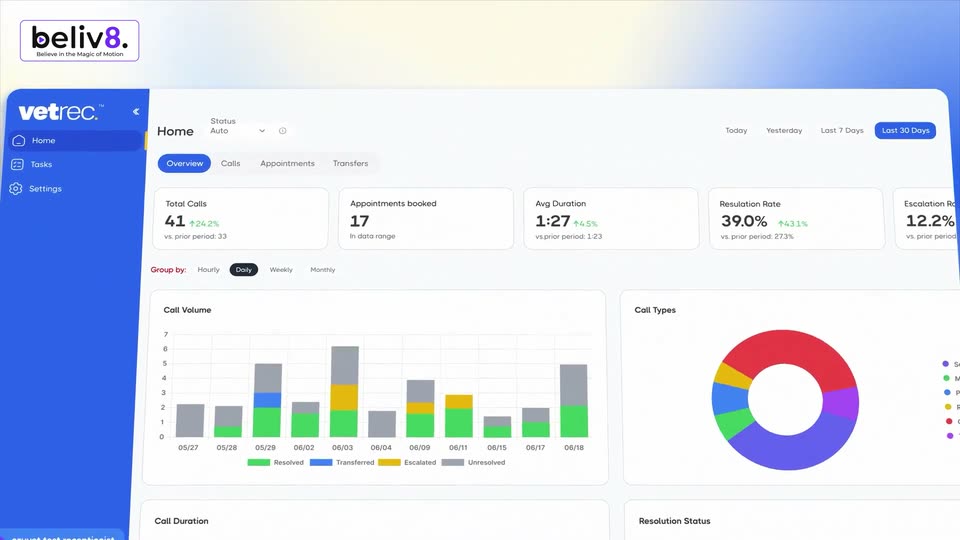

Product Feature Video for VetRec - Veterinary AI Assistant
VetRec · Sep 2026
Similar soundtrack
Films whose music sounds like this one, voice left out
0:20

Framer Design Agents — Cannonball
Framer · Upbeat electronic pop
2:12

Sierra: introduction to video
Sierra · Upbeat electronic
2:05
Meet Kira, the AI voice assistant - Insta360 GO Ultra
Insta360 · Upbeat electronic and funk
Automatiza Seguimientos Cálidos Con lemlist, scene by scene
· 31 scenes as text
01 · Hook · 0:00–0:00
White text types itself in the center of a solid blue field, letters appearing one by one until the line reads Aaaahhhh, with a thin vertical cursor at the end of the line.
On-screen text: “Aaaahhhh”
Techniques: Kinetic type
Camera: Static
02 · Problem · 0:00–0:01
A split-screen video call shows two men talking. The left panel, tagged Marco with the line SDR a Spanee, shows a man in a tan jacket gesturing; the right shows a man in a dark green jacket smiling. A blue bar with four round buttons spans the bottom.
Techniques: Split screen
Camera: Static
03 · Problem · 0:01–0:02
A video call window shows two participants in a side-by-side split: a man with glasses and a tan jacket gesturing on the left, a woman in a black top on the right. A blue control bar with four round buttons rests at the bottom center. The frame is locked off.
Techniques: Split screen
Camera: Static
04 · Problem · 0:02–0:03
A split-screen video call interface shows a bespectacled man on the left and a woman with a patterned scarf on the right, each in a rounded tile. A blue bar with four round buttons runs across the bottom. The frame stays locked and still.
Techniques: Split screen
Camera: Static
05 · Problem · 0:03–0:04
A video call interface shows two men in beige jackets in side-by-side panels; the right man speaks and gestures while the left man listens. A blue control bar with four round buttons sits at the bottom center.
Techniques: Split screen
Camera: Static
06 · Problem · 0:04–0:07
A split video-call view: on the left, Lucia rests her chin on her hand, then lifts a blue phone into frame and looks at it. The right tile stays dark with a waiting message, and a four-button control bar sits centered below both tiles.
Techniques: Split screen
Camera: Static
07 · Problem · 0:07–0:09
A locked-off video call UI shows two tiles: left, a blonde woman in black labeled Lucia; right, a dimmed empty room reading esperando al otro participante. A blue bar with four round buttons anchors the bottom; the woman blinks and shifts slightly.
Camera: Static
08 · Feature reveal · 0:09–0:10
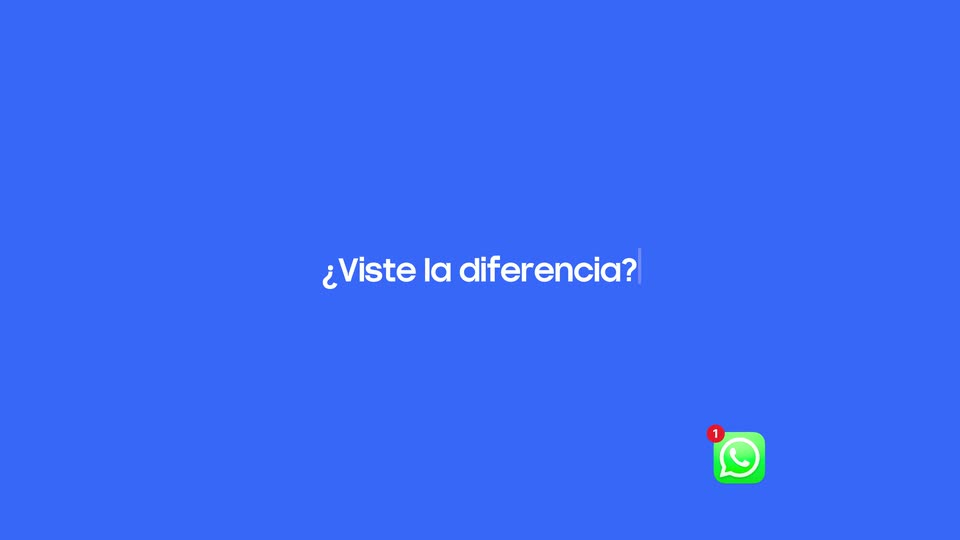
A solid blue field holds a centered white headline that types on letter by letter behind a blinking caret, then a green WhatsApp icon with a red badge pops in at the lower right.
On-screen text: “¿Viste la diferencia?”
Techniques: Kinetic type
Camera: Static
09 · Feature reveal · 0:10–0:15
Two glowing workflow screens side by side on blue, each with a wait step and a WhatsApp or Email node. Circular black-and-white video insets of a man and a woman sit below. The frame zooms in as hand-drawn circles and arrows highlight the wait blocks.
On-screen text: “¿Viste la diferencia?”
Techniques: Split screen, Masking, UI zoom
Camera: Static
10 · Feature reveal · 0:15–0:16
A glowing blue rounded frame flashes over a white dotted canvas, then fades as a workflow builder resolves into view. A start node links to a highlighted condition node, and a hand cursor taps the left branch before vanishing.
Techniques: Cursor demo
Camera: Static
11 · Feature reveal · 0:16–0:16
A workflow canvas shows a sequence start node linked to a highlighted condition node with green Yes and red No branches. The view scrolls down to reveal a bottom panel of automation step tiles, and a cursor hovers over the WhatsApp option.
Techniques: Cursor demo
Camera: Pull out
12 · Feature reveal · 0:16–0:18
A workflow builder canvas shows a flowchart with a start node, a condition node and a highlighted WhatsApp message node. The view reframes upward with motion blur on the background as a drag handle appears beside the selected node.
Techniques: UI zoom, Cursor demo
Camera: Static
13 · Feature reveal · 0:18–0:18
A workflow builder sits left of a WhatsApp step panel. A cursor clicks the sender type dropdown, picks the contact owner option, then moves into the message box, which turns blue. A warning note appears under the selection.
Techniques: Cursor demo
Camera: Static
14 · Feature reveal · 0:18–0:20
A close-up of a WhatsApp message editor shows a reminder being typed, with a blue handwritten note counting up to 30 percent, then the view zooms out to reveal the full Lemlist landing page and workflow canvas.
On-screen text: “disminuyo las inasistencias en un 30%”
Techniques: UI zoom
Camera: Static
15 · Product intro · 0:20–0:21
A white lemlist landing page holds a static Spanish headline and a blue button on the left. On the right, a 3D-tilted workflow builder mockup pans across its connected nodes, revealing different steps of the automation.
Techniques: 3D mockup, UI zoom
Camera: Static
16 · Feature reveal · 0:21–0:25
A workflow canvas with a steps panel; a red outline marks the WhatsApp step. A cursor clicks it, a side panel slides in over the blurred canvas, the sender dropdown is set, and a message template is typed then selected.
Techniques: Cursor demo, UI zoom
Camera: Push in
17 · Feature reveal · 0:25–0:26
On a solid green background, a white sentence types itself out character by character with a thin vertical cursor, reading “¿No se presentó? No hay problema.” The frame stays locked and the text remains centered left of middle.
On-screen text: “¿No se presentó? No hay problema.”
Techniques: Kinetic type
Camera: Static
18 · Feature reveal · 0:26–0:29
A blue screen holds the white headline on the left while a phone mockup on the right shows an iMessage thread. The phone eases into place, then a second message bubble pops in below the first.
On-screen text: “Re-agenda reuniones.”
Techniques: Kinetic type
Camera: Static
19 · Feature reveal · 0:29–0:30
A solid green field holds one line of white text that types out letter by letter, a thin vertical cursor blinking at the end as the sentence completes and holds.
On-screen text: “¿Silencio después del demo?”
Techniques: Kinetic type
Camera: Static
20 · Feature reveal · 0:30–0:33
A flat blue backdrop holds a white two-line headline on the left while a 3D phone mockup eases in on the right; its chat screen shows a sent bubble, then a reply bubble fades in below it.
On-screen text: “Rompe el silencio post-llamada.”
Techniques: Kinetic type, 3D mockup
Camera: Static
21 · Feature reveal · 0:33–0:35
A white headline reveals itself left to right on a solid green background, as if typed, with a thin vertical cursor bar trailing the last letter. The frame stays locked off and the line sits centered in the lower third.
On-screen text: “¿Un antiguo lead cambió de empresa?”
Techniques: Kinetic type
Camera: Static
22 · Feature reveal · 0:35–0:38
A white headline slides in on the left of a solid blue field as a 3D iPhone on the right shows a WhatsApp conversation; a second message bubble appears below the first message.
On-screen text: “Reconstruye la relación.”, “¿Un antiguo lead cambió de empresal”
Techniques: Kinetic type, 3D mockup
Camera: Static
23 · Feature reveal · 0:38–0:40
A white sentence types out letter by letter in the center of a solid green field, a thin vertical cursor trailing the last character as the line builds to the full question.
On-screen text: “¿Tienes noticias interesantes?”
Techniques: Kinetic type
Camera: Static
24 · Feature reveal · 0:40–0:42
A blue grainy background holds a white two-line headline on the left that fades in, while an iPhone mockup on the right shows an iMessage thread that scrolls down to reveal a reply bubble.
On-screen text: “Reactiva a leads antiguos.”
Techniques: Kinetic type
Camera: Static
25 · Other · 0:42–0:46
Three green chat-bubble captions stack on a blue background tiled with faint white line icons. The first appears at center, then two more drop in below it one after another, each pushing the earlier lines upward.
On-screen text: “Personalizado a gran escala”, “Warm-up integrado”, “Inbox multicanal unificado”
Techniques: Kinetic type
Camera: Pan
26 · Other · 0:46–0:47
Three green chat-bubble banners with white headlines slide in over a blue line-art icon pattern, while a tilted 3D interface mockup of a conversations list and channels panel floats on the right. A yellow arrow points from the banners toward the mockup.
On-screen text: “Personalizado a gran escala 13:19”, “Warm-up integrado 13:20”, “Inbox multicanal unificado 13:21”
Techniques: Kinetic type, 3D mockup
Camera: Static
27 · Problem · 0:47–0:49
A video call screen splits into two rounded tiles: a blonde woman in a black top looks aside and grimaces on the left, a black tile with a Spanish connection error on the right. A blue control bar with four round icons overlaps the bottom edge, and a Spanish headline slides in.
On-screen text: “Personalizado a gran escala”
Techniques: Split screen, Kinetic type
Camera: Static
28 · CTA · 0:49–0:53
A person in headphones sits at a wooden table by a bright window, gesturing mid-call, seen through glass. The WhatsApp icon drifts to the center, stops beside the blue Lemlist icon with a small × between them, and white text lines plus a URL fade in.
On-screen text: “Disponible por un costo adicional”, “en los planes Multichannel Pro+ & Enterprise”, “lemlist.com/es/whatsapp-prospecting”
Camera: Static
29 · CTA · 0:53–0:55
A bearded man in a black hoodie and headset works at a laptop behind a glass partition, smiling. Centered Spanish overlay notes the extra cost and eligible plans, with WhatsApp and Lemlist icons below and a URL at the bottom.
On-screen text: “Disponible por un costo adicional”, “en los planes Multichannel Pro+ & Enterprise”, “lemlist.com/es/whatsapp-propecting”
Camera: Push in
30 · CTA · 0:55–0:56
A bearded man in a headset sits at a desk behind a glass wall, gesturing with his hand. Centered Spanish text and two app icons, a green WhatsApp logo and a blue square, overlay the footage, with a URL at the bottom.
On-screen text: “Disponible por un costo adicional”, “en los planes Multichannel Pro+ & Enterprise”, “lemlist.com/es/whatsapp-prospecting”
Camera: Push in
31 · Outro · 0:56–0:57
A green chat-bubble logo card with the white lemlist wordmark and a 10:43 timestamp sits centered on a blue field of faint line-drawn app icons. The bubble holds still, then the frame clears to the patterned blue background as a small Spanish caption is present.
On-screen text: “Disponible por un costo adicional”, “lemlist”
Camera: Static