3:28

Introducing Gemini 3.5 Live Translate
Google · AI · Jun 2026
Kled’s 4:56 launch film runs 21 scenes, about 14 s each. The product is on screen from the first frame and 5 features are revealed. The call to action lands at 4:23 (89% in), over a voiceover. The video is a single presenter-led walkthrough: a talking-head intro in a bright living room, a split-screen phone demo, angled laptop screen shots for the enterprise side, and a black logo card to close. Pacing is slow and conversational at about two cuts per minute, with the signature moves being the split-screen presenter-plus-phone framing, the circular progress rings, and the white-on-black logo flare.
Is this your launch? to your site or press kit.
Google · AI · Jun 2026
Legora · Jun 2025
Films whose music sounds like this one, voice left out
Microsoft · Upbeat electronic
Native · Modern electronic
A man in a navy hoodie sits in a bright living room, talking to camera and gesturing with both hands. A lower third with his name and title slides in at the left, then a stat line appears top left as he continues, ending with him reaching for a phone.
On-screen text: “My name is Avi Patel.”, “Avi Patel, CEO/Kled AI”, “The First Data Marketplace”, “I am very excited”, “to introduce the Kled”, “mobile app and Kled”, “The first consumer data”, “marketplace today.”, “over 100, billion dollar data lawsuits in the last year alone”
Camera: Static
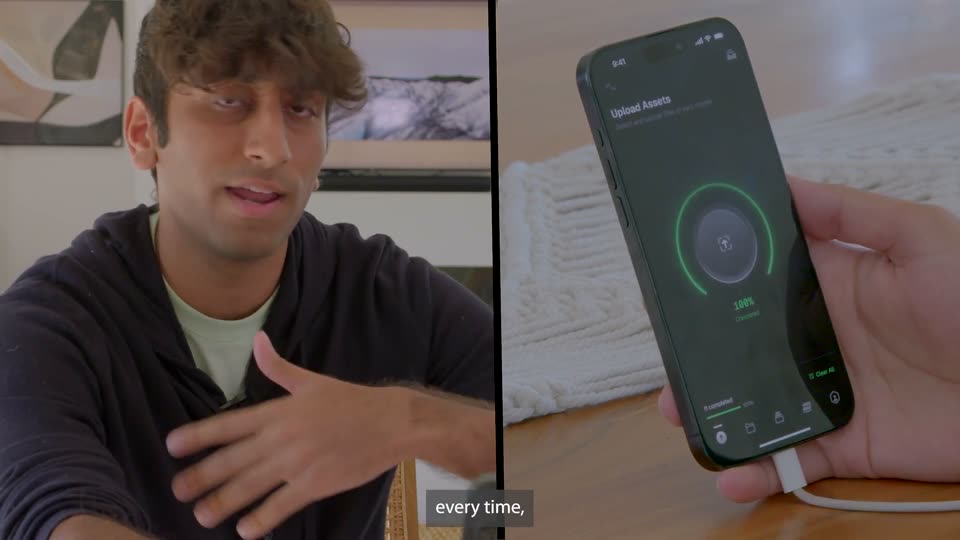
Split screen: a man in a dark hoodie talks on the left while a hand holds a phone on the right. The finger taps the upload circle, opens the photo library, selects pictures, and a green progress ring fills to 100%.
On-screen text: “you exactly how it works.”, “instantly with the Upload Assets page”, “It's one button.”, “We've added some cool animations.”, “go select library.”, “let's go to collections”, “and select 2022 us open.”, “over here”, “We'll select all these hit add”, “and that's basically it all you have to do on your end”
Techniques: Split screen
Camera: Static
Split screen: a man in a dark hoodie talks on the left while a hand holds a phone on the right. The phone shows an uploads list, then a finger taps into a folder revealing a grid of image thumbnails. Subtitles run along the bottom.
On-screen text: “page or all uploads,”, “you'll see that”, “I just put this batch through”, “all the images”, “and videos are right over here.”
Techniques: Split screen
Camera: Static
A man in a navy hoodie sits on a white sofa holding a smartphone, then sets the phone down and reaches for a laptop at the left edge of the frame as he speaks. White subtitles on dark bars run along the bottom of the locked-off shot.
On-screen text: “and videos are right over here.”, “and let's”, “switch over to my computer”, “where I can show you”, “exactly what happens”, “on the enterprise side.”
Camera: Push in
A laptop screen filmed at an angle shows a dark media-search interface. The search bar holds US Open, a spinner loads, then a grid of tennis photo thumbnails fills the page. A hand rests at the lower right edge.
On-screen text: “on the enterprise side.”, “Let's go to US open.”, “So let's say it's open AI or Google”, “that wants to license this content.”, “They can search US open.”, “We'll pop up every image”, “that fits that exact category.”, “So you can see the exact images”, “I just uploaded are already here.”, “Right. So it's very fast.”
Camera: Static
An angled close-up of a laptop screen shows a dark web app with a tennis-stadium photo, a generated caption, keyword list, tags and file info. The cursor moves and the page scrolls to reveal scene attributes; a hand gestures at the right edge. Subtitles run along the bottom.
On-screen text: “you'll see that it's been tagged”, “with keywords, metadata,”, “and a full text”, “detailed tagging as well.”, “So you can search anything”, “in natural language.”, “So if you're OpenAI”, “or Google or Facebook”, “and you want to license”, “this data, you can query it with like perfect accuracy. right? So this was labeled It says a tennis match at Arthur Ashe stadium, A tennis match is being played”
Techniques: Cursor demo
Camera: Static
A MacBook on a wooden table is filmed at an angle, its screen filling the frame with the KLED portal showing a grid of tennis and stadium image thumbnails. The view is static while a white caption line fades in at the bottom.
On-screen text: “over to my phone now,”
Techniques: 3D mockup
Camera: Static
A tilted laptop screen fills the frame, showing a dark web grid of stadium photos. The camera pans right past the screen to a young man in a cap and dark jacket, seated at a desk by a bright window, looking down.
On-screen text: “over to my phone now,”
Camera: Pan
A young man in a navy hoodie sits at a laptop in a bright living room. The shot opens behind the open laptop lid, then cuts to a front medium view as he talks and gestures with his hands. A white subtitle line sits at the bottom of the frame.
On-screen text: “I'll show you how this works.”
Camera: Static
A hand holds a phone over a wooden table beside a white rug; the screen switches from an upload view to a list of asset codes as a finger taps. A laptop edge sits at the right, and a caption runs along the bottom.
On-screen text: “I'll show you how this works.”, “All of the stats are shown as well.”
Camera: Static
A split screen pairs a man in a dark hoodie talking on the left with a close-up of a hand holding a phone on the right. The phone shows the app's upload list, and the finger scrolls the list as the status labels change.
On-screen text: “So it's labeling right now.”, “It's pending sale.”, “It's sold. It's rejected.”, “All of the stats are shown as well.”
Techniques: Split screen
Camera: Static
Split screen: a man in a dark hoodie talks on the left; on the right, a hand holds a phone angled toward the camera, its screen showing the All Uploads list as a thumb scrolls the items.
On-screen text: “all in this uploads page.”, “Once something's been sold,”
Techniques: Split screen
Camera: Static
Split screen: a man in a dark hoodie talks on the left while a hand holds a phone on the right, the app screen switching from an upload list to a payout batch view with a $150,000 ring, then scrolling a list of batches. White subtitles run along the bottom throughout.
On-screen text: “and you'll see the payment”, “almost instantly. Right.”, “So across the history,”, “my account personally,”, “I've made $1,600”, “for uploading around 200GB”, “of images.”, “And this is just a demo account,”, “of course,”, “But most of our users are experiencing that similar rate. If we go to my batches page, you'll see the current one. So to quickly explain this, every couple of 1”
Techniques: Split screen, UI zoom
Camera: Static
Split screen: a man in a dark hoodie talks to camera on the left, while a hand holds a phone on the right showing a dark payout screen with a $350,000 total. Subtitles run along the bottom.
On-screen text: “just $350,000.”, “So we'll be paying out”, “close to $700,000.”, “And we've only been live”
Techniques: Split screen
Camera: Static
Split screen: a man in a dark hoodie talks to camera on the left; on the right a hand holds a phone showing a dark Payout Batches screen with a $350,000 gauge. Subtitles run along the bottom. Near the end the phone screen flips to a batch detail view.
On-screen text: “for six weeks.”, “So the actual size of these batches”, “will increase”, “very exponentially over time.”, “So we're excited to see”, “what this gets to in 2026.”, “well hopefully we'll”, “hit our first billion dollar batch.”, “If we go to the”, “personal page over here,”
Techniques: Split screen
Camera: Static
Split screen: on the left a man in a dark hoodie speaks to camera in a bright room, on the right a hand holds a phone showing a dark stats page with totals, a date and a SOL balance. White subtitles caption his line at the bottom.
On-screen text: “personal page over here,”, “you'll see some cool”, “stats on your account.”
Techniques: Split screen
Camera: Static
A split screen pairs a man in a dark hoodie talking on the left with a hand scrolling an iPhone on the right. The phone shows a dark My Account dashboard with stats, account info and node stats, while white captions explain the upload quota.
On-screen text: “Total uploads, batches,”, “upload quota, currently 200GB.”, “You can upload per account,”, “but you can increase this”, “and nine out of ten times”, “will accept it.”, “And then stats for your account”
Techniques: Split screen
Camera: Static
Split screen: a man in a dark hoodie talks to camera on the left; on the right, a hand holds a phone at an angle over a wooden table, its dark app screen scrolling from a contributions list to a statistics page. Subtitle lines swap along the bottom.
On-screen text: “And then stats for your account”, “as well as well”, “as your contribution.”, “So super simple,”, “very easy to use,”, “very easy to upload.”, “And that's the whole point of it.”, “It's really simple.”, “Again, upload anything,”, “get paid for it.”
Techniques: Split screen
Camera: Static
A man in a navy hoodie sits in a bright living room, a laptop edge in the foreground, and talks to camera while gesturing. A white counter ticks up to 10,000 with the word Users, and a K5 GLOBAL logo fades in at the right as he names investors.
On-screen text: “get paid for it.”, “It should be live in the App Store”, “right now.”, “Please download.”, “We have close”, “10,000”, “Users”, “to 10,000 users so far.”, “but we'll be removing the waitlist”, “completely over time. It's a very successful app, on the infrastructure side, meaning that your uploads are safe, that you're secured and there will be no data.”
Camera: Push in
A bright white logo flares over a dimmed presenter in a dark room, the light burst blooming wide. The flare contracts and the background falls to black, leaving a compact glowing emblem centered on the chest.
Techniques: Light sweep
Camera: Static
The white KLED wordmark and wave symbol sit centered on black, glowing briefly before settling. The tagline UPLOAD CONTENT. GET PAID. types in beneath it, while a small app-store caption fades in at the bottom.
On-screen text: “Download the KLED Mobile App”, “Available on the App Store”, “UPLOAD CONTENT. GET PAID.”
Techniques: Kinetic type
Camera: Static