1:17
Motion Graphics Product Video | Agents Security Platform
Manifold · Nov 2026
InstaBox’s 2:22 launch film runs 42 scenes, about 3.4 s each. The product shows up at 0:23 and 7 features are revealed, with social proof. The call to action lands at 2:09 (91% in), over a voiceover. A talking-head host in a bright beige room alternates with dark, dotted-grid motion graphics that float 3D windows and the glowing machine cube. The video runs problem, product intro, a rapid tour of single-feature beats, proof, and a CTA, with kinetic white type and slow 3D drifts carrying each beat.
Is this your launch? to your site or press kit.
Manifold · Nov 2026
Lucent · B2B · Mar 2026
Bramante · Industrials · May 2025
Films whose music sounds like this one, voice left out
Novella · Modern corporate electronic
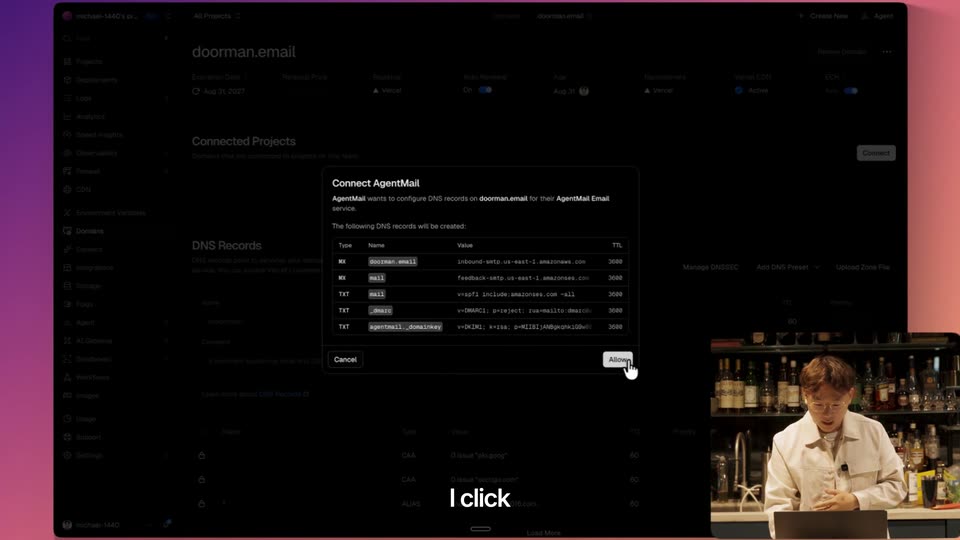
AgentMail · Electronic
A man in a black t-shirt sits at a table and closes a sticker-covered laptop lid, then rests his hand on it. White text 'Your' slides in at the upper right. Static medium shot, soft focus at the start.
On-screen text: “Your”
Camera: Pull out
A man in a black tee talks to camera at a desk with a closed laptop. White type overlays read “Your agents shouldn't stop when you close your laptop,” four X post cards pop in around him, and “Only part of the problem.” appears as he gestures.
On-screen text: “Your”, “agents”, “shouldn't stop”, “when you close your laptop”, “But still, today,”, “millions of people are leaving”, “their laptop lid cracked open”, “to keep their agents running.”, “And keeping your laptop open is”, “Only part of the problem.”
Techniques: Kinetic type
Camera: Push in
Locked-off medium close-up of a man in a black T-shirt speaking and gesturing against a beige wall and plant. Subtitles run along the bottom while white line icons labeled Memory, CPU, Disk space, File system, and Ports appear one by one on the left, each in a glowing box.
On-screen text: “Only part of the problem.”, “Your agents are also competing”, “with all your other work for your laptop's”, “Memory”, “CPU”, “Disk space”, “File system”, “Ports”
Camera: Static
A man in a black shirt speaks in a medium shot on the right, while a vertical column of white line icons with labels (Memory, CPU, Disk space, File system, Ports) sits on the left. The last entry, Ports, fades in at the end of the clip.
On-screen text: “Memory”, “CPU”, “Disk space”, “File system”, “Ports”
Camera: Static
A man in a black t-shirt sits at a wooden table against a beige wall, gesturing as he speaks. White kinetic text builds the phrase across his chest, then a bold InstaBox wordmark and a smaller tagline scale in below it.
On-screen text: “Your agents deserve”, “their own computers”, “Today, we're excited to officially introduce”, “InstaBox”, “Cloud Computers for AI Agents”
Techniques: Kinetic type
Camera: Static
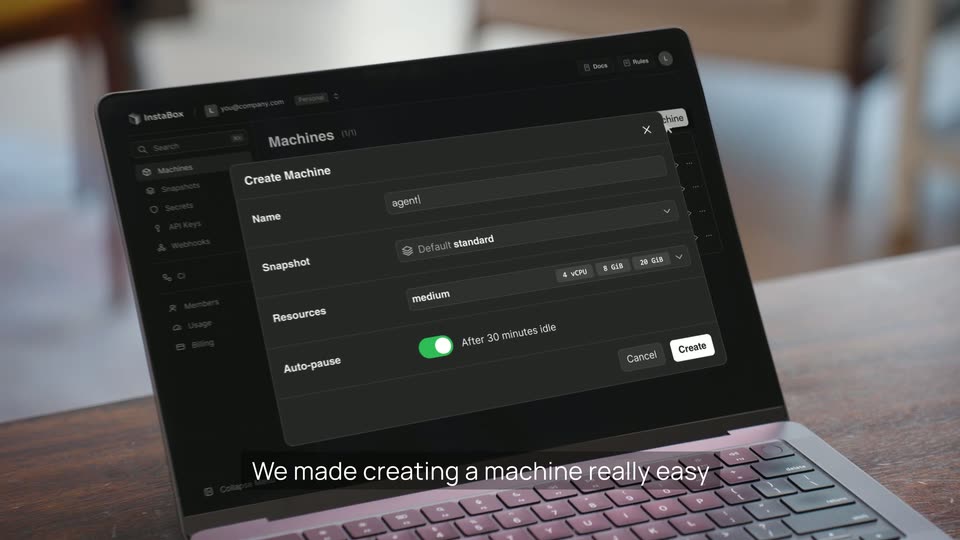
A laptop on a wooden desk, angled in 3D perspective, displays a dark dashboard. A Create Machine dialog opens over the machine list as a cursor appears at the top right. A white caption sits across the bottom.
On-screen text: “We made creating a machine really easy”
Techniques: 3D mockup, Cursor demo
Camera: Push in
A laptop angled on a desk shows the dark dashboard. A cursor sits on the Create button as the Create Machine dialog fades out, revealing the machine list with the new machine running.
On-screen text: “We made creating a machine really easy”
Techniques: 3D mockup
Camera: Static
A laptop on a wooden desk is filmed at a low angle against a blurred room. Its screen shows a dark interface with a terminal on the left and a glowing 3D cube on the right. White subtitles at the bottom carry the voiceover.
On-screen text: “We make creating a machine really easy”, “from our dashboard, API, or CLI.”
Camera: Pan
On a dark dotted grid, a code window card scales up into the center, showing a POST request to the instabox API and a Send button. A caption below reads “from our dashboard, API, or CLI.”
On-screen text: “from our dashboard, API, or CLI.”
Techniques: Kinetic type
Camera: Static
A dark API request card with a POST badge, endpoint URL, JSON body and Send button floats over a dotted grid. A blurred machine dashboard and terminal session slide in behind it as the card drifts, while a bottom caption stays fixed.
On-screen text: “from our dashboard, API, or CLI.”
Techniques: Parallax, Speed ramp
Camera: Push in
A macOS terminal window on a dotted dark background scrolls through SSH output, then the claude command is typed and the Claude Code banner with a red pixel invader logo appears. The framing slowly zooms in on the prompt. White subtitle captions read along at the bottom.
On-screen text: “from our dashboard, API, or CLI.”, “From there, you can immediately start”, “agent sessions from the terminal,”
Techniques: UI zoom
Camera: Push in
A dark terminal window with a red pixel alien icon and changelog text settles into the center of a dotted black background, scaling up slightly. A white caption pill at the bottom reads agent sessions from the terminal.
On-screen text: “agent sessions from the terminal,”
Camera: Static
A flat dark terminal window with the red Claude logo and changelog text slides down over a dotted grid, revealing a man in a black shirt speaking behind it. A white caption stays fixed at the bottom.
On-screen text: “or hook InstaBox up to any app”
Camera: Pan
A man in a black tee talks to camera in a bright room. On the left, a frosted-glass InstaBox header and five app rows (T3 Code, Orca, Herd, Claude Desktop, ChatGPT Desktop) slide up into place, each with a green status dot. White subtitles sit at the bottom.
On-screen text: “or hook InstaBox up to any app”, “that supports remote SSH connections.”
Camera: Static
A man in a black shirt sits on the right against a soft interior background. On the left, a translucent diagram shows an InstaBox header linked to five app rows, each with an icon and a green dot. The whole frame fades to dark while the bottom caption stays lit.
On-screen text: “that supports remote SSH connections.”
Camera: Static
A 3D browser window holding a dark cube with a glowing edge slides left and right across a dotted dark backdrop. Around it, abstract icons and language logos, Python, Go, R, JavaScript, GitHub, Docker, Git and Chrome, pop in one by one.
On-screen text: “Each InstaBox machine comes with”, “agents, languages, and tools preinstalled”
Techniques: 3D mockup
Camera: Pan
A 3D window labeled box-1 holds a dark cube with a glowing edge, ringed by floating tech logos that fade out. The camera then zooms into a larger terminal window behind it as box-1 slides away, and a command types itself into the input field.
On-screen text: “agents, languages, and tools preinstalled”, “so you can start using it right away.”
Techniques: 3D mockup, UI zoom, Cursor demo
Camera: Push in
A dark terminal prompt box with the typed command fix the failing analytics test sits low in the frame, then slides further down and blurs out of focus as the caption below switches lines. The camera stays locked off on the near-black background with a faint dotted grid at the bottom.
On-screen text: “Kick off a prompt,”, “and now your agents are running in the cloud.”
Techniques: Kinetic type
Camera: Static
Three rounded status cards labeled box-1, box-2, box-3 hover in a 3D void over a glowing white wave line. The center card's timer counts up as it drifts upward and exits, while the side cards stay put. A caption runs along the bottom.
On-screen text: “and now your agents are running in the cloud.”
Techniques: 3D mockup
Camera: Static
A closed sticker-covered laptop lies on a wooden desk beside clasped hands and a smartwatch. Three translucent agent cards float above it in 3D as the camera eases in, then rushes out in a blur. Caption: “Close your laptop and let them keep going.”
On-screen text: “Close your laptop and let them keep going.”
Techniques: 3D mockup, Speed ramp
Camera: Push in
A dark terminal on a dotted-grid background starts blurred, then locks onto the prompt line as 'open my browser and go to google' is typed above a yellow 'auto mode on' status line. Caption 'Your agents get a full desktop' sits at the bottom.
On-screen text: “Your agents get a full desktop”
Techniques: UI zoom, Speed ramp
Camera: Static
A dark terminal window on a dotted grid background scrolls upward, revealing a pink Embellishing line and a fresh prompt with a block cursor. A white caption at the bottom changes from Your agents get a full desktop to and browser in each box.
On-screen text: “Your agents get a full desktop”, “and browser in each box,”
Camera: Static
A dark terminal window runs Claude Code, its output lines appearing one after another as it launches a browser to Google, beside a static file manager panel. White subtitles at the bottom swap through three caption lines.
On-screen text: “and browser in each box,”, “with computer use built-in,”, “no additional setup needed.”
Camera: Pull out
A dotted dark grid holds a tilted 3D laptop mockup showing a terminal beside a Google browser window. The frame pulls from a soft blur into sharp focus as a white caption rests at the bottom.
On-screen text: “no additional setup needed.”
Techniques: 3D mockup
Camera: Pull out
A glowing Agent tile sits on a dark dotted grid. Four step tiles, Prompt, Execute, Verify, Complete, fade in below as connector lines draw out, small light dots travel along them, then a white rounded frame traces around the whole diagram.
On-screen text: “Agents now need to see work through end to end.”, “But most software still lives on the desktop,”
Techniques: Particles
Camera: Pull out
A dark window mockup holds a flowchart: a glowing Agent node branches to Prompt, Execute, Verify, and Complete tiles, with lines dropping to Linux, Apple, Windows, and Android logos. A light streak crosses the window, then a purple 3D app-grid panel slides up from the bottom.
On-screen text: “so we're bringing InstaBox to every major OS:”, “Linux, Mac, Windows, and Android.”
Techniques: Light sweep, 3D mockup
Camera: Pull out
A flat Linux desktop, purple gradient wallpaper with a geometric deer and a left dock of app icons, reframes from a tight crop to a full rounded window with a drop shadow on a dark dotted background. A caption box holds the OS list at the bottom.
On-screen text: “Linux, Mac, Windows, and Android.”
Techniques: UI zoom
Camera: Pan
A desktop with a wavy red, orange and purple wallpaper and a bottom dock of app icons fills the frame, the view tightening slightly as the top bar changes. A white caption sits centered at the bottom.
On-screen text: “Linux, Mac, Windows, and Android.”
Techniques: UI zoom
Camera: Pan
A dark dotted backdrop holds stacked OS screens: a macOS desktop slides up and out while a Windows desktop fills the frame and an Android phone screen rises from the bottom center. A white caption sits fixed at the bottom.
On-screen text: “Linux, Mac, Windows, and Android.”
Techniques: Parallax
Camera: Pan
A Windows desktop with a blue flower wallpaper and taskbar fills the frame. A smartphone home screen with a grid of app icons scales up and fades in at the center. A white caption reads across the bottom.
On-screen text: “Linux, Mac, Windows, and Android.”
Camera: Static
A phone home screen with app icons sits centered over a Windows 11 desktop. The phone slides downward with motion blur while the desktop switches to a macOS view, all against a dark dotted backdrop. A white caption line stays fixed at the bottom.
On-screen text: “Once you've set up one computer,”
Camera: Static
The view pulls back from a close-up of a code review window to a wider macOS desktop, where a second debugging window sits to the right and the dock plus a third window appear along the bottom.
On-screen text: “Once you've set up one computer,”, “you can copy it in seconds.”
Techniques: UI zoom
Camera: Pull out
Labeled macOS windows for agents 01 to 09 float in 3D space around a central desktop, each showing a task such as code review or debugging, and drift apart as the view pulls back. A caption bar sits at the bottom.
On-screen text: “Give different agents separate machines”
Techniques: 3D mockup, Parallax
Camera: Push in
Floating interface windows, a preview app, a code terminal, and a database client, drift past the camera in 3D perspective over a macOS desktop. They blur with speed as the view pans, ending on a centered database window.
On-screen text: “to work on different tasks.”
Techniques: 3D mockup, Parallax
Camera: Push in
On a dark dotted grid, a glowing hexagon with a star icon anchors a network of six labeled circular icons that pop in with connecting lines. Small sub-nodes branch out from each icon, then the camera zooms in and pans across the diagram.
On-screen text: “Anything that requires compute,”, “your agents can simply spin up”, “an InstaBox machine and run it there.”, “Subagents, dev servers,”, “test suites, builds.”
Camera: Pull out
A white line-art network diagram on a dark dot-grid background: circular node icons with server glyphs connect in rows, labeled TEST_RunB, TEST_RunA, Build Agents. The frame slowly pushes in as the caption test suites, builds. sits at the bottom.
On-screen text: “test suites, builds.”
Camera: Static
A dark CI dashboard floats in 3D perspective over a dotted grid, then tilts flat and zooms into a job list as the panel sharpens. The shot cuts to a man in a black shirt speaking against a dark backdrop, a small logo in the corner.
On-screen text: “You can even move your team's CI to InstaBox.”
Techniques: 3D mockup, UI zoom
Camera: Pan
A man in a black sweatshirt with a small white logo speaks to camera in a bright room, a leafy plant and pale wall behind him. He gestures with his hands as a white subtitle sits on a dark bar along the bottom of the frame.
On-screen text: “We launched in beta less than a month ago.”
Camera: Static
A man in a black tee sits at a desk with a laptop, talking to camera. A dark line-chart card slides in at right while a large white counter rolls to 1,000,000 at left, labeled InstaBox VMs; both shrink away as he keeps talking.
On-screen text: “We launched in beta less than a month ago.”, “Since then, developers and their agents”, “have created over a million InstaBox VMs.”, “over”, “1,000,000”, “InstaBox VMs”, “And today, we're coming out of beta”, “and opening InstaBox to everyone.”
Techniques: Kinetic type
Camera: Push in
A man in a black t-shirt sits at a table, then stands and walks toward the camera in a bright room with a potted plant and wall shelves. White subtitles sit on a dark bar at the bottom. The final shot loses focus and blurs.
On-screen text: “and opening InstaBox to everyone.”, “Close your laptop.”, “Give your agents their own computers,”, “and get started with InstaBox today.”
Camera: Pull out
A defocused shot of a person in a black shirt standing in a bright room with plants. A white line-cube logo and the wordmark InstaBox fade in centered over the figure, then a smaller tagline fades in beneath.
On-screen text: “InstaBox”, “Cloud Computers for AI Agents”
Camera: Static
A white InstaBox logo and wordmark hold center on a dark dotted background, with the tagline below. The whole lockup drifts slowly up and left as the tagline settles into alignment.
On-screen text: “InstaBox”, “Cloud Computers for AI Agents”
Camera: Static