0:31
Taha - a product this good deserved a launch video that matched it. so we b
Migma AI · Aug 2026
HyperFrames · Nov 2026 · 0:22 · AI-annotated
HyperFrames’s 0:22 launch film runs 15 scenes, about 1.5 s each. The product shows up at 0:02 and 1 feature is revealed. There is no explicit call to action; a voiceover carries the film. The video bookends a single feature demo with a glowing star transition and a brand logo card, framing the HyperFrames interface and its Stream clips workflow inside a hand-painted tropical sunset. Pacing is quick and bouncy at around 118 bpm, layering flat UI mockups and phone clip cards with chunky gradient headlines that pop in over the illustrated palms.
Is this your launch? to your site or press kit.
Migma AI · Aug 2026
Nautilo (by AgentSea) · Sep 2026
Films whose music sounds like this one, voice left out
Family · Upbeat electronic dance music
Apple · Modern funk/disco-inspired dance-pop
DeepReach Inc. · Upbeat commercial electronic
Six star icons sit centered on a dark background. They brighten into a glowing row, colored from warm yellow on the left to purple on the right, on a locked-off frame.
Camera: Static
A cream five-pointed star forms at center on a near-black field as a horizontal light streak blurs across it. A magenta glow blooms behind the star and a small window screenshot fades in at its core.
Techniques: Light sweep
Camera: Push in
A flat interface window floats at the center of a painted tropical sunset. Foreground monstera and palm leaves in pink, teal and green slide outward, parting to reveal the sun, the water and a standing heron as the view widens.
Techniques: Parallax
Camera: Push in
A stylized painted sunset beach with palm trees on both sides frames a tilted 3D browser window showing the HyperFrames interface. The camera pushes toward the window as it scales up and the palms slide outward.
Techniques: 3D mockup, Parallax
Camera: Push in
The HyperFrames app window floats in 3D over a tropical sunset backdrop of palm trees and monstera leaves. The camera pushes in on the interface, flattening the perspective as the red headline slides out of frame left.
On-screen text: “Make something.”
Techniques: 3D mockup, UI zoom
Camera: Push in
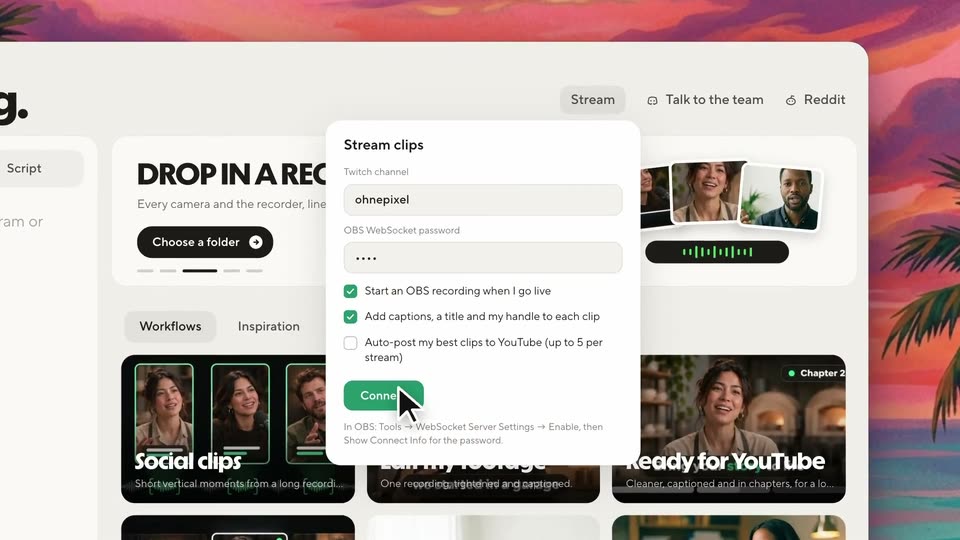
A cursor taps the Stream button on a white dashboard panel set against a sunset backdrop, opening a Stream clips menu with channel and password fields. The cursor then slides down to hover the green Connect button.
Techniques: Cursor demo
Camera: Push in
A product interface card fills the frame over a sunset backdrop, then zooms in past its headline and a row of video thumbnails. The view cuts to a live stream layout: gameplay footage on the left and a scrolling chat panel on the right.
Techniques: UI zoom
Camera: Push in
A streaming interface shows Grand Theft Auto VI gameplay with a character on a mobility scooter, a streamer webcam at lower left, and a live chat column scrolling on the right. A LIVE badge and chat lines slide into place.
Camera: Push in
A locked-off stream view shows a woman on a pink scooter driving down a suburban GTA V street, with a webcam of the streamer in the lower left. A red LIVE badge slides into the top left corner while the chat panel on the right scrolls upward.
Camera: Push in
An illustrated tropical sunset with palm trees frames a vertical phone window showing a streamer's facecam above GTA 6 gameplay of a rider on a pink scooter. A magenta banner and green caption pop in over the phone as the background water shifts color.
On-screen text: “THE SLOWEST GETAWAY IN GTA 6 HISTORY”, “JACKPOT!”
Techniques: Split screen
Camera: Pull out
A phone mockup centered on a sunset palm backdrop shows a stream clip with a pink caption banner. It duplicates into three tilted mockups, a gradient headline pops in above, and the trio slides right to reveal the app's dark clip-list UI on the left.
On-screen text: “YOUR STREAM, CLIPPED.”
Techniques: 3D mockup
Camera: Static
An illustrated sunset with palm trees frames a flat landscape live-stream player on the left and a fanned stack of three vertical clip cards on the right. The headline sits above. Chat lines pop into the player while the card fan eases into place.
On-screen text: “WHILE YOU PLAY.”
Techniques: 3D mockup
Camera: Static
On a painted sunset, a live stream window and a Stream clips panel sit side by side while the headline swaps from “WHILE YOU PLAY.” to “AND POSTED TO YOUTUBE BEFORE YOU LOG OFF.”, then it cuts to the full stream with a chat column.
On-screen text: “WHILE YOU PLAY.”, “AND POSTED TO YOUTUBE BEFORE YOU LOG OFF.”
Techniques: Kinetic type, UI zoom
Camera: Pull out
A 3D iridescent star with a tropical leaf pattern spins and shrinks on a dark background, collapsing into a glowing magenta ring that resolves into the HeyGen logo with the HyperFrames wordmark fading in below.
On-screen text: “HeyGen”, “HyperFrames”
Techniques: Morph
Camera: Pull out
On a near-black background, the HeyGen HyperFrames wordmark and a two-shape green logo mark hold a locked-off center frame. A pink neon glow on the type fades out, leaving flat white text and a crisp teal-green mark.
On-screen text: “HeyGen”, “HyperFrames”
Camera: Static