
1:48
Explore
00:00:00 / 02:17:01
- Length
- 2:17
- Scenes
- 27 · 5.1 s avg
- Product on screen
- 0:00
- Voiceover
- Yes
- Views
- 1.3M on YouTube
as of November 20, 2026
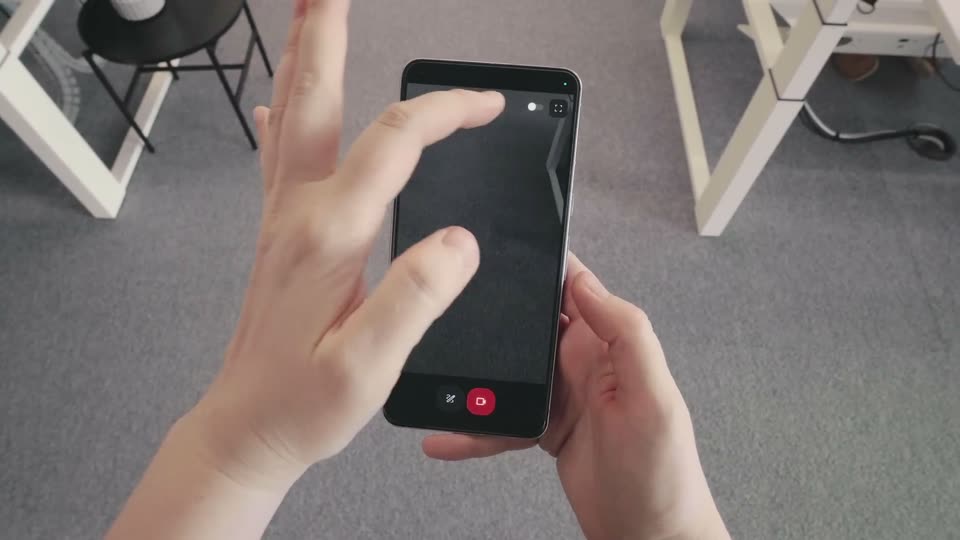
Gemini’s 2:17 launch film runs 27 scenes, about 5.1 s each. The product is on screen from the first frame. There is no explicit call to action; a voiceover carries the film. The video is one continuous first-person take: a black title card, then a handheld walk through an office where a phone assistant answers a rapid chain of visual questions, closing on a gradient star logo. Its signature moves are the phone screen mirroring the real world, small caption pills carrying the dialogue at the bottom, and a floating dot marking the assistant's focus.
Footage neededEstimated needs: 1 official logo — reused across the film · 25 filmed passages — shoot, supply or replace
Is this your launch? to your site or press kit.
More like this

2:50

Introducing Gemini's speech-to-speech translation capabilities
Google · AI · Dec 2025
0:30
Surrender To The Feel With Immersive Audio | Bose
Bose QuietComfort Ultra · Nov 2023
Project Astra: Our vision for the future of AI assistants, scene by scene
· 27 scenes as text
01 · Product intro · 0:00–0:06
On a black background, a centered two-line white caption fades in, then a third line fades in beneath it. The text holds for a beat, then the whole block fades to black. The frame is locked off throughout.
On-screen text: “This is a two-part demo of Project Astra, Google DeepMind's”, “vision for the future of AI assistants.”, “Each part was captured in a single take, in real time.”
Camera: Static
02 · Product intro · 0:06–0:07
A black frame holds a small gray caption, then cuts to a dim overhead view of two hands holding a smartphone with a dark screen and a red button at the bottom.
On-screen text: “This is a two-part demo of Project Astra, Google DeepMind's”, “vision for the future of Al assistants.”, “Each part was captured in a single take, in real time.”
Camera: Static
03 · Demo · 0:07–0:10
Two hands hold a smartphone over a gray office floor, the screen showing a camera app with a dark viewfinder and red shutter button. Near the end, the left index finger taps the flash icon at the top right. A small caption reads Prototype shown.
On-screen text: “Prototype shown”
Camera: Static
04 · Demo · 0:10–0:17
A pair of hands holds a smartphone in an office, panning the live camera view across desks, monitors and a seated person. Subtitle captions appear at the bottom as the user asks the app to find something that makes sound.
On-screen text: “User: Tell me when you see something that makes sound.”, “Gemini: I see a speaker, which makes sound.”
Camera: Pull out
05 · Demo · 0:17–0:17
First-person hands hold a smartphone in a sunlit office; its screen shows a desk photo with a row of color dots, while monitors and a seated person fill the blurred background. A dark caption pill at the bottom carries the Gemini line as the handheld camera drifts.
On-screen text: “Gemini: I see a speaker, which makes sound.”
Camera: Push in
06 · Demo · 0:17–0:28
Hands hold a phone over an office desk; the viewfinder frames a white speaker. The shot tightens as a finger taps the screen and draws a red arrow at the tweeter. Chat bubbles and bottom subtitles carry the AI's answer as the viewfinder zooms in.
On-screen text: “Gemini: I see a speaker, which makes sound.”, “User: What is that part of the speaker called?”, “Gemini: That is the tweeter.”, “It produces high-frequency sounds.”
Camera: Push in
07 · Demo · 0:28–0:42
First-person POV of hands holding a smartphone, aiming the camera at a striped cup of colored pencils on an office desk. The screen shows a live view with user and Gemini chat bubbles appearing. A colleague types on a laptop in the background.
On-screen text: “It produces high-frequency sounds.”, “User: Give me a creative alliteration about these.”, “Gemini: Creative crayons color cheerfully.”, “They certainly craft colorful creations.”
Camera: Push in
08 · Demo · 0:42–0:44
First-person view of a hand holding a smartphone in a bright office. The phone pans from a striped cup of colored pencils on the desk to a colleague working at a laptop, and the screen shows live captions describing each subject.
Camera: Pan
09 · Demo · 0:44–0:47
First-person hands hold a phone showing a video call with a small picture-in-picture window, then turn it toward a seated colleague at a desk with a laptop and sticky notes. A caption appears at the bottom of the frame.
On-screen text: “User: What does that part of the code do?”
Camera: Push in
10 · Demo · 0:47–0:49
First-person view of two hands holding a smartphone above a desk cluttered with a monitor, laptop and framed photo. The phone screen shows lines of code and a chat prompt that then updates to a longer code view. A caption sits at the bottom edge.
On-screen text: “User: What does that part of the code do?”
Camera: Pan
11 · Demo · 0:49–1:03
A person holds a smartphone in both hands over a desk, its screen showing a Python file and an AI chat thread that updates as the assistant explains the code. A laptop and a code-filled monitor sit in the background. Subtitles at the bottom quote the explanation.
On-screen text: “Gemini: This code defines encryption and decryption functions.”, “It seems to use AES-CBC encryption to encode and decode data”, “based on a key and an initialization vector (IV).”
Camera: Pull out
12 · Demo · 1:03–1:06
First-person view: two hands hold a phone showing a live camera feed of the desk with an info panel along the bottom. The camera pans right past a laptop and monitor to center the phone, while a person keeps typing on the left.
On-screen text: “based on a key and an initialization vector (IV).”
Camera: Push in
13 · Demo · 1:06–1:09
Hands hold a smartphone showing a camera app with a code snippet overlay, then pan the device toward a window to reveal a city skyline. A caption bar appears at the bottom.
On-screen text: “User: What neighborhood do you think I'm in?”
Camera: Pan
14 · Demo · 1:09–1:11
A pair of hands holds a smartphone in front of a window, its screen mirroring the city rooftops outside with an AI assistant panel docked at the bottom. The phone tilts gently as the hands adjust. A caption at the bottom poses the user's question.
On-screen text: “User: What neighborhood do you think I'm in?”
Camera: Pull out
15 · Demo · 1:11–1:16
Hands hold a phone steady at a window, its screen mirroring the rooftop view behind it. A chat answer appears on the screen while a caption at the bottom names the neighborhood.
On-screen text: “Gemini: This appears to be the King's Cross area of London.”, “It is known for its railway station and transportation connections.”
Camera: Static
16 · Demo · 1:16–1:20
A pair of hands holds a smartphone to a window, its screen mirroring the rooftops outside with an AI caption. The hands tilt the phone downward and the camera pans left, ending on the room interior and a closet.
On-screen text: “It is known for its railway station and transportation connections.”
Camera: Push in
17 · Demo · 1:20–1:30
First-person view of two hands holding a smartphone while walking through a bright office. The phone screen shows a live camera feed of the room with chat bubbles, and dark caption pills at the bottom carry the dialogue about the missing glasses.
On-screen text: “User: Do you remember where you saw my glasses?”, “Gemini: Yes, I do.”, “Your glasses were on the desk near a red apple.”
Camera: Pan
18 · Demo · 1:30–1:32
A first-person view shows two hands holding a smartphone whose screen displays a live camera feed of an office. A finger taps the screen, then the hands rotate the phone to pan across a white desk holding an apple, glasses and sticky notes.
Camera: Push in
19 · Demo · 1:32–1:33
A hand sets a light blue phone face-down on a brown paper bag on a white desk, then lifts a pair of black glasses into the left of the frame. The desk holds an apple, green sticky notes, a photo frame and a pen cup.
On-screen text: “F”, “2”
Camera: Pan
20 · Demo · 1:33–1:34
A tilted top-down shot of a white desk with a tablet, apple, phone and pen holder cuts to a dim wide view of an open office filled with desks and monitors.
Camera: Pull out
21 · Demo · 1:34–1:37
A wide office shot pans right past desks, monitors, and ceiling light strips while a person works at a workstation. A small picture-in-picture call window in the lower right shows a person with glasses. The pan ends on a sticky-note partition and whiteboard.
Techniques: Split screen
Camera: Pan
22 · Demo · 1:37–1:50
The camera glides from a busy office toward a whiteboard holding a hand-drawn latency diagram of a load balancer, servers and database. A hand marks a red arrow at the database, then a white caption explains adding a cache between server and database.
On-screen text: “Adding a cache between the server and database could improve speed.”
Camera: Push in
23 · Demo · 1:50–2:00
Two blue marker cat doodles on a whiteboard, one with red X eyes. Hands place a cardboard box with a question mark between them, hold it, then lift it away. Captions below change from a caching tip to 'Schrödinger's cat.'
On-screen text: “Adding a cache between the server and database could improve speed.”, “Schrödinger's cat.”
Techniques: Kinetic type
Camera: Pull out
24 · Demo · 2:00–2:01
A whiteboard with blue marker cat sketches fills the frame, the caption “Schrödinger's cat.” centered with a small lavender dot below. A hand holds plush tabby cats along the bottom edge. The camera pans right to reveal an office wall covered in sticky notes.
On-screen text: “Schrödinger's cat.”
Camera: Push in
25 · Demo · 2:01–2:03
First-person handheld shot in an office: the view swings from a photo-pinned cubicle wall to a colleague at a desk, a plush cat and dog held in the foreground, a small blue icon floating at center. White captions “Schrödinger's cat.” then “19” scale in at the bottom.
On-screen text: “Schrödinger's cat.”, “19”
Techniques: Kinetic type
Camera: Pull out
26 · Demo · 2:03–2:12
Handheld first-person view in an office: hands hold a striped plush tiger to a golden retriever, which licks it while a hand strokes its head. The dog sprints off with the toy down the aisle and the frame fades to black.
On-screen text: “Golden Stripes.”, “Prototype shown”
Camera: Pull out
27 · Outro · 2:12–2:17
On a black background, a small glowing point expands into a four-pointed star with a blue and purple gradient. The star holds center with a soft glow, then fades to black.
Camera: Static