1:07

Introducing ElevenAgents Architect
ElevenLabs · AI · Oct 2026
Grep AI · Oct 2026 · 1:32 · Full motion · AI-annotated
Grep AI’s 1:32 launch film runs 25 scenes, about 3.7 s each. The product shows up at 0:09 and 6 features are revealed. The call to action lands at 1:24 (92% in), over a voiceover. The video alternates centered indigo caption cards with flat UI mockups and diagrammatic workflow cards, each beat timed to one voiceover phrase on a steady 96 bpm pulse. Motion stays restrained: crossfades, slide-ins, count-up charts and a multiplying dot grid, with a single glitch accent on the closing wordmark.
Is this your launch? to your site or press kit.
ElevenLabs · AI · Oct 2026
ElevenLabs · AI · Nov 2026
Figma · Design · Nov 2025
Films whose music sounds like this one, voice left out
Agent Tincan · Electronic dance music, hip-hop
Google · Electronic, Funk, Country-Pop, Rock, Metalcore, Pop
Canva · Electronic Dance Music (EDM), with a chiptune segment
Bold indigo phrases fade in and out one by one in the center of a pale lavender field, timed to the voiceover. A faint mirror reflection sits beneath some lines, and small gray dots drift in the background.
On-screen text: “Running an agent once”, “is easy.”, “Trusting an agent”, “to run high-stakes work”, “thousands of times”, “without getting it wrong”, “is”, “still”, “hard.”
Techniques: Kinetic type
Camera: Static
On a pale lavender field with faint drifting dots, the purple word hard. scales and fades out as the gray monospace wordmark GREP AI holds centered, ending with a small cursor after the I.
On-screen text: “hard.”, “GREP AI”
Techniques: Kinetic type, Particles
Camera: Static
A black GREP AI wordmark holds center on a pale background, then fades as the lavender tagline The agent workforce slides into place. The frame stays locked off throughout.
On-screen text: “GREP AI”, “The agent workforce”
Techniques: Kinetic type
Camera: Static
Bold indigo phrases appear one at a time in the center of a pale field with faint drifting dots. The first phrase slides in, then each holds for about a second before the next replaces it.
On-screen text: “The agent workforce”, “that scales”, “high volume work”, “you can't afford”, “to get wrong.”
Techniques: Kinetic type, Particles
Camera: Static
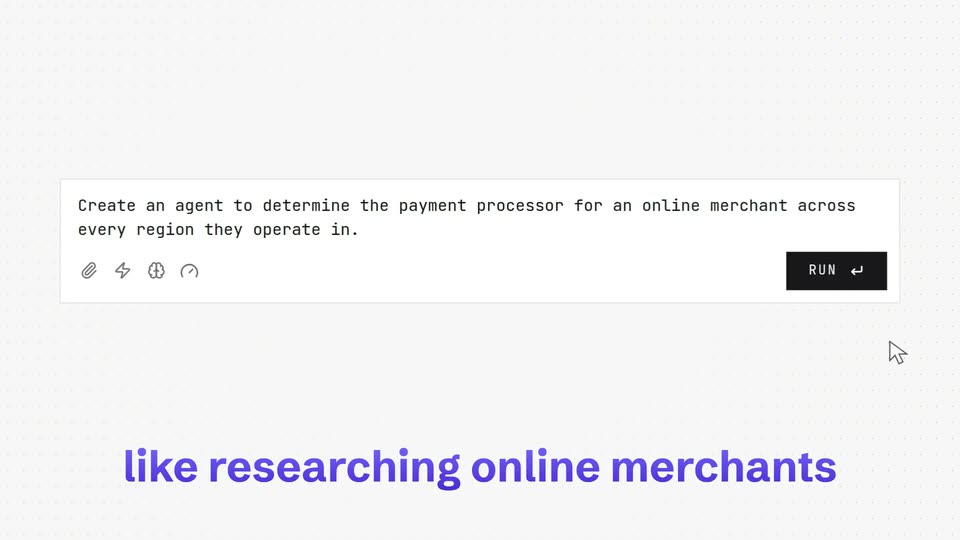
A white prompt bar on a dotted gray background types out a request to create an agent while a purple caption below crossfades through phrases. A cursor then clicks the black RUN button, and the view fades into a two-panel research interface.
On-screen text: “Just describe the job”, “you need to get done”, “like researching online merchants”
Techniques: Kinetic type, Cursor demo
Camera: Push in
On a dotted off-white field, a left list of source cards ticks off, a center Deep research card updates its caption, and a right agent card fills its Skills, Tools and Context rows. A large purple headline builds phrase by phrase along the bottom.
On-screen text: “Grep uses deep research”, “and a library of skills”, “and data integrations”
Techniques: Kinetic type
Camera: Pull out
A white interface card detailing an agent's skills and tools sits on a light dotted background. A cursor hovers over the run button while large blue text at the bottom reads to create an expert agent.
On-screen text: “and data integrations”, “to create an expert agent”
Techniques: Kinetic type, Cursor demo
Camera: Static
A flat form interface on a dotted grid fills in as a cursor types values and clicks the purple RUN button. The form then fades to a faint Researching Cubitts line while the bottom caption crossfades to the next phrase.
On-screen text: “to create an expert agent”, “read to test in minutes”
Techniques: Cursor demo
Camera: Static
A vertical agent activity list builds row by row on a light dotted grid, each entry with an icon and status line. A browser card slides in, then the view zooms into the opened cubitts.com product page. Purple captions swap at the bottom.
On-screen text: “read to test in minutes”, “The first time the agent runs”, “it uses an agentic loop”, “autonomously navigating”
Techniques: Cursor demo, UI zoom
Camera: Push in
A browser window on a dotted grid background shows the Cubitts product page for Moreland glasses. The page scrolls down past the tortoiseshell frame image and the detail rows, while a purple caption sits at the bottom.
On-screen text: “autonomously navigating”
Camera: Static
A browser window on a white dotted background displays a shopping cart. The page transitions to a checkout form as a purple caption appears at the bottom.
On-screen text: “to the checkout page”
Camera: Static
A flat checkout page of a glasses shop sits on a dotted background. A purple shop button and a black Pay button fill the express checkout field. A purple caption at the bottom swaps lines while a small label updates at the top right.
On-screen text: “on the merchant's website”, “Open the checkout”, “Observed: Shop Pay - Google Pay”, “trying different payment options”
Camera: Static
On a dotted grid, four white cards form a loop, arrows draw between them in sequence, and lock icons appear as steps lock. The center label swaps through workflow states while large purple captions phrase the voiceover at the bottom.
On-screen text: “With every run it learns”, “how to do the task more accurately”, “creating a workflow as it goes”, “Gradually moving repetitive steps”, “into code”
Techniques: Kinetic type
Camera: Static
A four-card workflow diagram cycles through states, inserting a 'Reason through the block' card and updating the top-left card to 'Inspect regional checkout' as the center caption reaches 'Workflow v2 validated'. Below, the purple caption 'While learning from edge cases and errors' gives way to a cost bar chart.
On-screen text: “The normal path stops.”, “A region redirect blocks checkout.”, “While learning from edge cases”, “Intelligence takes over.”, “Same case. Same evidence standards.”, “and errors”, “Case solved”, “Evidence collection saved”, “Workflow v2 validated”, “Ready for the next batch.”
Techniques: Kinetic type, Morph
Camera: Push in
Gray bars fall in sequence as a blue line traces the descent, while a stats card counts cost from $4.04 down to ~$0.50 and accuracy up to 99%. Blue caption lines appear in sequence below, then the cards fade into the Merchant Processor Research screen.
On-screen text: “The more the agent runs”, “the more efficient it becomes”, “cutting costs by up to 90%”, “without any loss in accuracy”
Techniques: Kinetic type
Camera: Static
A white card showing a workflow diagram of connected nodes sits centered on a dotted grid, then multiplies into three side-by-side cards highlighting different steps. The large bottom headline crossfades to the new line.
On-screen text: “without any loss in accuracy”, “So you can run the agent 100 times”
Techniques: Split screen
Camera: Pull out
A grid of tiny flowchart cards labeled Merchant Processor Research collapses into plain indigo squares on a dotted off-white background. The indigo headline at the bottom stays fixed while the cards shrink into the abstract square pattern.
On-screen text: “So you can run the agent 100 times”
Techniques: Morph
Camera: Pull out
A grid of indigo squares on a pale background multiplies and shrinks, filling the frame as the caption escalates from 100 to 100,000 times. The squares condense into a fine dot mesh, and the final line fades out.
On-screen text: “So you can run the agent 100 times”, “a 1,000 times”, “or even 100,000 times”, “with confidence”
Camera: Pull out
A job history table fills the frame as blue horizontal bars wipe away to reveal the full list of rows and status badges. Large purple text reads across the screen, the center line clearing as the bottom line extends.
On-screen text: “with confidence”, “and every output”, “is ready to drive a decision”
Techniques: Kinetic type, Masking
Camera: Pull out
A white report panel for Cubitts · Germany rests on a dotted grid, listing two sections of body copy, while a large indigo line of text anchors the lower third. The panel drifts down a few pixels and holds.
On-screen text: “is ready to drive a decision”
Camera: Static
A white activity panel sits on a light dotted background, listing two tool data source entries with a JSON response block. Below it, a large purple headline reads 'with a complete audit log'. The shot is locked-off.
On-screen text: “with a complete audit log”
Camera: Static
A two-panel product interface sits on a dotted grid: a research report on the left and a JSON tool-output panel on the right, both locked still. A large indigo caption fades in across the bottom edge.
On-screen text: “citations, and all the files included”
Camera: Static
The report and checkout panels crossfade into a full-width files list showing report.html, a JSON file and a CSV. A large purple caption reading citations, and all the files included sits at the bottom and fades out.
On-screen text: “citations, and all the files included”
Camera: Static
On a pale background, purple phrases cycle through the center: 'Are you ready to scale' gives way to 'your work', 'your team' and 'your agents', each sliding up as the previous fades, then the light GREP.AI wordmark appears.
On-screen text: “Are you ready to scale”, “your work”, “your team”, “your agents”, “GREP.AI”
Techniques: Kinetic type
Camera: Static
Bold purple GREP.AI lettering holds center on a near-white field, locked off. A faint offset echo of the type flicks to the lower right, a brief glitch, then the wordmark settles solid and stays.
On-screen text: “GREP.AI”
Camera: Static