1:13
StoreTrack – Simplify Store Discovery & Location Management
StoreTrack · Jun 2026
StoreTrack · Nov 2024 · 1:13 · AI-annotated
studio Zelios
The video alternates flat pale lavender and electric blue fields with 3D tilted app mockups, cutting on a steady 96 BPM pulse with word by word headline builds. Signature moves are the two pin logo scaling in, 3D camera pushes on UI windows, and blue accent words popping into headlines.
StoreTrack · Jun 2026
Notion · Productivity · May 2025
Eccasion · Nov 2026
Rounded chat bubbles in blue, navy, and white tilt into frame one after another on a pale lavender background, carrying customer questions about finding a store. The camera pushes in to a close-up of the crowded bubbles.
On-screen text: “Where is your store?”, “I can't seem to find you ...”, “How can I find you?”, “Why is finding your store ...”, “How do I get to your store easily?”, “Outdated map”, “Where exactly are you ...”, “Is there an easier way to ...”, “Where can I find your nearest ...”, “Why is it so hard to locate ...”
Techniques: Kinetic type
Camera: Push in
Navy and blue chat bubbles slide off a pale lavender field, leaving a centered headline that assembles word by word.
On-screen text: “Then It's time for a change”
Techniques: Kinetic type
Camera: Static
On a pale lavender field, a centered line of dark blue sans-serif text slides into place, reading 'Then It's time for a change' with the final phrase set bold, then holds still.
On-screen text: “Then It's time for a change”
Techniques: Kinetic type
Camera: Static
A blue map pin sits centered on a pale lavender field. It slides left and shrinks as the wordmark StoreTrack scales in beside it, Store in dark navy and Track in blue.
On-screen text: “Then It's time for a change”, “StoreTrack”
Techniques: Kinetic type
Camera: Static
On a pale lavender background, the StoreTrack logo is centered: two overlapping map pins, dark navy and blue, beside the wordmark. The whole lockup scales up from a small size, the pins and letters sharpening as they grow.
Camera: Static
On a blue field, the white StoreTrack pin logo scales up at center as thin concentric rings ripple outward. Small rounded app icons, including Maps, a CSV file, a code window and an Aa tile, slide in from the edges and drift around the logo.
On-screen text: “StoreTrack”
Camera: Push in
On a blue field with faint concentric rings, a white disc holding a dark and a blue location pin scales up at the center as small app icons orbit it and drift outward. The disc fills the frame, revealing the dark blue word Store.
On-screen text: “Store”
Techniques: Parallax, Masking
Camera: Push in
The StoreTrack lockup, a dark and blue map pin icon beside the wordmark, holds centered on a pale background with a faint map grid. The frame is locked off and the logo stays still.
On-screen text: “StoreTrack”
Camera: Static
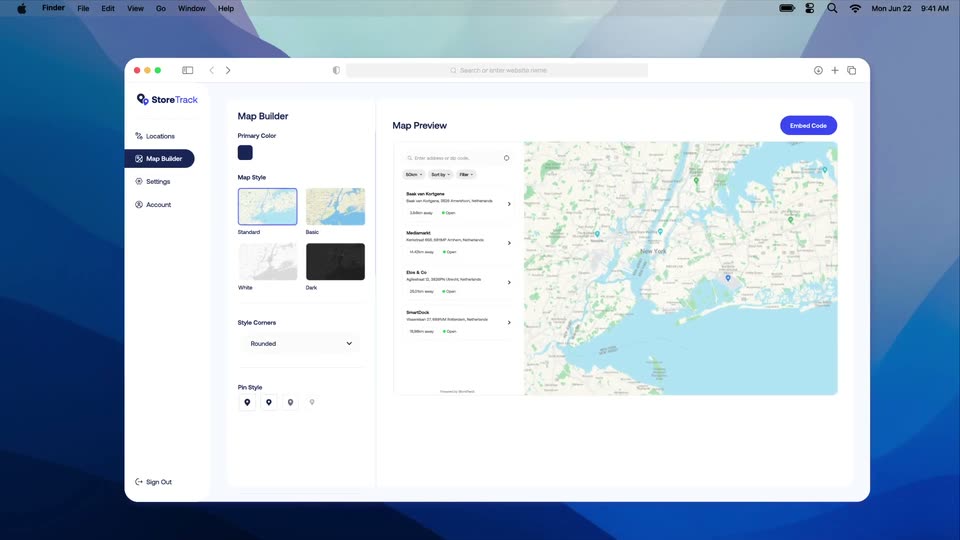
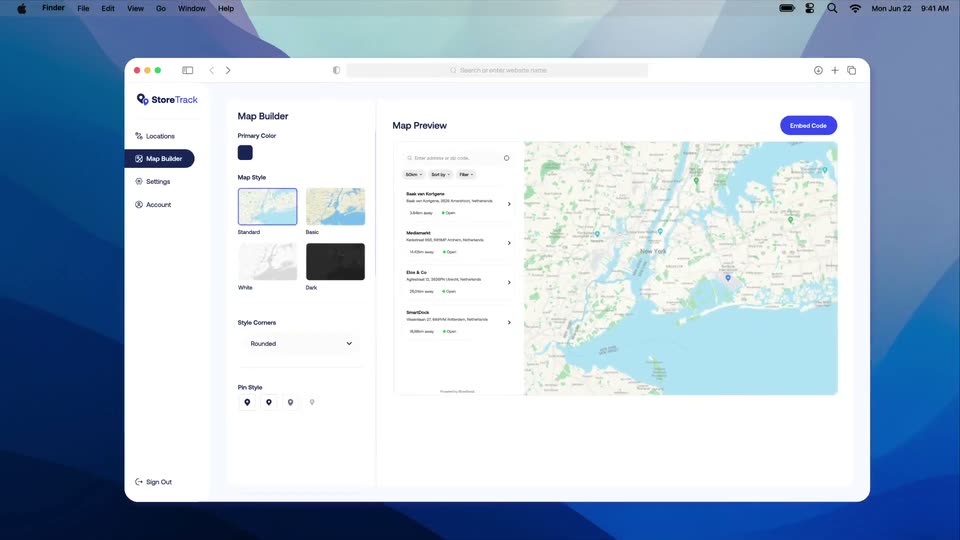
A 3D browser mockup of the StoreTrack Map Builder scales in from an angled view to fill the frame, revealing the sidebar, map style options, and a live map preview of New York stores on a macOS desktop.
Techniques: 3D mockup, UI zoom
Camera: Pull out
A macOS desktop shows a Finder window holding the StoreTrack Map Builder screen, angled in 3D perspective, then rotating flat to face the camera. Inside, a sidebar and map-style and pin-style options sit beside a live New York map preview with an Embed Code button.
Techniques: 3D mockup
Camera: Pull out
A tilted browser window of the StoreTrack app sits on a blue desktop, then flattens as the view zooms into the Locations page. A cursor clicks Upload CSV, drags a blue CSV file into the modal, a progress bar fills, and a table of store locations populates.
Techniques: 3D mockup, UI zoom, Cursor demo
Camera: Push in
A white background holds a flat map of the New York metro area. A headline builds word by word at the top while blue location pins pop in across the map, one after another, marking each store.
On-screen text: “Displaying all your stores at once”
Techniques: Kinetic type
Camera: Pull out
Centered line 'Worried about style?' in navy with a blue 'style?' sits on a cream field, framed by pale lavender ribbon curves in the top-left and bottom-right corners. The text scales up smoothly while the ribbons drift slowly.
On-screen text: “Worried about style?”
Techniques: Kinetic type
Camera: Static
A white card with a dark New York map on a blue background shrinks and shifts up-right as a white badge with a blue map pin drops onto its corner. A cursor hovers near the Embed Code button while the headline “Worried about style?” scales in.
On-screen text: “Worried about style?”
Techniques: Kinetic type, Cursor demo
Camera: Pull out
A dark map preview card sits centered on a blue field with a pin icon above it. White customization panels slide in around the map, then the layout shifts left to reveal a large Colors heading beside a primary color picker.
On-screen text: “Colors”
Camera: Push in
A dark map preview window sits centered on a blue background, ringed by a color-picker gradient, a primary color swatch card, and a hex input card that drift gently. An arrow points right to the word Colors in large white type.
On-screen text: “Colors”
Camera: Static
A flat map preview mockup sits centered on a blue field as two white cards, Font Titles and Font Body with font dropdowns, slide out to the left and lower right. An arrow points to a large white word on the right that reads Fonts.
On-screen text: “Colors”, “Fonts”
Camera: Static
A flat blue stage holds a centered map interface card, ringed by three smaller map-style thumbnails that drift slightly; a white arrow points right to the large word Layout, all on a locked-off frame.
On-screen text: “Layout”
Camera: Static
On a flat blue field, a centered line builds word by word, with “You have” in a light weight and “full control” in bold white.
On-screen text: “→ Layout”, “You have full control”
Techniques: Kinetic type
Camera: Static
A store-locator interface floats in 3D over a blue field, rotating flat to face the camera as a white headline appears above it. It then tilts back and pushes in toward the results list.
On-screen text: “And the best part?”
Techniques: 3D mockup, UI zoom
Camera: Pull out
A desktop and a mobile store locator UI float in 3D perspective on a blue background. The desktop panel pairs a results list with a pinned map; the mobile panel stacks the map over the list. Both drift right as the mobile panel rises into frame.
Techniques: 3D mockup
Camera: Pan
White text builds word by word on a flat blue background with faint curved shapes, then a map interface with a search bar slides up from the bottom to fill the lower half.
On-screen text: “No more ugly, hard-to-use maps”
Techniques: Kinetic type, Masking
Camera: Static
A cascade of map search cards, in light and dark styles, stacks diagonally on a blue background and slides down to reveal a location list at the bottom. A cursor hovers over the top map.
Techniques: Cursor demo
Camera: Pull out
A fanned stack of map app panels floats in 3D perspective on a solid blue field. Each panel shows a New York map beside a search sidebar with a result card; the top panel carries a cursor while the layers shift slightly.
Techniques: 3D mockup
Camera: Static
A map interface panel with a business list sidebar sits on a blue background, with several fanned copies of the panel stacked diagonally below it, including a dark version. A cursor drifts across the map as the stack slides up slightly.
Camera: Pull out
A browser window showing a map builder sits on a macOS desktop, ringed by floating circular platform logos for Wix, WordPress, Shopify and weebly. The view zooms into the map preview panel, ending on the Embed Code button as a cursor hovers it.
Techniques: UI zoom, Cursor demo
Camera: Push in
A three-panel web interface displays map customization options, a location preview, and an installation guide. A cursor moves to hover over a blue copy button in the right panel.
Techniques: Cursor demo, Split screen
Camera: Pull out
A flat UI screen holds the StoreTrack dashboard: a Map Builder panel left, a London Café map preview center, and an install panel with an embed code and platform logos right. A cursor moves over the logos.
Techniques: Cursor demo
Camera: Static
A dark HTML code editor card with a Webflow badge on top fades in, fills with syntax-highlighted code, and a cursor glides from the code area to the blue Save button.
Techniques: Cursor demo
Camera: Static
Centered on a pale lavender field, 'Just plug it in' swaps to 'and you're ready to go', the last three words in blue. A 3D browser mockup of the Add Location page, with a map, rises from the bottom and tilts into view behind the text.
On-screen text: “Just plug it in”, “and you're ready to go”
Techniques: 3D mockup
Camera: Static
A browser window shows the StoreTrack Add Location form. A cursor types the website and email, selects a cover photo, toggles opening hours, and fills social links as the page scrolls down, then back up. A caption reads and you're ready to go.
On-screen text: “and you're ready to go”
Techniques: Cursor demo
Camera: Push in
A blue pill button with a bookmark icon and the label Save Location sits centered on a plain light background. The button scales up to fill the frame while a cursor arrow tracks along its lower-right edge.
Techniques: UI zoom, Cursor demo
Camera: Static
A solid blue field holds the centered phrase “Sign up today”, with “Sign up” in a light weight and “today” in bold. The bold word fades in after the first, then the line holds still.
On-screen text: “Sign up today”
Techniques: Kinetic type
Camera: Static
A blue background holds a 3D carousel of tablet mockups showing a map with a store list; the side tablets blur as the carousel rotates. A white headline builds word by word, then the line is replaced by a second one.
On-screen text: “Make finding your stores easier”, “and more stylish than ever before”
Techniques: Kinetic type, 3D mockup, Parallax
Camera: Pull out
White headline sits above a centered map app panel showing a dark map, a green pin and a results sidebar. Blurred copies of the panel sit at the left and right edges, drifting at different speeds. Pagination dots rest below on a solid blue field.
On-screen text: “and more stylish than ever before”
Techniques: Parallax
Camera: Static
Centered on a plain off-white field, the StoreTrack logo, two map pins and a two-color wordmark, assembles from partial shapes into the full mark. The tagline and URL appear below and hold for the sign-off.
On-screen text: “The store locator, simplified”, “storetrack.io”
Camera: Static