0:43
Explore
Genie 4: A new generation of world simulation
Google Deepmind · Oct 2026 · 2:27 · AI-annotated
- Length
- 2:27
- Scenes
- 53 · 2.8 s avg
- Product on screen
- 0:00
- Features shown
- 5
- Call to action
- 2:21 · 96%
- Voiceover
- Yes
- Views
- 644K on YouTube
as of November 21, 2026
00:00:00 / 02:27:06
- Length
- 2:27
- Scenes
- 53 · 2.8 s avg
- Product on screen
- 0:00
- Features shown
- 5
- Call to action
- 2:21 · 96%
- Voiceover
- Yes
- Views
- 644K on YouTube
as of November 21, 2026
Google Deepmind’s 2:27 launch film runs 53 scenes, about 2.8 s each. The product is on screen from the first frame and 5 features are revealed. The call to action lands at 2:21 (96% in), over a voiceover. The video intercuts live-action studio coverage of a film crew with full-screen generated worlds, each world framed by a fixed WASD and arrow-key overlay and a rounded prompt card so the interface reads as a constant layer over the footage. Pacing is steady at about five cuts per minute, with slow push-ins and rack-focus reveals into monitors, then a rapid-fire montage of short worlds before a clean focus-pull title card; the style is defined by that screen-within-a-screen framing and the calm,雾
Footage neededEstimated needs: 5 capture groups — your screens or recordings · 34 filmed passages — shoot, supply or replace · 1 graphic passage — draw or supply · 8 3D passages — build or supply
Is this your launch? to your site or press kit.
More like this


Similar soundtrack
Films whose music sounds like this one, voice left out
1:37

Addiiiii - We got into @ycombinator to fix how AI makes music. Today we're lau
Taan · Cinematic Electronic
1:42
Gallatin AI - We've announced our $50M Series A. Military logisticians deserve bet
Gallatin AI · Cinematic documentary score with dramatic orchestral and electronic elements
1:36
Christian Ondaatje - 10 years ago I wouldn't shut up about how important distributed GPU i
Aranya · Modern electronic, cinematic sci-fi
Genie 4: A new generation of world simulation, scene by scene
· 53 scenes as text
01 · Product intro · 0:00–0:03
A man in a gray shirt walks through a film studio holding a camera, crew and equipment blurred behind him. The camera tracks him, then pans past colleagues at a workstation. The title Genie 4 sits centered over the shot.
On-screen text: “Genie 4”
Camera: Push in
02 · Product intro · 0:03–0:04
A curly-haired person works at a laptop in a bright room with a yellow chair. The camera rack-focuses from the person to the dark screen and pushes in, centering a small rounded text box that holds a white prompt.
Camera: Push in
03 · Feature reveal · 0:04–0:05
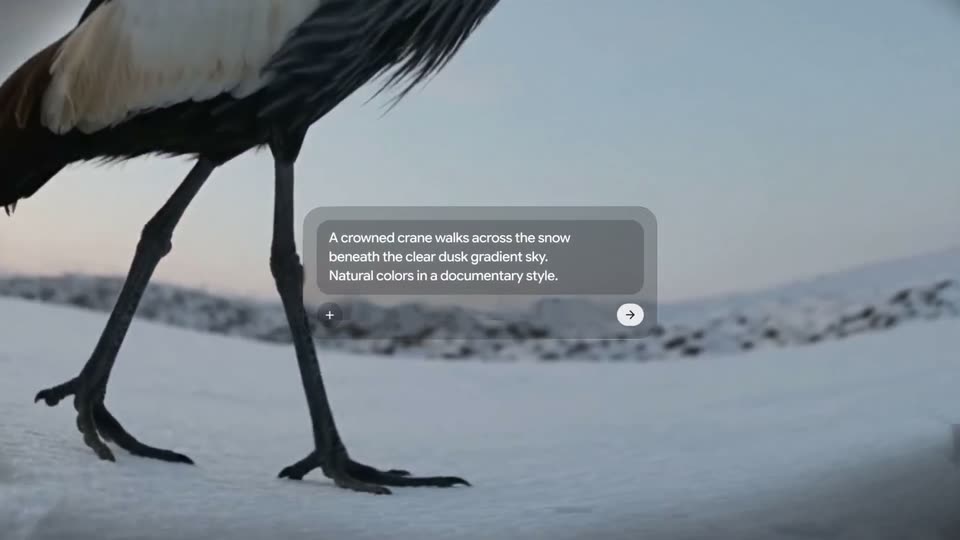
A rounded prompt card sits centered on a dark laptop screen, its typed prompt ending on a blinking caret with a plus and a round button below. The screen fills with footage of a crowned crane walking on snow, and the round button becomes a right arrow.
Techniques: UI zoom
Camera: Static
04 · Feature reveal · 0:05–0:06
Full-screen dusk shot of a crowned crane stepping across a snowfield, head lowered, as a rounded prompt box fades in at center and out. WASD key tiles sit bottom left, arrow buttons bottom right, and a small disclaimer line stays at the bottom edge.
On-screen text: “Results for illustrative purposes. Sequences shortened.”
Camera: Pull out
05 · Feature reveal · 0:06–0:21
A 3D grey crowned crane walks across snow under a pale sky. A prompt bar fades in and types a sentence, then a light streak crosses the sky; a second prompt is typed and a white piano appears ahead. WASD keys and arrow buttons light up at the corners.
On-screen text: “Results for illustrative purposes. Sequences shortened.”
Techniques: Kinetic type, 3D mockup
Camera: Pull out
06 · Feature reveal · 0:21–0:27
A black-and-white bird with a spiky golden crest walks across a snowy plain toward a white keyboard lying in the snow, lowering its beak toward the keys. A dark chat box rises at the bottom and types a caption, while key controls sit in the corners.
On-screen text: “It presses a key.”
Techniques: 3D mockup, Kinetic type
Camera: Pull out
07 · Feature reveal · 0:27–0:28
A 3D crane with black and white plumage and a spiky crest lowers its beak to press a key on a small white keyboard lying on snow. A pale sky fills the background. A caption at the bottom reads “It presses a key.”
On-screen text: “It presses a key.”
Camera: Pull out
08 · Feature reveal · 0:28–0:30
A laptop in the foreground displays a black and white crested bird on a pale surface. The camera pans right across a blurred studio set, revealing a gold cone lamp on a wooden box and a crew member in a black shirt reaching up to a grid wall.
Techniques: Parallax
Camera: Pull out
09 · Feature reveal · 0:30–0:31
A crew member on a ladder adjusts a vertical LED light bar against a grid wall. The camera pans right past a tripod camera rig to a gold-framed Starry Night painting on a white paneled wall.
Camera: Pan
10 · Feature reveal · 0:31–0:33
A crew member in a gray shirt films a framed Starry Night replica on a white studio wall, the monitor beside him shows the same shot. The camera pans right across the set, past lighting rigs and a ladder.
Camera: Push in
11 · Feature reveal · 0:33–0:36
A studio monitor on a stand is pushed in by the camera. Its dark screen shows a small card with a Starry Night thumbnail and prompt text, then the display fills with a painterly 3D landscape of a stone village under a swirling sky.
Camera: Push in
12 · Feature reveal · 0:36–0:37
A Van Gogh style painted village is shown in first person as the view pushes forward along a cobblestone lane, with WASD and arrow key hints in the lower corners and a small credit line at the bottom.
On-screen text: “Sounds for AudioScapes. Sequences shortened.”
Techniques: Parallax
Camera: Push in
13 · Feature reveal · 0:37–0:47
A 3D village rendered in Van Gogh's Starry Night style, with a swirling blue sky and yellow stars. The camera pans right along a stone wall, revealing two figures in yellow coats on a path, then tilts down toward the garden. A dark wipe closes the scene.
On-screen text: “Results for illustrative purposes. Sequences shortened.”
Techniques: Parallax, Masking
Camera: Pull out
14 · Feature reveal · 0:47–0:48
Over-the-shoulder shot of a person at a desk. The monitor shows a 3D landscape with rooftops and a painted sky, framed by tree branches, with WASD and arrow key hints in the corners. The camera starts tight on the screen and pulls back to reveal the user's shoulder.
Camera: Pull out
15 · Feature reveal · 0:48–0:54
A woman in a white shirt walks through a dim studio toward a large projection screen playing a video call of a man on a highway. The camera tracks her from behind as the screen cuts between his face and a first-person road view with small control icons.
Camera: Push in
16 · Feature reveal · 0:54–0:54
A person in a white shirt stands before a large wall screen that plays a third-person game. The on-screen camera pushes in from a wide highway view to a tight close-up of two characters, while the dim room and a seated viewer frame the display.
Camera: Push in
17 · Feature reveal · 0:54–0:56
In a dim room, two faces sit out of focus behind a laptop. The focus pulls to a close-up of a hand resting on a black keyboard, fingers tapping the keys on the person's lap.
Camera: Push in
18 · Feature reveal · 0:56–1:08
A generated dusk shot of a couple on a scooter, the man steering and the woman in a white helmet behind, framed inside the app's canvas. WASD keys and an arrow pad sit in the corners while a prompt box at the bottom types out directions word by word as the camera drifts.
On-screen text: “Results for illustrative purposes. Sequences shortened.”
Techniques: Kinetic type
Camera: Pull out
19 · Feature reveal · 1:08–1:14
A man and a helmeted woman ride a scooter along a dusk highway as explosions and giant tentacles rise over the skyline behind them. A prompt box at the bottom types out a line describing the scene, with WASD and arrow keys in the corners.
Camera: Push in
20 · Feature reveal · 1:14–1:15
A flat screen framed on black shows a sunset with two helmeted silhouettes and small control icons. The view pulls back and tilts, revealing the screen as a tablet held in 3D space with a speaker on its edge.
Techniques: 3D mockup
Camera: Pull out
21 · Feature reveal · 1:15–1:19
A woman in a black cap sits at a desk facing a large monitor, flanked by white studio speakers and audio gear. The camera pushes in from a blurry wide shot to a tight over-the-shoulder view as the screen switches to a game scene of a dragon over mountains.
Camera: Push in
22 · Feature reveal · 1:19–1:20
A gaming desk holds a monitor showing a fantasy battle, a white flip clock reading 27 TUE, a studio speaker, a controller, and a small handheld console in front. The shot racks focus from soft to sharp and pushes in slightly.
Camera: Push in
23 · Feature reveal · 1:20–1:21
A small screen on a cluttered desk plays a dragon game scene, surrounded by a controller, cables, and a dark dragon figurine. The blurry wide shot pushes in and racks focus onto the screen.
Camera: Push in
24 · Feature reveal · 1:21–1:22
A monitor on a cluttered desk shows a first-person dragon flight over misty mountains, with a second dragon at left. A red-tipped mic and a dragon figurine frame the set. The camera pushes in toward the screen until the game fills the frame and its WASD and QERT control hints read clearly at the bottom.
Camera: Push in
25 · Feature reveal · 1:22–1:31
First-person 3D view over the back of a black dragon flying toward a stone castle in a misty mountain pass, two other ridden dragons and siege towers alongside. The camera banks and dives as the dragon nears the walls. White key and arrow icons sit in the corners.
Camera: Pull out
26 · Feature reveal · 1:31–1:32
A desk monitor, framed at an angle, plays a fantasy game showing a horned dragon and a castle flag. The camera pulls back to reveal a capped player at a keyboard in the soft-focus foreground.
Camera: Pull out
27 · Feature reveal · 1:32–1:33
A fast, blurry pan moves through an indoor space, showing a desk with a red object, a blue screen, and a hanging light fixture.
Camera: Pan
28 · Feature reveal · 1:33–1:35
The camera whips through a bright office, motion blur softening a large wall screen that shows a man's face. Seated attendees face the display at a table. A person in a green sweater walks past the lens as the shot keeps panning across desk monitors.
Camera: Pull out
29 · Feature reveal · 1:35–1:38
A man in a green sweater walks into a lab and sits at a bench, back to camera, facing two monitors. The left screen shows a grid of security camera feeds, the right a single feed of lab equipment. The camera pulls back to reveal the room.
Camera: Push in
30 · Feature reveal · 1:38–1:39
A man in a green shirt stands with his back to the camera before a large monitor displaying a grid of robot camera feeds, each showing an arm working on a lab bench. The camera pushes in until the screen fills the frame.
Techniques: Parallax
Camera: Push in
31 · Feature reveal · 1:39–1:43
A 4x4 grid of lab footage shows robotic arms running pick-and-place and suturing tasks, each tile labeled with episode counts and success rates. The tiles play at once and the grid cycles to new clips.
Techniques: Split screen
Camera: Push in
32 · Feature reveal · 1:43–1:44
A mosaic of lab clips collapses into one locked-off shot of a robotic arm holding a pipette tip above a clear well plate. Corner key clusters and a reasoning panel stay fixed while the arm lowers the tip.
Techniques: Split screen, UI zoom
Camera: Push in
33 · Feature reveal · 1:44–1:51
A gray robotic arm dips a clear pipette tip into a microplate well on a lab bench, with a reasoning panel and key overlays on the footage. The camera pulls back to reveal the view on a monitor, then the arm hovers over a beaker of red liquid.
On-screen text: “Results for illustrative purposes. Sequences shortened.”
Camera: Pull out
34 · Feature reveal · 1:51–1:54
A row of white robotic arms works on a metal lab bench, one pouring a thin stream of clear liquid into a beaker. The camera pans left as a person in a green shirt walks across the background holding a tablet.
Camera: Push in
35 · Demo · 1:54–1:55
A woman in a green sweater and jeans stands on a film set, receiving a small device from a crew member at left. Tripods and lighting rigs frame the shot while blurred figures work in the background.
Camera: Pan
36 · Demo · 1:55–1:56
In a gallery with framed paintings, a man in a gray shirt adjusts a tripod while a woman in a green sweater walks past. The camera pans left as a person in a white shirt crosses the foreground, briefly blocking the view.
Camera: Pan
37 · Demo · 1:56–1:57
A camera pans left across a workshop, past a man holding a tripod, to a desk where a laptop plays a video beside a wooden speaker crowned by a gold cone lamp, framed by an out-of-focus head in the foreground.
Camera: Pan
38 · Demo · 1:57–2:01
A person sits at a desk with a laptop on a stand between two wooden speakers; the screen plays a video of a bird walking on ice. The camera pulls back from the screen to reveal the workspace and the person's hands on a keyboard.
On-screen text: “8”, “1”
Camera: Pull out
39 · Demo · 2:01–2:02
A woman in a green top types at a desk, a laptop in front of her playing a clip of a bird on snow. The frame pulls back to reveal the shot as a monitor in a studio, flanked by wooden speakers and a metal lamp.
Techniques: Masking
Camera: Pull out
40 · Demo · 2:02–2:07
A framed image of a desk with a laptop and wooden speakers fills the frame, then the camera pulls back as a crew member carries it away, revealing a studio where a man operates a camera rig and a person in a green shirt works at a desk.
Camera: Pull out
41 · Demo · 2:07–2:08
A tablet screen fills the frame showing a 3D studio scene with crew and cameras; the camera tilts up and pulls back to reveal a person in a white shirt standing in a train car, keyboard and arrow controls overlaid on the tablet.
Techniques: 3D mockup
Camera: Pull out
42 · Demo · 2:08–2:09
A man in a white shirt and yellow headphones walks down the subway car aisle toward the camera. An open laptop in the foreground shows a 3D room scene, with WASD keys and arrow buttons overlaid in the bottom corners.
Camera: Static
43 · Demo · 2:09–2:10
A barefoot skater in a black-and-white jacket crouches low on a longboard with orange wheels, rolling down a mountain road. A side tracking camera follows as the guardrail and hills blur past. Small WASD and arrow key icons sit in the lower corners.
Techniques: Parallax
Camera: Static
44 · Demo · 2:10–2:13
A man in a green sleeveless shirt floats in a zero-gravity capsule, knees drawn up and hands clasped, while red apples drift around him. Bright portholes glow behind him and a WASD plus arrow-key control overlay sits in the lower corners.
Camera: Push in
45 · Demo · 2:13–2:14
A polished steel knight in full plate armor sits in a sunlit alpine meadow dotted with yellow flowers, holding a tablet in its gauntlets and tapping the screen. White keycap icons (WASD and arrows) sit in the lower corners as a control overlay.
On-screen text: “W”, “A”, “S”, “D”, “Results for illustrative purpose. Sequences shortened.”
Camera: Push in
46 · Demo · 2:14–2:15
Two horses, a white and a black one, gallop rightward across a dry field with hazy mountains and a pale sky. Dark rounded keycaps W, A, S, D sit lower left and four arrow buttons lower right, framing the footage as a key-controlled demo.
On-screen text: “Results for illustrative purposes. Sequences shortened.”
Camera: Pull out
47 · Demo · 2:15–2:16
First-person view from inside a tracked vehicle cab, hands in red sleeves and white gloves grip two joysticks as an orange blade pushes snow across a mountain pass at dusk. White WASD and arrow-key control hints sit in the lower corners over the live simulation.
On-screen text: “Results for illustrative purposes. Sequences shortened.”
Camera: Static
48 · Demo · 2:16–2:18
A 3D triceratops rotates its head in a dense green forest, swinging from a rear frill view to a front view with its mouth open. Flat WASD keys and arrow buttons sit in the lower corners, with a small disclaimer line centered at the bottom.
On-screen text: “Results for illustrative purposes. Sequences shortened.”
Techniques: 3D mockup
Camera: Pan
49 · Demo · 2:18–2:19
A red car drifts through a corner on a night race track, trailing white tire smoke, as the camera pans left to follow it. Keyboard key icons for W, A, S, D and arrow keys sit in the lower corners.
On-screen text: “Results for illustrative purposes. Sequences shortened.”
Camera: Static
50 · Demo · 2:19–2:19
Two fencers in white gear and VR headsets lunge at each other on a blue strip in a dark arena. It cuts to a low forest floor where a blurred brown branch whips past. WASD and arrow key icons sit in the corners.
On-screen text: “Results for illustrative purposes. Sequences shortened.”
Camera: Pull out
51 · Demo · 2:19–2:21
Underwater, a diver plunges headfirst into dark blue water, trailing a burst of bubbles, with their reflection rippling on the surface above. WASD and arrow-key controls sit in the lower corners, the W and down arrow highlighted. A small disclaimer line rests at the bottom center.
On-screen text: “Results for illustrative purposes. Sequences shortened.”
Camera: Push in
52 · CTA · 2:21–2:26
A defocused underwater diver shot clears to a smooth dark teal gradient as the white Google DeepMind wordmark and URL sharpen into focus at center, hold steady, then blur out again.
On-screen text: “Google DeepMind”, “deepmind.google/genie”
Camera: Static
53 · Outro · 2:26–2:27
A dark teal gradient fills the frame, heavily out of focus. A faint horizontal light streak sits near the center and dissolves as the soft gradient drifts, with no sharp elements or text in view.
Camera: Static