0:29
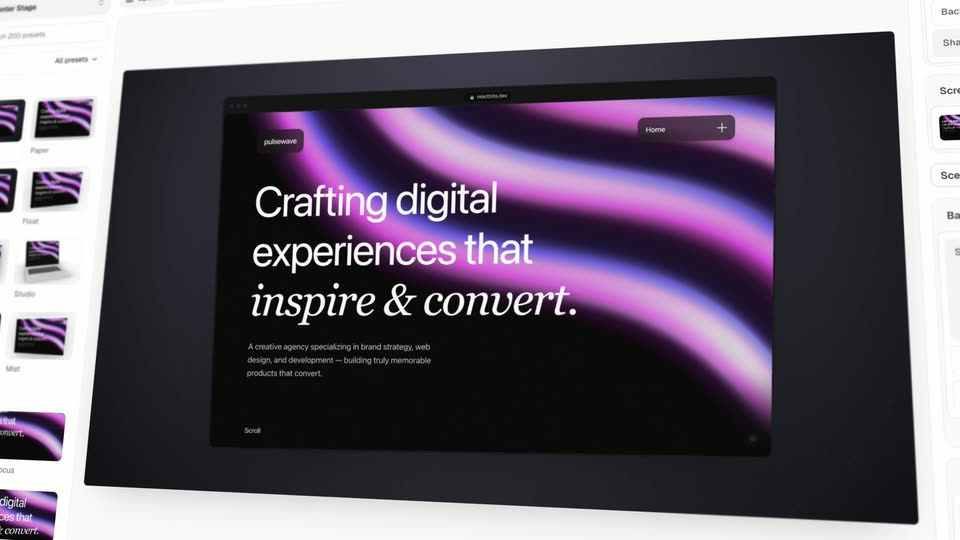

Introducing Center Stage
React Bits · Developer tools · Oct 2026
Goldfish’s 3:29 launch film runs 37 scenes, about 5.6 s each. The product shows up at 0:23, with social proof. The call to action lands at 3:14 (93% in), over a voiceover. The video is a single rooftop monologue that cuts between the presenter and full-screen UI demos of the app across LinkedIn, Twitter and Slack, with every demo triggered by a pixelated cursor and an option-click. Pacing runs near 150 bpm with word-by-word captions, 3D tilts of app windows, and a blurred coastal backdrop behind each screen recording.
Is this your launch? to your site or press kit.
React Bits · Developer tools · Oct 2026
ElevenLabs · AI · Dec 2024
Films whose music sounds like this one, voice left out
Profound · Upbeat electronic
HeyGen · Modern electronic
Wispr Flow · Upbeat electronic
A full-frame color wash shifts from warm orange to cyan, then flares into a bright white flash. Small specks and thin streaks drift across the frame, and a faint rounded outline sits on the left before the flash.
Techniques: Particles
Camera: Static
A man in a white t-shirt carries an open black PC tower across a concrete rooftop, walking away from the camera toward a hazy city skyline. Cables lie on the floor. The camera holds a wide rear view as he moves forward.
Camera: Static
A man in a white t-shirt and dark pants walks left across a rooftop, carrying a large black monitor on its side. The camera tracks him against a hazy city skyline and a bright cloudy sky.
Camera: Pan
A wide establishing shot of a coastal city. A white building corner and rooftop vents sit in the foreground, a bay and fog-wrapped mountains fill the horizon under a bright blue sky. The camera pans slowly right as clouds drift across the frame.
Camera: Pan
A hazy coastal town view dissolves into a man in a white t-shirt on a rooftop terrace. He opens a white box on a small table, revealing a skateboard deck with red and green circular graphics as the camera tilts down to a close-up of the deck.
Camera: Static
A man in a white tee sits at a rooftop table with a pink can and a product box, glancing down at it. The camera pulls back to a wide shot revealing the city rooftops and ocean behind him as he looks up.
Camera: Pan
A young man in a white t-shirt sits cross-legged on a rooftop, a city skyline blurred behind him. He claps his hands together, then lifts both into a double thumbs up in front of a sticker-covered laptop on a small table.
Camera: Pan
The clip opens on a black frame, then a heavily blurred gradient of deep maroon and teal fades in, filling the frame as an out-of-focus backdrop with no sharp elements.
Camera: Static
A man in a white T-shirt walks to a stack of three black speakers on a sunny rooftop, crouches, then stands behind them and addresses the camera as the shot pushes in. Blurred duplicates of him flash on both sides while captions build at the bottom.
On-screen text: “alright let me tell you what we”, “built”
Techniques: Kinetic type
Camera: Push in
A low shot of cracked concrete shows a black case and a sandaled foot, then cuts to a person seated with a white laptop on their lap. The frame tightens on both hands resting on the keyboard as they type.
Camera: Static
A close-up diagonal view of a silver laptop keyboard with dark keys. A hand types across the keys, one finger resting on the trackpad, then shifts to press more keys. The shot stays tight on the keyboard and hand.
Camera: Push in
A dark chat interface tilts in 3D over a laptop keyboard and a hand holding a phone. A radial zoom blur snaps the screen into focus, revealing message bubbles and a typing field. The view then holds steady on the tilted UI plane.
Techniques: UI zoom, 3D mockup
Camera: Static
A dark chat interface is held over a soft-focus laptop keyboard. The message thread stays still while a reply types itself into the input box letter by letter, finishing with a smiley emoji and a blinking caret.
Camera: Static
A man in a white tee sits at a rooftop table behind a sticker-covered laptop, talking to camera and gesturing against a city and cloud backdrop. White captions build word by word along the bottom as he speaks.
On-screen text: “I didn't type that I didn't dictate”, “it”, “the only thing I did was press”, “option on my keyboard”, “and goldfish predicted”, “the message that I wanted to”, “write”
Techniques: Kinetic type
Camera: Pull out
A man in a white t-shirt sits on a sunny rooftop, a coastal city and blue sky behind him, holding a sticker-covered laptop and gesturing as he talks to the camera. White subtitles appear at the bottom of the locked-off frame.
On-screen text: “the message that I wanted to write”, “listen”, “listen Al writing is everywhere”, “right”, “but people can instantly spot”, “when it's an Al”, “slop message”
Camera: Static
A man in a white T-shirt sits at a sticker-covered laptop on a rooftop, talking to the camera and gesturing with his hands. A coastal city and blue sky fill the background while white subtitles build word by word along the bottom.
On-screen text: “voice dictation is a little bit better”, “I love it it's super effective”, “but most of the times”, “you shouldn't need to ramble the entire message”, “all over again”, “because most of the things you write”, “is based upon something you just read”, “or something you worked on just before”, “or it's a message”, “that you've been sending a lot of times before”
Techniques: Kinetic type
Camera: Static
A man in a white t-shirt stands on a sunny rooftop above a coastal city, holding a sticker-covered silver laptop. He faces the camera, gesturing with both hands as he speaks, while white captions build word by word along the bottom of the frame.
On-screen text: “so we built this sort of second”, “that collects your work context in real time”, “all stored locally and predicts your next message”, “and it does it exactly in your”, “that you usually write in look”, “that you've been sending a lot of”, “times before”
Techniques: Kinetic type
Camera: Static
A white card floats over a blurred coastal city backdrop. A pixelated hand cursor pops in at the center as the white caption slides in beneath it. The cursor then shifts onto a rounded rectangle filled with diagonal orange and blue stripes.
On-screen text: “that you usually write in”
Camera: Static
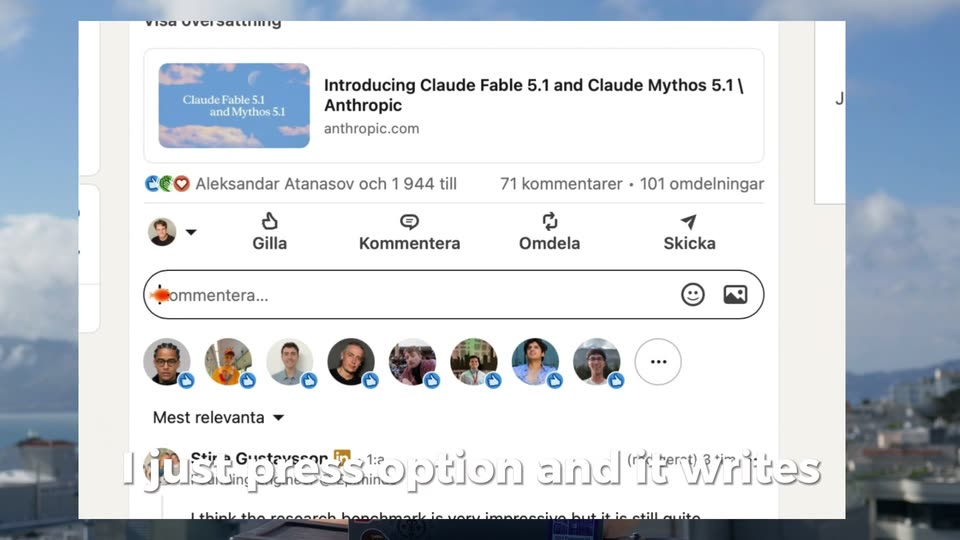
A LinkedIn post about Fable 5.1 fills the frame, then the view zooms into the comment box as an orange cursor clicks it and a reply types itself. White lowercase captions track the voiceover along the bottom edge.
On-screen text: “so”, “so fable 5.1 just released”, “so fable 5.1 just released today”, “so let's say i wanna comment on this post from”, “i just press option and it writes it”, “because it's able to read the text”, “and knows exactly how i usually”, “comment”
Techniques: UI zoom, Cursor demo, Kinetic type
Camera: Push in
A man in a white t-shirt sits on a rooftop over a sea and city skyline, looking down at a sticker-covered laptop. White captions track his speech along the bottom, then a cut reveals a LinkedIn feed showing a post by Boris Cherny.
On-screen text: “it's able to predict my comment”, “and this requires no screenshots”, “or screen”, “oh”, “oh and something I do everyday”, “outreach”
Techniques: Kinetic type
Camera: Static
A LinkedIn post card floats over a blurred city skyline. A hand-shaped cursor taps the author name at the top while the post body sharpens from blur. A white outlined caption sits along the bottom edge.
On-screen text: “let's do outreach to Boris”
Techniques: Cursor demo
Camera: Push in
A flat LinkedIn profile for Boris Cherny sits over a blurred rooftop background. A hand cursor drifts down and clicks the message button while the page scrolls. White captions read 'let's do outreach to Boris', then 'I just scroll'.
On-screen text: “let's do outreach to Boris”, “I just scroll”
Techniques: Cursor demo
Camera: Pan
A LinkedIn profile window sits over a blurred coastal city backdrop. The page scrolls up and down, then reframes onto the header action buttons while a cursor glides to one. White outline captions appear at the bottom.
On-screen text: “I just scroll through the profile”, “and hit option”
Techniques: UI zoom, Cursor demo
Camera: Push in
A LinkedIn profile card for Boris Cherny floats over a blurred outdoor backdrop, a hand cursor rests on the message button, then the card scrolls down to reveal a second profile. A white outlined caption reads and hit option at the bottom.
On-screen text: “and hit option”
Techniques: Cursor demo
Camera: Static
A LinkedIn new-message window sits over a blurred coastal photo. An outreach message fills the body, then a dark prompt bar slides in; the user types a revision and clicks the orange button, inserting a new paragraph. White italic captions narrate at the bottom.
On-screen text: “It knows what my usual outreach message is”, “so it will write with a suitable variation of it”, “and adapt it to the person”, “I could even add like”, “oh actually add three short use cases”, “that he would probably enjoy”, “with goldfish given his role”, “and it will add it voila”
Techniques: Kinetic type, Cursor demo
Camera: Static
A LinkedIn screen over a blurred outdoor backdrop shows a post on the left and a list of connection cards on the right. A hand cursor slides down from the feed to the messages bar at the bottom.
Techniques: Cursor demo
Camera: Static
A centered Twitter post from Boris Cherny about Goldfish x Claude Code sits over a blurred lakeside background, flanked by two blurred duplicate cards that drift sideways. A large white caption 'and now I want' slides in across the bottom.
On-screen text: “and now I want”
Techniques: Parallax
Camera: Pull out
A Twitter thread on a macOS desktop tilts in 3D perspective, the window rotating to reveal a dark code editor behind it. A white caption builds word by word at the bottom of the frame.
On-screen text: “and now I want to update Caspian”
Techniques: 3D mockup
Camera: Static
A dark chat window over a blurred coastal skyline zooms into the message composer, where a small goldfish icon sits beside the input field. A short English command is typed, then replaced by a longer Swedish paragraph, while white captions track the voiceover along the bottom.
On-screen text: “and now I want to update Caspian about”, “I just prompt”, “I just prompt goldfish in the text field directly”, “brief Caspian”, “brief Caspian on the fable update”, “brief Caspian on the fable update and my Boris outreach”, “then I press option it takes it in as a prompt”, “and boom writes”, “even in Swedish in my language”, “the summary of what I just did”
Techniques: UI zoom, Kinetic type
Camera: Pan
A man in a white T-shirt stands on a rooftop behind a sticker-covered laptop, talking to camera and gesturing, with a coastal city and sea behind him. White subtitles accumulate word by word along the bottom of the frame.
On-screen text: “many of our users use this to”, “colleagues and clients across all different apps”, “from Slack WhatsApp”, “LinkedIn”, “LinkedIn X whatever”, “you can even use it to prompt”, “Claude better”, “or clean up your voice”, “into a polished email to your client”, “oh and many of our users use the voice dictation and goldfish which means you can hold FN and option at the same time”
Techniques: Kinetic type
Camera: Static
A dark Slack channel window floats over a blurred coastal city backdrop. The view zooms into the message composer, holds while white captions type the prompt word by word, then pulls back to reveal the thread above the input box.
On-screen text: “hey goldfish”, “please write an update to the”, “what new things we've shipped in our last update”, “three concrete use cases that”, “people”, “immediately”, “and there we”, “it queries goldfish immediately in the text box”, “and since it knows everything”, “here's an example”
Techniques: UI zoom, Kinetic type
Camera: Static
A dark Slack thread sits over a blurred city skyline. A markdown warning tooltip pops up at the right, then a hand cursor taps the green send button as the caption at the bottom fills in word by word.
On-screen text: “and since it knows everything about goldfish”, “it will be able to predict this message for”
Techniques: Kinetic type, Cursor demo
Camera: Static
A man in a white t-shirt stands on a rooftop against a cloudy sky and city skyline, holding a sticker-covered laptop. He smiles and spreads both hands in a shrug as a white caption builds word by word across the lower third.
On-screen text: “and there we go ready to send to”, “the Slack community”
Techniques: Kinetic type
Camera: Static
A man in a white t-shirt stands on a rooftop holding a sticker-covered silver laptop toward the camera, gesturing with both hands as he talks. White captions build word by word along the bottom. A blue sky, sea and city skyline fill the background.
On-screen text: “and this is live”, “our users have been clicking the”, “option”, “click a quarter of a million times”, “which is pretty”, “in just the two months we've been working on this”, “so please go into our website”, “download the app and let us know what you think”, “because it's still in beta”
Camera: Static
A man in a white t-shirt sits on a rooftop behind a sticker-covered laptop, speaking to camera against a cloudy sky and city skyline. White subtitles caption his lines at the bottom. He waves, stands, and walks out of frame right as the orange URL appears over the sky.
On-screen text: “because it's still in beta”, “now let's wrap this up sun is shining”, “I have a great view”, “and I just wanna enjoy this weather a little bit see ya”, “goldfish.sh”
Camera: Static
A blurred laptop lid with orange fish stickers sits in the lower foreground of a rooftop view over a city and bay. The orange URL goldfish.sh holds steady at center against the cloudy sky.
On-screen text: “goldfish.sh”
Camera: Static
The orange lowercase wordmark goldfish.sh sits centered on a plain black background, then the frame goes fully black.
On-screen text: “goldfish.sh”
Camera: Static