0:41

Instant - It’s here: Instant Analytics. Your complete analytics intelligence la
Instant Ai · Aug 2026
Gojiberry · Sep 2026 · 1:04 · Full motion · AI-annotated
Gojiberry’s 1:04 launch film runs 39 scenes, about 1.7 s each. The product is on screen from the first frame. The call to action lands at 0:53 (82% in), over a voiceover. A single continuous prompt drives the whole film: a typed ChatGPT command unfolds into a step-by-step outbound workflow (find, enrich, personalize, launch, reply, book) rendered as flat white UI mockups with coral-to-orange gradient captions, then resolves into an abstract interface-versus-engine diagram and a plugin install call to action. The style is defined by near-white negative space, a recurring orange pixel and halo motif, and a black cursor that performs every click, so the motion reads
Is this your launch? to your site or press kit.
Instant Ai · Aug 2026
OpenAI · AI · Nov 2026
Runway · AI · Oct 2026
Films whose music sounds like this one, voice left out
Tana · Electronic, house, dubstep
Samsung · Modern electronic, cinematic
monday sidekick · Modern electronic
On a plain white background, the black OpenAI knot logo and wordmark scale in on the left. A small x appears, then the red Gojiberry mark and wordmark assemble on the right, forming a co-brand lockup.
Camera: Static
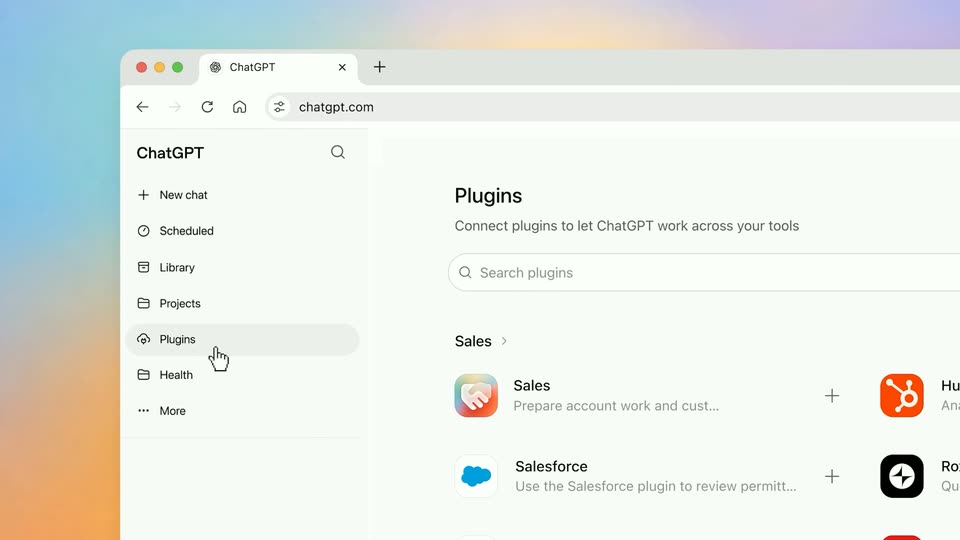
White interface screen: the heading What can I help with? above an empty prompt field. A black cursor moves in, clicks the field with a red ripple, and the frame zooms into the field as Run my outbound types out behind a blinking caret.
Techniques: Cursor demo, UI zoom
Camera: Push in
A white app icon with an orange and red geometric mark sits left of center on a pale background. The Goji berry wordmark fades in letter by letter to its right, locking into a static logo lockup.
Techniques: Kinetic type
Camera: Static
An orange rounded-square icon with a white V mark holds center on a plain white field. A halo of small orange dots fades in around it, forming a ring that frames the icon.
Camera: Static
A flat ChatGPT window with sidebar and prompt field sits centered; an orange pixel-dot border dissolves away from the edges while a large rounded-rectangle outline draws itself over the window. The UI content fades out, leaving the empty frame with a plus sign in the lower left.
Techniques: Masking
Camera: Push in
On a white field, a thin rounded-rectangle frame and a small gray plus mark sit still while the dark gray @Gojiberry wordmark slides in from the left, revealing letter by letter until the full handle is centered in the upper half.
On-screen text: “@Gojiberry”
Techniques: Kinetic type
Camera: Static
Tight close-up of a white rounded card on a pale gray field, the handle centered inside. The card drifts slowly left and down so the corner and the text slide toward the left edge, a faint plus mark at the bottom.
Camera: Pan
A headline line slides left across a plain off-white background, coral words leading gray ones, then it is replaced by a smaller coral line that fades in at center.
On-screen text: “100 SaaS founders hiring salespeople”, “enrich their contact details”
Techniques: Kinetic type
Camera: Static
A pink-to-orange gradient line of text slides across the center of a white background, then exits as a light gray line scales in lower on the frame.
On-screen text: “enrich their contact details”, “write a personalised message”
Techniques: Kinetic type
Camera: Static
On a white background, the line “write a personalised message” in a red-to-orange gradient scales in at center, then “and launch the campaign.” slides left off-frame with “campaign.” in orange, and a black circular button with a white arrow pops in right of center.
On-screen text: “write a personalised message”, “and launch the campaign.”
Techniques: Kinetic type
Camera: Static
A black circular badge holding a white arrow and cursor icon sits centered on white. The badge shrinks as its fill dithers into orange-and-white squares, and a ring of small orange pixels scatters outward around it.
Techniques: Morph, Particles
Camera: Static
A blue rounded prompt box with the Gojiberry logo and a task line sits at the top, with a Working... status label below it. A black circle holding a white cursor icon drifts down the frame as the box slides into place, the edges dissolving through pink pixels.
Camera: Pan
A light blue chat card with the Gojiberry icon and a prompt slides up as a second card stacks in below it. A red Working status scales in under the top card, then fades to gray.
Camera: Push in
A blurred red ring sweeps across the foreground and exits, revealing a loose grid of rounded headshot tiles, each captioned with a red status line. The tiles scale and slide into place, the centre one sharp, the outer ones soft.
Techniques: Parallax
Camera: Push in
On a white field, a smiling woman's contact card floats at center while a man's card and another recede out of frame as the camera pulls back, shrinking the central tile. A red checkmark and short label fade in to its right.
Techniques: 3D mockup, Parallax
Camera: Push in
A flat contact card sits on a white background, a rounded photo of a smiling woman on the left. The pink status line fades out as her name, title, email, phone and website slide in from the right, line by line.
Camera: Static
A contact card for Maya Estêvão, with her photo, email, phone and LinkedIn, sits on a white background, then clears to a centered headline that slides in.
On-screen text: “Brings the right context into every message”
Techniques: Kinetic type
Camera: Static
On a plain white background, the dark headline “Bring the right context into every message” is overlapped by a brown variant “Brings the right context into every message” that slides in from the right. The dark line slides out and the new line settles centered in dark gray.
On-screen text: “Bring the right context into every message”, “Brings the right context into every message”
Techniques: Kinetic type
Camera: Static
A contact card on white: a rounded photo of a smiling woman left, her name, title, email, phone and links right. The name types on letter by letter, then the whole card zooms in and blurs out as a transition.
Camera: Pan
A LinkedIn-style chat card on a light background pulls from blur into focus. The header shows a profile name and title, a blue message bubble reads Hi Maya! beside a sender avatar, and a message input bar sits at the bottom.
Camera: Push in
A LinkedIn chat window shows Maya Estevão's name and a small blue “Hi” bubble. The view zooms in on the bubble, which expands as its text becomes “Saw you're growing your sales team,” the second line sliding in. The sender's avatar stays at the right.
Techniques: UI zoom, Morph, Kinetic type
Camera: Push in
A light chat panel holds a woman's circular avatar beside a three-dot typing bubble, with an empty message field below. A blue rounded badge in the top right swaps its headline text, sliding “your sales team” into view, while the whole panel drifts slowly right.
On-screen text: “Saw you're growing your sales team”
Techniques: Kinetic type
Camera: Push in
A Launch button sits centered on a white background while a black cursor glides up and hovers it, the button scaling up. Rounded portrait tiles of people pop in around the button, then a cut reveals a large brown headline.
On-screen text: “Right here in ChatGPT”
Techniques: Cursor demo
Camera: Push in
A white card shows the bold black phrase Right here, which shrinks and gains the brown words in ChatGPT. The line then gives way to a flat ChatGPT input field with an Ask anything placeholder, a mic icon and an up-arrow button.
On-screen text: “Right here in ChatGPT”
Techniques: Kinetic type
Camera: Static
A flat white prompt bar sits centered on a white background. The gray placeholder “Ask anything” under a hand cursor is replaced by the typed prompt “Gojiberry launch a Linkedln outbound campaign targeting SaaS founders in the US.”, the first line sliding in and the second line in orange, while the orange Goji tile and black send button fill in.
Techniques: Kinetic type
Camera: Static
A rounded prompt box with the orange Goji icon and a typed LinkedIn campaign request fills the frame, then it clears to white as the caption “Goji flags interested prospects” slides in centered.
On-screen text: “Goji flags interested prospects”
Techniques: Kinetic type
Camera: Static
A LinkedIn chat window with a prospect's message fades in under the headline “Goji flags interested prospects.” A “Thinking of the best reply” pill switches to a green checkmark, the frame zooms into the thread, and a blue reply bubble fills in line by line.
On-screen text: “Goji flags interested prospects”
Techniques: Kinetic type, UI zoom
Camera: Push in
A white day-calendar grid with gray time labels. A blue rounded event block for a 1:15-2:15pm meeting with Maya - Founder @OpenBundle scales into place as a black cursor glides to its top edge. A three-line headline slides in over the grid.
On-screen text: “We help teams scale”, “content without hiring.”, “Worth a quick chat?”
Techniques: Cursor demo, Kinetic type
Camera: Pull out
On a plain white background, the orange word “Chat” sharpens from a blur as “GPT” slides in beside it, “Chat” turning black to form “ChatGPT”. The line then reads “ChatGPT is the interface”, sliding into place on a locked-off frame.
On-screen text: “ChatGPT is the interface”
Techniques: Kinetic type, Morph
Camera: Static
On a white background, the bold black word ChatGPT sits centered as a thin line draws itself into a long oval loop around the text, ending in a dot at the right. The phrase then completes to ChatGPT is the interface, the added words in a muted tan.
On-screen text: “ChatGPT is the interface”
Techniques: Kinetic type
Camera: Static
On a white background, thin gray lines and dots draw in from the edges, bending into a bracket shape on the left while the goji wordmark and orange icon settle in the center. A second goji wordmark with a trailing dot holds on the right as the lines lock off.
On-screen text: “ChatGPT is the interface”, “Lead Scoring”, “Intent Signals”
Techniques: Morph
Camera: Static
Three feature rows on a pale background, each a thin line ending in a dot, an orange circle icon, and a label. The rows slide left into frame: a target icon with Intent Signals, a people icon with Lead Scoring, a paper-plane icon with AI Outreach.
On-screen text: “Intent Signals”, “Lead Scoring”, “AI Outreach”
Techniques: Kinetic type
Camera: Static
A plain off-white card holds the centered phrase “From one prompt” in a medium sans. The last word begins in orange while the rest sits in dark brown, then the line runs through a quick horizontal blur as the colors blend into one warm tone.
On-screen text: “From one prompt”
Camera: Static
A chat interface opens out of focus, then sharpens on a blue message bubble beside a circular avatar of a man in a suit. The bubble fills line by line as the reply text slides in, with a grey incoming bubble partly visible at the top left.
On-screen text: “From one prompt”
Camera: Pull out
A pale yellow rounded button reading Install Plugin sits centered on a white background. A black arrow cursor glides up from below and rests on the button, hovering over the word Install.
Techniques: Cursor demo
Camera: Static
A rounded prompt bar on white zooms in as the line “Find 50 ideal prospects, messages, and start the outreach” types out and scrolls left, ending on a dark circular arrow button.
Techniques: UI zoom, Kinetic type
Camera: Push in
Close-up of a white interface card with a black circular button. A white cursor arrow hovers on the button as the arrow icon inside rotates and turns into a hand pointer, while the card border and a gray heading scroll left.
Techniques: Cursor demo
Camera: Push in
A black circular button with a white up arrow and a black pointer triangle glides left and down, exiting the bottom-left, against a white background bordered by a thin gray rounded line.
Camera: Static
The gojiberry logo, an orange and red angular mark beside the black wordmark, holds centered on white while the tagline Your AI go-to-market team fades in beneath it. The mark scales up slightly.
On-screen text: “Your AI go-to-market team”
Camera: Static