
0:49
Explore
Introducing the GitHub Models tab: Manage & test your AI prompts
GitHub · May 2025 · 2:06 · Full motion · AI-annotated
- Length
- 2:06
- Scenes
- 24 · 5.3 s avg
- Product on screen
- 0:00
- Features shown
- 4
- Voiceover
- Yes
- Views
- 50K on YouTube
as of November 27, 2026
00:00:00 / 02:06:07
- Length
- 2:06
- Scenes
- 24 · 5.3 s avg
- Product on screen
- 0:00
- Features shown
- 4
- Voiceover
- Yes
- Views
- 50K on YouTube
as of November 27, 2026
GitHub’s 2:06 launch film runs 24 scenes, about 5.3 s each. The product is on screen from the first frame and 4 features are revealed. There is no explicit call to action; a voiceover carries the film. A continuous screen-capture walkthrough cut into six beats: product intro, prompt editor, Compare tab, org permissions, code snippets, and a logo outro, with each beat opened by a voiceover line and a push-in zoom onto the relevant control. Pacing holds near four cuts per minute at 139 BPM, and the signature moves are tight zooms on dropdowns and buttons, the browser floating over a shifting blue-green-purple gradient, and the white-line logo draw on black at the close.
No filming indicatedEstimated needs: 5 capture groups — your screens or recordings · 1 official logo — reused across the film
Is this your launch? to your site or press kit.
More like this

3:29
Ocular AI Demo
Ocular AI · B2B · Mar 2024
3:20

Replit ⠕ - AI builds web apps well. Mobile apps have been harder. Now, the i
Replit · Developer tools · Jan 2026
Introducing the GitHub Models tab: Manage & test your AI prompts, scene by scene
· 24 scenes as text
01 · Product intro · 0:00–0:15
A GitHub repository view opens on a YAML prompt file in the boardgame-stats repo. The page scrolls down through the code lines, then returns to the top of the file.
Camera: Pan
02 · Product intro · 0:15–0:21
A GitHub repository page sits on the Models tab, listing three prompts in a white panel. A cursor glides across the top navigation, then clicks the first row, and the view switches to that prompt's detail page with its system and user prompt text.
Techniques: Cursor demo
Camera: Static
03 · Feature reveal · 0:21–0:26
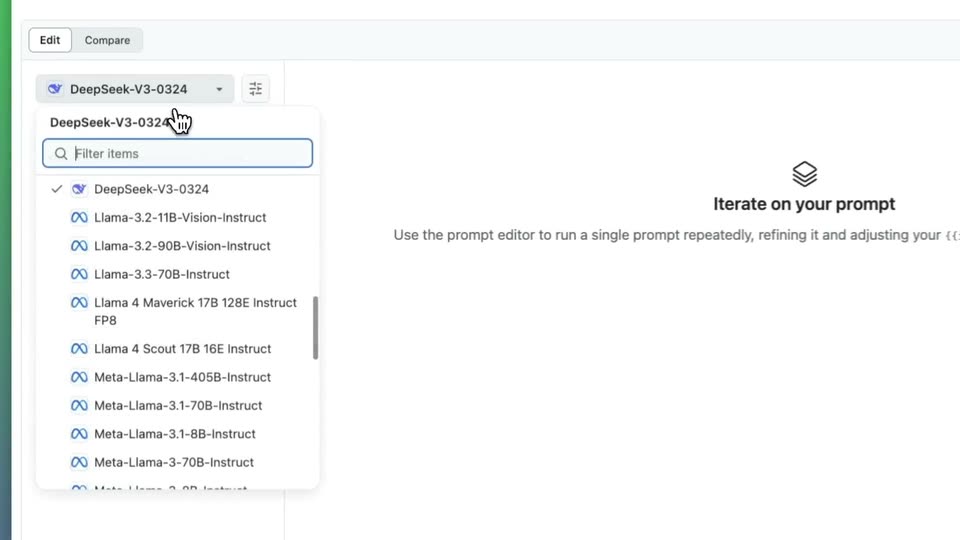
A GitHub-style Models page shows a prompt editor with system and user prompt boxes beside an empty state. The view zooms to the model selector as the cursor clicks the DeepSeek dropdown, opening a scrollable list of model options.
Techniques: UI zoom, Cursor demo
Camera: Push in
04 · Feature reveal · 0:26–0:28
A cursor hovers over a settings icon in a prompt editor interface, then moves down to a Variables button as a parameters panel on the right is replaced by a new panel.
Techniques: Cursor demo
Camera: Static
05 · Feature reveal · 0:28–0:29
A close-up of the product interface. The left panel blurs and slides out of frame as the view settles on the right Variables panel, a cursor hovering near the top navigation.
Techniques: UI zoom
Camera: Pan
06 · Feature reveal · 0:29–0:30
A white Variables panel on the right displays a text box with prompt parameters, as the view zooms in to focus on the interface.
Techniques: UI zoom
Camera: Static
07 · Feature reveal · 0:30–0:32
A GitHub-style prompt editor. The frame reframes from a centered empty state showing a stacked-layers icon and the line Iterate on your prompt to a two-panel view with a system prompt, a user prompt listing variables, and a response block. A cursor rests on the Commit changes button.
Techniques: UI zoom, Cursor demo
Camera: Pull out
08 · Feature reveal · 0:32–0:37
A GitHub-style prompt editor fills the frame. The camera zooms into the left panel, where a cursor highlights and edits words in the System and User prompt boxes, each box flashing a blue outline. The view then pulls back to the full screen.
Techniques: UI zoom, Cursor demo
Camera: Static
09 · Feature reveal · 0:37–0:52
A light GitHub-style prompt page shows a system prompt beside a generated RPG campaign. A cursor clicks the Compare tab, and the view switches to a table listing evaluators and a dataset of sample inputs. The browser floats on a shifting blue-green-purple gradient.
Techniques: Cursor demo
Camera: Static
10 · Feature reveal · 0:52–0:57
A code editor shows a YAML prompt file, with a file tree on the left and test data entries on the right. The view stays static while the voiceover explains the file holds test prompts used to compare models.
Camera: Static
11 · Feature reveal · 0:57–1:00
A GitHub-style models page shows a single prompt column; the view zooms into the prompt area as a cursor opens the Add prompt menu and a second identical column slides in, then the cursor hovers the edit icon.
Techniques: UI zoom, Cursor demo
Camera: Push in
12 · Feature reveal · 1:00–1:05
A two-pane interface shows a prompt list on the left and a model editor on the right. A hand cursor opens the model dropdown, scrolls the list from Llama to OpenAI GPT entries, picks GPT-4.1, then moves to the green Update button.
Techniques: Cursor demo
Camera: Pan
13 · Feature reveal · 1:05–1:14
A GitHub-style prompt comparison view zooms into the lower right corner, where a cursor clicks the Add evaluator button. A dropdown of evaluator types opens and the cursor hovers across its items, then the frame zooms back out to the full two-column grid.
Techniques: UI zoom, Cursor demo
Camera: Pull out
14 · Feature reveal · 1:14–1:17
A GitHub models view shows two prompt columns side by side. A right-hand panel lists evaluator options; a cursor hovers over the Add evaluator button, then the panel slides closed to widen the view as the cursor moves to the Required sections label.
Techniques: Cursor demo
Camera: Static
15 · Feature reveal · 1:17–1:21
A settings modal titled Edit test criteria floats over a dashboard, a cursor resting on the sidebar. The frame zooms in on the Prompt box, which lists the required output sections, then pulls back to the full window.
Techniques: UI zoom
Camera: Static
16 · Feature reveal · 1:21–1:24
A GitHub-style prompts page sits dimmed behind a centered 'Edit test criteria' modal dialog listing name, model, prompt and choices fields. A white cursor fades in and rests on the green Update button.
Techniques: Cursor demo
Camera: Static
17 · Feature reveal · 1:24–1:40
A GitHub-style prompts view with two model columns and a dataset table. A hand cursor clicks the green Run button at top right, which flips to Stop, then four output cells stream in markdown text and a metadata line each, ending with all four marked Pass.
Techniques: Cursor demo
Camera: Static
18 · Feature reveal · 1:40–1:44
A GitHub organization settings page fills the frame, then the view zooms into the Models permissions section. A hand cursor clicks the Enabled list dropdown, which opens to reveal Enabled and Disabled list options before closing as the cursor drifts right.
Techniques: UI zoom, Cursor demo
Camera: Push in
19 · Feature reveal · 1:44–1:45
A settings modal titled Select models and publishers opens over a blurred admin page. The Microsoft group is expanded with checked model rows, and a hand cursor hovers on the Add models or publishers button at the bottom right.
Techniques: UI zoom, Cursor demo
Camera: Push in
20 · Feature reveal · 1:45–1:47
A dimmed settings page holds a large model-selection modal listing AI publishers and checked models. The modal clears and the frame zooms out to the full Models Overview dashboard, sidebar and prompt cards included, as a cursor appears at the bottom right.
Techniques: UI zoom, Cursor demo
Camera: Static
21 · Feature reveal · 1:47–2:01
A GitHub Models page scrolls from the overview cards to a Python snippet, then reframes on the model selector as a cursor clicks it, opening a dropdown that scrolls through dozens of model names.
Techniques: UI zoom, Cursor demo
Camera: Push in
22 · Feature reveal · 2:01–2:02
A close-up of a code editor with an open model-picker dropdown. The list scrolls rapidly past model names such as DeepSeek, Llama, Mistral and Phi, while the focused search field and the top toolbar stay fixed.
Camera: Static
23 · Outro · 2:02–2:02
A thin white line traces the outline of the GitHub cat logo on a black background, drawing the shape progressively from the ears down to the base.
Camera: Static
24 · Outro · 2:02–2:06
A thin white line traces the GitHub mark at center on a black field, then the outline fills to a solid white logo and holds. The frame stays locked.
Techniques: Morph
Camera: Static