0:57
Explore
Best Product Explainer Video | Fronter | Best SaaS Explainer Video
Fronter · Jul 2019 · 1:02 · AI-annotated
created What a Story · studio What a Story
- Length
- 1:02
- Scenes
- 13 · 4.8 s avg
- Product on screen
- 0:04
- Features shown
- 5
- Voiceover
- Yes
- Views
- 149K on YouTube
as of November 27, 2026
00:00:00 / 01:02:03
- Length
- 1:02
- Scenes
- 13 · 4.8 s avg
- Product on screen
- 0:04
- Features shown
- 5
- Voiceover
- Yes
- Views
- 149K on YouTube
as of November 27, 2026
Fronter’s 1:02 launch film runs 13 scenes, about 4.8 s each. The product shows up at 0:04 and 5 features are revealed. There is no explicit call to action; a voiceover carries the film. The video anchors every feature demo on a live-action desk shot, then cuts to flat 2D interface screens driven by a cartoon hand cursor, with pop-in avatar badges and blue mask wipes as signature moves. Pacing is steady at 120 bpm with short cuts, and a 3D card fly-in plus a white fade close the story before the logo card.
Footage neededEstimated needs: 5 capture groups — your screens or recordings · 1 official logo — reused across the film · 6 filmed passages — shoot, supply or replace · 1 3D passage — build or supply
Is this your launch? to your site or press kit.
More like this

1:30

FullSeam Launch Video
FullSeam · B2B · Feb 2026
1:57

Introducing ElevenLabs Conversational Agents
ElevenLabs · AI · Dec 2024
Similar soundtrack
Films whose music sounds like this one, voice left out
1:00

Jira Product Launch Video: Stunning Motion Graphics Animation for Release & Widgets
Atlassian · Upbeat electronic
1:44

Evardi: Agents that engineer the grid edge
Evardi · Corporate tech / Electronic
1:10

Akur8 ReservingOne - The modern, end-to-end agentic actuarial reserving software
AKUR8 · Modern electronic
Best Product Explainer Video | Fronter | Best SaaS Explainer Video, scene by scene
· 13 scenes as text
01 · Problem · 0:00–0:04
A laptop on a wooden office desk displays a website mockup as flat circular app icons pop in and float around it. A green and a blue chat bubble slide in from the left and right, while notification badges count up. The blurred office background shows a person walking past.
On-screen text: “Please change the header of image of the product page to the image I sent you by email!”, “Can you increase the font of the second paragraph on the features page?”
Camera: Push in
02 · Product intro · 0:04–0:05
A laptop sits on a wooden desk in a softly blurred office. On its white screen the red and blue Fronter mark assembles beside the black wordmark FRONTER, while a person moves in the background.
On-screen text: “FRONTER”
Techniques: Morph
Camera: Static
03 · Product intro · 0:05–0:06
A laptop on a wooden desk in a bright office displays the Fronter logo on a white screen. A blurred person walks past in the background while a coffee cup, phone and pen sit on the desk.
On-screen text: “FRONTER”
Camera: Static
04 · Demo · 0:06–0:12
A laptop on a desk in a bright office shows the product dashboard; the camera pushes in on the screen while flat circular avatars labeled MANAGER, DEVELOPER, COPYWRITER, DESIGNER, QA TESTER pop in around it. Blurred colleagues walk past behind.
On-screen text: “MANAGER”, “DEVELOPER”, “COPYWRITER”, “DESIGNER”, “QA TESTER”, “DESIGNER”
Techniques: 3D mockup, UI zoom
Camera: Push in
05 · Feature reveal · 0:12–0:19
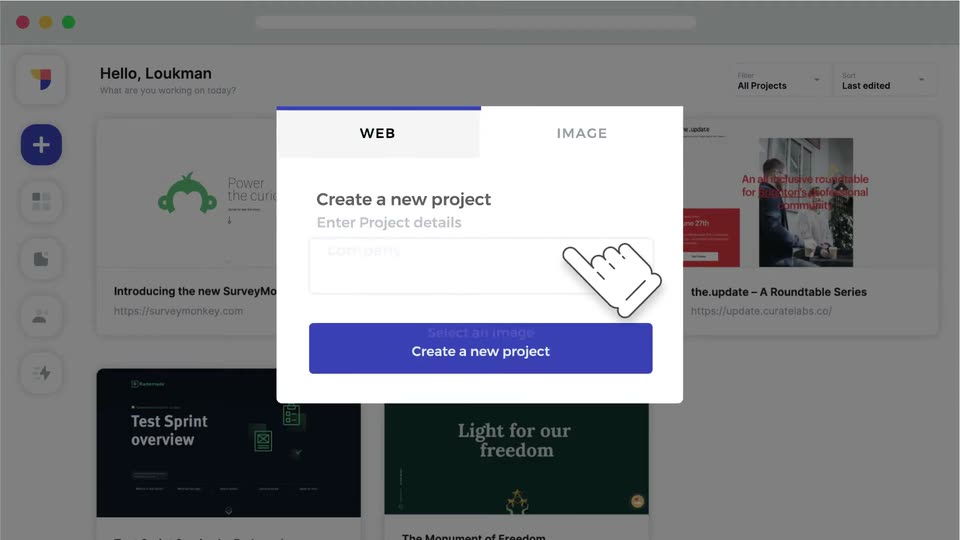
A project dashboard with a grid of cards; a hand cursor clicks the blue plus button, the screen dims and a modal with WEB and IMAGE tabs opens, the cursor types a title, switches to the WEB tab, enters a website URL and clicks Create a new project.
Techniques: Cursor demo
Camera: Push in
06 · Feature reveal · 0:19–0:31
A flat website mockup in a browser window fades in, then a bottom toolbar rises. A cursor box-selects the headline, a comment card pops up, a hand cursor types a mention and clicks Add comment, and a numbered badge appears on the selection.
Techniques: Cursor demo
Camera: Static
07 · Feature reveal · 0:31–0:32
A flat browser window showing a website mockup sits on a gray canvas above a bottom toolbar. A white hand cursor slides left to tap the phone icon, and the window scales down to preview the layout at a smaller resolution.
Techniques: Cursor demo
Camera: Static
08 · Feature reveal · 0:32–0:43
A flat product screen shows a webpage mockup beside a phone and desktop frame. A white hand cursor taps the device icons, then the collaborator avatars, opening a share dialog. It clicks through the People, Email and Link tabs, ending on a copy-link button.
Techniques: Cursor demo
Camera: Push in
09 · Feature reveal · 0:43–0:46
A browser window frames a landing page mockup next to a comment panel. The camera zooms into the panel while a cartoon hand cursor slides to the blue Export Comment button and presses it.
Techniques: UI zoom, Cursor demo
Camera: Push in
10 · Feature reveal · 0:46–0:47
A blue-tinted comment panel shows a hand cursor over an Export Comment button, then a blue mask retracts to reveal a laptop on a wooden desk displaying the same interface, set in a blurred office.
Techniques: Cursor demo, Masking
Camera: Static
11 · Feature reveal · 0:47–0:52
A laptop on a wooden desk shows a design mockup with a comment panel. A large blue logo tile shrinks into a round badge in a fan of white tool icons, then a white Tasks card slides in from the right as a hand cursor hovers.
Techniques: Morph, Cursor demo
Camera: Static
12 · Demo · 0:52–0:56
A laptop rests on a wooden office desk. Enlarged web-page cards float in 3D around it at varying depths, then shrink and fly into the screen, settling into a neat grid. The shot closes with a soft blur and white fade.
Techniques: 3D mockup, Parallax
Camera: Pull out
13 · Outro · 0:56–1:02
On a plain white field, the black FRONTER wordmark holds center while the four-color mark to its left assembles: a red square rotates down from an offset tilt into the grid, joining the yellow, red and blue quadrants. The finished logo then holds still for the rest of the shot.
On-screen text: “FRONTER”
Camera: Static