1:22

Bring your agents into the meeting | Tana Launch
Tana · Productivity · Nov 2026
Floot’s 0:37 launch film runs 13 scenes, about 2.9 s each. The product shows up at 0:08. The call to action lands at 0:28 (78% in), over a voiceover. The video alternates a talking-head founder in a home office with full-frame UI demos on a cream dotted grid, following one workflow from sketch to shipped pricing page. Its signature moves are line-by-line bold lowercase captions, hand-drawn sketches with orange scribble accents that annotate both the presenter and the interface, and a walk-away close that lands on the URL.
Is this your launch? to your site or press kit.
Tana · Productivity · Nov 2026
Narrative · Consumer · Sep 2026
The Browser Company · Productivity · Apr 2024
Films whose music sounds like this one, voice left out
HeyGen · Upbeat electronic dance-pop
Orgo · Upbeat electronic
Vapi · Upbeat electronic
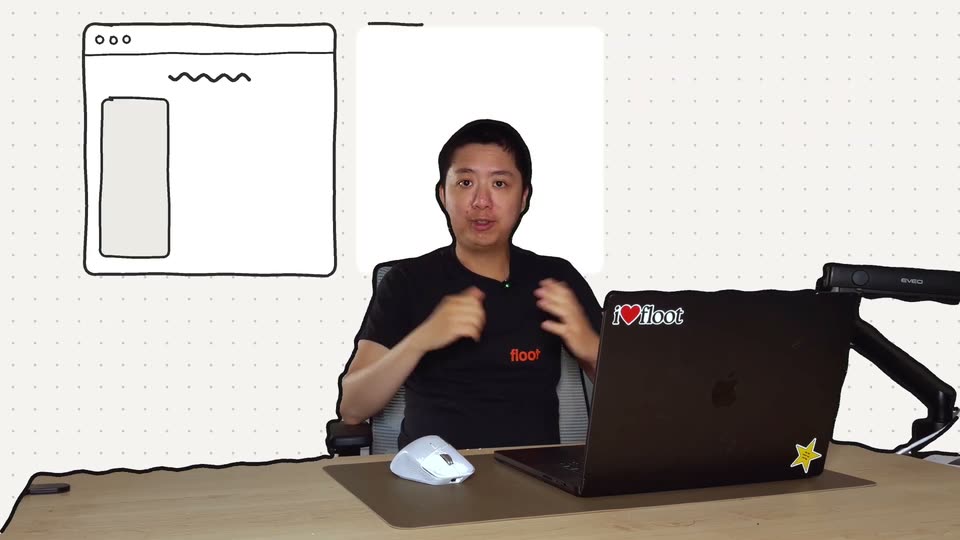
A man in a black tee sits at a desk with a laptop, gesturing to camera. Bold black captions build line by line on the left, then a name lower-third appears. A stack of white and purple app cards pops in and is crossed out with orange scribbles.
On-screen text: “vibe coding”, “doesn't have to mean”, “ai slop”, “yujian yao”, “co-founder, ceo”
Techniques: Kinetic type
Camera: Static
A presenter sits at a desk with a closed laptop, talking and gesturing to camera. The floot design logo sits at left while an orange underline draws in beneath the word floot.
On-screen text: “floot design”
Techniques: Masking
Camera: Static
A presenter gestures at his desk while hand-drawn cards, arrows and a question mark sketch in around him; the words put three type into a white box on the left.
On-screen text: “put three”
Camera: Static
A man in a black t-shirt sits at a desk with a laptop, gesturing as he speaks. A hand-drawn caption box types out text at left, then three sketchy browser wireframes with pricing cards appear side by side behind him.
On-screen text: “put three versions of the pricing page on the canvas”
Techniques: Kinetic type
Camera: Static
Two pricing page layouts sit side by side in a split view, the left showing three stacked plan cards and the right showing one large dark green plan card, while the frame pans slowly left to right. The Tally logo appears at the top of each panel.
On-screen text: “Pricing page”, “A: Th...”, “The page as it is now: ...”, “B: O...”, “Studio gets the stage, ...”
Techniques: Split screen
Camera: Pan
Two Tally pricing page layouts sit side by side. The left card-based view pans horizontally to reveal its headline and a dark green Studio plan card, while the right shows a three-row table with the Studio row highlighted in yellow.
Techniques: Split screen
Camera: Push in
A Tally pricing page fills the frame. A cursor moves to the Monthly Yearly toggle and clicks it, flipping the switch to Yearly. The Studio price drops from $12 to $10 and the Agency price from $29 to $24.
Techniques: Cursor demo
Camera: Push in
A dotted-grid canvas holds five flat Tally screens arranged as a flow, joined by hand-drawn arrows and white pill labels. Orange ellipses draw around key buttons as the camera pans and zooms right, ending on the dashboard and new invoice pages.
On-screen text: “How the pages connect”, “Landing”, “Sign up”, “Dashboard”, “Start free”, “Create account”, “See pricing”, “Pick a plan”, “Pricing”, “New invoice”
Techniques: UI zoom
Camera: Push in
A design canvas shows three pricing page variants side by side; the middle frame is selected and the cursor clicks the orange Build button. The view zooms into that frame, then cuts to a dark AI chat screen where the cursor moves into the prompt field.
Techniques: Cursor demo, UI zoom
Camera: Push in
A dark AI chat panel and a browser window sit side by side on a pale blue background. The chat reports it is building the pricing design, with a file line circled in orange. The shot opens tight on the chat, then pulls back to reveal the generated pricing page with three plan cards on the right.
Techniques: UI zoom, Split screen
Camera: Pull out
A Figma canvas and a browser window showing a pricing page sit side by side. The view zooms into the browser, and a hand-drawn orange outline traces the dark Studio plan card while a yellow marker highlights the word Studio in the headline.
Techniques: UI zoom
Camera: Push in
A man in a black floot tee sits at a desk and gestures while talking beside an open laptop. Bold black lowercase text 'stop the ai slop' pops in around him with an orange line drawn under 'slop', then he closes the laptop lid.
On-screen text: “stop the ai slop”
Techniques: Kinetic type
Camera: Static
A man in a black t-shirt stands up from a desk with a laptop and white mouse, then walks out of frame to the right. Centered black text reveals 'floot it today.' with an orange dot, then swaps to a cream rounded-square F logo beside 'floot.com'.
On-screen text: “floot it today.”, “floot.com”
Techniques: Kinetic type, Masking
Camera: Static