1:04

Framer - 🖌️ Vectors are now available on the Framer Marketplace. Easily add re
Framer · Design · Oct 2025
Vapi · Nov 2026 · 1:19 · AI-annotated
Vapi’s 1:19 launch film runs 18 scenes, about 4.4 s each. The product is on screen from the first frame. The call to action lands at 1:09 (88% in), over a voiceover. A talking-head presenter frames a flat, zooming walkthrough of the five-step Agent Loop (setup, observe, build, test, deploy), then returns for a waitlist call to action and a glowing logo card. The style is defined by slow zooms into dashboard cards, 3D-tilted mockups on a wavy cream backdrop, and green-accented counters and charts that draw in at a measured pace of about 89 bpm.
Is this your launch? to your site or press kit.
Framer · Design · Oct 2025
Notion · Productivity · Apr 2025
Microsoft · AI · Nov 2023
A woman in a black zip-up top sits before a boom-arm microphone against a gray-to-green gradient wall and speaks to camera. A lower-third name card appears at bottom left, then at 10 s a headline with a green accent word and a two-line subline fades in on the left.
On-screen text: “Bets Margulies”, “Product Manager, Vapi”, “Agent Loop”, “Self-improving voice agents, now in early access.”
Camera: Push in
A woman in a black zip-up sits at a boom microphone against a gray-to-green gradient, a white and green title block locked on the left. A flat Agent Loop dashboard grid fades in over her and grows until it fills the frame.
On-screen text: “Agent Loop”, “Self-improving voice agents, now in early access.”
Camera: Static
A product architecture diagram sits on a wavy cream background: a green “Agent Loop” box above rows of feature and component tiles. The diagram blurs and fades as a teal panel scales in at center, clearing the way for a tagline.
On-screen text: “Agent Loop”, “Self-improving voice agents,”, “now in early access.”
Camera: Static
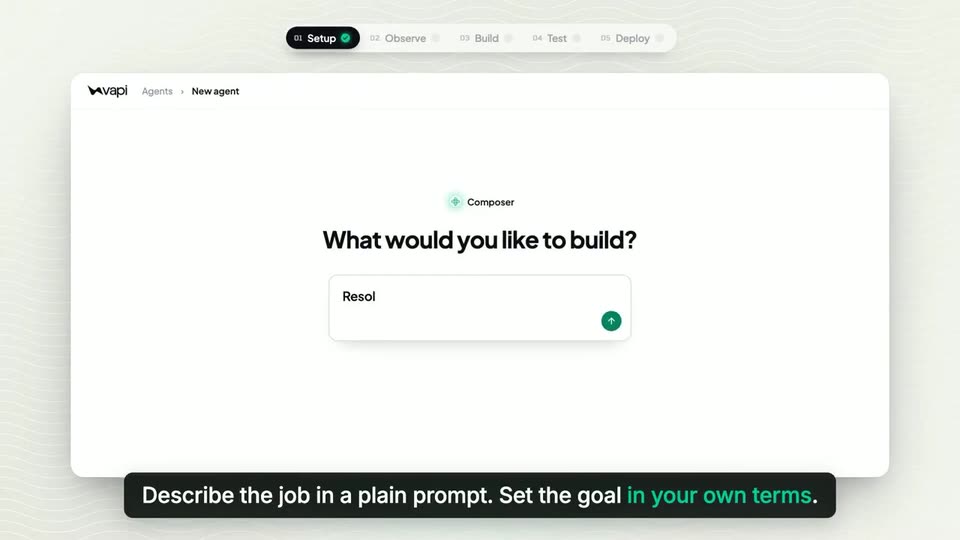
A flat vapi New agent screen centers the Composer prompt field under a step pill bar. The view zooms in on the input box as a prompt is typed into it, while a dark caption bar with a green accent phrase sits along the bottom.
On-screen text: “Describe the job in a plain prompt. Set the goal in your own terms.”
Techniques: UI zoom
Camera: Static
A flat Composer screen shows a prompt box typing a goal, which morphs into a green-bordered goal card. Below it, four tool rows (policy doc, Shopify, Zendesk, call recordings) slide in with green check marks. A black caption bar at the bottom swaps to a second line.
On-screen text: “Describe the job in a plain prompt. Set the goal in your own terms.”, “Give it the tools and knowledge to do the work.”
Techniques: Morph
Camera: Static
A flat Vapi agent screen on a light wavy background. Left: goal and four checked sources. Center: glowing green Composer icon. Right: checklist ticks off items one by one, then the heading flips to Lowtide support is ready with a Live v1 badge. A black caption bar sits below.
On-screen text: “01 Setup 02 Observe 03 Build 04 Test 05 Deploy”, “Composer assembles the first version in minutes.”
Techniques: Morph
Camera: Static
A flat Vapi dashboard for Lowtide support fades in on a light wavy background. Call rows stack into the list from the top, then the screen crossfades to a resolution-rate view as the top step pill moves from Setup to Observe. A caption holds at the bottom.
On-screen text: “01 Setup 02 Observe 03 Build 04 Test 05 Deploy”, “Every call is scored against your goal.”
Camera: Static
A flat Vapi dashboard pairs a calls list with a problems panel. Dotted lines link escalated rows to three issue cards as their counts tick up. The top issue expands to show a customer quote, then the Build step in the top stepper gains a checkmark.
On-screen text: “Every call is scored against your goal.”, “The misses are grouped into issues.”
Camera: Static
A 3D-tilted Vapi dashboard shows a list of support issues beside a Problems panel; the right side then swaps to a detail view titled Add a Handle return skill with a Composer row. A black caption bar at the bottom states the line and changes to the next.
On-screen text: “The issues are grouped into issues.”, “Composer drafts an improvement.”
Techniques: 3D mockup
Camera: Static
A tilted 3D view of the Vapi dashboard holds on an improvement card. In the green After box, new skill text types out, then a tool chip and a Drafted badge pop in. A dark caption pill at the bottom reads Composer drafts an improvement.
On-screen text: “Composer drafts an improvement.”
Techniques: 3D mockup
Camera: Static
A large counter on the Vapi Simulations page ticks from 0 to 300 of 300 simulated calls passed. A dot matrix lights up green and row statuses flip from Queued to Passed. A black caption bar at the bottom reads Hundreds of simulations test the improvement.
On-screen text: “Hundreds of simulations test the improvement.”
Camera: Pull out
A Vapi support-bot dashboard fills the frame, showing a simulations table with green Passed tags and a large 300 of 300 simulated calls passed counter. The screen holds steady while a black caption bar at the bottom swaps its line.
On-screen text: “Hundreds of simulations test the improvement.”, “A human stays in the loop to approve the change.”
Camera: Static
A flat dashboard of a “Needs you” screen with a top stepper zooms into a card titled “Add a Handle return skill”, listing problem, simulations and expected gain above a green approve button. A dark caption bar with white text rests along the bottom edge.
On-screen text: “A human stays in the loop to approve changes.”
Techniques: UI zoom
Camera: Push in
A vapi A/B experiment dashboard fills the frame. The resolution chart draws across seven days as the v2 rate counts up to 71.2% and the success chance to 96%. A green “Make v2 live” button appears; a cursor clicks it and the traffic split shifts to v2 at 100%.
On-screen text: “The new version is sent to a slice of live traffic.”, “If the goal rate improves, it can be rolled out to everyone.”
Techniques: Cursor demo
Camera: Pull out
A tilted 3D mockup of the vapi A/B experiment dashboard floats on a cream wavy background, showing the v1-to-v2 call flow and a resolution-rate chart. A dark caption pill at the bottom crossfades to read “Lessons are saved, and the loop runs continuously.”
On-screen text: “Lessons are saved, and the loop runs continuously.”
Techniques: 3D mockup
Camera: Static
A flat dashboard shows a line chart drawing across eight weeks as the percentage counts from 71% to 85% and a Goal reached badge appears. The bottom caption swaps, then the screen dissolves into a live shot of a woman at a microphone.
On-screen text: “Lessons are saved, and the loop runs continuously.”, “Improving with every rotation, until you exceed your goal.”
Camera: Static
A woman in a black vapi jacket sits against a gray-to-green gradient wall, speaking into a Shure mic on a boom arm. A dark lower-third panel with a green accent bar appears at the lower left, showing the URL and a waitlist line.
On-screen text: “vapi.ai/agent-loop”, “Join the waitlist”
Camera: Static
A white angular logo glows green at center on a near-black background. The gray URL vapi.ai/agent-loop fades in below it, holds, then both fade out to black. Locked-off frame, slow pace.
On-screen text: “vapi.ai/agent-loop”
Camera: Static