
0:47
Explore
Every Launches Benefits
Every · Jul 2026 · 0:27 · Full motion · AI-annotated
- Length
- 0:27
- Scenes
- 10 · 2.7 s avg
- Product on screen
- 0:00
- Features shown
- 2
- Voiceover
- Yes
- Views
- 45 on YouTube
as of November 26, 2026
00:00:00 / 00:27:23
- Length
- 0:27
- Scenes
- 10 · 2.7 s avg
- Product on screen
- 0:00
- Features shown
- 2
- Voiceover
- Yes
- Views
- 45 on YouTube
as of November 26, 2026
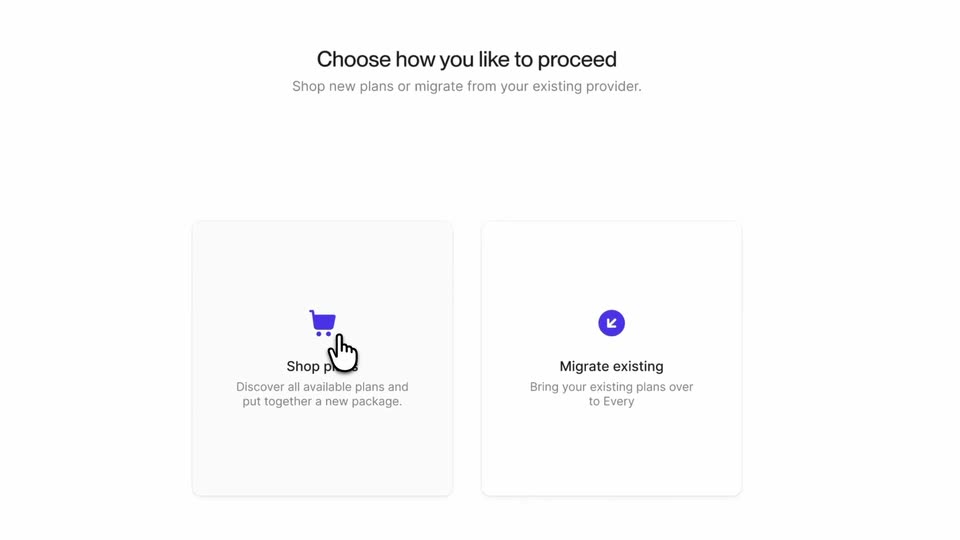
Every’s 0:27 launch film runs 10 scenes, about 2.7 s each. The product is on screen from the first frame and 2 features are revealed. There is no explicit call to action; a voiceover carries the film. A continuous interface walkthrough that chains screens with slow camera pushes, 3D tilts and motion-blur smears, moving from the benefits dashboard through plan shopping, cost breakdown and plan year management. The pace is steady and quiet, letting cursor clicks and dissolves carry the story, and it closes on an animated sunburst logo lockup on black.
No filming indicatedEstimated needs: 3 capture groups — your screens or recordings · 1 official logo — reused across the film · 1 3D passage — build or supply
Is this your launch? to your site or press kit.
More like this

0:40
Lightspark - Introducing Grid Global Accounts. Your app can now be a full global
Lightspark · Apr 2026
1:07


Introducing ChatGPT Pulse
OpenAI · AI · Sep 2025
Similar soundtrack
Films whose music sounds like this one, voice left out
0:45

Rimba AI - Launch (YC X25)
Rimba · Cinematic electronic and hip-hop
0:16
Anything - we took the internet’s best domain
Anything · Orchestral Trap
0:30

Meet Google Pixel 11 Pro | Attention-Grabbing. Not Attention-Seeking.
Google · Cinematic Hip-Hop / Trap
Every Launches Benefits, scene by scene
· 10 scenes as text
01 · Demo · 0:00–0:02
A pale benefits dashboard sits centered on a light gray field. The frame pushes in toward the Health FSA 2026 row while a cursor slides in from the right to rest on it, the whole interface smearing with motion blur.
Techniques: UI zoom, Cursor demo
Camera: Push in
02 · Feature reveal · 0:02–0:04
On a white background, a heading sits above two cards, Shop plans and Migrate existing. A hand cursor glides left and clicks the first card, then the screen switches to a benefits panel showing Health, Dental and Vision tabs.
Techniques: Cursor demo
Camera: Push in
03 · Feature reveal · 0:04–0:06
A white pricing panel sits on a light gray field, the single Anthem Growth Package card centered. The view then widens to a row of three plan cards, UHC Startup Package in the middle, each with tier tags, price range and a Choose button.
Techniques: UI zoom
Camera: Push in
04 · Feature reveal · 0:06–0:07
A light interface shows three pricing cards in a row, then reframes to a single centered card carrying the Anthem logo and package title, which then fades. The reframe happens quickly within the one second clip.
Techniques: UI zoom
Camera: Static
05 · Feature reveal · 0:07–0:11
A white Anthem Growth Package card on a light gray background zooms in on the plan field, where HRA Enabled Plans is typed beside a purple icon and Save up to $45k/year appears in purple. The scene fades to white as a Cost breakdown card fades in.
Techniques: UI zoom
Camera: Static
06 · Feature reveal · 0:11–0:16
A cost breakdown panel fades in, then the camera zooms into its overview bar and coverage table. It pulls back to reveal the full benefits dashboard with a left sidebar, tilts slightly in 3D, and pushes in on the premiums, enrollment and dates stat cards.
Techniques: UI zoom, 3D mockup
Camera: Push in
07 · Feature reveal · 0:16–0:17
A benefits dashboard shows three summary cards for premiums, enrollment and dates. The cards slide left as the figures update, then the view cuts to a member table with a pending action row before returning to the cards.
Camera: Static
08 · Feature reveal · 0:17–0:19
A tilted 3D view of a benefits dashboard on a white background shows a pending actions card and a health plan table. The page scrolls slowly upward, revealing more employee rows with green and purple status badges.
Techniques: 3D mockup
Camera: Static
09 · Feature reveal · 0:19–0:21
A benefits dashboard displays a numbered checklist with status labels on the right. A hand cursor glides to the purple Set active button and presses it, the screen resolving out of an overlapping-text dissolve.
Techniques: Cursor demo
Camera: Static
10 · Outro · 0:21–0:27
On a black field, a thin white line at center lengthens, then radial spokes fan out around it to form a sunburst mark. The lowercase wordmark every fades in to its right, and the lockup holds still.
Techniques: Morph
Camera: Static