
0:35
Explore
Introducing Composer, a section-by-section song editor.
ElevenLabs · Aug 2026 · 0:59 · Full motion · AI-annotated
- Length
- 0:59
- Scenes
- 22 · 2.7 s avg
- Product on screen
- 0:00
- Features shown
- 3
- Call to action
- 0:49 · 83%
- Voiceover
- Yes
- Views
- 5.7K on YouTube
as of November 27, 2026
00:00:00 / 00:59:04
- Length
- 0:59
- Scenes
- 22 · 2.7 s avg
- Product on screen
- 0:00
- Features shown
- 3
- Call to action
- 0:49 · 83%
- Voiceover
- Yes
- Views
- 5.7K on YouTube
as of November 27, 2026
ElevenLabs’s 0:59 launch film runs 22 scenes, about 2.7 s each. The product is on screen from the first frame and 3 features are revealed. The call to action lands at 0:49 (83% in), over a voiceover. The film opens on the morphing logo, then walks one feature at a time (start a song, section editing, audition takes) with centered UI cards that scale in and out on a near-black field. Its signature moves are the glossy teal liquid that fills and drains the cards and the slow parallax drift through floating waveform tiles, closing on the wordmark resolving into the ElevenMusic URL card.
No filming indicatedEstimated needs: 4 capture groups — your screens or recordings · 1 official logo — reused across the film · 3 graphic passages — draw or supply · 3 3D passages — build or supply
Is this your launch? to your site or press kit.
More like this




Similar soundtrack
Films whose music sounds like this one, voice left out
1:13
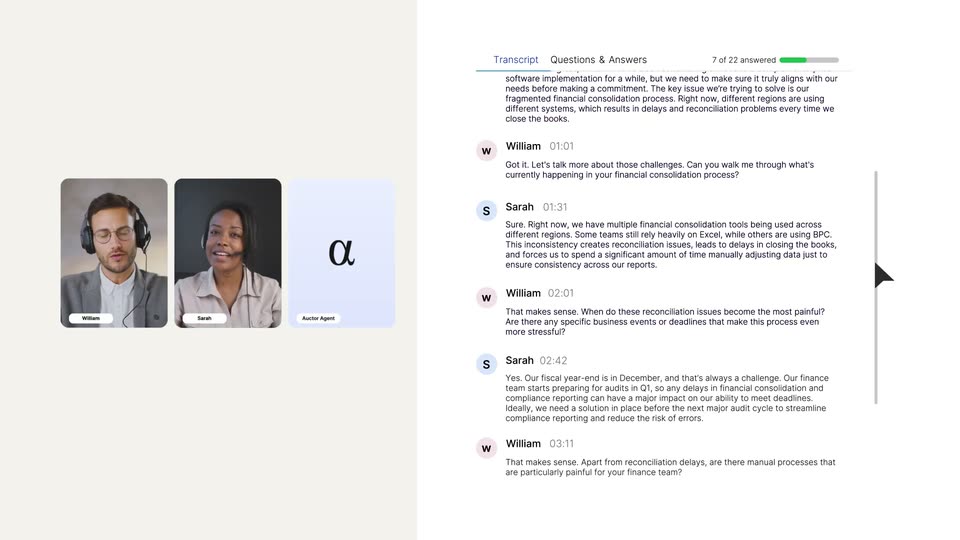

Auctor AI (YC X25) Launch Video
Auctor · Modern electronic
1:42

Transport One by Delhivery: The Best Product Launch Video? | Beliv8 Motion Breakdown
Delhivery · Modern electronic
0:49

Meet Phone (4a) Pro
Nothing · Electronic
Introducing Composer, a section-by-section song editor., scene by scene
· 22 scenes as text
01 · Product intro · 0:00–0:04
A white abstract logo of two vertical bars joined by a wavy link sits centered on a near-black background. The strokes separate and morph into the word Composer., which scales down to a locked-off center frame.
On-screen text: “Composer.”
Techniques: Morph, Kinetic type
Camera: Static
02 · Product intro · 0:04–0:04
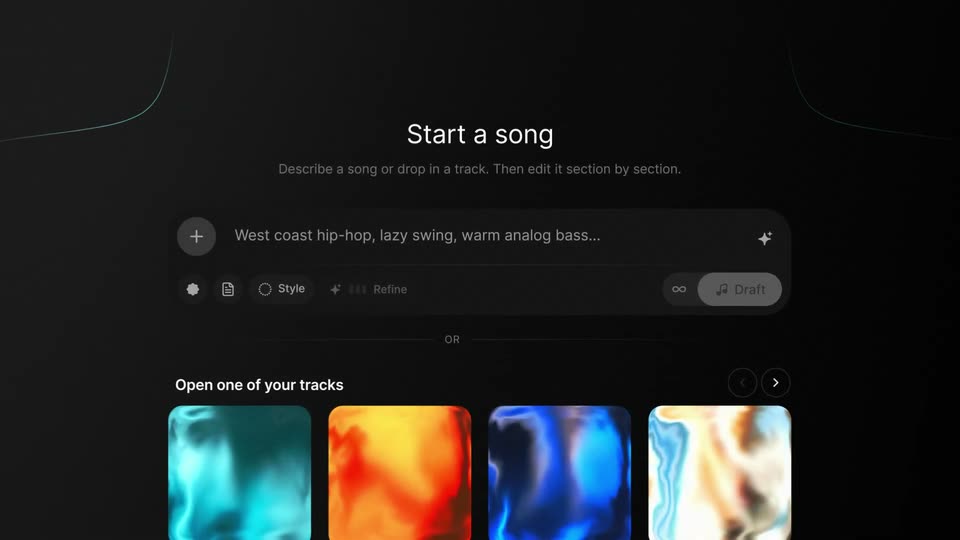
On black, the title Composer. scales up and dissolves, revealing a dark interface that fades in: a Start a song heading, a one-line description, and a prompt field with placeholder text plus a row of control buttons.
On-screen text: “Composer.”
Techniques: Kinetic type
Camera: Pull out
03 · Feature reveal · 0:04–0:08
A dark app screen fades in with a song prompt field and four colorful track thumbnails sliding into place below. The view then zooms into the interface as a blurred track card drops in from the top right corner.
Techniques: UI zoom
Camera: Pull out
04 · Feature reveal · 0:08–0:10
Two blurred video thumbnails fly in from the top right and settle over the left upload box, merging into a single circular preview labeled Catalyst Horizon.mp4. The panel shows an Upload or drop audio box beside a Record box, with a prompt field and toolbar below.
Techniques: Morph
Camera: Static
05 · Feature reveal · 0:10–0:15
A glossy blue 3D sphere with a white X sits on black. The X turns into a plus as a dark pill expands right, typing '[Verse]' then 'I woke up chasing light, as if the world was still a toy' with a cursor, while the sphere exits left.
On-screen text: “[Verse]”, “I woke up chasing light”, “as if the world was still a toy”
Techniques: 3D mockup, Morph, Kinetic type
Camera: Static
06 · Feature reveal · 0:15–0:16
Five black pill labels reading Intro, Verse, Chorus, Verse, Bridge with durations stack vertically and slide upward across a soft teal liquid background, the top pill exiting the frame.
On-screen text: “Intro 12s”, “Verse 16s”, “Chorus 18s”, “Verse 12s”, “Bridge 8s”
Camera: Static
07 · Feature reveal · 0:16–0:17
A vertical stack of dark pill buttons labeled Intro, Verse, Chorus, Verse, Bridge sits on a teal silk backdrop. The Chorus pill quickly widens into a large rounded panel, revealing playback controls and a lyric line, while the other labels hold still.
Techniques: Morph
Camera: Static
08 · Feature reveal · 0:17–0:20
A dark rounded lyrics panel floats over a flowing teal liquid-metal surface. The chorus lines update in place, then the panel's dark fill drains away to reveal the moving metal, leaving a thin white outline of the inner text box.
Techniques: Masking
Camera: Pull out
09 · Feature reveal · 0:20–0:23
A rounded card with a rippling blue liquid texture sits centered on black. It holds a tempo control: a large BPM count that ticks up from 74 to 104, flanked by minus and plus buttons, above a Tap Tempo button. The card scales down at the start.
Techniques: Kinetic type
Camera: Pull out
10 · Feature reveal · 0:23–0:24
A teal silk-textured rounded card floats centered on black. The large white BPM number counts up from 104 to 116 while the fabric ripples, and the minus, plus and Tap Tempo controls hold still.
Camera: Static
11 · Feature reveal · 0:24–0:26
A close-up of a key selector over a softly glowing teal surface. The white label Key, a vertical column of note names, and the words Major and Minor fade in, while the note list scrolls up to highlight D#.
Techniques: Kinetic type
Camera: Push in
12 · Feature reveal · 0:26–0:28
A teal rounded card floats over a black background with a faint music staff. A glossy blue button labeled Key shows a vertical note list and Major/Minor options that scroll and collapse to a single line reading Key E Minor as the card shrinks and glows.
Camera: Static
13 · Feature reveal · 0:28–0:32
A full audio waveform with a cyan glow sits on a dark background under a time ruler, with Chorus and Verse labels below. A rounded card scales in at the center, isolating a clip segment in white and cyan while the surrounding waveform dims to gray.
Techniques: Masking
Camera: Static
14 · Feature reveal · 0:32–0:33
A centered rounded card holds a flowing blue liquid texture behind a white audio waveform that pulses in place. A timecode ruler runs above and Chorus and Verse labels sit below on a black field.
Camera: Static
15 · Feature reveal · 0:33–0:36
A rounded audio-clip card with a swirling blue liquid fill and a white waveform sits centered on black. The waveform bars pulse and reshape as the liquid moves. The view pulls back, shrinking the card into a blurred dark interface with a small waveform tile at the top right.
Techniques: UI zoom
Camera: Pull out
16 · Feature reveal · 0:36–0:40
A rounded card holding a white audio waveform sits centered on a black field of blurred waveform tiles. Its glossy blue silk fill fades to a flat dark surface in the first second while the background tiles drift slowly past at different depths.
Techniques: Parallax
Camera: Pull out
17 · Feature reveal · 0:40–0:40
A dark void fills with rounded-rectangle cards holding white audio waveforms at varying depths. The in-focus cards drift left while blurred ones slide the opposite way, a slow parallax pan across the floating shapes.
Techniques: Parallax
Camera: Pan
18 · Feature reveal · 0:40–0:49
A field of rounded waveform chips floats in dark 3D space with soft depth of field. The camera drifts across them; the focused chip fills with a flowing blue liquid while its white bars pulse, then compress to dots before the view moves to the next chip.
Techniques: Parallax, Morph
Camera: Pan
19 · CTA · 0:49–0:50
A loose grid of dark waveform tiles drifts across a black field, one tile glowing teal. The tiles slide at uneven speeds while the focus shifts, then the field clears to black as a large blue word slides in at the right edge.
On-screen text: “Composer.”
Techniques: Parallax
Camera: Static
20 · CTA · 0:50–0:52
On a black background, the wordmark “Composer.” scales up from a dim teal state to full white, a blue tint lingering on the right edge as it locks in.
On-screen text: “Composer.”
Techniques: Kinetic type, Light sweep
Camera: Static
21 · CTA · 0:52–0:53
The word Composer. scales on a black field, then a small metallic logo mark forms inside a thin rounded square outline.
On-screen text: “Composer.”
Techniques: Kinetic type
Camera: Static
22 · CTA · 0:53–0:59
A small white logo mark at the center morphs into the wordmark IIElevenMusic over dark concentric rounded-square outlines. The URL elevenmusic.io types in below with a blinking caret, then holds.
On-screen text: “IIElevenMusic”, “elevenmusic.io”
Techniques: Morph, Kinetic type
Camera: Static