
1:31
Explore
00:00:00 / 01:13:20
- Length
- 1:13
- Scenes
- 31 · 2.4 s avg
- Product on screen
- 0:32
- Voiceover
- Yes
- Views
- 4K on YouTube
as of November 23, 2026
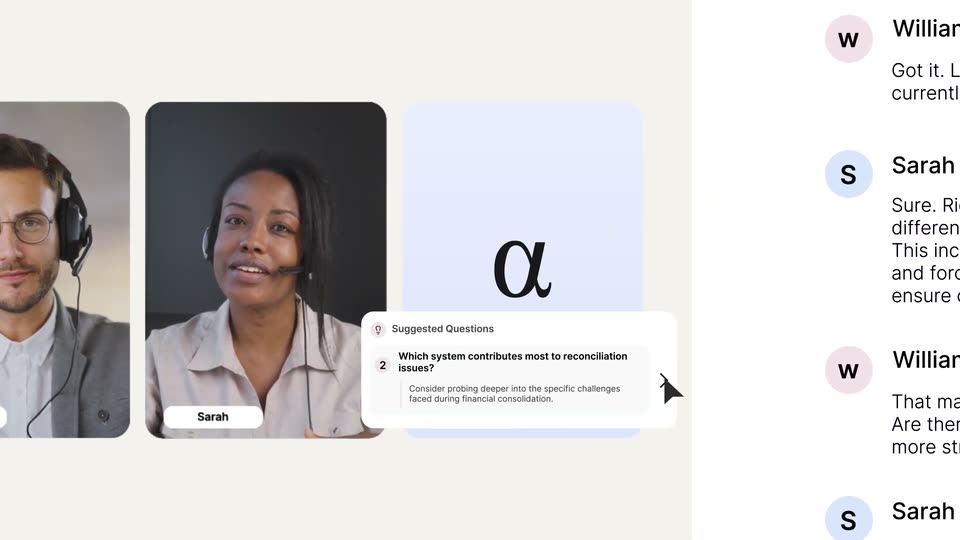
Auctor’s 1:13 launch film runs 31 scenes, about 2.4 s each. The product shows up at 0:32. There is no explicit call to action; a voiceover carries the film. The video opens on a black grid with a falling dashed chart and word-by-word white type, cuts through archival Titanic and Mars Climate Orbiter footage with highlighted newspaper text, then flips to a pale blue gradient stage where a serif alpha wordmark assembles between glossy chrome 3D forms and a clean product UI tour runs from video call to generated artifacts. Pacing is steady at about 86 bpm with hard cuts synced to the voiceover, high-contrast monochrome graphics in the first half giving
Footage neededEstimated needs: 1 capture group — your screens or recordings · 1 official logo — reused across the film · 6 filmed passages — shoot, supply or replace · 9 graphic passages — draw or supply
Is this your launch? to your site or press kit.
More like this

Similar soundtrack
Films whose music sounds like this one, voice left out
1:14

Paloma (YC S25) is an AI-native CRM for managing billing, renewals and expansions | www.getpaloma.ai
Paloma · Modern electronic
0:55

Red Teaming Voice AI Agents: Jailbreak, Bias and Toxicity | Cekura
Cekura · Electronic
1:07

Introducing ElevenAgents Architect
ElevenLabs · Modern electronic
Auctor AI (YC X25) Launch Video, scene by scene
· 31 scenes as text
01 · Hook · 0:00–0:06
On a black grid, a white dashed line draws a falling stock chart while bold white words appear one by one in the center: history's, greatest, failures, didn't happen, at the end, started, beginning. The frame then pushes into the top-left corner where the line begins to drop.
On-screen text: “history's”, “greatest”, “failures”, “didn't happen”, “at the end”, “started”, “beginning”
Techniques: Kinetic type
Camera: Pull out
02 · Problem · 0:06–0:07
A flat scan of a vintage American newspaper fills the frame, headline “800 DEAD” in heavy black serif type dominating the lower half. The page holds still with a slow push-in, then a dark gradient and faint new lettering begin to dissolve in from the right.
On-screen text: “American”, “GREATER NEW YORK”, “BUSINESS PROPERTY”, “ST ON TITANIC”, “800 DEAD”
Techniques: Masking
Camera: Static
03 · Problem · 0:07–0:09
A black and white newspaper front page tears open to reveal a vintage illustration of the Titanic listing in icy water, lifeboats crowded with figures below. Centered white text reads “because”, then “hit”.
On-screen text: “because”, “hit”
Techniques: Masking, Kinetic type
Camera: Pull out
04 · Problem · 0:09–0:10
Grainy black-and-white archival footage shows a large iceberg floating on dark water, with visible film dust and scratches. The word 'iceberg' in white lowercase sans sits centered over the frame, static throughout. The camera is locked off.
On-screen text: “iceberg”
Camera: Static
05 · Problem · 0:10–0:11
A black and white wide shot shows a large iceberg floating in dark water, with a dark overhanging mass at the upper left and a tall, jagged ice wall on the right. The frame pans slowly right across the still surface, archival grain throughout.
Camera: Static
06 · Problem · 0:11–0:15
A black line-drawn cross-section of a ship zooms in on its lower decks, then the engine room and bottom compartments fill with orange while the upper decks stay monochrome.
Camera: Push in
07 · Problem · 0:15–0:16
Overlapping vertical frames of a rocket stage in a cleanroom dissolve into a single horizontal shot; workers in white suits and helmets move around the base of the stage.
Camera: Static
08 · Problem · 0:16–0:16
Three still photos of a rocket launch sit side by side on a white background. The center photo of a Delta rocket lifting off tilts and skews in 3D while the side photos of suited technicians at the pad stay fixed.
Techniques: Split screen
Camera: Static
09 · Problem · 0:16–0:18
A black line-drawing blueprint of a rocket lies on a white field, exploded into stages and parts. Thin leader lines point to each component as small labels type in letter by letter, while the title settles at the top and an italic caption fades in at the bottom.
On-screen text: “Mars Climate Orbiter”, “Orbiter's Delta II launch vehicle”
Techniques: Kinetic type
Camera: Push in
10 · Problem · 0:18–0:20
A red line drawing of the Mars Climate Orbiter rocket on a pink background holds, then a white article page with a bold serif headline and body copy fades in over it, the diagram dissolving away.
On-screen text: “Mars Climate Orbiter”, “Orbiter's Delta II launch vehicle”, “Mars scientists fail to measure up”, “Mars Climate Orbiter”
Camera: Pan
11 · Problem · 0:20–0:23
A newspaper article on a white background resolves from a doubled, garbled state into crisp text. The serif headline and red subhead fade to light gray while a yellow highlighter marks the phrase about converting imperial measurements, matching the voiceover.
On-screen text: “Mars scientists fail to measure up”, “Mars Climate Orbiter”, “failure to convert imperial measurements into their metric equivalents”
Techniques: Kinetic type
Camera: Push in
12 · Problem · 0:23–0:24
A rocket climbs from a night launch pad, its engine flare blooming into a starburst as smoke rolls across the base. The camera stays locked on the rising plume.
On-screen text: “HD”
Camera: Static
13 · Problem · 0:24–0:27
A night rocket launch rises through a dark sky, bright flame and smoke filling the center. Large white lowercase words swap in one by one over the footage: software, implementation, shouldn't be, rocket science.
On-screen text: “software”, “implementation”, “shouldn't be”, “rocket science”
Techniques: Kinetic type
Camera: Pan
14 · Problem · 0:27–0:28
A dark launch shot with a faint orange glow at the bottom and a NASA HD mark cuts to a black screen. White text reads 'but it' on the first line as 'feels' slides in below it, centered.
On-screen text: “but it”, “feels”
Techniques: Kinetic type
Camera: Static
15 · Problem · 0:28–0:32
On a plain black background, white lowercase phrases cut in one after another at center, each holding for about a second in sync with the voiceover.
On-screen text: “feels”, “that way”, “crucial”, “requirements”, “don't reach”, “the right”, “at the”, “right”, “time”
Techniques: Kinetic type
Camera: Static
16 · Product intro · 0:32–0:33
A blue-gray gradient holds the word “time” in white lowercase, then a polished chrome ring with iridescent edges flies in from the top-left as the background lightens.
On-screen text: “time”
Techniques: Kinetic type
Camera: Static
17 · Product intro · 0:33–0:35
A pale blue gradient stage holds two glossy black 3D forms, a ring at left and an angular slab at upper right, drifting into focus as the wordmark α Auctor assembles in the center.
On-screen text: “α Auctor”
Techniques: Kinetic type
Camera: Pan
18 · Product intro · 0:35–0:36
On a pale blue gradient, the black serif wordmark α Auctor sits centered between a chrome torus at the lower left and a chrome zigzag at the upper right. The wordmark slides right, the alpha glyph pulling away from the word.
On-screen text: “α Auctor”
Techniques: Kinetic type
Camera: Static
19 · Product intro · 0:36–0:37
Three rounded cards settle onto a cream background: two portrait cards of smiling support agents with name pills, and a pale blue card holding a serif alpha mark. The wordmark slides past the mark while the bottom label scales into place.
On-screen text: “Auctor Agent”
Camera: Pull out
20 · Demo · 0:37–0:47
A product screen with a three-tile video call on the left and a scrolling transcript on the right. The camera zooms onto the tiles as a Suggested Questions tooltip pops up, then pulls back while a cursor clicks the Questions & Answers tab and opens a Sources panel.
Techniques: UI zoom, Cursor demo
Camera: Pull out
21 · Demo · 0:47–0:48
A product interface fills the frame: a 3D laptop on the left shows a video call with the Alpha audio agent, the center lists question and answer cards, and a right panel shows source transcripts with speaker names. The text sharpens from a brief blur.
Techniques: 3D mockup
Camera: Push in
22 · Demo · 0:48–0:51
A two-panel interface shows Q&A cards with a progress bar on the left and transcript chat bubbles on the right. A black cursor moves to a Generate Artifacts button that fades in at top right, then a white panel slides in from the left, covering part of the list.
Techniques: Cursor demo
Camera: Push in
23 · Demo · 0:51–0:52
A product dashboard fades in from transparent, showing a grid of document cards titled Hooli SOW, HLD, Proposal, BRD, with two floating detail cards on the right and a cursor hovering over the user story card.
Techniques: Cursor demo
Camera: Static
24 · Demo · 0:52–0:54
A flat Hooli Artifacts dashboard fills the frame, a two-column grid of document cards on the left. Two floating cards, User Story and Epics, sit at the right. The view slowly zooms in, reframing toward those right-side cards.
Techniques: UI zoom
Camera: Pan
25 · Demo · 0:54–1:01
A white Design Doc card sits centered on a pale blue field, ringed by floating file icons joined by white lines. The document builds up with a diagram and yellow lines, ending in an Approve Changes prompt with check and cross buttons. The camera zooms in as a cursor appears.
Techniques: Parallax, UI zoom, Cursor demo
Camera: Push in
26 · Demo · 1:01–1:03
A white requirement card sits on a light blue gradient, with faded version cards stacked behind it. The placeholder lines shift from orange to gray while a dark cursor glides toward the See history button at the bottom.
Techniques: Cursor demo
Camera: Static
27 · Demo · 1:03–1:05
A vertical list of pale requirement cards scrolls upward over a soft blue gradient. Each card carries a bold title, a pink High Priority tag, and a View Source button, with a faint blur on the rows.
Camera: Pan
28 · Other · 1:05–1:06
A dark two-line headline, Auctor reimagines your software implementation & delivery, sharpens into the center of a pale blue gradient as three translucent requirement cards fade out above it.
On-screen text: “Auctor reimagines your software”, “implementation & delivery”
Camera: Static
29 · Other · 1:06–1:09
A centered two-line headline holds on a pale blue gradient. The letters start overlapping and blurred, then settle into a clean lockup, after which the frame stays locked off.
On-screen text: “Auctor reimagines your software”, “implementation & delivery”
Camera: Static
30 · Other · 1:09–1:10
A light blue gradient fills the frame with a centered two-line dark gray headline. The text holds, then clears away as a small purple and black U-shaped mark draws in at the center.
On-screen text: “Auctor reimagines your software implementation & delivery”
Camera: Static
31 · Outro · 1:10–1:13
A black italic serif lowercase alpha sits centered on a soft lavender gradient. At the start a small lavender tail at its base fades into the solid black letterform, then the frame holds still.
On-screen text: “α”
Camera: Static