
0:39
Explore
Introducing Agent Workflows
ElevenLabs · May 2026 · 1:00 · Code only · AI-annotated
- Length
- 1:00
- Scenes
- 33 · 1.8 s avg
- Product on screen
- 0:00
- Features shown
- 2
- Call to action
- 0:53 · 88%
- Voiceover
- Yes
- Views
- 8.2K on YouTube
as of November 27, 2026
00:00:00 / 01:00:09
- Length
- 1:00
- Scenes
- 33 · 1.8 s avg
- Product on screen
- 0:00
- Features shown
- 2
- Call to action
- 0:53 · 88%
- Voiceover
- Yes
- Views
- 8.2K on YouTube
as of November 27, 2026
ElevenLabs’s 1:00 launch film runs 33 scenes, about 1.8 s each. The product is on screen from the first frame and 2 features are revealed. The call to action lands at 0:53 (88% in), over a voiceover. A single-feature launch built as a chain of reveals: logo sting, feature name, node-by-node flowchart assembly, abstract line diagrams, UI panels, benefit words, then a particle-to-logo morph into the URL card. The signature moves are self-drawing lines with arrowheads, glowing node cards that scale in on black, and a strict cyan-on-black palette with soft blue glows.
No filming indicatedEstimated needs: 3 capture groups — your screens or recordings · 1 official logo — reused across the film · 14 graphic passages — draw or supply · 1 3D passage — build or supply
Is this your launch? to your site or press kit.
More like this

1:00
Brex Launches Integrated Travel Solution
Brex · Mar 2023
1:22
Hogwarts Legacy | DLSS 5 Launch Trailer
NVIDIA · Nov 2026
Similar soundtrack
Films whose music sounds like this one, voice left out
1:41
kirill avery - Introducing Alien — the most private AI agent You shouldn't give you
Alien · Modern electronic
0:59
Sekoia | Autonomous defensive intelligence
Sekoia · Electronic
3:02
Kesava Kirupa Dinakaran - Today, we’re excited to introduce @luminai Topology. In healthcare,
Luminai · Modern corporate electronic
Introducing Agent Workflows, scene by scene
· 33 scenes as text
01 · Product intro · 0:00–0:00
On a black field, two glowing cyan strokes rotate and lock into the brand logo mark, their neon edges brightening as the shape settles into place. The reveal is brief and centered, with no other elements.
Camera: Static
02 · Product intro · 0:00–0:01
Two glowing blue vertical bars form the brand logo at center on black, their thin outline frames contracting inward. A dark rounded panel slides in from the right edge as the bars settle into solid light blue.
Techniques: Masking
Camera: Static
03 · Product intro · 0:01–0:02
A dark rounded card with a thin glowing edge holds a white two-bar logo, which condenses into a single dotted bar. A second rounded card with a blue gradient and beveled edge sits to the right, both shifting slightly on a black background.
Techniques: Morph
Camera: Static
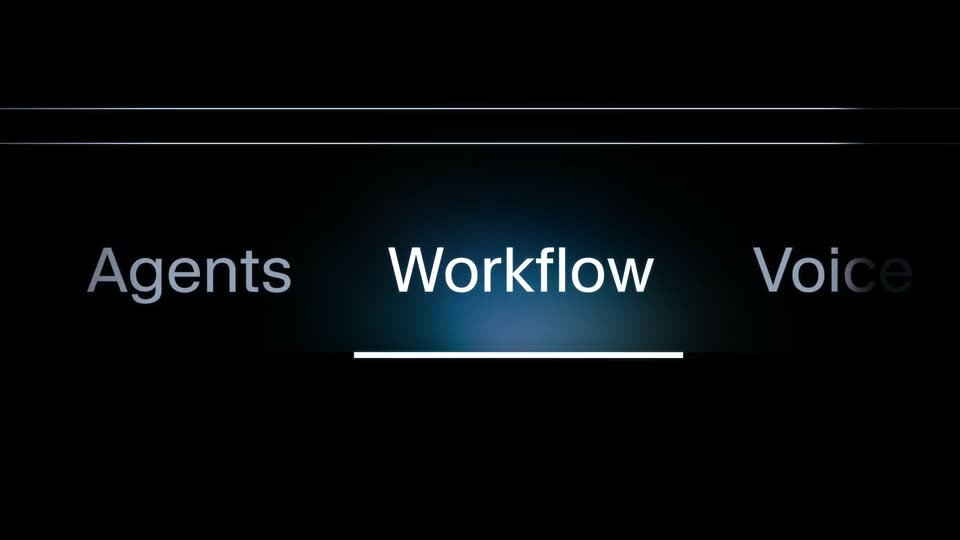
04 · Feature reveal · 0:02–0:03
On a black background, the word Workflow types on in the center above a white underline, while Agents and Voice slide in from the sides and brighten. A thin horizontal light streak glides across the top and fades out.
On-screen text: “Workflow”, “Agents”, “Voice”
Techniques: Kinetic type, Light sweep
Camera: Static
05 · Feature reveal · 0:03–0:04
On a black background, a row of three labels, Agents, Workflow, and Voice, slides slowly left. The white underline and blue glow shift from Workflow to Voice, which ends centered and lit while the other two dim and exit left.
On-screen text: “Agents”, “Workflow”, “Voice”
Techniques: Kinetic type
Camera: Static
06 · Feature reveal · 0:04–0:06
On black, a blue outlined pill with a flag icon types out the word Start, then the pill lifts while a white plus node and a vertical blue line grow downward, forming a single workflow node.
Techniques: Kinetic type
Camera: Static
07 · Feature reveal · 0:06–0:12
A flowchart assembles on black: a teal-outlined Routing Agent node scales in under a top arrow, then two condition pills branch below it and two agent nodes, Technical Help and Pricing Enquiry, fade in with connecting lines and downward arrows.
Camera: Pull out
08 · Feature reveal · 0:12–0:13
A dark teal node card with a person icon and the title Routing Agent scales out at the center of a black field. Two thin blue curves drop from where it sat, bending outward and finishing in small arrowheads.
Camera: Pan
09 · Feature reveal · 0:13–0:15
Thin white and cyan lines draw themselves across a black field, curving and splitting into separate paths, each ending in a small arrowhead. New strokes appear in sequence, suggesting branching routes.
Camera: Static
10 · Feature reveal · 0:15–0:16
Thin curved lines in white and light blue, each ending in an arrowhead, drift diagonally from the upper right toward the lower left across a black background. The lines bend and sway as they travel, overlapping without connecting.
Camera: Static
11 · Feature reveal · 0:16–0:18
On a black background, a thin blue line draws a curve with an arrow, then clears as the title Artificial Intelligence fades in at center. A straight line with an arrowhead extends beneath the text and holds. The frame is locked-off.
On-screen text: “Artificial Intelligence”
Techniques: Kinetic type
Camera: Static
12 · Feature reveal · 0:18–0:20
On a black field, the blue gradient text “Artificial Intelligence” slides in and exits to the right, then “Complex Logic” holds centered, framed by thin arrow lines above and below.
On-screen text: “Artificial Intelligence”, “Complex Logic”
Techniques: Kinetic type
Camera: Static
13 · Feature reveal · 0:20–0:20
Black background. The blue phrase Complex Logic fades out as Deterministic Action fades in at center, above a thin cyan line diagram: a vertical stem splitting into three upward arrows, with a horizontal arrow line entering from the left edge.
On-screen text: “Complex Logic”, “Deterministic Action”
Techniques: Kinetic type
Camera: Static
14 · Feature reveal · 0:20–0:22
On black, the blue-gradient headline “Deterministic Action” holds center while thin blue lines with arrowheads rise from below and converge behind it. The lines dim and the headline drifts right, fading out.
On-screen text: “Deterministic Action”
Techniques: Kinetic type
Camera: Static
15 · Demo · 0:22–0:23
On black, a thin white wireframe torso outline sits center frame. A rounded dark card with a red link icon, the title Dispatch Shipment and a two-line gray description fades and scales in above the figure, while a soft blue glow blooms behind it.
On-screen text: “Deterministic Action”, “Dispatch Shipment”, “Trigger sorting and delivery of product”, “to the customer's location.”
Techniques: Kinetic type, Masking
Camera: Static
16 · Demo · 0:23–0:24
A rounded info card with an orange wrench icon and white title sits over a white wireframe outline of a person's head and shoulders on a dark field. The card slides slightly into place as the body copy appears beneath the title.
On-screen text: “Dispatch Shipment”, “Trigger sorting and delivery of product”, “to the customer's location.”
Techniques: Kinetic type
Camera: Static
17 · Demo · 0:24–0:25
On a dark field, a thin white line-drawing of a stem and leaves sits behind a rounded card with a teal border. An orange eye-and-star icon and the white title fade in, followed by a grey two-line caption, as the card settles into place.
On-screen text: “Verify Customer”, “Search for the user's contact information”, “within knowledge base.”
Techniques: Kinetic type
Camera: Push in
18 · Demo · 0:25–0:26
On a dark blue field crossed by thin flowing lines, a glass card with an orange person icon and the heading “Verify Customer” slides in, then clears to reveal a second card with a phone icon reading “Transfer to Sales.”
Techniques: Kinetic type
Camera: Static
19 · Demo · 0:26–0:28
A dark blue background with a faint radial glow and a thin wireframe line on the left. A rounded UI card with an orange phone-arrow icon, the title Transfer to Sales, and a gray caption slides upward, and a second identical card follows it from below.
Camera: Static
20 · Demo · 0:28–0:29
A dark flowchart interface displays nodes for customer service scenarios. The view zooms out from a close-up of three nodes to reveal a wider branching logic diagram.
Techniques: UI zoom
Camera: Static
21 · Demo · 0:29–0:32
A dark node-graph flowchart fills the screen. The camera drifts and zooms across it while nodes light up in sequence, Routing Agent, then Pricing Enquiry, then Transfer to Sales, each glowing blue with its short description.
Techniques: UI zoom
Camera: Push in
22 · Demo · 0:32–0:33
A thin white line draws itself across a black field, bending into an S-curve with an arrowhead at its tip, while a faint dark card fades in below the path.
Camera: Static
23 · Feature reveal · 0:33–0:41
A dark New Subagent panel glows in beside a small card with hand-drawn arrows that counts documents from +0 to +6. Model names scroll past on the left as the LLM field switches to GLM-4.5-Air, then the panel slides down to reveal a large Control headline.
On-screen text: “Control”
Techniques: Kinetic type
Camera: Push in
24 · Other · 0:41–0:42
A dark frame holds a soft blue glow behind the word Control, centered in a light blue gradient sans. The glow drifts slightly downward while the text stays locked in place.
On-screen text: “Control”
Camera: Static
25 · Other · 0:42–0:44
A dark frame with a soft blue glow holds three centered words in sequence: Control, then Precision scaling in, then Escalation. Each word fills the middle of the screen in turn.
On-screen text: “Control”, “Precision”, “Escalation”
Techniques: Kinetic type
Camera: Static
26 · Other · 0:44–0:45
The word Escalation sits centered in blue sans-serif over a black field. A soft blue and teal glow blooms behind it, shifting position as the letters sharpen from a hazy edge to a solid fill.
On-screen text: “Escalation”
Camera: Static
27 · Other · 0:45–0:47
A small blue ring with a white center, the brand logo, holds the middle of a dark navy field as dozens of tiny blue and white dots fade in and drift outward, the background brightening into a soft blue gradient.
Techniques: Particles
Camera: Pull out
28 · Other · 0:47–0:48
A dark teal gradient with a soft central glow fills the frame. Dozens of small dots in white, cyan, and blue drift slowly across the field, some sharp, some blurred, creating a calm floating texture.
Techniques: Particles
Camera: Pull out
29 · Other · 0:48–0:49
A dark teal gradient fills the frame with dozens of small white and blue dots arranged in radial rays. A soft glow at the center sharpens into a bright white dot with a thin ring as the clip progresses.
Techniques: Particles
Camera: Pull out
30 · Other · 0:49–0:49
A dark grid of blue and white dots recedes into 3D perspective, with a glowing white circle at the center. A blue pinwheel fades into the circle as the dots streak outward with motion blur, the view pushing forward through the grid.
Techniques: Particles, Parallax
Camera: Pull out
31 · Other · 0:49–0:52
A glowing blue disc with a rotating pinwheel pattern sits centered on black. Faint particles drift around its halo, then two blue corner brackets slide in to frame the disc.
Techniques: Particles
Camera: Static
32 · Other · 0:52–0:53
A glowing blue circle with a radial pinwheel pattern and vertical light streaks sits centered on black, then collapses into two vertical glowing bars, one pale and one deep blue.
Techniques: Morph
Camera: Static
33 · CTA · 0:53–1:00
Two glossy blue vertical bars centered on black scale down and turn white, then the wordmark IIElevenLabs resolves around them in white. The URL elevenlabs.io/agents fades in below and the locked-off frame holds.
On-screen text: “IIElevenLabs”, “elevenlabs.io/agents”
Techniques: Kinetic type
Camera: Static