1:15
Framer 3.0 with Agents, Branching, and a new Community
Framer · Design · Jun 2026
Alien · Nov 2026 · 1:41 · AI-annotated
Alien’s 1:41 launch film runs 53 scenes, about 1.9 s each. The product shows up at 0:07 and 5 features are revealed. There is no explicit call to action; a voiceover carries the film. The video is built as a chain of feature chapters, each opened by a sliding headline card and demoed in tight phone mockups on black, bookended by surreal 3D set pieces with a live-action character. Signature moves include data that scrambles into gibberish to sell encryption, status lines that flip from Checking to Done, and the alien icon dropping through or standing in for words in the headlines.
Is this your launch? to your site or press kit.
Framer · Design · Jun 2026
Apple · Hardware · Oct 2026
The camera rushes forward with motion blur through a stormy blue landscape. A smartphone spins from edge-on to face forward at center, surrounded by floating glass spheres holding miniature trees under a lightning-filled sky.
Techniques: 3D mockup
Camera: Static
A black smartphone floats at the center of a misty blue 3D forest as personal-data objects, a boarding pass, credit card, health card, chat bubbles, calendar, map and loose papers, orbit and drift around it in layered depth.
Techniques: 3D mockup, Parallax
Camera: Push in
A bare hand reaches toward a black smartphone held upright in the center, while a blond man in a black shirt leans in behind it. Floating cards, a speech bubble, a location pin and a notepad drift through a hazy blue illustrated background.
Techniques: 3D mockup, Parallax
Camera: Static
A hand grips a black phone split by a vertical lightning bolt, then the shot widens to a blond man in black clothing holding the phone toward the camera. He crouches in a blue surreal landscape with a glass bubble and a shattered glass dome; UI cards drift behind him.
Techniques: 3D mockup
Camera: Push in
A blond man in a black hoodie crouches in a surreal blue storm landscape, thrusting a black smartphone toward the camera. The camera pushes in on the device until its dark screen fills the frame. A glass bubble and floating shards drift in the background.
Camera: Push in
A dark phone mockup on black with a blue glow above. The chat with the AI assistant Alien scrolls up, revealing a sleep bar chart and a Vienna map card. The shot opens as a close crop and pulls back to frame the device.
Camera: Static
A phone mockup sits centered on a black background with a blue glow at the top. Its chat screen scrolls upward in a quick pass, revealing message bubbles, flight option cards and a timeline, while the Alien avatar stays pinned at the top.
Techniques: 3D mockup
Camera: Static
A phone mockup on a dark background with a blue glow at the top shows a chat with an Alien agent. A blue message bubble asks about the last few months, then a summary card scrolls up to reveal stats for food orders, late orders, and rides.
Camera: Static
A blue chat bubble rests centered on a black field lit by a vertical blue beam. The prompt text types in line by line as the bubble grows, with a small alien-face badge fixed to its lower right corner.
Techniques: Kinetic type
Camera: Static
A blue chat bubble with white text fills the frame, then the view zooms out to a dark phone chat screen showing the Alien contact at top, while an incoming grey message appears line by line.
Techniques: UI zoom
Camera: Static
A front-facing phone on a dark, blue-lit background displays a chat with an AI contact, Alien. The thread scrolls up past a cat-costume message and a price-trend graph to a secure sign-in card, where a glowing cursor rests on a button.
Techniques: Cursor demo
Camera: Pull out
A glassy blue app icon with a white alien face forms at center, sitting in front of the large white wordmark Alien Agent. A glowing blue orb with fine specks hangs above on a black field. The icon brightens as the lockup settles.
On-screen text: “Alien Agent”
Techniques: 3D mockup
Camera: Static
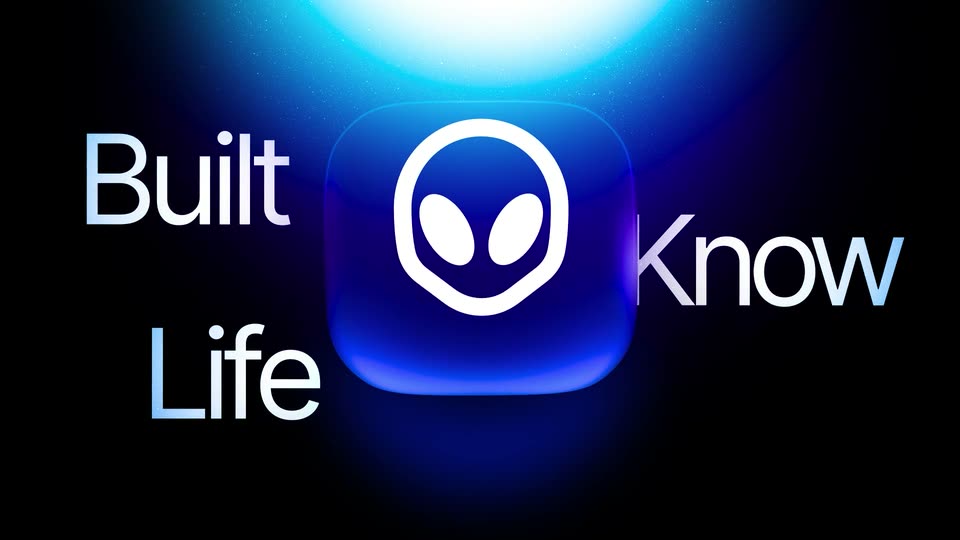
A glossy blue app icon with a white alien-like face floats centered under a bright blue glow. Large white words slide horizontally behind the icon, so Built, Know, Life and out appear on either side as the line moves.
On-screen text: “Built”, “Know”, “Life”, “out”
Techniques: 3D mockup, Kinetic type
Camera: Push in
A glowing blue 3D padlock rotates in the center of a dark void lit by a bright orb above, while smaller padlocks drift at the edges. The caption slides across the frame, passing behind the lock so only fragments show at a time.
On-screen text: “taking it from you.”
Techniques: Kinetic type, Particles, Parallax
Camera: Static
On a black void lit by a vertical blue beam, a health card, a credit-card mock and two file chips slide and scale into place while the card's numbers scramble into gibberish and an Encrypting pill pops above; a small app icon glows at the bottom.
Techniques: Light sweep, Particles
Camera: Push in
Two glowing data cards sit side by side on a dark blue field. A small Encrypting tag fades in above the left card while a vertical light beam sweeps it, and the labels and numbers on both cards scramble into random characters.
Techniques: Light sweep, Kinetic type
Camera: Pull out
A dark scene with a vertical blue light beam. A white 'Encrypting' pill sits at top as a blue alien-head icon rises. Large white text 'Not even' slides in from left and 'can' appears below, with scrambled purple letters at right, as the camera pushes in.
On-screen text: “Encrypting”, “Not even”, “can”
Techniques: Kinetic type, Particles
Camera: Push in
A small blue orb at the center expands into a large bright sphere while a wide beam of light projects from it toward the lower left. The dark background glows brighter at the top. The caption “Not even” slides across the frame.
On-screen text: “Not even”
Camera: Pull out
A luminous blue sphere with thin concentric rings floats in a dark starfield as the camera slowly orbits it. Two dark pill labels bearing random strings drift, slide and rescale at the lower right of the frame.
On-screen text: “ioiokacls_kjie”, “OUIOIcf_jo03”
Techniques: Particles, Parallax
Camera: Static
On a black field with a blue glow at the top, a white face mark rotates inside a blue orb and thin concentric rings, joined by a curving line to a small dot at lower left. A single caption line fades in along the bottom edge.
On-screen text: “Cancel my unused subscriptions.”
Camera: Static
A glossy black circular icon with a white alien face and an Alien label sits center on a dark field with a blue glow, linked by thin curved lines to a white dot. Below, the line Cancel my unused subscriptions. brightens and Checking.. slides in.
On-screen text: “Cancel my unused subscriptions.”, “Checking..”
Camera: Static
On a dark blue gradient, the word Checking in large gradient type holds center while three rounded app icons (a flower mark, a swirl mark, an Apple TV mark) snap into a row beneath it. The headline flips to Done in white as the icons gain a glowing blue base.
On-screen text: “Checking...”, “Done.”
Techniques: Kinetic type
Camera: Static
A purple prompt, “Cancel my unused subscriptions,” with a chat icon sits above a white “Done.” on a dark field with a blue glow. A thin vertical line with two dots links the lines, and three small app icons fade out as the block drifts up.
On-screen text: “Cancel my unused subscriptions.”, “Done.”
Techniques: Kinetic type
Camera: Static
A vertical task list on black scrolls upward. Each row pairs a prompt with a status line that flips from Analyzing to Done, while a new white row, Find a flight to London tomorrow, enters at the bottom with Finding.
Techniques: Kinetic type
Camera: Static
A 3D boarding pass mockup spins on a black background, flipping from its blue front to its black code-covered back, while the word Flight slides in and scales up across the center.
On-screen text: “Flight”
Techniques: 3D mockup, Kinetic type
Camera: Static
A glowing blue Air France boarding pass rotates from a tilted angle to upright at center as a vertical light beam falls on it. The white word Flight slides in from the left and found fades in on the right, forming the headline.
On-screen text: “Flight”, “found”
Techniques: 3D mockup, Kinetic type, Light sweep
Camera: Pan
A vertical task list on a black background scrolls upward, each line a request with a small line icon and a status word beneath it. The active line glows white while the others stay dim, and the status labels fade in one by one.
Techniques: Kinetic type
Camera: Static
A dark health onboarding card fades in and slides up beneath a glowing blue orb. The card holds a heading, a subline, three suggestion pills over a blue banner, a row of small icons and two pill buttons.
Camera: Static
A dark panel lists health apps, Apple Health, Oura, Whoop, Garmin, with a progress card counting 0 to 20 percent above. As the list scrolls up, the Connect buttons on Apple Health and Oura become blue checkmarks, then the rows detach into two tilted cards above a new pill that reads You run better with friends.
Techniques: Particles, Morph, 3D mockup
Camera: Static
Three translucent glass cards float in 3D space before a glowing blue orb with thin connecting lines. The Oura and Apple Health cards sit at the top with checkmarks, while a moon-icon card reads below. The whole composition slides up and scales in as the frame tightens.
On-screen text: “Oura”, “Sleep, readiness, night HRV”, “Apple Health”, “Steps, sleep, heart rate”, “You run better with friends”
Techniques: 3D mockup, Parallax
Camera: Static
A vertical stack of dark stat cards linked by a thin wavy line scrolls up on a black background. The top card reads “You run better with friends”, the middle card shows a two-bar calories graph, and a battery-icon card about walking slides in at the bottom.
On-screen text: “You run better with friends”, “You're walking 13% less than six years ago”
Camera: Static
On a black field, a glassy bar-chart card and a battery-icon insight pill linked by a thin line drift upward, and a new pill card slides in from the bottom edge.
Camera: Pan
On a black background, a stat card with a battery icon sits at top left. Below it, a line chart card fades in from dim to bright, a blue glow blooming at its center as the descending step-count line and axis labels sharpen into view.
Camera: Static
A glowing 3D padlock sits on black under a vertical light beam. A translucent blue chat bubble with a flag emoji slides in reading the tennis match message, then a blue pill labeled only you see this appears above it.
On-screen text: “Tennis looks like your strongest match”, “only you see this.”
Techniques: Kinetic type
Camera: Static
On a black background a vertical beam of light pours into the top of a dark blue rounded panel. Below it a blue pill expands and the white text grows from “With secure” to “With secure form”.
On-screen text: “With secure form”
Techniques: Kinetic type
Camera: Static
A glowing blue beam rises from a dark void behind a pill labeled With secure form, which scrolls up and out of frame. The view then settles on a circular alien icon above a sign-in form with email and password fields fading in.
On-screen text: “With secure form”
Techniques: Kinetic type
Camera: Static
A dark sign-in form types in an email and password while a glowing marker hops from field to field, then the view reframes into a phone chat showing a secure sign-in badge and a payment card.
Techniques: Cursor demo, UI zoom
Camera: Pan
A dark payment sheet fades in, showing an Enter securely header and a card form. A blue glow sweeps across the card number, expiry, and name fields in turn, then a fingerprint icon pulses over the Pay button.
Techniques: Light sweep
Camera: Static
A flat phone screen on black shows a contact entry labeled Alien, then a payment sheet rises to fill the view with a card form, a checked Save option and a blue Pay button; a tap ripple pulses on the button.
Camera: Static
A dark phone screen with a blue glow shows an AI chat feed scrolling up, revealing a travel card about a delayed flight. The view zooms into the card, which expands into a flight detail with route, times, and a confirm button.
Techniques: UI zoom
Camera: Static
A 3D phone mockup hovers in a dark blue-lit space, displaying a flight app where an Alien agent compares a delayed and a suggested flight. A small circular scan indicator drifts down the screen, ending on the confirm button.
Techniques: 3D mockup, Cursor demo
Camera: Static
A blue checkmark badge expands into a rounded notification card on a black field with a glowing blue dome above. The card holds a check icon, the title Task created and the line Change my flight to Lisbon sliding in, with a chevron at the right.
Techniques: Morph
Camera: Static
A phone mockup floats in 3D against a dark blue glow. The chat conversation scrolls upward as new messages and a user bubble appear, then the screen cuts to a flight confirmation card with an airport photo and detail rows. A white caption fades in below the device.
Techniques: 3D mockup
Camera: Static
A phone mockup floats in a dark blue 3D space with a soft glow at the top. Its screen shows a flight detail card, an airport photo and a list of rows that scroll down to reveal the change fee.
Techniques: 3D mockup
Camera: Static
A dark blue background with a vertical light beam. The headline Because you own it scales up in the center, then a blue 3D app icon with a white face logo falls through the line and exits below, leaving a ghosted echo of the text.
On-screen text: “Because you own it”
Techniques: Kinetic type, 3D mockup, Particles
Camera: Static
A black frame shows a thin blue arc curving across the top like a planet's rim, brightening as the clip runs. Over the dark field the words Because you own it appear, the first scaling in before the second line holds still.
On-screen text: “Because”, “you own it”
Techniques: Kinetic type
Camera: Static
A dark 3D space holds a glowing blue planet horizon and a vertical light beam. A rounded blue card with a white agent logo and the text Agent ID fades into the center as the beam brightens. The frame stays locked-off.
On-screen text: “Agent ID”
Camera: Push in
A glowing alien logo hovers above a glass pill reading Agent ID, with two thin lines dropping to a second pill that fills in from Verified to Verified Human, set over a dark scene with a blue planet horizon and a vertical light beam.
On-screen text: “Agent ID”, “Verified Human”
Camera: Static
A glowing blue arc and a vertical light beam fill a dark frame as an alien-icon Agent ID badge holds center, then the badge fades and the blue headline AI that works scales in at the lower left.
On-screen text: “Agent ID”, “AI that works”
Techniques: Kinetic type, Particles
Camera: Static
Locked-off shot on a dark blue backdrop lit by a vertical beam from above. The headline “AI that works” scales up in white, then the line “for your privacy” slides in below it, a blue alien-face icon set between the words.
On-screen text: “AI that works”, “for your privacy.”
Techniques: Kinetic type
Camera: Static
A vertical blue light beam falls from above on a dark background. White text reads “AI that works for your privacy.”, centered on two lines, with a blue rounded-square icon bearing a white alien face standing in for the “u” in “your”. The lines scale and slide into place.
On-screen text: “AI that works for your privacy.”
Techniques: Kinetic type
Camera: Static
Over a 3D cloud sea, 'AI that works for your privacy.' gives way to 'Alien Agent', then 'Your AI.', 'Your context.', 'Your control.'; a black phone rises to center, ringed by floating cards, papers and bubbles.
On-screen text: “AI that works”, “for your privacy.”, “Alien Agent”, “Your AI.”, “Your context.”, “Your control.”
Techniques: Kinetic type, 3D mockup
Camera: Push in
On black, a small white alien-head mark scales up at center as the lowercase wordmark alien wipes in beside it with a white-to-blue color sweep that settles to solid white. The lockup holds, then fades to gray and out.
Camera: Static