
0:39
Explore
Brex Launches Integrated Travel Solution
Brex · Mar 2023 · 1:00 · Full motion · AI-annotated
- Length
- 1:00
- Scenes
- 31 · 2.0 s avg
- Product on screen
- 0:00
- Features shown
- 5
- Call to action
- 0:56 · 93%
- Voiceover
- No
00:00:00 / 01:00:15
- Length
- 1:00
- Scenes
- 31 · 2.0 s avg
- Product on screen
- 0:00
- Features shown
- 5
- Call to action
- 0:56 · 93%
- Voiceover
- No
Brex’s 1:00 launch film runs 31 scenes, about 2.0 s each. The product is on screen from the first frame and 5 features are revealed. The call to action lands at 0:56 (93% in). The video opens on the brand mark and the product name, then walks through the app one feature at a time, each introduced by a centered headline card before a tilted 3D phone mockup demonstrates it. Pacing is steady at 140 bpm on a near-black field, with blur-to-focus text reveals, iris wipes and sliding phone mockups as the signature moves.
No filming indicatedEstimated needs: 3 capture groups — your screens or recordings · 1 official logo — reused across the film · 2 graphic passages — draw or supply · 17 3D passages — build or supply
Is this your launch? to your site or press kit.
More like this


0:57

Introducing Google AI Ultra: The best of Google AI in one subscription
Google · AI · May 2025
3:25

DJI – Introducing the Inspire 1
DJI · Hardware · Nov 2014
Similar soundtrack
Films whose music sounds like this one, voice left out
0:25

Sky Yang - Introducing the new @imagineagi. Check it out: We made new logo, new
Imagine AI · Electronic dance music
1:50

Amandeep Singh - We’re incredibly excited to share what we’ve been building over the p
Scalar Field · Cinematic trailer and electronic dance music
0:48

mert - today we are releasing Orb a human-readable Solana block explorer wi
Orb · Orchestral, Trap, Electronic Dance
Brex Launches Integrated Travel Solution, scene by scene
· 31 scenes as text
01 · Product intro · 0:00–0:00
A white rectangular ring with a diagonal notch on two opposite corners sits centered on a black field and rotates a half turn, shifting the notch from the right side to the left.
Camera: Static
02 · Product intro · 0:00–0:05
Rotating rings and a soft glow fill a black field as “Introducing” and “Brex travel” scale in from blur. A 3D phone mockup of the Trips screen slides in, then shifts right beside the tagline “Travel and expense, Better together.”
On-screen text: “Introducing”, “Brex travel”, “Travel and expense”, “Better together.”
Techniques: Kinetic type, 3D mockup
Camera: Pan
03 · Demo · 0:05–0:06
White headline text sits centered on a black background as three dark rounded cards with gray travel icons, a plane, a bed and a car, slide up from the bottom edge.
On-screen text: “Travel and expense management.”, “Better together.”
Camera: Static
04 · Demo · 0:06–0:07
A static white headline on black gives way to two tilted phone mockups in 3D perspective, their screens showing a wallet view with a card and an expense list.
On-screen text: “Travel and expense management.”, “Better together.”
Techniques: 3D mockup
Camera: Static
05 · Demo · 0:07–0:11
A smartphone mockup tilts from a steep 3D angle to a flat front view against a black backdrop, its wallet screen scrolling through expense rows. A circular iris wipe then opens from the left, revealing a trip detail screen reading Portland to Austin.
Techniques: 3D mockup, Masking
Camera: Pan
06 · Demo · 0:11–0:13
A phone mockup floats in 3D on a dark background showing a flight booking. Two more phones slide in to form a row of three, each with a different reservation screen. The row shrinks as an orange line links the devices.
Techniques: 3D mockup
Camera: Pan
07 · Feature reveal · 0:13–0:15
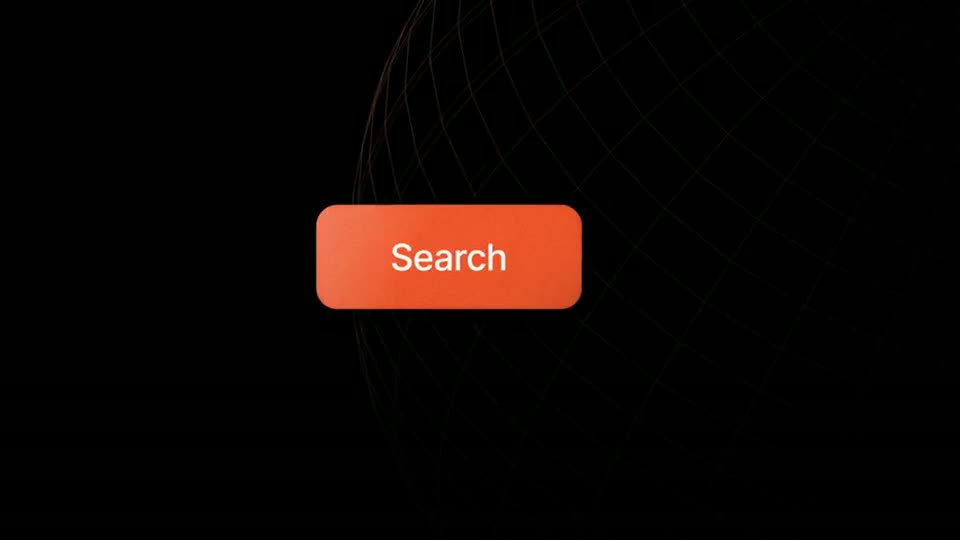
A black frame holds a rounded search button that fills from a thin orange outline to solid orange with white text, then shrinks and drifts up-left as a wireframe sphere rotates behind it on the right.
Camera: Static
08 · Feature reveal · 0:15–0:16
A wireframe globe fills the right of a black frame. An orange Search pill floats at left with the white headline Global inventory beneath it, the headline sharpening from a soft blur while the globe holds still.
On-screen text: “Search”, “Global inventory”
Camera: Pull out
09 · Feature reveal · 0:16–0:17
On a black field, an orange Search chip and the white headline Global inventory sit left of a faint wireframe globe. They blur and slide right as a tilted 3D phone rises bottom-left, its screen showing a flight booking view under the white headline Show in-policy flights.
On-screen text: “Search”, “Global inventory”, “Show in-policy flights”
Techniques: 3D mockup
Camera: Static
10 · Feature reveal · 0:17–0:20
A white headline 'Show in-policy flights' sits above a phone mockup on black. The camera zooms into the screen as the flight list scrolls up, revealing more fares and an orange button at the bottom.
On-screen text: “Show in-policy flights”
Techniques: UI zoom
Camera: Pull out
11 · Feature reveal · 0:20–0:21
A black screen opens to the centered headline Book and manage travel, which fades in and scales up in two lines of light cream type.
On-screen text: “Book and manage travel”
Techniques: Kinetic type
Camera: Pull out
12 · Feature reveal · 0:21–0:23
A cream two-line headline on a dark green-glow field scales down and slides right as a 3D iPhone mockup enters from the left, its tilted screen showing a flight date picker with prices.
On-screen text: “Book and”, “manage travel”
Techniques: Kinetic type, 3D mockup
Camera: Static
13 · Feature reveal · 0:23–0:25
A 3D phone mockup turns on a black background, its screen moving through a travel app from seat map to traveler details and payment. A scaling headline reads Book and manage travel.
On-screen text: “Book and”, “manage travel”
Techniques: 3D mockup, Kinetic type
Camera: Static
14 · Feature reveal · 0:25–0:27
A phone mockup floats on a black background. The booking screen crossfades from a traveler card to a charges summary, then the bottom action bar swipes right, morphing the orange button into a card and ticket illustration.
Techniques: 3D mockup, Morph
Camera: Static
15 · Feature reveal · 0:27–0:29
A phone mockup on a black background shows a flight booking confirmation, the heading and orange Finish button fade in, then the device tilts into a 3D angle with a glint on its right edge.
Techniques: 3D mockup, Light sweep
Camera: Static
16 · Feature reveal · 0:29–0:31
A 3D iPhone in three-quarter view sits on a black background, its amber screen showing an incoming call, while large white text reads anywhere, anytime. next to a small gray line and get support. The phone and the text slide in opposite directions.
On-screen text: “and get support”, “anywhere,”, “anytime.”
Techniques: 3D mockup, Parallax
Camera: Pull out
17 · Feature reveal · 0:31–0:35
On a black background, the two-tone headline 'Keep everyone on budget' slides in, then cuts to a second block where 'with' sits above 'built-in spend controls', which scales up. The frame stays locked off throughout.
On-screen text: “Keep everyone”, “on budget”, “with”, “built-in spend controls”
Techniques: Kinetic type
Camera: Static
18 · Feature reveal · 0:35–0:37
A white budget card with a green progress ring and dollar icon sharpens from blur on black, an orange 'View policy' link scaling in beside it. It cuts to a 'Spend guidelines' card listing airline fare rules, with an orange arrow pointing at it.
On-screen text: “with”, “built-in spend controls”
Techniques: Kinetic type
Camera: Static
19 · Feature reveal · 0:37–0:38
A white rounded card titled Spend guidelines, with an Airline expenses heading and two bullet points, sits centered on a black field and drifts down a few pixels, exposing a dimmer Card expenses card stacked behind it.
Camera: Static
20 · Feature reveal · 0:38–0:40
Two white interface cards float on black. The lower card, titled Required documentation, slides up and blurs as the upper card sharpens into a headline card reading Collect receipts and memos automatically.
On-screen text: “Collect receipts and memos automatically”
Techniques: UI zoom
Camera: Static
21 · Feature reveal · 0:40–0:41
A black void holds a 3D app icon cropped at the top edge, its rounded square face showing a blue, green and yellow gradient. Below, a three-line cream headline sits centered and still.
On-screen text: “Collect receipts”, “and memos”, “automatically”
Techniques: 3D mockup
Camera: Static
22 · Feature reveal · 0:41–0:42
A 3D phone mockup sits at an angle on a black background. On its lock screen a receipt notification card slides in, while a static three-line headline holds below the device.
On-screen text: “Collect receipts and memos automatically”
Techniques: 3D mockup
Camera: Static
23 · Feature reveal · 0:42–0:43
A tilted iPhone floats on a black background, its screen glowing with a multicolor gradient wallpaper. A white notification banner reads $410.82 at American Airlines with receipt copy, while the phone slowly drifts and rotates in 3D space.
Techniques: 3D mockup
Camera: Static
24 · Feature reveal · 0:43–0:44
A tilted 3D iPhone rotates upright against a black background. Its screen shows an American Airlines expense detail, then a boarding pass receipt slides into the receipt field while a caption slides in at the bottom.
On-screen text: “Now”, “We automatically generated a receipt for this”, “expense. You're all set!”
Techniques: 3D mockup, Kinetic type
Camera: Static
25 · Feature reveal · 0:44–0:48
A black phone floats in 3D perspective, tilting from a side angle to face the camera. A white notification banner with a green lightning icon slides in above it. The screen displays an American Airlines flight receipt.
On-screen text: “Receipt automatically generated”
Techniques: 3D mockup
Camera: Static
26 · Feature reveal · 0:48–0:48
A phone's top edge peeks in at the bottom, then the frame fills with rotating teal and copper arcs around a receipt icon. The headline 'and close the books in real-time.' slides in beside it on black.
On-screen text: “and”, “close the books”, “in real-time.”
Techniques: Kinetic type
Camera: Static
27 · Feature reveal · 0:48–0:50
A white document icon rests in a rotating ring of teal and peach arcs, with faint concentric circles behind it. The word 'and' holds still as the larger lines slide in from the right, then the composition scales up and blurs out.
On-screen text: “and”, “close the books”, “in real-time.”
Techniques: Kinetic type
Camera: Static
28 · Feature reveal · 0:50–0:53
A white Month-end close card fills its progress bar from 24% to 100% while the legend counts up, then the camera pulls back to reveal the card on a laptop screen showing the full Brex accounting page. A tagline slides in over the dark background.
On-screen text: “and”, “close the books”, “in real-time.”
Techniques: UI zoom, 3D mockup
Camera: Push in
29 · Other · 0:53–0:56
A white headline fades in centered on a near-black background, above a row of circular country-flag icons that cycle through different nations. A white curved mask then wipes in from the left to cover the frame.
On-screen text: “Optimize your T&E in”, “one global platform.”
Techniques: Masking
Camera: Static
30 · CTA · 0:56–0:57
A black rounded mark with a center cutout sits on a light gray field, then flips and inverts to white as the background darkens to near black, settling into the Brex logo. The tagline and URL hold static on the dark field.
On-screen text: “Optimize your T&E in”, “one global platform.”, “brex.com/travel”
Techniques: Morph
Camera: Static
31 · CTA · 0:57–1:00
The white Brex logo holds centered on a dark, vignetted background, then fades as the URL brex.com/travel blurs into focus and locks in place at center.
On-screen text: “brex.com/travel”
Camera: Static