0:27
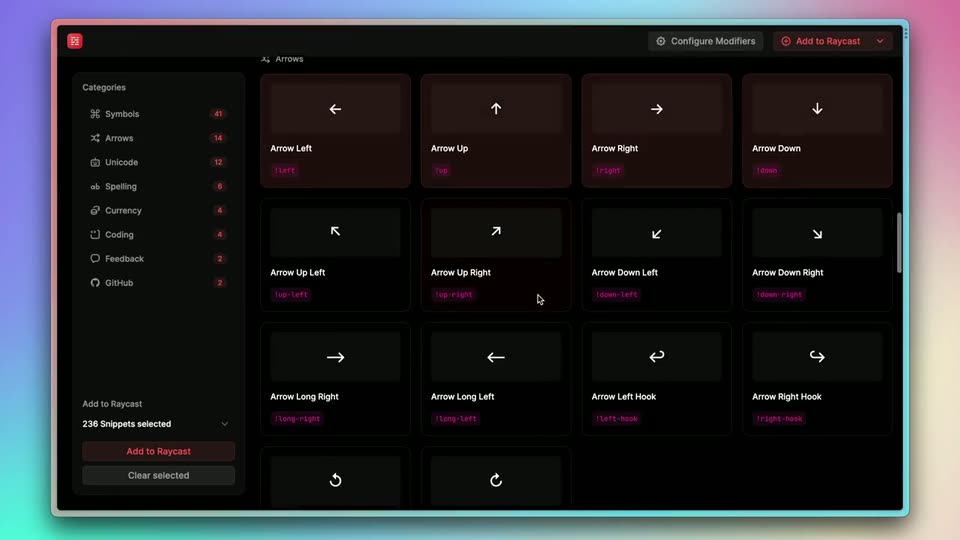
Raycast - 🕵️♂️ Announcing Snippet Explorer — our first open source project! A
Raycast · Productivity · Jan 2023
Delphina · Nov 2026 · 0:24 · Clip · AI-annotated
Delphina’s 0:24 clip runs 16 scenes, about 1.6 s each. The product is on screen from the first frame and 2 features are revealed. A single continuous screen recording follows one user flow, from the preference form through the agent's working steps to the generated bracket report, with each new section revealed by a smooth vertical scroll. Signature moves are the fixed bottom input bar, the crossfading report panel, and the recurring purple follow-up box, and the pacing holds a steady mid-tempo with quick cuts between scroll states.
Is this your launch? to your site or press kit.
Raycast · Productivity · Jan 2023
A cream form on a dark navy background scrolls down as a cursor types UConn into the first field, picks Medium from a dropdown, and fills in more answers beneath the headline Build your Bracket with Data.
Techniques: Cursor demo
Camera: Pan
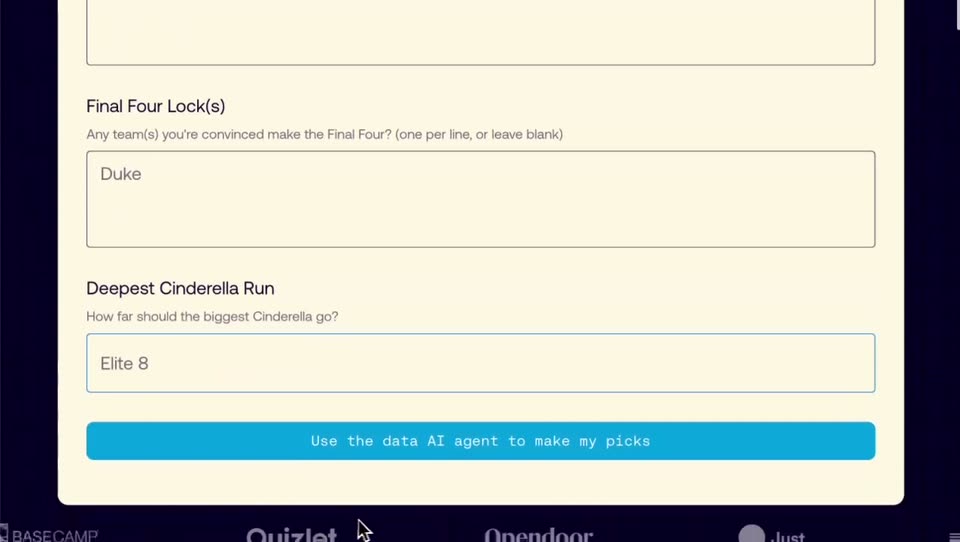
A form scrolls upward, centering a blue button. The button's text scales slightly as it becomes prominent.
Techniques: Kinetic type
Camera: Push in
A close-up of a spreadsheet row highlighted in blue shows the text “Use the data AI agent to make my picks”. A white hand cursor glides in and clicks the row as the view zooms slightly.
Techniques: UI zoom, Cursor demo
Camera: Static
A close-up of a chat interface scrolls up through numbered steps of an AI agent building a sports bracket, a Working line and a tool call appearing at the bottom while a static output card holds at the top right.
On-screen text: “Use the data AI agent to make my picks”
Camera: Pull out
A close-up of a light chat interface shows the assistant's reply updating in place. The step label ticks from STEP 6 to STEP 7 as the paragraph text is swapped, and a small Working status with a purple dot fades in just above the input field.
Camera: Static
A light chat interface shows a step label and a code-action row with a pulsing working indicator. A bracket report panel, headed by a basketball icon and a bold title, crossfades in over the lower half of the screen.
Camera: Static
A light chat interface scrolls upward through an AI response, revealing a 2026 March Madness Bracket heading, a methodology paragraph, a legend row, and a matchup table with Region, Round, Matchup and Pick columns.
Camera: Pan
A light data table of bracket matchups scrolls upward, rows of seeded team names sliding up to reveal a second table header with column labels at the bottom. A rounded text input field sits at the base of the frame.
Camera: Pan
A white stats table scrolls upward, replacing a bracket list with rows for Houston, Duke, Gonzaga and Connecticut beneath the heading Final Four & Championship key stats. A rounded text input field stays fixed at the bottom of the frame.
Camera: Pan
A light document view scrolls downward past a table of Final Four team stats, revealing a bracket summary heading and bullet points. An input field reading Ask Delphina stays fixed at the bottom edge.
Camera: Pan
A light document view scrolls upward past a bracket summary table and bulleted team notes, revealing a new section header with a magnifying glass icon, while a fixed input bar stays at the bottom.
Camera: Pan
A light article view scrolls upward. The bold heading and a magnifying-glass subheading move to the top while a purple-left-border box holding an italic question and a right arrow settles at the bottom above a text input.
Camera: Pan
A close-up of the Delphina chat interface scrolls upward through body copy about March games and BARTHAG, passing a 'Want to dig in?' suggestion list with arrows and a bold heading beside a search icon. The rounded input bar reading 'Ask Delphina...' stays fixed along the bottom edge.
Camera: Pan
A light chat interface list scrolls upward, revealing a new suggestion row at the bottom while the input bar stays fixed at the base.
Camera: Static
A white chat interface shows a long basketball analytics answer about Michigan and UConn. The text block scrolls up a few lines, revealing more body copy above the input bar at the bottom of the screen.
Camera: Static
A white document interface scrolls upward, revealing a paragraph on UConn's three-point shooting. A purple 'Want to dig in? Ask:' box with an italic question and a right arrow slides into view at the bottom, above a rounded input field.
Camera: Pan