1:01

Excellence Learning Demo
Excellence Learning · Education · Feb 2025
Cortex AI · Oct 2026 · 1:00 · Full motion · AI-annotated
Cortex AI’s 1:00 launch film runs 16 scenes, about 3.8 s each. The product is on screen from the first frame and 4 features are revealed. There is no explicit call to action. The video is a four-step product walkthrough for Cortex Harness: a cream title card names the product, then each feature (model + task, language guidance, remote intervention, autonomous continuation) opens on a two-tone cream card and demos on a dark app screen showing three live robot camera feeds beside a streaming reasoning log. Pacing is slow and even at about 90 bpm, with locked-off frames, slow zooms and crossfades between the cream cards and the dark UI, and a two-tone gray/black type on
Is this your launch? to your site or press kit.
Excellence Learning · Education · Feb 2025
Cursor · Developer tools · Oct 2026
Films whose music sounds like this one, voice left out
Replit · Cinematic hybrid of orchestral, electronic dance, and trap
Rimba · Cinematic electronic and hip-hop
A static title card on a plain cream background. Three centered lines hold without motion: a small gray label, a large black product name, and a two-tone tagline.
On-screen text: “INTRODUCING”, “Cortex Harness”, “Models act. Humans step in.”
Camera: Static
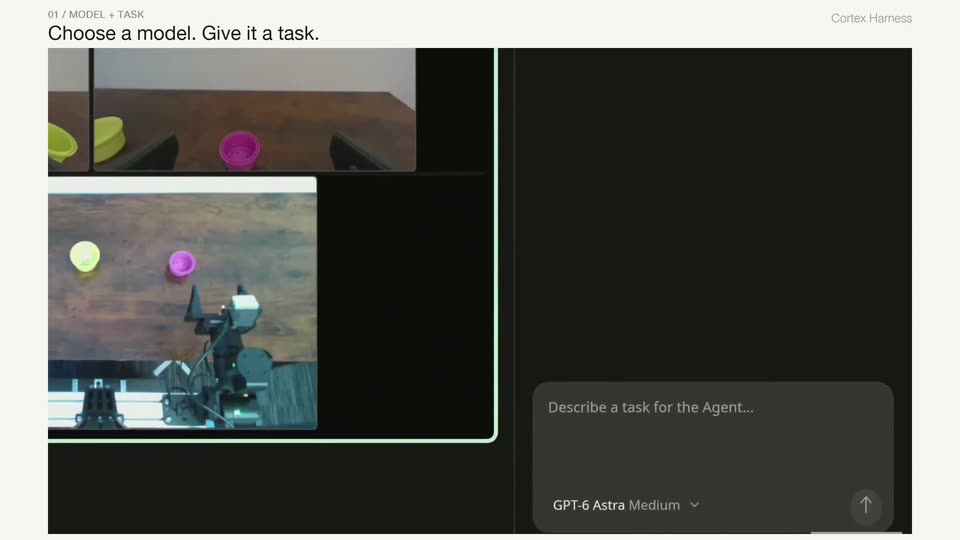
A dark agent interface fills the frame with three live camera feeds of robotic arms on a wooden table, each marked left, right, top with colored discs. The view zooms in, dropping the white headline and enlarging the feeds and the task input box on the right.
On-screen text: “01 / MODEL + TASK”, “Choose a model. Give it a task.”, “Cortex Harness”
Techniques: UI zoom
Camera: Push in
Model and effort menus close as the Ultra fast toggle flips on and the task “stack the cups with largest at the bottom” types itself; a cursor presses send. The view crossfades to a live episode panel with three robot camera feeds and streaming agent text.
On-screen text: “01 / MODEL + TASK”, “Choose a model. Give it a task.”, “Cortex Harness”
Techniques: Cursor demo
Camera: Pull out
A dark CortexAI window sits on a light gray field under the headline. A green-outlined panel holds three robot camera feeds labeled left, right, top, while the right-side reasoning text streams new lines.
On-screen text: “01 / MODEL + TASK”, “Choose a model. Give it a task.”, “Cortex Harness”
Camera: Static
A single centered sentence holds on a plain off-white background. The words 'Steer with' render in dark gray while 'a prompt.' stays light gray, the line held static for the full shot.
On-screen text: “Steer with a prompt.”
Camera: Static
The CortexAI app screen fills the frame: live left, right and top camera feeds of a robot arm handling colored cups on a wooden table sit left, a chat panel with robot status lines and a guidance input field sits right. Text is typed into the field, queued as a message, and the view reframes to the full dashboard as the top camera feed enlarges.
On-screen text: “Steer while the robot is working.”, “The model changes its view and retries.”
Techniques: UI zoom
Camera: Static
A dark guidance panel with a policy box and a log feed fades away, revealing three labeled camera views of robotic arms sorting colored cups on a wooden table. A black headline and small gray labels sit above the feeds.
On-screen text: “02 / LANGUAGE GUIDANCE”, “The model changes its view and retries.”, “Cortex Harness”
Camera: Push in
A light slide shows a three-panel split screen of robot camera feeds labeled left, right, and top. The robot arms on the wooden table shift and re-grip the yellow and pink cups while the top view re-frames the scene.
On-screen text: “02 / LANGUAGE GUIDANCE”, “The model changes its view and retries.”, “Cortex Harness”
Techniques: Split screen
Camera: Static
A dark CortexAI dashboard sits on a light background, its left panel showing three labeled robot camera feeds of an arm moving colored cups while a reasoning log streams in the right panel. The shot opens zoomed into the window and pulls back to reveal the full frame.
On-screen text: “02 / LANGUAGE GUIDANCE”, “The model changes its view and retries.”, “Cortex Harness”
Techniques: UI zoom
Camera: Pull out
A centered line of text sits on a plain cream background. “Take control.” reads in dark gray and “Remotely.” in lighter gray, both static in a locked-off frame.
On-screen text: “Take control. Remotely.”
Camera: Static
A dark Cortex Harness window sits on a pale gray field under a static section title. Three robot camera views (left, right, top) show an arm at a wooden table with batteries, while the right-hand log updates and a green Take control! button plus input field appear as the border label switches from POLICY to HITL IN POLICY.
On-screen text: “03 / REMOTE INTERVENTION”, “Take control when the model needs help.”, “Cortex Harness”, “Take control. Remotely.”
Camera: Static
A dark app window shows three robot camera feeds and a text panel; the frame zooms into the top-down feed, where a white robot arm hovers over a battery tray beside an inset of a woman typing at a desk.
On-screen text: “03 / REMOTE INTERVENTION”, “Take control when the model needs help.”, “Cortex Harness”
Techniques: UI zoom, Split screen
Camera: Push in
A cream card holds a single centered line that stays locked off for the whole shot. The first clause reads in dark gray, the second in a lighter gray, with no motion or camera move.
On-screen text: “Hand control back. The model resumes.”
Camera: Static
A dark Cortex Harness window fills the frame, showing a three-view video feed of a robotic arm and a person at a desk, with a chat log on the right. A headline sits above the window. The frame is locked off with only minor UI updates on the right panel.
On-screen text: “04 / AUTONOMOUS CONTINUATION”, “Hand control back. The model finishes the task.”, “Cortex Harness”
Camera: Static
A dark application window fills the frame, locked off. Three live camera views of a robotic arm on a wooden table sit in a left panel, while a column of reasoning text scrolls upward on the right. A headline reads across the top.
On-screen text: “04 / AUTONOMOUS CONTINUATION”, “Hand control back. The model finishes the task.”, “Cortex Harness”
Camera: Static
On a cream background, the CortexAI logo lockup sits centered: the wordmark, the line Cortex Harness, the tagline and the URL fade in from light gray to black, then hold still for the rest of the shot.
On-screen text: “Hand control back. The model finishes the task.”, “Cortex Harness”, “Real robots. Human supervision.”, “cortexrobot.ai”
Camera: Static