3:39
Introducing Carson, an adaptive assistant with serious security
/dev/fast · B2B · Feb 2026
Constellation Space · Oct 2026 · 2:05 · Full motion · AI-annotated
Constellation Space’s 2:05 launch film runs 23 scenes, about 5.4 s each. The product is on screen from the first frame and 6 features are revealed. The call to action lands at 1:48 (86% in), over a voiceover. The video is a feature tour: a brand lockup over the planet horizon, then the dashboard, then one feature at a time, each announced by a typed headline above a browser mockup that tilts in 3D and flattens as the camera pushes in. Signature moves are the slow push-ins, the 3D tilt-to-flat transitions, typewriter text with a blue caret, and the constant glowing horizon; pacing is even and unhurried at roughly one cut every twelve seconds.
Is this your launch? to your site or press kit.
/dev/fast · B2B · Feb 2026
Morphik · B2B · May 2025
Spline · Design · Oct 2026
Films whose music sounds like this one, voice left out
Akool Inc · Electronic
Trope · Modern electronic
Sapiom · Corporate Tech / Electronic
A white ringed-planet logo mark fades in at center over a starfield and a planet's glowing blue horizon, then shifts left as the wordmark CONSTELLATION appears beside it. A gray tagline scales in below while the camera slowly pushes in on the horizon.
On-screen text: “CONSTELLATION”, “Know your fleet, before it fails.”
Techniques: Kinetic type
Camera: Static
Over a starfield and a glowing planet horizon, the Constellation logo holds while its tagline scales in, then a browser window with the account dashboard rises into frame beneath a welcome headline.
On-screen text: “CONSTELLATION”, “Know your fleet, before it fails.”, “Welcome to Constellation.”
Techniques: Kinetic type
Camera: Push in
A starry space backdrop with a planet rim below frames a white headline and a browser window showing the Constellation dashboard. The headline fades in, then the camera slowly pushes into the dashboard, enlarging the greeting and stat cards.
On-screen text: “Welcome to Constellation. Your fleet in one place.”
Techniques: Kinetic type, UI zoom
Camera: Push in
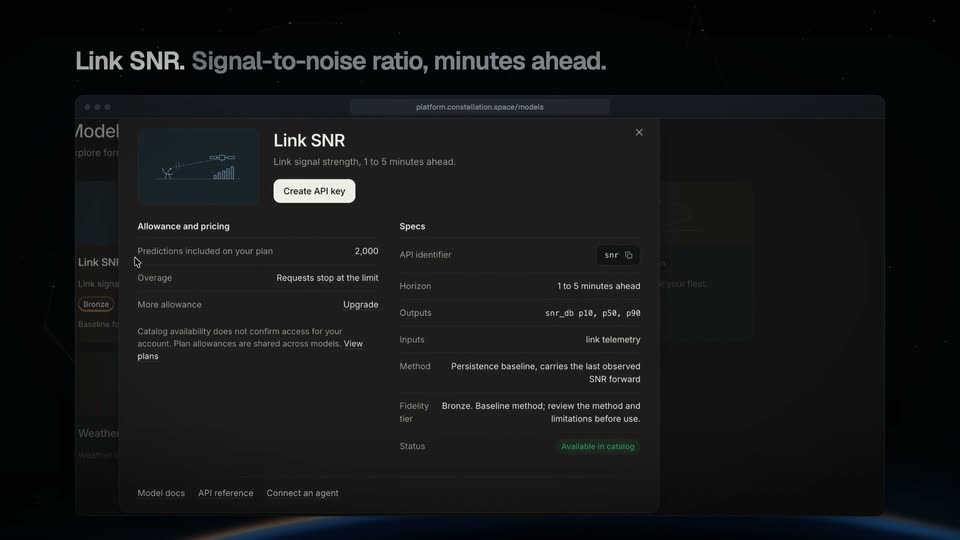
A dark space backdrop holds a browser window on the Models page as the caption fades in above it. The cursor clicks the Link SNR card, opening a spec modal; the camera slowly pushes in and highlights the Horizon row.
On-screen text: “Link SNR. Signal-to-noise ratio, minutes ahead.”
Techniques: 3D mockup, Cursor demo, UI zoom
Camera: Push in
A dark browser mockup floats over a starry space background. A model detail card titled Link SNR slides in from the left and settles at center, dimming the catalog page behind it. A static white headline reads above the window.
On-screen text: “Link SNR. Signal-to-noise ratio, minutes ahead.”
Camera: Pull out
A dim web interface of a Models page brightens to full opacity. The headline at top swaps from the Link SNR line to the Traffic demand line, words sliding in, while the Traffic demand card lights up with a glowing border.
On-screen text: “Link SNR. Signal-to-noise ratio, minutes ahead.”, “Traffic demand. Every pool, the”
Techniques: Kinetic type
Camera: Static
Over a dark space backdrop, a browser window holds a dimmed model catalog. The Traffic demand modal brightens to full opacity at center, and a cursor drifts from the Create API key button down to the Inputs row.
On-screen text: “Traffic demand. Every pool, the next hour.”
Techniques: Cursor demo
Camera: Push in
A tilted browser mockup floats over a starry space backdrop with a planet curve below. A modal panel showing a bar chart and a specs list brightens into focus as the dimmed page behind it fades up, under a static top-left headline.
On-screen text: “Traffic demand. Every pool, the next hour.”
Techniques: 3D mockup
Camera: Static
A dark space backdrop with faint constellation lines and a glowing horizon holds a 3D browser mockup of the platform. A dimmed model list sits behind a “Traffic demand” detail panel that fades in over it, while a headline reads above.
On-screen text: “Traffic demand. Every pool, the next hour.”
Techniques: 3D mockup, Masking
Camera: Pull out
A starfield with a planet curve at the bottom frames a flat browser window on the Models page. A grid of forecast cards fills the window, the Traffic demand card tinted red. A white headline sits above. The shot is locked-off.
On-screen text: “Traffic demand. Every pool, the next hour.”
Camera: Static
A dark browser window showing the API keys page sits flat over a starfield and planet curve. A two-tone headline swaps from one phrase to the next above the window while a cursor moves from the sidebar to the Create live key button.
On-screen text: “Traffic demand. Every pool, the next hour.”, “Create a live key. Scoped to your workspace.”
Techniques: Kinetic type, Cursor demo
Camera: Static
A dark browser window displays an API keys screen with a Create live key dialog open. A cursor types demo into the Name field, then moves down and clicks the Create key button. A white headline reads above the window.
On-screen text: “Create a live key. Scoped to your workspace.”
Techniques: Cursor demo
Camera: Push in
A dark dashboard shows a Save your key modal over an API keys table. The cursor moves to the Connect it to an agent button, and the view crossfades to an Agents setup page with client chips and a terminal snippet, all under a static headline.
On-screen text: “Create a live key. Scoped to your workspace.”
Techniques: Cursor demo
Camera: Static
A dark Agents documentation page fills the frame, showing a row of client buttons and a terminal command block. A mouse cursor hovers over the command line as a bold white headline fades in across the top.
On-screen text: “Connect Claude Code with”
Camera: Pull out
A dark browser window shows the agents setup page; the view scrolls and zooms onto the terminal command block. A cursor clicks the Copy button, the label flips to Copied, then the frame pulls back to the full page beneath the static headline.
On-screen text: “Connect Claude Code with one command.”
Techniques: UI zoom, Cursor demo
Camera: Pull out
A dark star field with a glowing blue and orange planet horizon along the bottom edge. White text types out in the center with a blue caret, reading Now, ask your fleet., then fades to black.
On-screen text: “Now, ask your fleet.”
Techniques: Kinetic type
Camera: Static
A dark terminal window sits centered over a starfield and a glowing planet horizon. A headline types in at the top left while a prompt line fills with text at the bottom of the window.
On-screen text: “Forecast link signal at”
Camera: Static
A dark terminal window over a starfield runs two Claude Code demos. A signal-forecast prompt types in, then a link table appears with a red under-22-dB flag and a value tooltip; the window clears, a demand-pool prompt types in, and a ranked pool table ends the clip.
On-screen text: “Forecast link signal at Randolph Ridge.”, “Find the busiest demand pool.”
Camera: Pull out
A dark integrations screen sits in a browser window over a starfield. The headline types on at the top left while a cursor hovers over the Grafana Cloud option in the send-to panel.
On-screen text: “Send every forecast to Grafana.”
Techniques: Kinetic type, Cursor demo
Camera: Static
A dark browser mockup of an integrations page sits under a top-left headline. The view zooms into the right-hand panel, a cursor glides down to the Download dashboard button and rests on it, then the screen dissolves into a Grafana dashboard showing link metrics.
On-screen text: “Send every forecast to Grafana.”
Techniques: UI zoom, Cursor demo
Camera: Push in
A tilted browser window of a dark Grafana dashboard rotates flat over a starfield with Earth's horizon. The view zooms in as a cursor clicks rows and the dashboard scrolls through tables, heatmaps and charts, then fades to a small white ringed-planet logo.
On-screen text: “Your fleet, live in Grafana.”
Techniques: 3D mockup, UI zoom, Cursor demo
Camera: Pan
A white ringed-planet mark hovers above a blue-lit planet horizon in a starfield, then settles into the CONSTELLATION lockup. A glowing URL pill fades in below it, followed by the tagline appearing word by word.
On-screen text: “CONSTELLATION”, “platform.constellation.space”, “Know your fleet, before it fails.”
Techniques: Kinetic type
Camera: Static
A locked-off sign-off: the CONSTELLATION logo and tagline hover over a dark planet horizon while the URL pill below them fades out, and the whole lockup dims to black over half a second.
On-screen text: “CONSTELLATION”, “Know your fleet, before it fails.”, “platform.constellation.space”
Techniques: Kinetic type
Camera: Static