1:44

Spine Product Demo
Spine · B2B · Sep 2026
Trope · Jul 2026 · 1:15 · AI-annotated
Trope’s 1:15 launch film runs 23 scenes, about 3.3 s each. The product shows up at 0:06 and 3 features are revealed. The call to action lands at 1:09 (92% in), over a voiceover. A single presenter in a brick-walled studio anchors the talk, while the product is shown as flat white UI cards that tilt into 3D on a cream field, with bold sans-serif captions tracking the voiceover. Pacing is steady and cut-driven, alternating live action with interface demos and using pop-in keywords, counters and sliding stat cards as the signature moves.
Is this your launch? to your site or press kit.
A man in a black shirt stands centered against a brick wall flanked by two pendant lamps and potted plants. A large white counter reads $1, $17, then $50 beside the word billion, while white captions 'is spent on' and 'ERP implementations,' appear at the bottom.
On-screen text: “$50 billion”, “is spent on”, “ERP implementations,”
Techniques: Kinetic type
Camera: Push in
A man in a black shirt stands centered before a brick wall with two hanging lamps and potted plants, speaking to camera. Large white “two thirds” and red “fail” text pop in on either side of his head while white captions track his words along the bottom.
On-screen text: “ERP implementations,”, “and two-thirds of them”, “two”, “thirds”, “fail”, “fail.”, “I'm Matthew, co-founder of Trope,”
Techniques: Kinetic type
Camera: Pull out
A man in a black shirt speaks to a locked-off camera before a red brick wall with two pendant lamps and potted plants. A white Trope wordmark scales up top left as a name caption and a rolling subtitle line sit over the frame.
On-screen text: “Trope”, “Matthew Chow”, “Co-founder, Trope”, “I'm Matthew, co-founder of Trope,”, “and we're backed by Y Combinator to make”
Camera: Push in
A man in a black shirt speaks to camera before a brick wall with pendant lamps and potted plants. The Trope logo and his name caption sit left; at right the Y Combinator mark is replaced by a fading stack of company logos. White subtitles run along the bottom.
On-screen text: “Trope”, “Matthew Chow”, “Co-founder, Trope”, “Combinator”, “Y”, “and we're backed by Y Combinator to make”, “every ERP implementation AI-native.”, “TESLA”, “amazon”, “Schneider Electric GENERAC Zipline”
Camera: Static
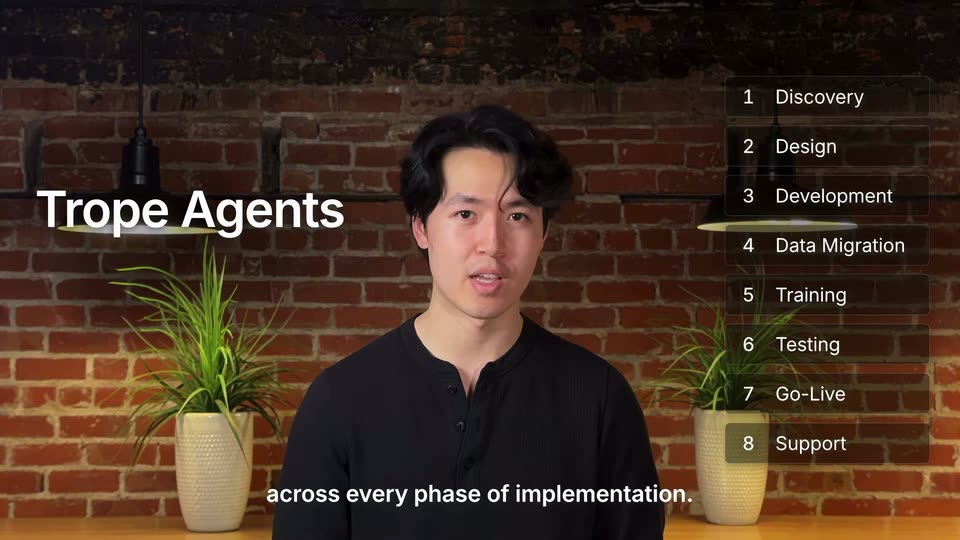
A man in a black shirt speaks to camera, centered before a brick wall with two pendant lamps and potted plants. The white title Trope Agents fades in left, a numbered eight-phase list reveals line by line on the right, and captions run along the bottom.
On-screen text: “Trope Agents”, “Trope Agents to find and resolve risks”, “1 Discovery”, “2 Design”, “3 Development”, “4 Data Migration”, “5 Training”, “6 Testing”, “7 Go-Live”, “8 Support”
Camera: Pull out
A fogged room with a seated figure and two potted plants dissolves into a white app screen with a left sidebar, the caption held steady at the bottom.
On-screen text: “Trope understands your ERP projects”
Camera: Static
The Trope dashboard tilts into 3D perspective on a cream field as app icons drift around it. A cursor selects Documents, opening a requirements page, while a bold black caption at the bottom swaps through phrases.
On-screen text: “Trope understands your ERP projects”, “from requirements and calls”, “to configurations, data, and code.”, “Agents compare what was promised”
Techniques: 3D mockup, Cursor demo
Camera: Pull out
The Trope document UI fills the frame, showing a finance requirements table with a cursor on the page. The view zooms into the table, the FIN-002 row outlines in blue while the surrounding rows dim. A bottom caption tracks the voiceover.
On-screen text: “Agents compare what was promised”, “and what's actually being configured”
Techniques: UI zoom, Cursor demo
Camera: Push in
A tilted 3D Trope document card with a highlighted requirement row sits over a beige background, then cuts to a tilted Dynamics 365 Business Central workflow page. A black caption line completes at the bottom.
On-screen text: “and what's actually being configured”, “in your ERP.”
Techniques: 3D mockup
Camera: Static
A flat Dynamics 365 workflow page sits on a beige field. The view zooms into the steps table as a red box highlights a condition cell. An Evidence card slides in from the right, linked by a curved line, showing the mismatch and a task. Bottom captions run through.
On-screen text: “in your ERP.”, “When something doesn't match,”, “Trope flags the error, shows the evidence,”, “and helps the team take action.”, “But Trope takes it a step further.”
Techniques: UI zoom
Camera: Pull out
A tilted 3D view of an ERP workflow screen, an evidence panel on the right. The camera zooms onto a red-flagged condition field while a dark terminal below types a fix command, prints a red-green diff, and confirms the change. A white caption sits at the bottom.
On-screen text: “Trope can configure and code ERPs”
Techniques: 3D mockup, UI zoom
Camera: Push in
A workflow configuration screen shows a purchase invoice approval setup, with a green-outlined condition box and four response rows. A black caption sits at the bottom. The interface text briefly doubles with a vertical offset before settling into a clean view.
On-screen text: “to resolve issues automatically.”
Camera: Static
A man in a black shirt stands centered before a brick wall with two pendant lamps and potted plants, speaking to camera. Subtitles run along the bottom, role labels pop in one by one on the right, and huge 24 and 7 numerals appear on either side of him.
On-screen text: “Trope gives implementation teams the”, “leverage of a project manager,”, “Project Manager”, “data engineer, and consultant”, “Data Engineer”, “Consultant”, “all working 24/7.”, “24”, “7”
Camera: Static
A washed-out live action shot shows a person seated between two potted plants, flanked by large light numerals 24 and 7. The frame fades to a plain beige background where the caption FOR NET NEW IMPLEMENTATIONS sits centered.
On-screen text: “24”, “7”, “FOR NET NEW IMPLEMENTATIONS”
Camera: Static
A flat cream field holds a small gray label centered. A larger dark headline fades in beneath it while the label nudges upward, then both lines hold still for the remainder of the shot.
On-screen text: “FOR NET NEW IMPLEMENTATIONS”, “Trope finds gaps and creates actionable artifacts”
Techniques: Kinetic type
Camera: Static
A dark sans headline anchors the top of a cream background. A white document card labeled Northstar SOW fades in at center left, listing numbered scope and deliverable lines, while a bottom caption with bolded keywords appears beneath it.
On-screen text: “Trope finds gaps and creates actionable artifacts”, “from SOWs to custom configurations and code”
Camera: Static
A cream field holds a centered dark headline and a bottom caption. A white SOW document card sits left; line 3.2 flashes red with a gap tag, and a Configuration XML code card slides in beside it on the right.
On-screen text: “Trope finds gaps and creates actionable artifacts”, “from SOWs to custom configurations and code”
Camera: Static
On a cream background, a centered headline sits above two white cards, a SOW document with a pink-highlighted row and an XML config, while a third card of custom code slides up into the foreground. A bottom caption reads from SOWs to custom configurations and code.
On-screen text: “Trope finds gaps and creates actionable artifacts”, “from SOWs to custom configurations and code”
Camera: Static
A ghosted product mockup fades out on a cream background as a centered gray caption, 'FOR MIGRATION AND OPTIMIZATION PROJECTS', fades in and holds static in wide letter-spaced caps.
On-screen text: “FOR MIGRATION AND OPTIMIZATION PROJECTS”
Camera: Static
On a plain cream background, a small letter-spaced uppercase line sits centered. A larger mixed-case line scales up below it, then the small line drifts up and fades to the top while the big line holds centered.
On-screen text: “FOR MIGRATION AND OPTIMIZATION PROJECTS”, “Trope scans the existing ERP”
Techniques: Kinetic type
Camera: Static
A Dynamics 365 General Ledger entries list scrolls upward while three white stat cards slide in from the right, their counters climbing rapidly. A bold black headline sits at the top and a caption runs along the bottom.
On-screen text: “Trope scans the existing ERP”, “to map data and configurations that would have taken hundreds of calls”, “Tables scanned”, “Configurations mapped”, “Fields resolved”
Camera: Push in
A tilted 3D view of a Dynamics 365 general ledger table sits on a light background. Three white stat cards float on the right, their progress bars filling and counts ticking up, while a headline caps the top and a caption runs along the bottom.
On-screen text: “Trope scans the existing ERP”, “Tables scanned”, “812”, “Configurations mapped”, “1,284”, “Fields resolved”, “46,900”, “to map data and configurations that would have taken hundreds of calls”
Techniques: 3D mockup
Camera: Static
A man in a black shirt speaks to camera, centered before a brick wall with two pendant lamps and potted plants. White subtitles run along the bottom, then a white Trope wordmark with trope.ai appears on the left as a closing call to action.
On-screen text: “If you're tired of ERP delivery”, “staying the same for decades,”, “Trope”, “trope.ai”, “let's chat at trope.ai”
Camera: Push in