3:35

Meet the Data Agent in ChatGPT Work
OpenAI · AI · Sep 2026
Composio · Dec 2024 · 2:13 · Full motion · AI-annotated
Composio’s 2:13 launch film runs 16 scenes, about 8.4 s each. The product is on screen from the first frame and 2 features are revealed. There is no explicit call to action; a voiceover carries the film. The video is built as a problem to demo arc: a glowing wordmark and a node diagram establish the brand and the auth pain, then long, calm screen recordings walk through the white label flow, the quick start code, and the dashboard. Signature moves are the central glowing bolt icon on near-black frames, animated arrows linking cards, and a consistent purple accent on interactive UI elements.
Is this your launch? to your site or press kit.
OpenAI · AI · Sep 2026
Google · AI · May 2025
Framer · Design · Oct 2026
Films whose music sounds like this one, voice left out
Tasklet · Modern electronic
Nessie · Upbeat electronic
Butter · Electronic
The white wordmark AgentAuth holds center on a near-black field, edged by a faint halo of light. The frame stays locked off and the text remains perfectly still through the clip.
On-screen text: “AgentAuth”
Camera: Static
A glowing rounded app icon with a white lightning bolt holds the center of a dark frame as a grid of brand app icons fills the space around it, edges softly blurred. The bolt then takes on a shield outline while the surrounding icons drift out of focus.
On-screen text: “4”
Techniques: Morph
Camera: Pan
A dark field of blurred app icons fills the frame. A glowing rounded-square icon sits center, its shield-and-bolt mark resolving into a plain lightning bolt. A notification card reading Elena hovers at the top, a thin arrow dropping from it to the icon.
On-screen text: “Send an email to sam about last week's customer calls”
Camera: Static
A glowing lightning-bolt node sits center on a dark blurred grid. Cards for a user request, LLM and Framework, then Gmail and Salesforce, connect to it with animated arrows, while an Authenticating Agent card below fills in checkmarks and flips to Connected.
On-screen text: “Send an email to sam about last week's customer calls”, “Framework”, “LLM”, “Function Calling”, “API Call”, “Authenticating Agent”, “Authenticating Elina's Gmail”, “Authenticating Elina's Salesforce”, “Connected”, “Authenticated API Call”
Camera: Pull out
A dark web app interface shows a grid of integration tool cards beside a category sidebar. A white cursor hovers over the cards, then moves up to the browser address bar as the page scrolls slightly.
Techniques: Cursor demo
Camera: Static
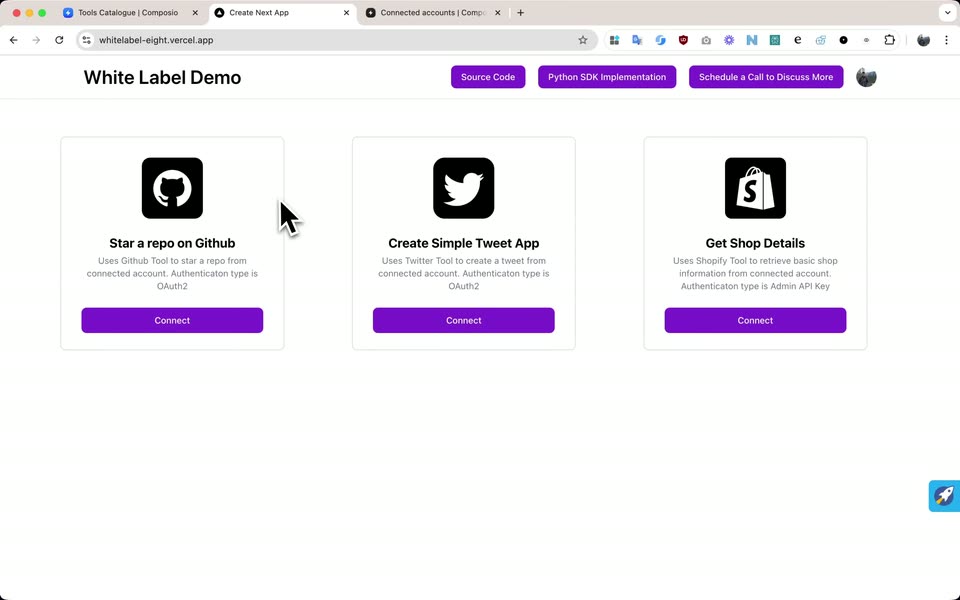
A browser window holds a static White Label Demo page with three white cards, each with a black app icon, title, and purple Connect button. A cursor drifts from the address bar across the middle card, then hovers its Connect button, switching to a pointing hand.
Techniques: Cursor demo
Camera: Static
A macOS browser window shows a black OAuth page with a white angular monogram logo centered and a white cursor arrow resting on it. The frame is locked off and static, with the address bar reading a twitter.com oauth2 authorize URL across the top.
Camera: Static
A locked-off screen recording of a browser window shows a Twitter OAuth page with a placeholder company logo. A cursor drifts over the logo and heading, then clicks the blue Authorize app button, and the page cuts to a grey loading skeleton.
Techniques: Cursor demo
Camera: Static
A browser window shows a White Label Demo page with three service cards. A white modal, Connect Account & Execute Action, overlays the left card as a hand cursor hovers by its title and Done button. The shot fades in from a dimmed state.
Techniques: Cursor demo
Camera: Static
A browser window shows three tool cards on a white page. A hand cursor clicks the middle card's purple button, which turns green and reads Perform Action. The cursor then moves up to the address bar as the page area fades to black.
Techniques: Cursor demo
Camera: Static
A dark-themed Composio tools catalogue page fades in from a dimmed state inside a browser window, then a cursor glides from the top left to hover over the github card in the grid.
Techniques: Cursor demo
Camera: Static
A dark Quick Start modal for a github integration sits over a blurred browser page. A white cursor clicks the sidebar steps in order, and the code panel swaps in new Python snippets with each click; the cursor also opens the framework dropdown.
Techniques: Cursor demo
Camera: Static
A browser window displays the Composio dashboard. A cursor glides across the Connected accounts table, hovers the left menu, then the view jumps to the Logs page where a spinner reads 'Fetching data from the server' as rows load in.
Techniques: Cursor demo
Camera: Static
A full-screen browser window shows a logs dashboard with a left sidebar and a table of timestamped entries. A cursor glides down the rows, then slides left to hover over the Settings menu item. A loading spinner flashes near the table's center at the open.
Techniques: Cursor demo
Camera: Static
A browser window shows a settings page titled API Keys. A single-row table fades in and out while a hand cursor hovers over the Events and Triggers item in the left sidebar.
Techniques: Cursor demo
Camera: Static
A dark field of colorful app icons surrounds a central icon with a white lightning bolt. A shield outline draws in around the bolt and fills white. The camera pushes in as the outer icons fly off, leaving the glowing bolt icon alone.
On-screen text: “X”
Techniques: Masking, UI zoom
Camera: Push in