1:04

The new iPad mini: Thinner. Lighter. Ultraportable.
Apple · Hardware · Oct 2026
Commas · Sep 2026 · 0:35 · AI-annotated
made Addx Studio · studio Addx Studio
Commas’s 0:35 launch film runs 25 scenes, about 1.4 s each. The product is on screen from the first frame and 5 features are revealed. There is no explicit call to action. The video is built as a rapid feature montage: a particle title card opens, then each feature gets a blur-to-focus headline card followed by a tight UI or 3D device demo over nature backdrops. Signature moves are frosted-glass cards, blur-to-focus type reveals, and camera pullbacks on floating devices, all cut on a 110 bpm grid.
Is this your launch? to your site or press kit.
Apple · Hardware · Oct 2026
Google · AI · Oct 2016
HeroUI Pro 1.0 · Nov 2026
Films whose music sounds like this one, voice left out
LandAtlas · Electronic Dance Music
Lovable · High-energy electronic dance music
Logitech · Electronic dance music (EDM), tech house, progressive house
A white headline reads Introducing over a horizontal ribbon of fine gray particles that ripples and thins across the frame. The particle band opens to clear the type, then a smaller line slides in below on a locked-off frame.
On-screen text: “Introducing”, “Commas Studios,”
Techniques: Particles, Masking, Kinetic type
Camera: Pull out
A soft blue blur of horizontal bands shifts on a white field as the dark gray wordmark “Commas Studios,” slides into the center and locks off.
On-screen text: “Commas Studios,”
Techniques: Kinetic type
Camera: Static
On black, a white and blue comma mark rotates and sharpens at center, then the lowercase wordmark “commas” scales in beside it and the full logo holds still.
Techniques: Kinetic type
Camera: Static
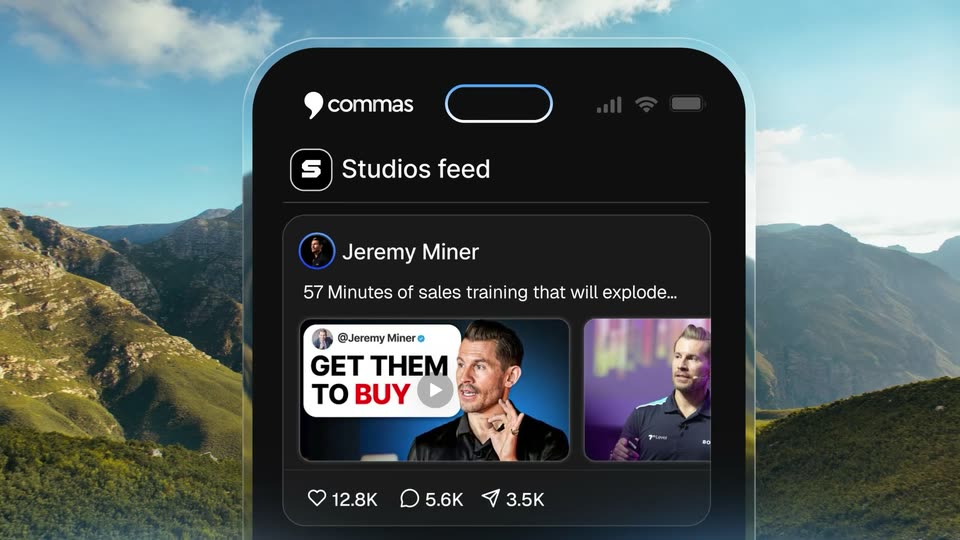
An extreme close-up of the white commas logo on a black phone screen pulls back to reveal the full phone floating in 3D over a mountain landscape. The interface shows a Studios feed post with video thumbnails, then the phone frame fades to translucent glass.
Techniques: UI zoom, 3D mockup
Camera: Pull out
A social post card rests on a dark field with a blue glow. The label Post fades from the top, then the view zooms into the card's lower corner as Engage slides in beside the like, comment and share counts.
On-screen text: “Post”, “Engage”
Techniques: UI zoom, Kinetic type
Camera: Push in
A dark frame with a soft blue glow along the bottom holds the word Grow, which slides in while sharpening from a heavy blur to crisp focus. The camera stays locked off on the centered text.
On-screen text: “Grow”
Techniques: Kinetic type
Camera: Pan
A dark Pathway Coaching app panel scrolls up over a Starry Night painting, showing a channel list and a welcome feed post. A large Grow headline slides across the locked-off frame.
On-screen text: “Grow”
Techniques: Kinetic type
Camera: Push in
A zoomed-in dark channel list scales out to reveal the full sidebar, then the frame settles on the Courses row, which glows amber as the cursor moves onto it.
Techniques: UI zoom, Cursor demo
Camera: Pull out
A dark grid of six course cards sits in a rounded community-app window over a swirling blue background. A vertical beam of blue light sweeps across the cards, then the view zooms in to settle on the Hooks That Stop the Scroll card.
Techniques: Light sweep, UI zoom
Camera: Push in
On a black-to-blue vertical gradient, the word Gate pops in with a quick scale-up and motion blur, then your best content. fades in to complete the centered headline, which holds still for the rest of the shot.
On-screen text: “Gate your best content.”
Techniques: Kinetic type
Camera: Static
A frosted-glass post card scales down and settles at center over a starry night mountain backdrop as a ghosted copy dissolves behind it. A white cursor slides up from the bottom right and hovers near the blue unlock button.
Techniques: Cursor demo
Camera: Pull out
A social post card floats over a mountain ridge that shifts from starry night to bright day. A cursor sits on the blue unlock button, then the paywall overlay lifts to reveal the full body text.
Techniques: Cursor demo
Camera: Static
A frosted-glass social post card hovers over a bright mountain landscape, gliding up and to the right with soft motion blur while the backdrop holds still.
Camera: Static
A community feed of post cards scrolls upward on a soft blue gradient. The input field and two member posts rise, revealing a third post with a title at the bottom edge.
Camera: Push in
A centered dark sans-serif headline sits on a plain white-to-light-blue gradient. The text remains still in the middle of the frame.
On-screen text: “Hostyourcourses.”
Camera: Static
A static view of a course management interface featuring a left sidebar and a grid of course cards. A mouse cursor moves into the frame from the bottom right and hovers over the first card.
On-screen text: “Hostyourcourses.”
Techniques: Cursor demo
Camera: Push in
A course editor interface zooms from a full three-panel view into the lesson panel, where a cursor clicks the upload dropzone and a video thumbnail with a yellow headline fills the frame, then the view settles on the video and body text.
Techniques: UI zoom, Cursor demo
Camera: Push in
A content editor screen shows a video block with a man in a black shirt and bold white and yellow headline text, above a rich text toolbar and a paragraph. The view scrolls down a few pixels, bringing the toolbar and body copy into focus.
Camera: Static
A course outline panel settles into frame with a brief vertical slide. The FOUNDATIONS section lists two draft lessons; the highlighted first row carries a yellow check, and the second row's gray dot flips to a matching yellow check.
Camera: Pan
A pale gradient background fades from white at the top to soft blue at the bottom. Centered text reads 'Sell inside your community' across two lines, scaling up from a small faded state to full size in darker gray.
On-screen text: “Sell inside your community”
Techniques: Kinetic type
Camera: Static
A 3D laptop mockup stands in a grass field under a blue sky, its screen showing a community platform feed with a channel list and posts. The camera pushes in on the screen as the headline 'Sell inside your community' scales up over the shot.
On-screen text: “Sell inside your community”
Techniques: 3D mockup, Kinetic type
Camera: Pull out
A soft blue radial gradient fills the frame, lighter at the center. The studio name appears centered in dark gray, the final letters of the word resolving into place over the first half second.
On-screen text: “Commas Studios”
Techniques: Kinetic type
Camera: Static
The words 'Commas Studios' sit centered on a soft blue gradient, then the letters drift apart to either side as a glowing blue comma-shaped blob forms in the middle over a faint white grid.
On-screen text: “Commas Studios”
Techniques: Kinetic type
Camera: Pull out
A soft blue and white comma shape sits centered on a white dotted-grid background, flanked by the black words Commas on the left and Studios on the right. The frame holds still as a locked-off brand sign-off.
Camera: Static
On black, a blue-and-white comma mark appears centered, then shifts left as the white lowercase word “commas” fades in beside it, followed by “studios.” The full lockup holds for a beat, then fades to black.
On-screen text: “commas”, “studios”
Techniques: Kinetic type
Camera: Static