0:35

Google Gemini - Today, we’re releasing a significant upgrade to our specialized reaso
Gemini 3 Deep Think · Feb 2026
Commas · Jul 2026 · 0:35 · AI-annotated
Commas’s 0:35 launch film runs 23 scenes, about 1.5 s each. The product is on screen from the first frame and 5 features are revealed. There is no explicit call to action. The video is built as a logo sting, a rapid chain of one-word feature cards each cut to a cursor-driven zoom into the interface, and a closing lockup. Its signature moves are blur-to-focus type reveals, glassmorphic cards floating over shifting mountain backdrops, and hard cuts on a steady 110 bpm pulse at roughly 24 cuts per minute.
Is this your launch? to your site or press kit.
Gemini 3 Deep Think · Feb 2026
Craft · Productivity · Nov 2025
Retool · Developer tools · Sep 2023
Rippling horizontal bands of gray dots drift across a white field behind the centered word Introducing, which carries a blue offset shadow. A smaller line, Commas Studios., slides in beneath it on a static frame.
On-screen text: “Introducing”, “Commas Studios.”
Techniques: Particles, Kinetic type
Camera: Pull out
On a white background, a blue abstract shape built from horizontal bands drifts left while the black wordmark Commas Studios, slides into the center, the comma settling at the end.
On-screen text: “Commas Studios,”
Techniques: Kinetic type
Camera: Static
On black, a blurred white and blue droplet sharpens into the comma icon as the lowercase wordmark commas resolves beside it. The lockup then scales up while a dark rounded panel edge and a blue arc slide in at the frame borders.
Camera: Static
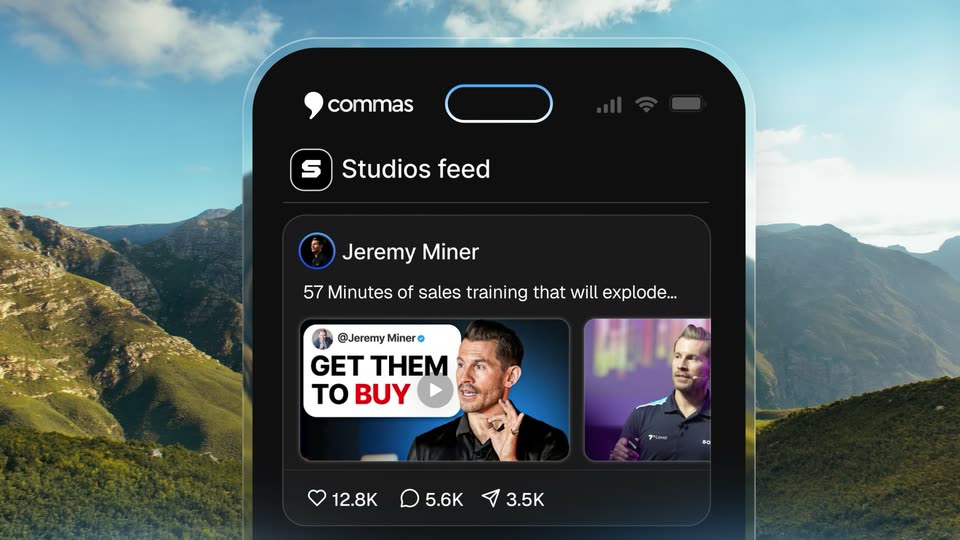
The shot opens on an extreme close-up of the white commas logo on a black screen, then pulls back to reveal a tilted phone mockup in 3D perspective. The screen shows a social feed with a post by Jeremy Miner and video thumbnails, set against a mountain landscape.
Techniques: UI zoom, 3D mockup
Camera: Pull out
A dark social post card for Jeremy Miner sits centered over a blue glow, the label Post fading in above it. The view then zooms into the bottom right of the card, the heart icon fills red, and the word Engage slides in on the left beside the metric row.
On-screen text: “Post”, “Engage”
Techniques: Kinetic type, UI zoom
Camera: Push in
A large light-blue sans-serif word “Grow” slides into a locked-off frame, sharpening from soft blur to crisp focus over a dark backdrop with a blue glow along the bottom edge.
On-screen text: “Grow”
Techniques: Kinetic type
Camera: Static
A dark community app sidebar fills the frame as the camera zooms into the GROWTH section. The cursor glides down the channel list and clicks Courses while the rest of the interface blurs out.
Techniques: UI zoom, Cursor demo
Camera: Pull out
A dark interface with a channel sidebar and a grid of course cards zooms in, reframing onto the Hooks That Stop The Scroll card. A cursor hovers near the New course button at the start.
Techniques: UI zoom
Camera: Push in
A black-to-blue vertical gradient fills the frame as a white headline builds word by word, settling into the centered line Gate your best content. A small 2h tag then scales in near the text.
On-screen text: “Gate your best content.”, “2h”
Techniques: Kinetic type
Camera: Static
A glassmorphic social post card floats over a mountain landscape that shifts from starry night to bright day. A cursor moves to the blue Unlock for $19.00 button and clicks it, and the locked body text expands into the full script.
Techniques: Cursor demo
Camera: Pull out
A frosted-glass social post card floats over a sunlit mountain landscape. The card holds a headline, body copy and engagement counts. Two cursors appear and the card shifts upward as they move.
Techniques: Cursor demo
Camera: Static
A light-blue community feed of white post cards scrolls up as a translucent white overlay fades in and the word Host appears centered in large light-gray type.
On-screen text: “Host”
Camera: Push in
A single centered line of dark gray sans-serif text, “Host your courses.”, sits on a white-to-light-blue vertical gradient. It settles into focus over the short clip with a brief horizontal motion blur.
On-screen text: “Host your courses.”
Techniques: Kinetic type
Camera: Static
A community dashboard with a channel sidebar and a grid of course cards. The view zooms in as a cursor glides to the first card, which brightens to white while the others dim.
Techniques: UI zoom, Cursor demo
Camera: Push in
A three-panel course editor fills the frame. The view zooms into the right editor as a video thumbnail, a woman's face with yellow text, loads into the upload box while a cursor hovers over it, then reframes to the full layout. A dark Save button sits top right.
Techniques: UI zoom, Cursor demo
Camera: Push in
A flat screen capture of a course editor scrolls downward. A video thumbnail with a bold white and yellow headline sits above a formatting toolbar and a paragraph of body copy, while a left sidebar of lesson labels passes by the frame.
Camera: Static
A white course outline panel lists lessons under a Foundations heading. The first row, Find your niche and angle, glows orange with a DRAFT tag, then the next row, The Pathway method, lights up with its own tag as the list shifts down.
Camera: Pan
A two-line headline scales up at the center of a soft white-to-blue gradient, the letters resolving from a light extruded form into flat dark gray.
On-screen text: “Sell inside your”, “community”
Techniques: Kinetic type
Camera: Static
A laptop mockup rests on grass beneath a blue sky, its screen filled with a community app: a channel sidebar on the left and a feed of posts with avatars and images on the right. A headline scales over the locked frame.
On-screen text: “Sell inside your”, “community”
Techniques: 3D mockup, Kinetic type
Camera: Pull out
Centered on a soft blue-to-white radial gradient, the dark gray studio name 'Commas Studios' assembles letter by letter, the final 'os' sliding in, on a locked-off frame.
On-screen text: “Commas Studios”
Techniques: Kinetic type
Camera: Static
A dark gray wordmark is centered on a soft blue-to-white gradient. The background turns white with a faint square grid as a glossy blue teardrop rises in the center and the letters of the name scatter to the edges.
On-screen text: “Commas Studios”
Techniques: Kinetic type
Camera: Static
A soft, glossy blue-and-white comma-shaped blob sits centered on a white dot-grid background, flanked by the words “Commas” on the left and “Studios” on the right. The blob shimmers and shifts its highlights while the text and frame stay locked off.
Camera: Static
On a black field, a blue comma-shaped mark scales down and slides left as the white lowercase wordmark builds in beside it, word by word. The full lockup holds, then fades to black.
On-screen text: “commas studios”
Camera: Static