1:39

adam - Introducing Adam, the first AI mechanical engineer
Adam · B2B · Jan 2026
CodeRabbit · Nov 2026 · 1:51 · AI-annotated
CodeRabbit’s 1:51 launch film runs 25 scenes, about 4.5 s each. The product is on screen from the first frame and 5 features are revealed. The call to action lands at 1:41 (90% in), over a voiceover. Warm host-led launch: a presenter in a cozy room alternates with clean screen recordings, each feature announced by a UI title then shown in a single cursor-driven pass. Pacing is steady with light motion-graphic cards (flowcharts, checklists, 3D-fanned screenshots) punctuating the demos, and the brand bookends the film with the orange rabbit mark and an underlined Verify wordmark.
Is this your launch? to your site or press kit.
Adam · B2B · Jan 2026
Microsoft · AI · May 2020
Figma · Design · Nov 2026
Films whose music sounds like this one, voice left out
Aspect · Modern electronic
Sapiom · Corporate Tech / Electronic
andTruth · Modern corporate electronic
A curly-haired man in a black hoodie sits at a desk, speaking to camera and gesturing with one hand. A shelf of objects and warm side light fill the background. A name caption holds in the lower left corner.
On-screen text: “Hendrik Krack”, “Developer Advocate·CodeRabbit”
Camera: Pull out
A blonde man in a black hoodie sits at a wooden desk with a sticker-covered laptop, speaking to camera. A white name caption holds in the lower left. An orange panel with the CodeRabbit logo and wordmark wipes in from the right edge.
On-screen text: “Hendrik Krack”, “Developer Advocate · CodeRabbit”, “CodeRabbit”
Techniques: Masking
Camera: Static
On a black background, the CodeRabbit lockup sits centered: an orange circle with a white rabbit icon beside the white wordmark. The wordmark slides away, then the icon fades out to black on a locked-off frame.
On-screen text: “CodeRabbit”
Techniques: Kinetic type
Camera: Static
A dark background with a warm glow on the left holds the word Verify in white, which sharpens from a motion blur as an orange underline draws beneath it. The small CodeRabbit logo and wordmark sit above.
On-screen text: “Verify”, “CodeRabbit”
Techniques: Kinetic type
Camera: Static
A presenter in a black hoodie sits at a sticker-covered laptop in a warm-lit room while three floating UI cards on the left cycle their button states. Blue cursors click each button, flipping labels to green success or red error states as the cards fade in.
On-screen text: “Verify”
Techniques: Cursor demo
Camera: Static
A blond man in a black hoodie sits at a desk with a sticker-covered laptop, gesturing as a user-journey flowchart builds on the left, its labels popping in one by one, then turning green with check marks or red with crosses.
On-screen text: “Professor”, “Sign up”, “Sign in”, “Forgot password”, “Verify email”, “Dashboard”, “Build a Simulation”, “Preview”, “Create a Cohort”, “Invite students”
Techniques: Kinetic type
Camera: Static
A man in a black hoodie sits at a desk in a warm-lit room, talking and gesturing to camera. On the left, two caption pills pop in, then a pull request card drops down with checklist rows filling in with red and green icons, capped by a green tag.
On-screen text: “Two ways to verify”, “CodeRabbit Verify”, “Results before you merge”
Techniques: Kinetic type
Camera: Static
A presenter in a black hoodie sits at a desk with a sticker-covered laptop, gesturing while talking. On the left, a white tag reads Two ways to verify above a dark CodeRabbit Verify pill, and a dark card slides in showing a grid of squares filling green, red and orange, then status chips and a second tag.
On-screen text: “Two ways to verify”, “CodeRabbit Verify”, “Open”, “Pull request #358”, “Results before you merge”, “Saved user journeys 19”, “Build”, “Regressions across your app”
Techniques: Masking, Kinetic type
Camera: Static
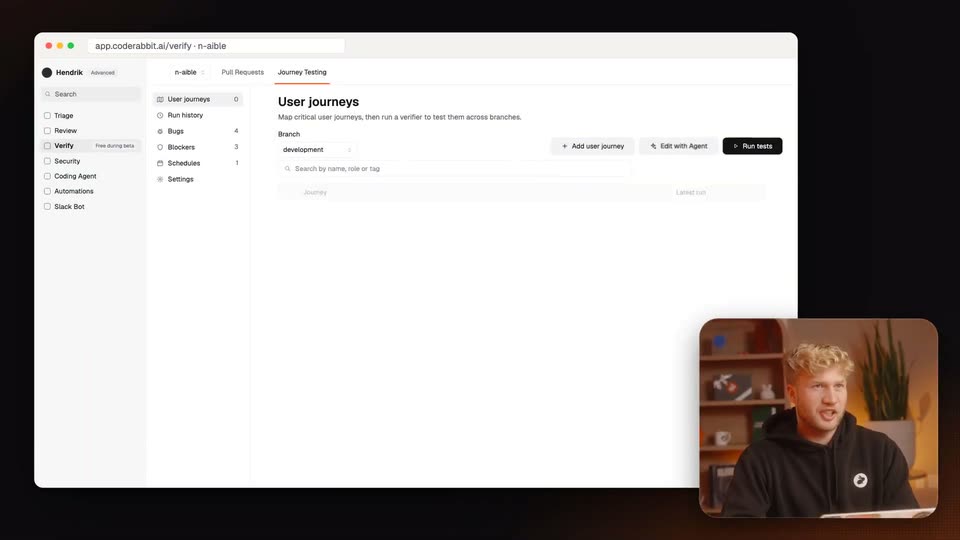
A man in a black hoodie sits at a desk with a sticker-covered laptop, then the shot cuts to the CodeRabbit interface showing a User journeys page, with the speaker in a small inset window at the bottom right.
Camera: Pull out
A verify dashboard zooms onto the Edit with Agent button as a cursor clicks it. The button becomes a green 19 mapped badge while journey rows fill in, then a Goal and Steps panel slides in from the right. A presenter speaks in a corner inset.
Techniques: UI zoom, Cursor demo
Camera: Push in
A browser window shows a journey page with Goal, Steps, and Assertions; the orange cursor scrolls and clicks Run, which becomes Running then Started, then a journeys list fills the window. A presenter talks in a rounded inset at the bottom right.
Techniques: Cursor demo
Camera: Push in
A light-themed web app screen shows a User journeys list, with a cursor resting on the Schedules item in the side menu, highlighted in orange. A small inset of a man in a black hoodie gestures in the lower right corner.
Techniques: Cursor demo
Camera: Static
Opens on the Coderabbit verify screen with a small video inset of the speaker, then cuts to a full shot of him at a desk with a sticker-covered laptop. He talks and gestures in a warm room with plants and shelves as the camera slowly pushes in.
Camera: Push in
A blonde man in a black hoodie sits at a wooden desk in a warm-lit room, talking to camera with a sticker-covered laptop in front of him. A flat product interface panel, showing a code editor and a chat window, slides up over the lower half of the frame.
Camera: Pull out
A browser window shows the Coderabbit environments page with a presenter's face-cam inset in the corner. A cursor clicks Connect repository, turning the button green, then scrolls through setup, secrets, and repositories as it triggers Configure with agent.
Techniques: Cursor demo
Camera: Push in
Screen recording of the Verify app: a cursor clicks Run tests, the view zooms in, then switches to a run history where numbered steps gain green checks in sequence, the last step turns red, and a bug report panel slides in. A presenter inset sits in the bottom-right corner.
On-screen text: “app.coderabbit.ai/verify - n-able”
Techniques: UI zoom, Cursor demo
Camera: Static
A bug report page scrolls as reproduction steps and 3D-fanned evidence screenshots appear. The Create ticket button turns green and the Fix button darkens to Fix in progress, then the page morphs into a GitHub pull request view. A presenter sits in a small window at bottom right.
Techniques: 3D mockup, Morph, UI zoom
Camera: Push in
A browser window on a dark background shows a GitHub pull request page; the PR title slides in and a Review Evidence button plus a CodeRabbit Verify label pop into the bot comment. A small video of a gesturing man sits in the bottom right corner.
Camera: Pull out
A GitHub pull request page scrolls down as the CodeRabbit Verify table's Running cells resolve into green checks and one red bug icon, then zooms and crossfades to a verify page with a 1 scenario with bugs card and a disabled Merge button. A small presenter video sits bottom right.
On-screen text: “github.com/Hendrik040/n-aible/pull/358”, “app.coderabbit.ai/verify - n-aible”
Techniques: UI zoom
Camera: Push in
A centered browser window shows the Verify dashboard on a dark background. Issue cards settle into Bugs and Blockers columns, then the view zooms into one Blocker card and opens its detail page. A small webcam of the presenter sits in the lower right.
Techniques: UI zoom
Camera: Static
A blonde man in a black hoodie sits at a desk with a sticker-covered laptop, gesturing as he talks to camera. The shot opens inside a dark frame border that clears to full frame over the first half second.
Techniques: Masking
Camera: Push in
A man in a black hoodie sits at a desk with a sticker-covered laptop, gesturing to camera. Bold white text builds line by line on the left, with LIVE NOW and FREE popping into orange highlight boxes.
On-screen text: “CODERABBIT VERIFY”, “IS ACTUALLY”, “LIVE NOW”, “IT'S”, “FREE”, “WHILE WE HAVE IT”, “IN BETA”
Techniques: Kinetic type
Camera: Static
A blond man in a black hoodie sits at a desk behind a sticker-covered laptop, smiling at the camera. An orange panel wipes across the frame, collapsing the shot into a dark card where the serif word Verity appears under a small CodeRabbit logo.
On-screen text: “Verity”
Techniques: Masking
Camera: Static
A near-black background with a soft warm glow on the left holds a centered CodeRabbit logo and the word Verify in large white type, underlined in orange. The frame stays locked and still throughout the clip.
On-screen text: “Verify”
Camera: Static
On a black background, an orange circle holding a white rabbit icon sits centered, then slides left as the white wordmark CodeRabbit appears to its right, assembling the full logo lockup in the middle of the frame.
On-screen text: “CodeRabbit”
Camera: Static